

A resident arrives at a gated community with a delivery driver behind them. The resident enters a shared four-digit code, the gate opens, and traffic moves on. Later, the property manager asks who accessed the community that afternoon. A shared keypad code can open the gate, but it usually can't identify the person who used it.
That tension explains why a keypad security system remains useful, yet no longer answers every access-control need. Keypads are familiar, relatively simple to deploy, and practical for many gates and doors. They also create risks involving code reuse, observation, tampering, and weak auditability.
This guide helps HOA boards, property managers, security installers, and gated-community residents evaluate keypad access control in practical terms. It covers how the systems work, which types fit different properties, where PIN security breaks down, and how cellular smartphone access can modernize an existing gate without replacing the gate operator.
Table of Contents
- Introduction to Keypad Security Systems Today
- How a Keypad Security System Works
- Types of Keypad Security Systems and Core Components
- Pros and Cons You Should Weigh Before Choosing
- Security Vulnerabilities and How to Mitigate Them
- Installation Compatibility and Modernization Options
- Use Cases Pricing Maintenance and Practical Recommendations
Introduction to Keypad Security Systems Today
Keypad entry still solves a real problem. A resident can approach a gate without carrying a metal key or searching for a clicker, while an installer can connect a familiar access device to an electronic gate operator or door controller.
The difficulty begins when convenience becomes the entire security policy.
A community might give every resident the same code because shared access is easy to explain. That code may then appear in move-in documents, text messages, contractor instructions, and old resident records. When one household moves away, changing the code for everyone creates administrative work, so the code often remains active longer than it should.
Practical rule: A keypad should be judged not only by whether it opens a gate, but also by whether administrators can control and review access.
Keypad systems have remained central to mainstream security. A 2018 industry report cited by Security Sales on keypad and key-fob alarm systems stated that 92% of intrusion alarm systems sold globally in 2017 used either a keypad or a key fob. More recent projections place the smart security keypad market at $2.98 billion in 2025, $3.44 billion in 2026, and $5.98 billion by 2030, with projected growth rates of 15.2% from 2025 to 2026 and 14.9% through 2030, according to the same linked industry coverage.
Those figures point to evolution rather than disappearance. Modern products add event logging, remote administration, schedules, mobile credentials, and software updates around the familiar act of entering a code.
The right question for a property isn't “Does a keypad work?” It's more specific:
- Who needs access?
- Does every credential identify a person or household?
- Can administrators revoke access immediately?
- Will the system keep working if site Wi-Fi fails?
- Can the existing gate and operator remain in place?
For many properties, a keypad can remain part of the access strategy. For exposed entrances, high-turnover communities, and locations requiring reliable audit trails, a cellular smartphone retrofit can add individual digital credentials without forcing a complete hardware replacement.
How a Keypad Security System Works
A keypad access point behaves like a digital doorman. The keypad receives a credential, the controller checks whether that credential is accepted, and the gate operator or electric lock performs the requested action.
The process usually follows four steps:
- Credential entry: A resident, employee, or visitor enters a PIN on physical buttons or a touchscreen.
- Credential evaluation: A local controller or connected access platform checks the PIN against its authorized rules.
- Permission decision: The system accepts or rejects the request, sometimes based on a schedule or access zone.
- Physical action: A relay signals the gate operator, strike, maglock, or other electric hardware to release.
The visible keypad is only one part of the system. The controller is the decision-maker, while the gate operator or lock supplies the mechanical movement. Power supplies keep the components running, and network or cellular modules can connect the site to remote management tools.
Standalone and connected operation
A standalone keypad stores credentials locally. It may work well for a small property with stable users and limited reporting needs, but administrators typically manage codes at the device itself.
A networked or cloud-based access-control system can add:
- Individual credentials instead of one shared PIN.
- Time schedules for residents, staff, vendors, and contractors.
- Event logs showing credential activity.
- Remote changes when a user moves out or loses authorization.
- Administrative roles for managers, boards, and installers.
Wired systems connect the keypad and controller through physical cabling. Wireless systems may use a local radio connection or a cellular module. Cellular access control uses mobile towers and carrier networks rather than depending on a property's local router, and it can continue operating during internet or power outages when supported by appropriate backup power, as explained in this cellular and Wi-Fi access-control comparison.
The distinction matters because “wireless” doesn't automatically mean “Wi-Fi.” A cellular controller can communicate with a remote platform without joining the property's local wireless network.
For a plain-language explanation of how cellular gate access works, the key idea is simple: a mobile credential reaches a cellular-connected controller, and the controller signals the existing electronic gate or lock.
Types of Keypad Security Systems and Core Components
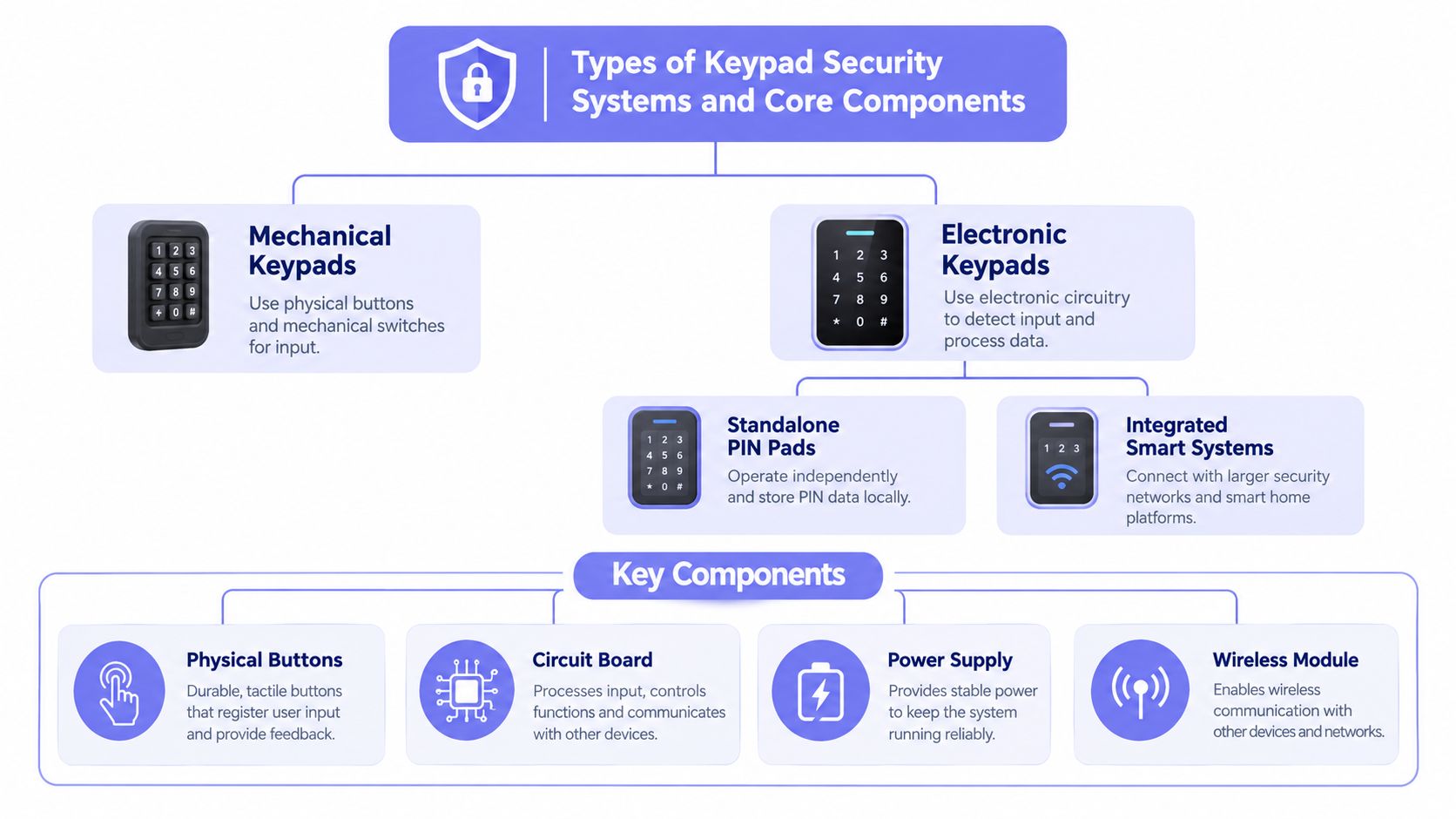
Keypad systems differ in both their user interface and their management capability. A mechanical keypad can operate without electronics or software, while an integrated smart system may connect credentials, schedules, logs, remote administration, and visitor workflows.
Mechanical versus electronic keypads
Mechanical keypads use physical buttons and a mechanical combination mechanism. They can be attractive where the property wants minimal wiring and minimal software, but they generally offer limited or no event history.
Electronic keypads use a circuit board to evaluate a PIN and activate a relay or controller. They may be standalone, or they may form part of a broader access-control platform.
Commercial electronic units often add sealed housings and tamper outputs. For example, the Locknetics DKP installation guide describes keypad hardware with tamper contacts that can signal an alarm if the unit is opened or removed.
Standalone pads versus integrated systems
A standalone PIN pad is straightforward, but management remains close to the device. An integrated system can connect the keypad to a central controller, cloud dashboard, mobile credentials, visitor access, and reporting.
The system's practical components include:
- Keypad: Receives the PIN or other local input.
- Controller: Decides whether access should be granted.
- Gate operator or lock: Performs the physical release.
- Power supply: Supports the keypad, controller, and connected hardware.
- Wireless or cellular module: Carries data to a remote management platform when present.
- Management software: Handles users, schedules, logs, and administrative permissions.
A hardware-agnostic retrofit can sit alongside an existing gate operator rather than forcing an owner to replace functioning equipment. That approach matters for communities with installed equipment from manufacturers such as LiftMaster, Viking, FAAC, Nice, DoorKing, or Mighty Mule.
For boards comparing credential types, an overview of the benefits of electronic access control can help clarify why audit logs, user administration, and credential revocation often matter as much as the reader itself.
Keypad system types at a glance
| System Type | Best Fit | Auditability | Management Effort |
|---|---|---|---|
| Mechanical keypad | Small, low-complexity entrances | Minimal | Low at first, but code changes are manual |
| Standalone electronic PIN pad | Small buildings, controlled doors, simple gates | Limited unless paired with a controller | Moderate |
| Integrated electronic keypad | Communities and commercial sites needing schedules and logs | Stronger, depending on software | Moderate to high |
| Smart keypad with mobile administration | Properties needing remote changes and credential control | Strong when users receive individual credentials | Lower for remote administration |
| Cellular retrofit with existing keypad | Existing gates that need smartphone access and better oversight | Supports digital credential records | Centralized and remote |
The decision should follow the site's location, traffic pattern, credential turnover, and auditability requirement. A low-traffic private gate may not need the same architecture as a multifamily property with frequent vendors, deliveries, and resident changes.
Pros and Cons You Should Weigh Before Choosing
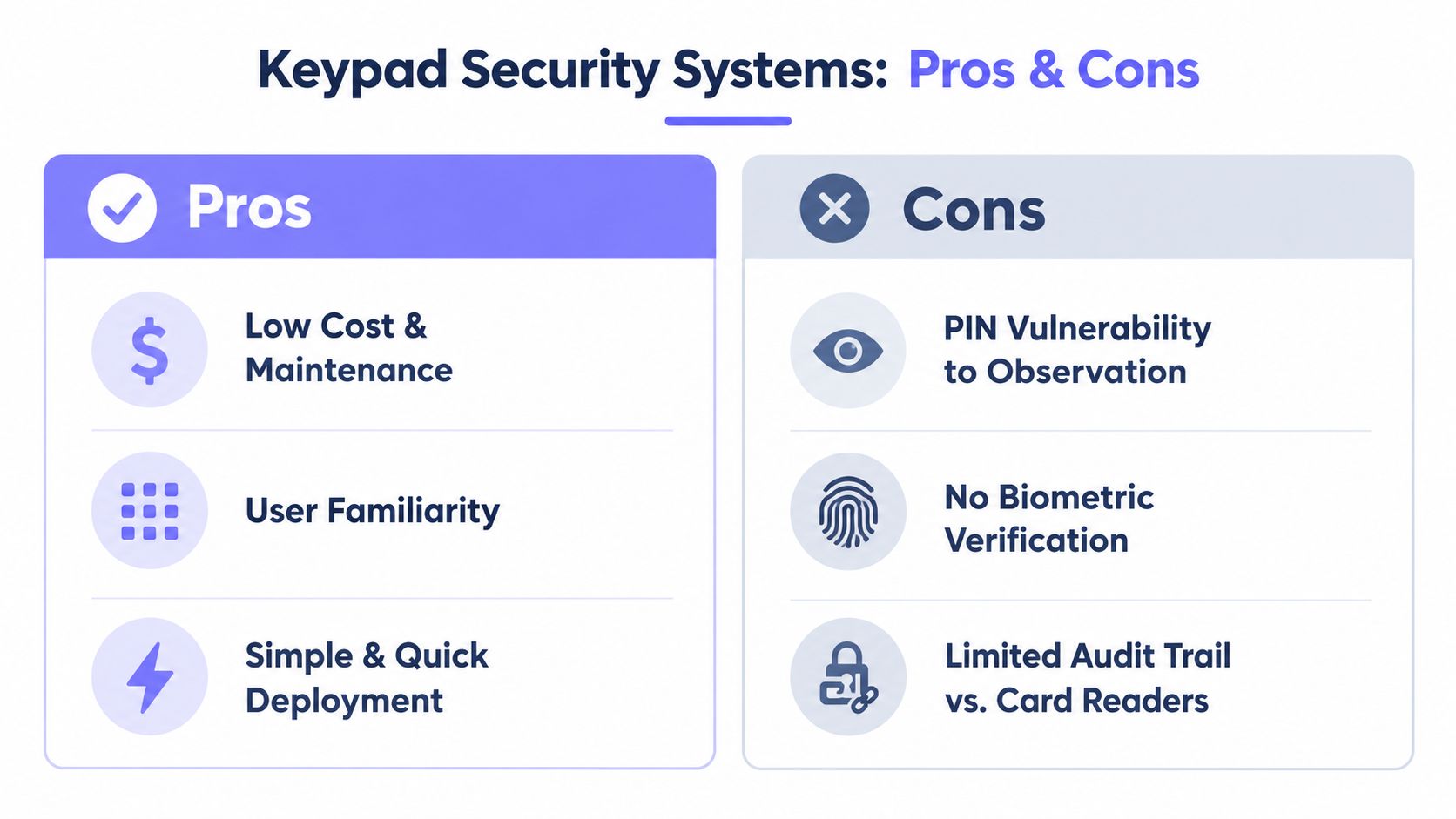
A keypad's main advantage is obvious at the gate. Residents already understand how to enter a code, and installers can often connect the device to familiar access hardware without teaching every user a new process.
The security trade-off is less visible. A shared PIN identifies a code, not necessarily the person who entered it.
Where keypads help
- Low entry friction: Residents don't need to carry a fob or clicker.
- Familiar operation: Pressing buttons is easy to explain to residents and visitors.
- Simple deployment: A basic unit can be appropriate for a small property with limited access rules.
- Local availability: Electronic keypads can continue allowing local entry even when remote management is unavailable, depending on the system design.
- Flexible placement: Keypads can serve gates, pedestrian entrances, amenity rooms, and controlled building doors.
Where keypads create exposure
- Shared-code ambiguity: A manager may know that a PIN was used without knowing which resident used it.
- Code observation: A person nearby can watch the sequence, especially at a public or semi-public entrance.
- Administrative delay: Changing a shared code requires communicating the new credential and updating authorized users.
- Physical traces: Button wear, smudges, heat, and acoustic signals can reveal input patterns.
- Maintenance burden: Outdoor devices need protection from weather, vandalism, and tampering.
A standard four-digit PIN has exactly 10,000 possible combinations, from 0000 to 9999. That sounds like a large search space until users select predictable patterns or reuse familiar numbers. Research summarized by Malwarebytes' discussion of real-world PIN behavior found that trying popular PINs first could raise an attacker's chance of a breach to 11.7%, with 1234 accounting for 9.0% of observed PINs and 1111 accounting for 1.6%.
A keypad alone may be reasonable when the entrance is private, the user population is stable, and administrators accept limited attribution. It becomes a weaker fit when the property needs person-level accountability, fast revocation, or reliable remote visitor handling.
Shared access is convenient for residents, but individual access is easier for managers to govern.
Security Vulnerabilities and How to Mitigate Them
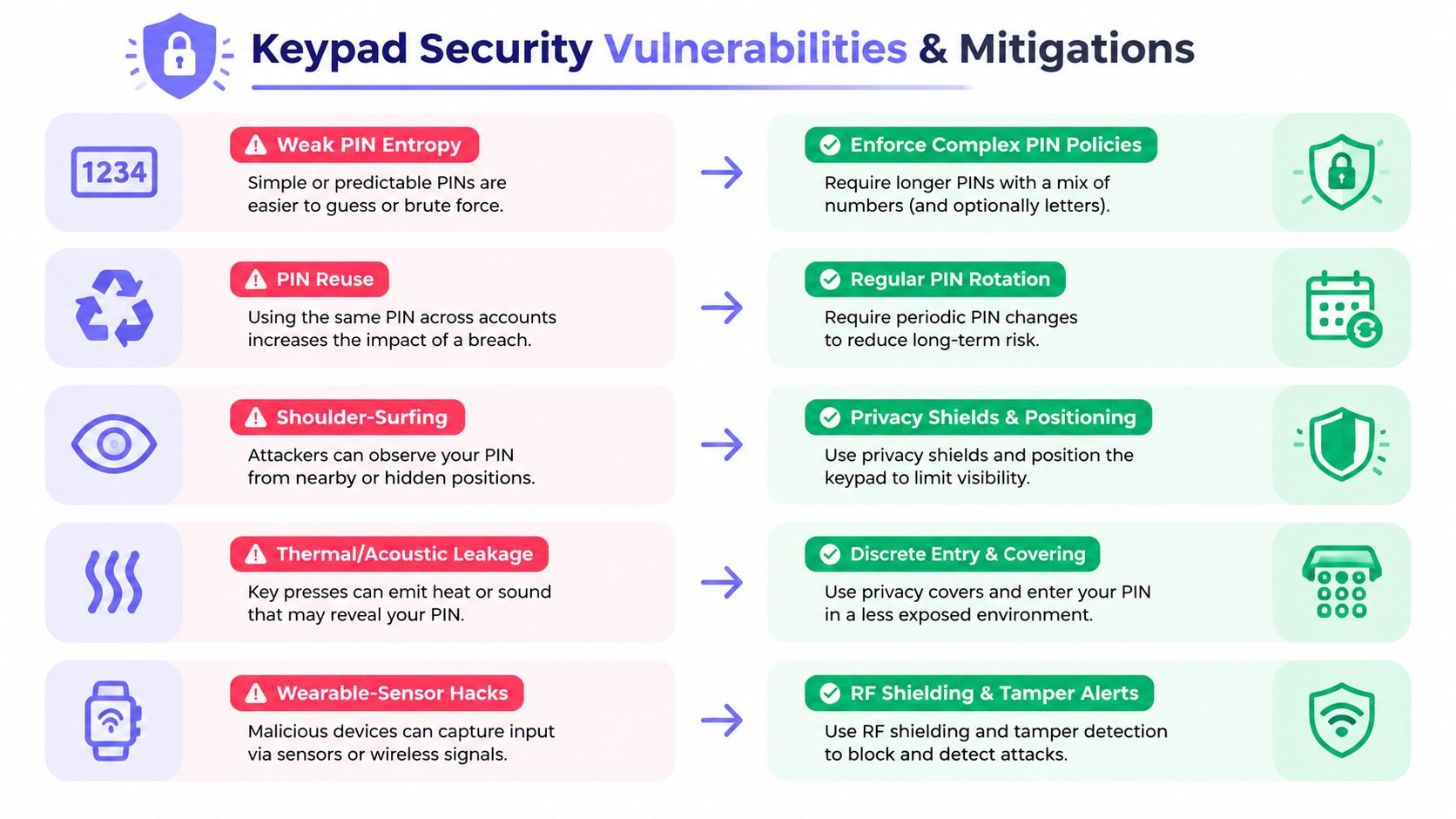
The strongest PIN policy can't eliminate every risk at an exposed entrance. A person may observe the keypad, study residual heat, listen to button sounds, or infer entry from a wearable device.
Weak PIN entropy
A four-digit PIN offers 10,000 combinations, while a six-digit PIN offers 1,000,000 combinations, according to FarPointe Data's PIN and access-control guidance. Longer codes expand the available search space, but only if users avoid predictable patterns.
Administrators should prohibit:
- Sequential numbers.
- Repeated digits.
- Simple keypad shapes.
- Unit numbers, street numbers, or other easily associated values.
- Codes reused across gates, doors, and amenity areas.
That policy improves resistance to guessing, but it doesn't solve the audit problem created by a shared credential.
Observation and side-channel leakage
Shoulder-surfing is the most straightforward exposure. A visitor, contractor, or passerby can watch a resident enter a code. Cameras positioned near entrances can create the same problem if the keypad and user's hands remain visible.
Thermal imaging adds a less obvious risk. A UC San Diego study found that thermal analysis could recover over half of entered keypad codes even one minute after the keypad was pressed, as documented in the thermal keypad attack study.
Research has also examined acoustic leakage, thermal traces, shoulder-surfing, and wearable-device sensor inference as ways to recover PIN sequences. One practical mitigation is a randomized keypad layout. In a randomized-layout study, entry time rose from about 1.4 seconds to about 2 seconds, while resistance to shoulder-surfing and thermal attacks improved, according to the randomized keypad research.
Physical tampering
A keypad should have a sealed enclosure, secure mounting, and a tamper output where the risk warrants it. A normally closed tamper contact can alert the controller when someone opens or removes the unit, turning an attempted physical compromise into a detectable event.
Installers should also verify:
- The keypad cannot be easily shielded from view by an attacker.
- The controller is protected from casual access.
- Cable routes don't expose an easy bypass.
- The system records tamper events.
- The property has a response procedure for alerts.
The practical conclusion appears in why 4 digit gate codes fail: shared codes create a gap between opening a gate and proving who opened it.
A modern mitigation path
Individual smartphone credentials can reduce dependence on a shared PIN. An administrator can grant access to a named resident, revoke it when authorization ends, and schedule a visitor credential for a defined purpose.
Nimbio is one example of a cellular smartphone retrofit that can operate alongside existing electronic gates, preserving legacy clickers and keypads while adding app-based credentials, remote administration, scheduled access, and entry records. The approach is useful when a property wants improved auditability without replacing a functioning gate operator.
Installation Compatibility and Modernization Options
A retrofit begins with the gate, not the keypad. Installers need to identify the operator, control inputs, power arrangement, enclosure location, and available cellular signal before recommending a device.
The existing operator may come from LiftMaster, Viking, FAAC, Nice, DoorKing, Mighty Mule, or another manufacturer. A hardware-agnostic controller should connect to the operator's supported access input while leaving the gate's core opening and safety functions intact.
Site assessment checklist
- Operator identification: Record the manufacturer, model, control board, and input type.
- Power review: Confirm available voltage, backup power, and enclosure capacity.
- Cellular review: Test signal at the proposed controller location.
- Access inventory: Document existing keypads, clickers, remotes, call boxes, and vehicle loops.
- User workflow: Separate resident, staff, vendor, delivery, and emergency access.
- Network decision: Use cellular connectivity where site Wi-Fi is unreliable or unavailable.
- Safety validation: Confirm that the retrofit doesn't interfere with gate loops, photo eyes, obstruction sensing, or emergency release procedures.
A gate access guide from Swiftlane describes cellular access control as a strong fit for remote gates and retrofits because it avoids dependence on site Wi-Fi and long network cable runs. Wi-Fi can still suit a gate with verified, managed coverage nearby, but a property shouldn't assume that a signal reaches the entrance just because it works inside the management office.
Preserving useful hardware
Modernization doesn't have to mean removing every existing device. A community may keep a keypad for residents who prefer local entry while adding smartphone credentials for residents, guests, and staff.
Remote administration can support:
- Visitor credentials: Issue access without distributing a permanent shared code.
- Scheduled hold-open periods: Keep an entrance open during approved windows.
- Immediate revocation: Remove a credential when a resident, vendor, or employee no longer needs access.
- Entry records: Review digital activity through a management dashboard.
- Over-the-air updates: Keep supported controller software current without replacing the unit.
GuestView-style one-way video verification can also help residents assess who is requesting entry before granting access. That workflow is different from a keypad because the resident can make a visitor decision from a phone instead of relying on a visitor to know a shared code.
Property managers and installers evaluating options can use Nimbio's gate access buyer's guide to organize compatibility, connectivity, credential, and management questions before purchase.
Use Cases Pricing Maintenance and Practical Recommendations
Different properties need different balances of convenience, control, and installation effort.
A single-family driveway gate may work well with a keypad plus smartphone access for family members, service providers, and guests. An HOA community usually benefits from individual resident credentials, visitor workflows, and an administrative record that doesn't depend on a shared code. A logistics or commercial site may need scheduled employee access, vendor permissions, and records that support operational review.
Practical recommendations
- Private residential gate: Use a longer, non-pattern PIN if a keypad remains active, and add smartphone access for guests or contractors.
- HOA or multifamily community: Avoid making one code the only credential. Use individual digital access where resident turnover and visitor traffic create accountability requirements.
- Commercial property: Separate employee, vendor, and temporary credentials. Confirm that the system supports schedules and administrative reporting.
- Existing gate retrofit: Keep the functioning operator and evaluate a hardware-agnostic cellular controller before budgeting for full replacement.
- Exposed entrance: Consider randomized keypad layouts, privacy positioning, tamper alerts, and a credential method that reduces visible PIN entry.
Pricing should be evaluated as a complete operating model rather than a keypad purchase alone. Common arrangements include hardware plus subscription, fixed monthly rates for residential and multifamily properties, and usage-based commercial pricing. Maintenance planning should include keypad cleaning, enclosure inspection, tamper-alert testing, credential reviews, and gate-operator servicing.
Nimbio's model includes a hardware device with a lifetime warranty and software-supported access administration, while the specific commercial or residential cost depends on the property's selected service structure. Boards and installers should request a site-specific proposal that accounts for the existing operator, power, cellular coverage, number of users, and visitor workflow.
Nimbio adds cellular smartphone credentials, remote visitor management, scheduled access, and entry records to existing electronic gates while allowing legacy keypads and clickers to remain in service. Property managers, HOA boards, and installers can visit Nimbio to evaluate a retrofit path that improves auditability without replacing the gate.


