

A property manager usually notices the gate problem long before the motor fails. Residents start sharing keypad codes, remotes go missing, delivery access becomes inconsistent, and nobody can say with confidence who opened the entrance or when.
That's why the LiftMaster electric gate opener matters as more than a motor. On many properties, LiftMaster hardware is the physical backbone of the gate, but the daily experience depends just as much on how access is granted, revoked, and tracked.
For HOA boards, gated communities, and small commercial sites, the question usually isn't whether LiftMaster hardware is capable. It usually is. The better question is whether the current system still fits how the property operates today, especially when staff need remote oversight and residents expect smartphone-based entry instead of clickers and shared PINs.
Table of Contents
- Your Guide to LiftMaster Electric Gate Openers
- Understanding Common LiftMaster Gate Opener Models
- Installation and Wiring Fundamentals
- Troubleshooting Common LiftMaster Issues
- The Modern Upgrade Your LiftMaster System Needs
- How Nimbio Modernizes Your LiftMaster Gate
- Frequently Asked Questions About LiftMaster Upgrades
Your Guide to LiftMaster Electric Gate Openers
At 7:15 on a Monday morning, the gate is opening and closing on command, but the property is still dealing with resident complaints, delivery delays, and a manager who has no clear way to add or remove access without chasing remotes and keypad codes. That is a common LiftMaster site problem. The operator is doing its mechanical job, while the access system around it is falling behind.
LiftMaster has been in enough apartment, HOA, and commercial entries that the pattern is easy to recognize. The hardware was designed around defined operator classes, safety requirements, and specific site conditions. For property managers, that matters because a gate opener is only one part of the entry system. Daily performance depends on how well the operator, safety devices, credentials, and management process fit the property.
Older LiftMaster installations are a good example of why the upgrade path matters. Many sites already have a capable operator in place, and full replacement is not always the best use of budget. In many cases, the better move is to keep the existing gate machine if it is mechanically sound and update the access layer around it with cellular, cloud-based control.
That distinction gets missed in standard buyer's guides. They focus on picking a new opener. Property managers usually need a different answer. They need to know whether the installed LiftMaster equipment can stay, what still has service life left, and how to modernize entry without creating a larger maintenance problem.
LiftMaster documentation has long reflected that these systems are built for regulated vehicular use, not casual consumer convenience. If a site is using a gate in ways it was never meant to handle, such as mixing pedestrian traffic into the vehicle lane, resident experience and liability both get worse fast.
A practical review of any LiftMaster gate should cover four questions:
- Is the operator still the right fit for the gate and traffic level?
- Are safety devices and controls working as installed, not bypassed or half-functional?
- How is access being issued, changed, and revoked today?
- Can the property modernize control without replacing the operator itself?
The last question is where many communities save time and money. A working LiftMaster operator can often remain the foundation while the property replaces outdated access methods with managed credentials, remote administration, event tracking, and easier visitor entry. The same logic shows up in adjacent accessibility planning too. Properties reviewing entry systems often also review automatic door openers for handicapped as part of a broader access and compliance conversation.
For managers, the goal is straightforward. Keep the gate reliable. Reduce manual access work. Give residents and vendors a smoother entry experience without tearing out hardware that still has useful life left.
Understanding Common LiftMaster Gate Opener Models
Some confusion around a LiftMaster electric gate opener comes from treating all operators as interchangeable. They aren't. Swing and slide systems solve different mechanical problems, and residential-duty equipment should never be assumed to behave like a high-traffic commercial operator.
How to think about swing and slide operators
A swing gate opener works best where the gate leaf has room to arc open and the hinges, posts, and geometry are in good condition. These systems are common on residential driveways and smaller private entries.
LiftMaster's LA400UL dual swing gate opener is a 24 VDC residential operator rated for gates up to 850 lb and 16 ft per gate, according to the LA400UL product listing. In practice, that matters because gate length, leaf weight, hinge drag, and wind exposure all affect how smoothly an actuator can start, stop, and hold position over time.
A slide gate operator is the better fit when the gate moves laterally along a track or roller path. These systems usually make more sense where swing clearance is limited or where the site needs a heavier commercial gate.
LiftMaster's CSL24UL is a 24 VDC high-traffic commercial slide-gate operator rated for gates up to 50 ft and 1,500 lb, and LiftMaster also offers a 120 VAC slide operator variant rated up to 2,000 lb and 50 ft on the CSL24UL product page. That jump in rating reflects a different class of equipment, one designed around duty cycle, gate inertia, and sustained site use.
A long, heavy gate doesn't just need “more power.” It needs an operator sized for starting torque, run time, and repeated cycling without turning every week into a service call.
For facility teams that also manage accessible entries inside buildings, this same equipment-matching principle applies to doors. A useful reference on that broader topic is this guide to automatic door openers for handicapped, especially when exterior gate planning overlaps with inclusive access planning.
LiftMaster gate operator classes at a glance
| Operator Class | Typical Use Case | Gate Type | Key Feature |
|---|---|---|---|
| Residential swing | Single-family homes, light-duty private entrances | Swing | Compact actuator design for residential gate automation |
| Residential slide | Homes or lighter shared entries with lateral travel space | Slide | Better fit where swing clearance is limited |
| High-traffic commercial slide | HOAs, multifamily, industrial or shared vehicle entrances | Slide | Built around heavier gates and frequent cycling |
| Commercial heavy-duty swing or slide | Large sites needing stronger duty-cycle performance | Swing or Slide | Broader integration with access-control systems |
A quick way to identify what's on site is to look at three things:
How the gate moves
If it arcs on hinges, it's swing. If it travels sideways, it's slide.How the property uses it
A private driveway and a community entrance may look similar, but they place very different demands on the operator.How much hardware stress already exists
Sagging hinges, rough rollers, and poor track alignment often get blamed on the opener, even when the gate itself is the actual problem.
Managers who get this classification right usually avoid the most expensive mistake in gate planning. They don't ask a residential operator to behave like a commercial one.
Installation and Wiring Fundamentals
A property manager usually sees installation problems on a Monday morning. The gate opens slower than expected, residents start stacking up at the entrance, and the service company says the operator is fine. In many cases, the operator is not the actual issue. The pad shifted, the chain line was set poorly, a loop lead was nicked in conduit, or the safety devices were never tested under normal traffic.
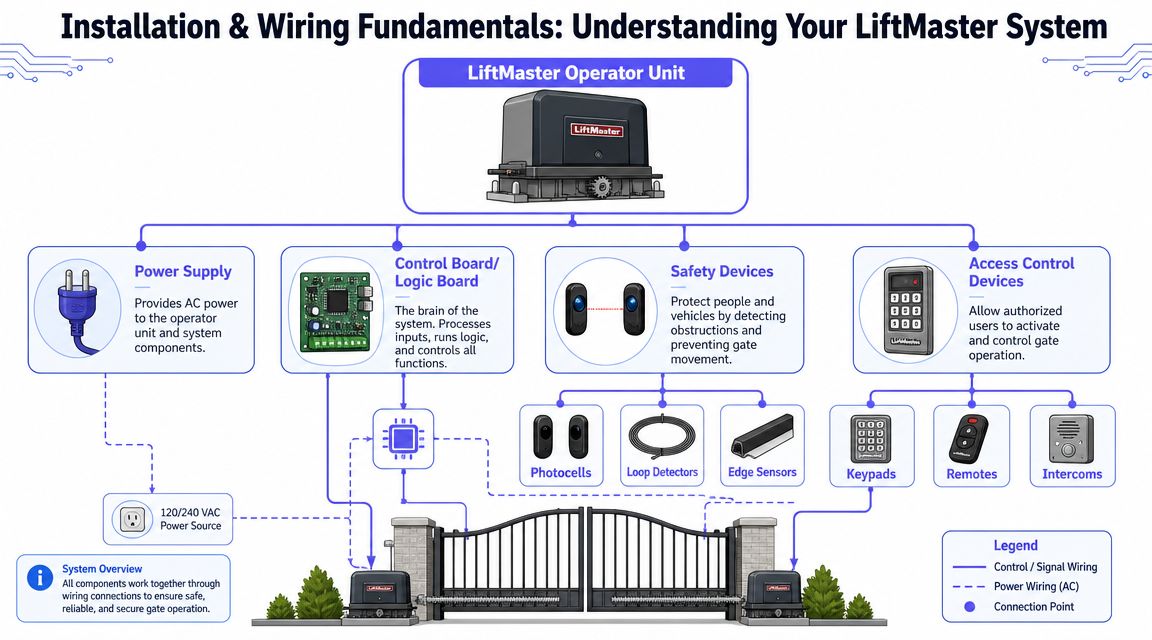
Good installation starts with the gate itself and the operator foundation. The mounting pad has to stay stable under vibration, weather, and repeated cycling. Operator placement also matters because chain alignment and force transfer affect how smoothly the gate travels and how much wear shows up at the motor, rollers, and hardware over time. If the installer had to fight the gate to make it move, that problem usually returns as noise, reversal events, or premature service calls.
Wiring quality decides whether the system stays serviceable. A clean cabinet layout, labeled conductors, protected low-voltage runs, and proper separation between high and low voltage save hours later. Poor terminations and weak grounding create intermittent faults that are hard to reproduce, which is why one technician can find nothing wrong while the next gets a failure on arrival.
Safety devices need the same level of attention. Photo eyes, edge devices, exit loops, and command inputs should be wired as part of the system design, then tested under actual operating conditions. A gate that works during a quick bench check can still fail during rain, glare, or peak traffic if those devices were installed as an afterthought.
For managers, the practical review is simple:
- Check the pad and operator mounting for stability and clear alignment.
- Ask how power, low-voltage control wiring, and loop leads were routed and protected.
- Confirm which terminals handle access control inputs, safety devices, and fire or emergency functions.
- Require a live test of sensors and entrapment protection before sign-off.
- Collect the final wiring diagram, model information, and any programming notes for site records.
Those records matter more than many teams expect. They make future service faster, and they make upgrades much easier when an older LiftMaster site adds cloud-based access control, a cellular entry system, or remote management. The installed base of legacy operators can often be modernized successfully, but only if the original wiring is documented and the input structure is understood first.
Electrical safety deserves a separate review whenever the project includes a new branch circuit, outdoor disconnects, or shared power with other site equipment. Facility teams comparing bids may want these expert electrical safety insights as a baseline for what good electrical practice looks like around exterior equipment.
One rule I give managers is simple. If the installer leaves no readable documentation behind, expect higher service costs later.
If you are already seeing odd behavior after an install, start with a structured checklist for how to troubleshoot your gate opener before authorizing parts replacement. That step often separates a wiring or setup problem from an actual operator failure.
Troubleshooting Common LiftMaster Issues
A common property-management call goes like this. The gate worked during the morning rush, then stopped after lunch, and now residents are stacking up at the entry while staff guess whether the problem is a remote, a photo eye, or the operator itself.
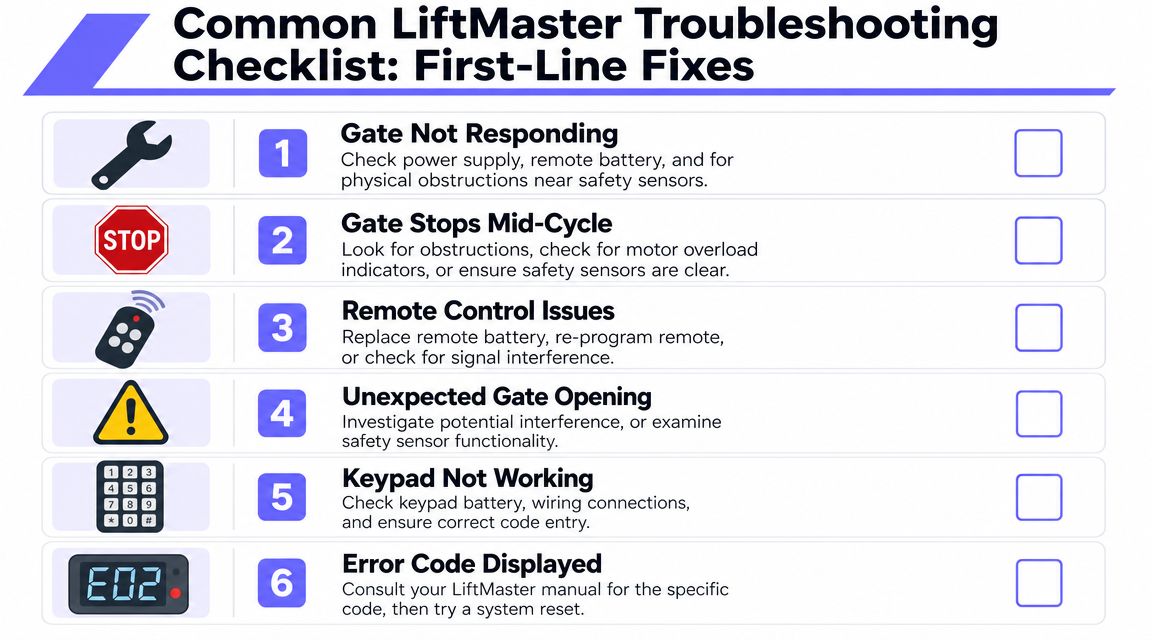
The fastest way to handle that situation is to separate access-control problems from gate-operator problems. On older LiftMaster sites, those get mixed together all the time. A dead transmitter battery, a bad loop input, and a dragging gate leaf can all look like “the gate is down” to the office.
The first checks that solve many service calls
Site staff can narrow the problem safely before dispatching a gate company.
- No movement at all: Verify incoming power, check the breaker or disconnect, and test with a known working credential or hardwired command device.
- Stops during travel: Look for wheel drag, track debris, hinge bind, or an obstructed safety device.
- Remote problems: Replace the transmitter battery, confirm the remote is still programmed, and check for nearby interference sources.
- Keypad complaints: Confirm the keypad has power, inspect field wiring, and rule out user-entry mistakes before assuming hardware failure.
- Unexpected reversals: Clean photo eyes, confirm alignment, and inspect the monitored safety devices tied into the operator.
This saves time because it gives the service technician a better starting point. It also protects the budget. I have seen managers approve a board swap when the gate was binding mechanically and tripping the operator on force.
For a more detailed field checklist, use this guide on how to troubleshoot your gate opener before authorizing parts replacement.
When onboard diagnostics save time
Many LiftMaster operators give you useful fault history, and that is one of the biggest advantages of newer electronic control platforms over older electromechanical setups. If the site already has that hardware in place, use it. Fault memory often points to whether the issue is power loss, an entrapment input, a travel problem, or a command problem.
That matters even more at properties with legacy LiftMaster operators that are being considered for a cellular or cloud-based access upgrade. Before adding modern entry management, the operator needs to be stable at the hardware level. A cloud system can improve credential control and remote administration, but it will not fix a failing safety circuit, bad limit setup, or a gate that drags every third cycle.
A few practical rules help:
- Record the code before resetting the operator.
- Check whether the same fault keeps returning, even if the gate resumes normal operation.
- Do not assume the motor failed just because the gate does not move. Inputs, safety devices, and gate condition cause many of the same symptoms.
If the site has a diagnostic display, the maintenance team should use it. Fault history usually shortens the path to the root cause.
LiftMaster also notes in its diagnostics guidance that fault history can be cleared from the operator after it is documented. Clear codes only after the service record is updated, or the next technician loses the best clue on site.
The Modern Upgrade Your LiftMaster System Needs
A property manager usually notices the access problem before the gate operator fails. The LiftMaster arm or slide gate still cycles, but residents are passing around the same PIN, vendors are using old credentials, and staff has no fast way to confirm who opened the gate after hours.
That is the gap many buyer's guides miss. A large share of LiftMaster systems in the field do not need a new operator. They need a better control layer.
Why traditional gate access keeps creating work
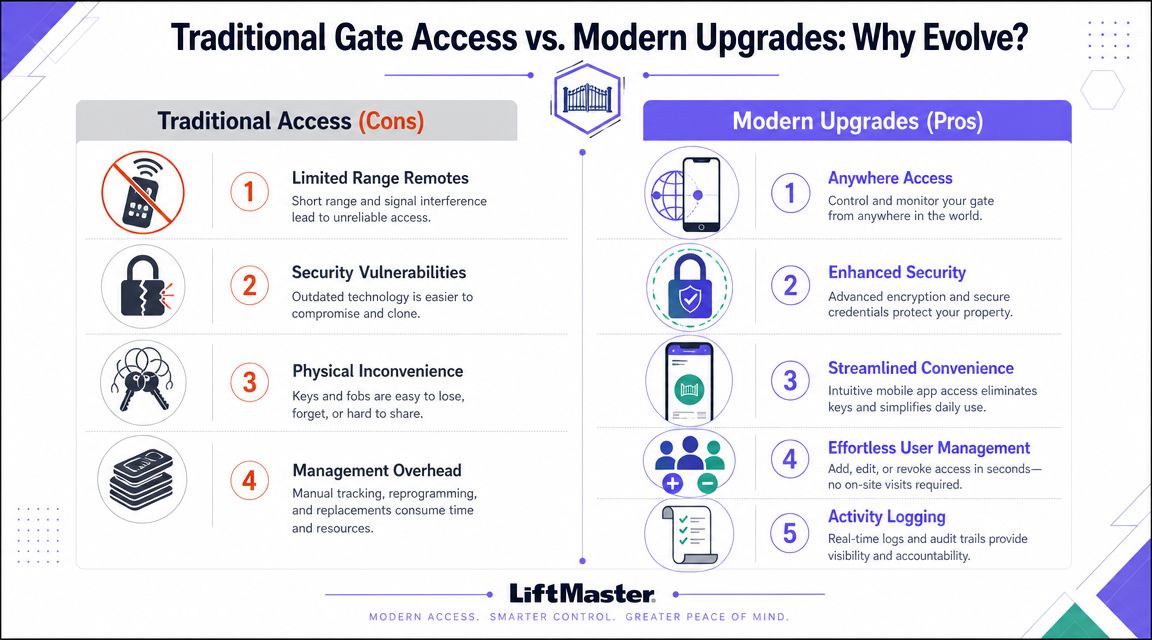
Older access methods tend to age badly at occupied properties. A shared gate code starts as a convenience and ends as a liability. Remotes go missing. Staff changes are not reflected at the gate right away. Delivery drivers and contractors create one-off access requests that someone on the management side has to handle manually.
The practical issue is control. If a property cannot revoke access quickly, assign time-based permissions, or review entry history without piecing together resident complaints, the gate is doing only part of its job.
Common pain points show up fast:
- Remote management is limited. Site staff often need to be on location, or call someone who is.
- Credentials are hard to contain. Once a PIN is shared beyond residents, it rarely stays private.
- Visitor access becomes repetitive office work. Deliveries, service calls, and guest entry keep pulling staff into the same task.
- Incident review is weak. Without usable event logs, disputes about tailgating or unauthorized entry are hard to resolve.
At that point, the conversation is no longer about the motor, gearbox, or gate type. It is about whether the property can manage access with the same discipline it applies to keys, fobs, and building doors.
Why cellular retrofit makes more sense than full replacement
For many sites, full operator replacement is hard to justify. If the LiftMaster hardware is mechanically sound, replacing it just to get phone-based entry adds cost, downtime, and avoidable installation work. It can also create new problems if the existing loops, photo eyes, and field wiring are already integrated and working properly.
A retrofit approach is often the better path because it respects the installed base. The operator keeps doing the gate movement. The upgrade changes how authorized users send an open command and how management controls permissions.
That matters in real budgets and real service schedules:
The existing operator stays in service
A stable LiftMaster unit still has value. Modern access can be added without throwing away hardware that has useful life left.Cellular control avoids dependence on site Wi-Fi
Gates are frequently the worst place on the property to rely on consumer-grade networking. A cellular path is often more predictable for remote administration.Administration moves off the gate keypad
Managers can issue, change, and remove access without treating every update like a truck roll or an onsite programming visit.Resident and visitor flow improves
Communities can reduce reliance on one shared code and give residents a cleaner way to manage guests, deliveries, and service providers.
This upgrade path is easy to underestimate. It is not as visible as replacing the operator, but it usually delivers the bigger operational gain. The property keeps the LiftMaster hardware it already paid for and modernizes the part residents and staff interact with every day.
Properties reviewing that shift often look at app-based credentials, remote entry tools, and in-vehicle access options. Smart gate entry for property managers is one example of how access control is moving toward phone-first and vehicle-integrated workflows.
The practical test is straightforward. If the gate operator is dependable, the next upgrade should improve credential control, visibility, and remote management. That is usually a retrofit decision, not a replacement decision.
How Nimbio Modernizes Your LiftMaster Gate
A property manager gets the call at 7:10 a.m. A vendor is stuck at the entrance, a resident forgot the gate code, and nobody wants to drive to the site just to change access. If the LiftMaster operator is still opening and closing the gate reliably, the better fix is usually to modernize control, not replace the machine.
What changes for the installer
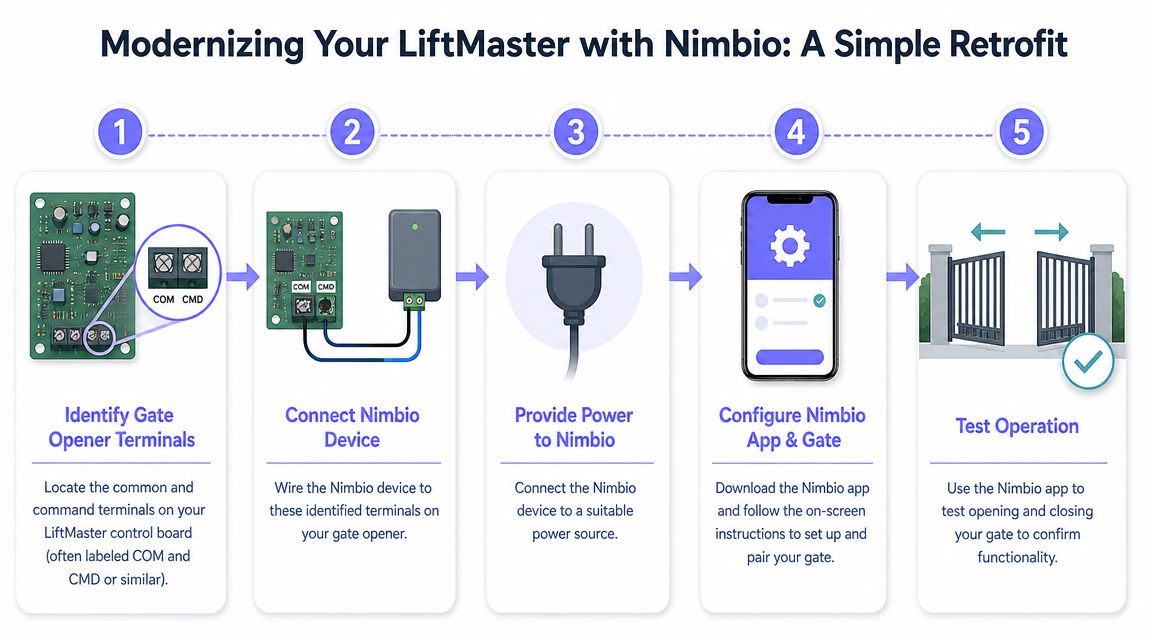
On the gate side, the job is straightforward. The operator stays in place. The retrofit controller ties into the LiftMaster board at the gate command input, gets power, and is tested against the site's real operating conditions, including open requests, hold-open behavior, and any existing safety devices that must still take priority.
That matters because a good retrofit respects the gate's original logic. Photo eyes, loops, edge devices, fire access requirements, and exit functions still need to behave the way the operator was designed to handle them. The new controller adds another authorized trigger. It should not interfere with entrapment protection or force settings.
In practice, that also gives installers more flexibility during rollout. Existing transmitters, keypads, or telephone entry hardware can often stay active while the new system is brought online. For occupied communities, that phased approach usually creates fewer resident complaints than a full rip-and-replace project.
One example is Remote access for electronic gates, which adds a cellular control layer to an existing gate system instead of replacing the LiftMaster operator.
What changes for management and residents
The bigger change happens after the wiring is done. Daily gate administration moves out of the cabinet and into a system management workflow that staff can handle without standing at the keypad or scheduling a service call for every access change.
For property managers, the practical improvement is control. Shared codes can be reduced, access rights can be changed faster, and entry activity is easier to review when there is a complaint, a vendor dispute, or a question about who had access and when. That is the gap many older LiftMaster installations still have. The operator itself may be fine, but the access layer is dated.
Residents notice different benefits. They are less dependent on a clicker that gets lost in a glovebox or on a code that keeps circulating after move-out. Visitors and service providers can be handled with cleaner approval methods, which is especially useful at properties that do not keep staff at the gate.
The operator handles movement. The modern access layer handles permissions, visibility, and remote administration.
Nimbio adds cellular smartphone-based control to existing electronic gates while allowing legacy access methods to remain in place during transition. That gives managers a practical upgrade path for older LiftMaster installations that still have years of mechanical life left but need better credential control and off-site administration.
For many HOAs, apartment communities, and light-commercial sites, that is the right modernization path. Budget stays focused on the part of the system that creates the most day-to-day friction, and the property avoids replacing dependable hardware before it needs to be replaced.
Frequently Asked Questions About LiftMaster Upgrades
Will old remotes and keypads still work
In many retrofit setups, yes. The operator remains the core gate machine, and the new controller is added as another command method rather than a replacement for every existing device. That makes phased rollout much easier for HOAs and occupied properties.
Is a retrofit usually more practical than replacing the operator
If the LiftMaster hardware is still mechanically sound, retrofit is often the more sensible path. It avoids unnecessary disruption and focuses budget on the access layer that residents and managers interact with every day.
Why is cellular control useful for gates
Cellular control separates gate access from the property's local Wi-Fi environment. That's helpful on sites where networking is inconsistent, where the gate is far from the main building, or where management needs dependable off-site control.
What problem does smartphone access actually solve
It reduces dependence on physical credentials and static codes. Managers can issue and revoke access more cleanly, and residents can handle guest entry without passing around gate codes that are hard to control later.
What should a property manager ask before approving an upgrade
Use this shortlist:
- Compatibility: Will the retrofit work with the existing LiftMaster operator?
- Continuity: Can current remotes or keypads stay active during transition?
- Administration: Can staff manage users and visitors remotely?
- Auditability: Does the system provide a useful record of gate activity?
- Connectivity: Does it depend on local Wi-Fi, or does it have its own communication path?
A LiftMaster gate can remain a strong long-term asset. The smarter decision is often not replacing the operator, but upgrading the way the property controls access around it.
A property with a working LiftMaster operator doesn't always need a new gate system. It may just need a better access layer. If the goal is to add smartphone entry, remote credential management, and cellular-based control without replacing the existing operator, Nimbio is worth evaluating.
For a broader framework on evaluating vendors and systems, see the guide on how to choose a cellular gate access system.


