

A resident calls the property manager after a community gate opens for an unknown vehicle at 2 a.m. The manager checks the access dashboard and finds that a resident credential appears to have been copied, reused, or granted to the wrong person. The gate operator worked exactly as designed, but the identity and authorization process behind the mobile app did not.
That scenario captures the central challenge of mobile app security for smart access control. A smartphone-controlled gate combines physical security, cellular or Wi-Fi connectivity, cloud services, APIs, device software, and human decisions. A weakness in any one layer can turn a convenient digital key into an unauthorized opening.
For property managers, HOA boards, installers, and residents, security has to mean more than encrypted traffic or an app-store review. It has to answer a practical question: who can open which gate, under what conditions, and how quickly can access be stopped when something changes?
Table of Contents
- Why Smartphone-Controlled Gates Need a Security-First Mindset
- The Threat Model for Phone-Controlled Entry Systems
- Authentication, Authorization, and Encryption Essentials
- Secure OTA Updates and Backend API Defense
- Auditability, Compliance, and the Human Attack Surface
- A Vendor and Platform Evaluation Checklist
- Putting It All Together for Your Community or Property
Why Smartphone-Controlled Gates Need a Security-First Mindset
A traditional clicker or keypad has a limited attack surface. A phone-based credential introduces more moving parts, including the resident's device, operating system, app session, cloud account, API, cellular connection, access controller, and gate operator.
That expansion brings useful capabilities. A property manager can issue a visitor credential remotely, revoke access when a lease ends, or review an entry event without visiting the property. It also creates more places where attackers may target identity, authorization, software updates, or user behavior.
OWASP's mobile security work reflects this broader reality. The organization's mobile security project combines the Mobile Application Security Verification Standard, Mobile Application Security Testing Guide, and Mobile Application Security Weakness Enumeration into a structured framework for testing, weakness identification, and verification across mobile apps, as described in the OWASP Mobile Application Security project.
Five questions should guide the review
A security-first evaluation should move through five connected areas:
- Threat modeling: Which assets matter, who might attack them, and what could an attacker physically do after gaining access?
- On-device protection: How are credentials stored, protected, and accessed if a phone is lost, shared, rooted, or infected?
- OTA and API defense: Can the platform prove that firmware is authentic, and does the backend independently verify every access request?
- Auditability and human risk: Can the property reconstruct an incident, and can staff and residents recognize social-engineering attempts?
- Vendor selection: Does the provider explain its signing keys, patch process, logging, testing, and incident response clearly?
The 2023 NowSecure benchmark, which covered nearly 6,500 popular mobile apps, found that 95% failed at least one of the seven OWASP MASVS categories. It also reported failures in 54% of apps for network security, 47% for platform security, and 43% for code security in its industry benchmark.
Those findings don't prove that every access-control app has the same weaknesses. They do show why property-access technology deserves verification rather than assumptions. A gate is a physical boundary, so a broken mobile control can create a direct perimeter problem.
Practical rule: Treat every smartphone-controlled opening as a cloud-connected critical function, not as an ordinary convenience feature.
The Threat Model for Phone-Controlled Entry Systems
Threat modeling starts with the consequence of failure. For a gate-access platform, the important assets include resident identities, guest credentials, administrator accounts, access commands, controller firmware, visitor records, and the physical gate itself.
The likely attacker doesn't need to defeat every security layer. An attacker may only need one working path, such as a stolen session, a weak API authorization check, a social-engineered temporary code, or a compromised device.
OWASP's MASVS organizes mobile controls around storage, cryptography, authentication, network communications, platform interactions, code quality, resilience, and privacy through its mobile security verification standard. In a gate deployment, each category maps to a physical consequence.
Map the attacker's objective to the control
| Attacker objective | Example in a smart community | Control to verify |
|---|---|---|
| Unauthorized entry | A stolen resident session opens a vehicle gate | Short-lived tokens, session revocation, server-side authorization |
| Credential resale | A guest pass is shared beyond its intended visitor | Narrow scope, expiration, identity-bound credentials |
| Mass intrusion | A compromised administrator account targets multiple gates | Multi-factor authentication, rate limits, anomaly detection |
| Command replay | A captured unlock request is sent again | Nonces, replay resistance, authenticated communication |
| Device compromise | Malware extracts a local access token | Secure storage, hardware-backed keystores, device integrity checks |
| Platform takeover | A debug firmware build accepts unsafe commands | Signed firmware, rollback protection, staged OTA deployment |
| Privacy exposure | Visitor and resident records leak from backend services | Data minimization, access controls, encrypted storage, audit logs |
The device layer includes rooted phones, malicious apps, screen overlays, Bluetooth or local-token theft, and stolen phones that remain signed in. The network layer includes interception, certificate abuse, replay, and manipulation of app-to-cloud traffic. The backend layer includes broken object authorization, exposed endpoints, compromised admin consoles, stolen cookies, and over-privileged service accounts.
OWASP's mobile guidance specifically groups risks such as insecure authentication and authorization, insecure communication, insecure data storage, insufficient cryptography, and supply-chain weaknesses in its mobile security framework, summarized in the Digital.ai mobile threat report.
Threat modeling should also include the people operating the system. A resident may approve a fraudulent visitor request, an installer may reuse a shared administrator credential, or a property manager may provide a temporary code to a convincing caller.
For a deeper explanation of keeping threat models active throughout development and operations, DevArmor's guide to continuous threat modeling provides useful context.
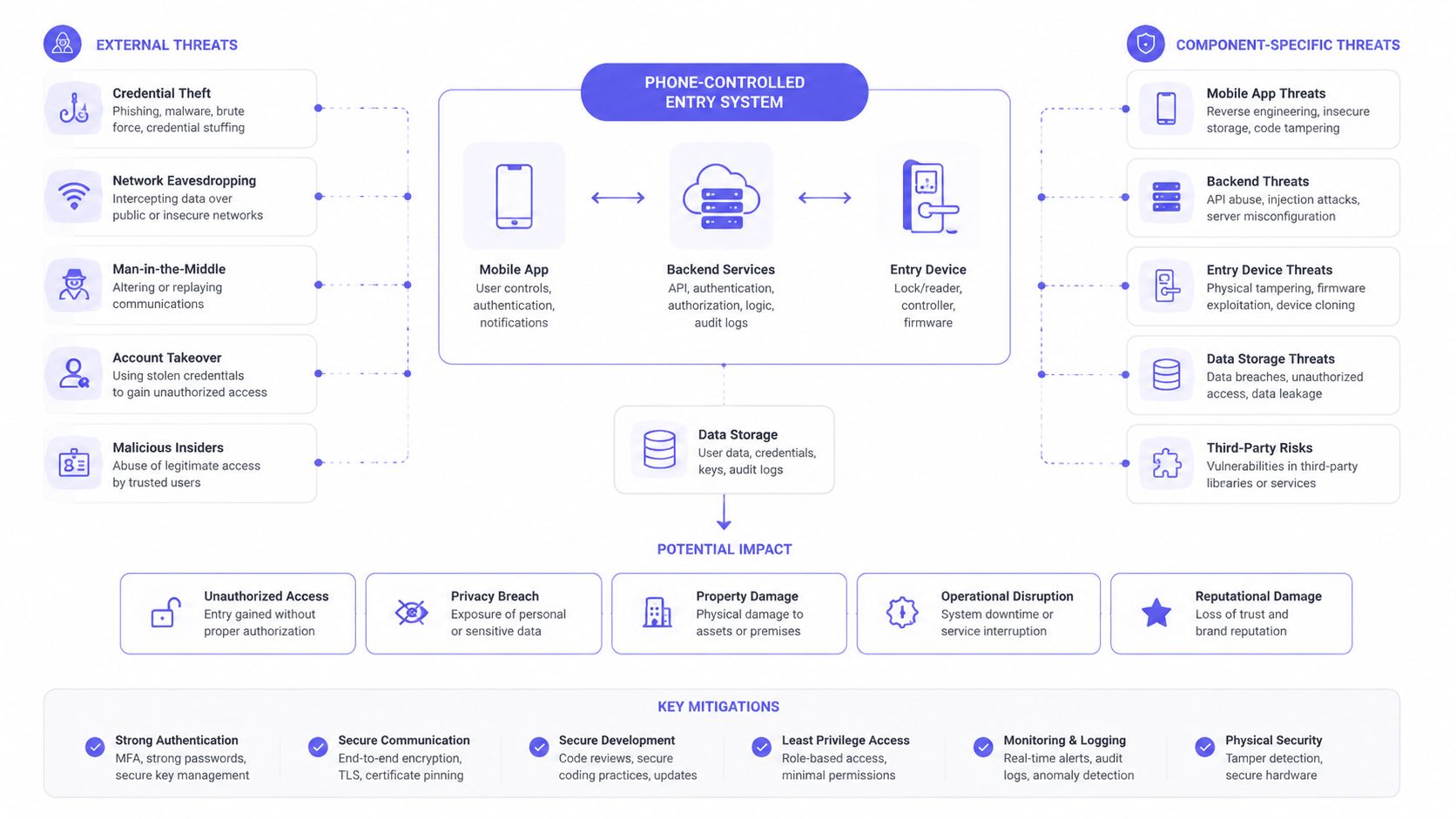
The practical test is simple: if a weakness lets a user open a gate they shouldn't access, the issue belongs in the access-control threat model, even when the defect appears in an app screen or backend API.
Authentication, Authorization, and Encryption Essentials
These three terms describe different protections. Authentication asks who the user is. Authorization asks what that user may do. Encryption protects information while it moves or sits in storage.
A resident signing into an app may authenticate with a device-bound credential, biometric verification, or another approved factor. An administrator should receive stronger protection, such as multi-factor authentication, because an administrator account may control many properties, gates, users, and visitor workflows.
Authorization must happen on the server. The app can display a gate button, but the backend must decide whether the authenticated user may open that specific gate at that moment. A resident, delivery worker, maintenance contractor, visitor, and property manager shouldn't receive the same permissions.
Least privilege in a gate-access workflow
A guest pass might authorize one entrance during a defined window. A maintenance credential might open a service gate but not resident parking. An administrator may grant or revoke credentials, while a resident may only manage approved visitors.
OWASP's Mobile Application Security Cheat Sheet recommends secure design from the beginning, least privilege, defense in depth, minimal permissions, no hardcoded credentials, and encryption of sensitive data in transit and at rest.
| Role | Authentication Factor | Authorization Scope | Encryption Control |
|---|---|---|---|
| Resident | Device-bound credential with PIN or biometric fallback | Assigned building, gate, or community entry | Encrypted token storage and protected API traffic |
| Guest | Time-limited invitation or verified visitor workflow | Specific access purpose and approved duration | Encrypted invitation and protected session data |
| Delivery worker | Credential issued for a defined delivery workflow | Limited entrance or scheduled access | Short-lived encrypted credential |
| Maintenance staff | Strong account authentication, preferably with additional verification | Approved service areas and work windows | Encrypted credentials, controlled device storage |
| Property administrator | Multi-factor authentication and protected admin session | User, gate, schedule, and audit controls | Strong transport encryption, encrypted storage, key rotation |
Encryption can't fix a shared phone. If staff members use one device with an active administrator session, the system may not know which person performed an action. Screen sharing, accessible devices, malicious accessibility tools, and notification previews can also expose sensitive workflows without breaking the encryption itself.
Key management matters as much as the algorithm
A platform should protect keys with hardware-backed keystores where available, limit access to cryptographic material, rotate keys through a controlled process, and revoke credentials when risk changes. Stored tokens should not be treated as ordinary text files, and credentials should never be hardcoded into the app.
For a closer look at how protected communications support access workflows, property teams can review Nimbio access control encryption.
Operationally, these controls support shorter credential lifespans, rapid revocation, role-specific access, and tamper-evident records. When a resident moves out, access should end through the authorization system, not through a manual search for a missing clicker.
Secure OTA Updates and Backend API Defense
A firmware update is a live trust channel into the gate controller. If an attacker compromises that channel, the attacker may alter the device's behavior even when the mobile app and user account remain secure.
Secure OTA delivery begins with a signed firmware bundle. The controller should verify the signature before installation, reject altered packages, prevent unauthorized downgrades, and support recovery if an update fails.
A secure update path needs multiple safeguards
- Signed releases: The controller verifies that the package came from an authorized publisher.
- Protected signing keys: The vendor limits and monitors access to the keys used to approve firmware.
- Rollback protection: Attackers can't install an older version because it contains a known weakness.
- Staged rollout: The vendor can observe a limited deployment before expanding the release.
- Recovery controls: A failed update shouldn't leave a community gate unusable.
- Component tracking: Third-party libraries and embedded services receive review and timely patching.
A rogue update could introduce a debug build that accepts an unsafe PIN, disables logging, or bypasses a controller's normal authorization checks. That example is hypothetical, but it demonstrates why update integrity belongs in the same review as app authentication.
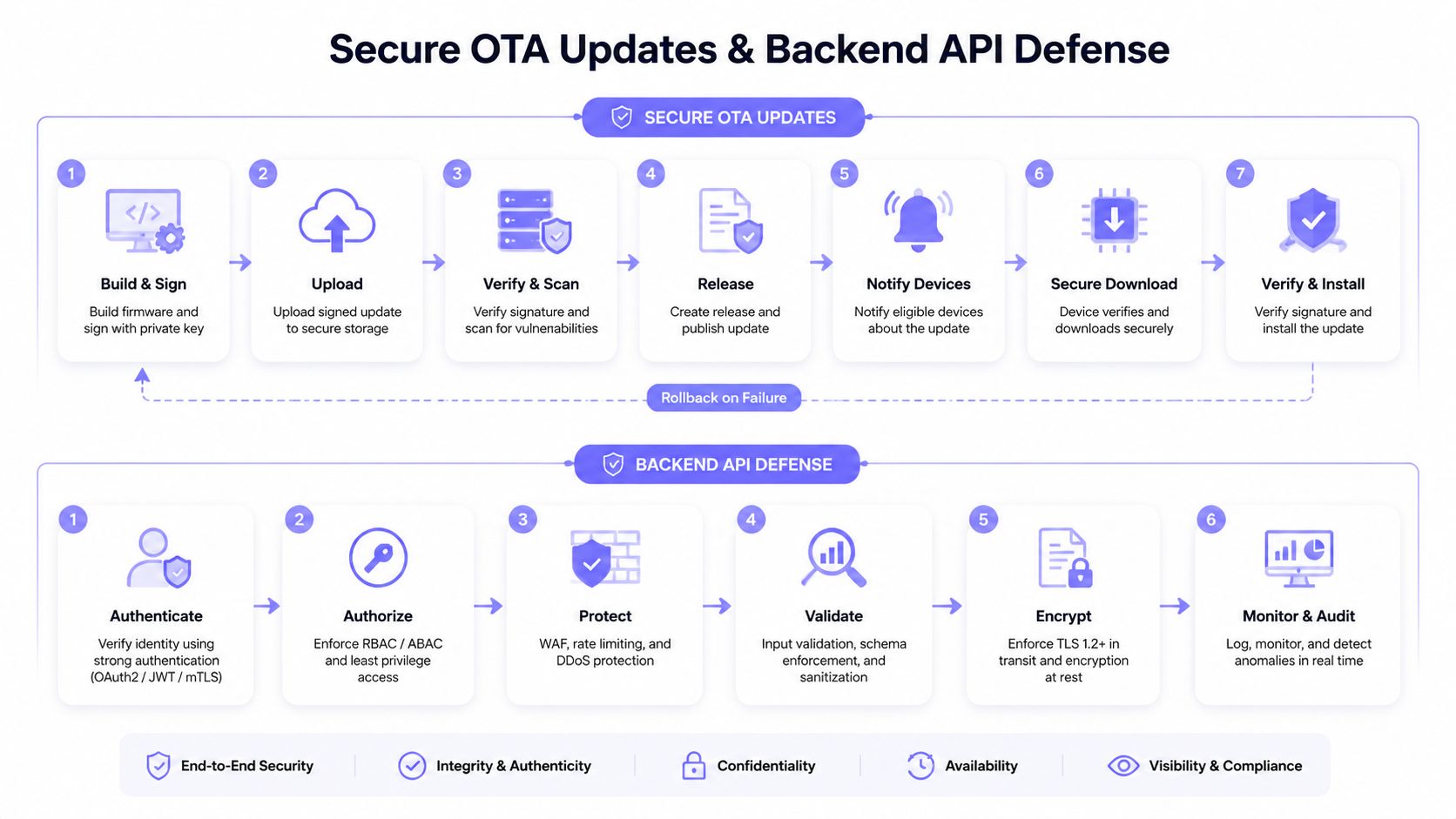
The API deserves equal attention. An app can be modified by an attacker, so the backend cannot trust a client-side statement that says, “this user may open gate A.”
The server must make the access decision
A resilient backend should apply:
- Strong client authentication, using an appropriate OAuth 2.0 flow, mutual TLS, or another verified mechanism.
- Server-side authorization, checking the user, device, property, gate, schedule, and requested action.
- Rate limiting, especially for unlock commands, login attempts, invitation creation, and administrative actions.
- Replay resistance, using nonces, timestamps, or short-lived signed requests.
- Input validation, so malformed gate identifiers and role values can't alter backend behavior.
- Secrets management, keeping service credentials outside source code and ordinary app storage.
- Detailed monitoring, linking unusual requests to an account, device, location, and controller.
CloudOrbis' guide to API security offers additional background on authentication, authorization, validation, and monitoring practices.
OTA security and API security solve different parts of one lifecycle problem. The update channel protects what the controller runs. The API protects which commands the controller receives. Property teams can review the vendor's approach to property access firmware updates alongside its backend controls.
Auditability, Compliance, and the Human Attack Surface
After an unexplained gate opening, a property manager needs more than a claim that the system is secure. The manager needs a reliable record showing who requested access, what happened, when it happened, which device made the request, which gate responded, and which authorization allowed the action.
A defensible event record should be tamper-evident and protected from ordinary administrative editing. It should distinguish a successful opening from a rejected request, a resident action from an administrator override, and an app command from a local keypad or legacy remote.
Log fields that make gate-access audits defensible
| Log Field | Why It Matters |
|---|---|
| User or credential identity | Connects the action to a named account or controlled credential |
| Role | Shows whether the actor was a resident, guest, delivery worker, installer, or administrator |
| Gate or controller identity | Establishes which physical asset received the command |
| Timestamp | Places the event in a reliable sequence |
| Device identity | Helps distinguish an approved phone from an unknown or replaced device |
| Authorization context | Shows the schedule, invitation, role, or administrator action behind access |
| Result | Separates approved, denied, failed, expired, and revoked requests |
| Administrative change | Records credential creation, modification, revocation, and permission changes |
| Integrity evidence | Helps show whether the record was altered after creation |
Compliance doesn't replace sound engineering, but it shapes how the property collects and retains information. SOC 2 reviews can make vendor controls easier to assess. GDPR encourages data minimization for resident identifiers. CCPA can create disclosure responsibilities where personal information and activity records fall within its scope. State requirements, contracts, insurance terms, and HOA rules may also govern visitor records.
The human attack surface often defeats a technically strong design. Zimperium's 2025 Global Mobile Threat Report identifies mobile-focused social engineering and application data leakage as important risks, including smishing and vishing activity and exposure of personally identifiable information.
Policies must cover the moments technology can't control
- Smishing: Residents should treat unexpected texts about account verification or gate access as suspicious and use a known support channel.
- Vishing: Staff shouldn't issue a temporary code because a caller sounds like a vendor or resident.
- Shared devices: Each administrator should use an individual account rather than a shared active session.
- Tailgating: Residents and visitors still need physical-entry practices because an authorized vehicle can allow an unauthorized person through.
A secure access platform should make the correct action easy, but policy determines what happens when a person is pressured to bypass it.
Short-lived visitor credentials, approval workflows, staff training, and routine log review close gaps that encryption alone can't address.
A Vendor and Platform Evaluation Checklist
A gate-access platform may remain in service for years, so vendor selection is a security decision with a long operational tail. A polished app demo doesn't reveal whether the provider can protect signing keys, patch a vulnerable dependency, investigate an incident, or revoke a compromised credential quickly.
Property managers and installers should ask for evidence rather than accept broad assurances. The vendor's answers should describe the complete chain from phone enrollment to cloud authorization to controller behavior.
Questions to bring to a vendor demonstration
- How is firmware signed? The vendor should explain how signing keys are protected, who can use them, and how emergency revocation works.
- How does the API authorize access? The answer should confirm server-side checks for identity, role, gate, schedule, device, and credential status.
- What happens after a phone is lost? The platform should support rapid device and credential revocation without waiting for a physical key replacement.
- How are sessions protected? Ask about short-lived tokens, logout invalidation, replay resistance, and suspicious-session detection.
- What testing has been completed? Request a recent penetration-test summary, remediation process, and scope.
- Does the app detect device compromise? Ask about certificate pinning, jailbreak or root detection, overlay abuse, and device attestation.
- How are vulnerabilities disclosed? The provider should identify its reporting channel, severity process, patch workflow, and customer notification practice.
- What does the audit trail contain? Confirm that logs connect identity, device, controller, authorization, result, and timestamp.
Security evidence can include control reports, vulnerability-management policies, architecture documentation, and incident-response procedures. For teams comparing compliance-management platforms, evaluate Vanta with SOC2Auditors as one source of background, while still requesting the access vendor's own evidence.
Warning signs deserve equal weight
- No written update policy: Closed-source firmware isn't automatically unsafe, but silence about updates creates unacceptable uncertainty.
- Phone-number-only identity: A phone number can be reassigned, intercepted, or socially engineered.
- Unclear key management: A vendor that can't explain signing and encryption key custody may not have mature controls.
- Client-side permissions: If the app decides which gate a person may open, the architecture is exposed to tampering.
- No usable logs: A system that can't support incident reconstruction creates operational and compliance risk.
- No retrofit strategy: Replacing every gate operator can add project complexity and delay security improvements.
The what to look for in a gate access system should include these security questions alongside compatibility, installation, cellular availability, visitor management, and lifecycle support.
Putting It All Together for Your Community or Property
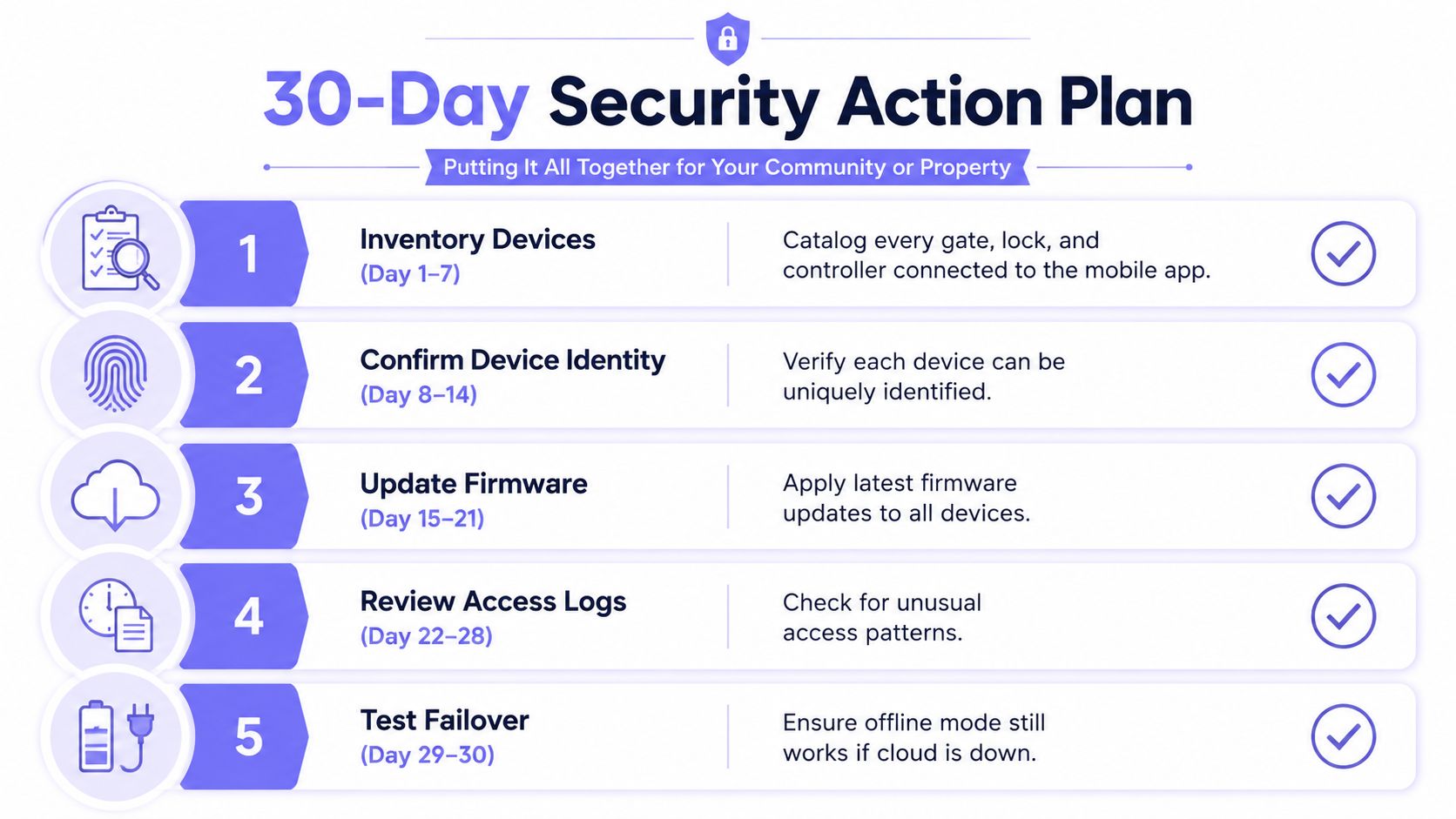
A practical security program can begin with a controlled rollout rather than a disruptive replacement project. Property managers should inventory every gate, lock, call box, and controller connected to a mobile app, then document the users, roles, integrations, update paths, and fallback methods associated with each device.
A workable rollout sequence
- Inventory assets: Record each gate operator, controller, access point, mobile workflow, and legacy credential still in circulation.
- Confirm identity: Verify that every connected controller has a unique identity and that administrators can distinguish one device from another.
- Review trust paths: Confirm signed firmware, protected API communication, server-side authorization, credential revocation, and cellular failover.
- Clean up administration: Replace shared administrator credentials with individual accounts, remove former staff, and narrow permissions.
- Inspect the evidence: Review access logs for unusual activity, unexplained overrides, expired credentials, and unfamiliar devices.
- Test failure handling: Confirm how residents, visitors, installers, and emergency personnel operate if the cloud connection or local power becomes unavailable.
- Prepare people: Give residents clear guidance about smishing, vishing, visitor approvals, lost phones, and tailgating.
- Write the playbook: Name the person who contacts the vendor, cyber insurer, affected residents, and law enforcement when an incident requires escalation.
A cellular-first controller can reduce dependence on homeowner Wi-Fi and its unpredictable coverage or dropouts. A hardware-agnostic retrofit can modernize an existing gate operator without requiring a property to replace every functioning motor, keypad, or remote at once.
Nimbio provides a cellular-based retrofit that connects electronic gates, call boxes, and building entry systems to smartphone access, with individual credentials, remote visitor management, revocation controls, entry logs, and OTA updates. Its GuestView workflow lets a visitor request entry through a web directory and one-way video call, giving a resident an opportunity to verify the visitor before granting access.
A sensible community pilot can start with one amenity gate, weekly log reviews, resident-facing social-engineering guidance, and a written incident process. The property can then use those results to refine roles, visitor policies, controller placement, update procedures, and vendor support expectations before expanding.
Decision test: The right platform should give the property both convenience for legitimate users and enough control to explain, limit, and revoke every digital opening.
Nimbio helps property managers and installers modernize existing gates and entry systems with cellular smartphone access, remote visitor credentials, revocation tools, and auditable entry records without depending on homeowner Wi-Fi. Visit Nimbio to review a practical path toward secure, hardware-agnostic access control for a community or commercial property.


