

The popular advice is to start with the gate operator, smart lock, or fob reader. That approach is backwards. Multifamily property access management is an operating model first and a hardware decision second. It governs how residents, staff, vendors, guests, delivery workers, and contractors receive permission, use it, lose it, and have it revoked.
The market already shows the tension. A 2024 survey found that 76% of multifamily properties used traditional keys exclusively, while only 7% used smart locks exclusively and 16% used a hybrid approach. Among properties using mixed methods, 56% still relied on metal keys as the primary resident access method (KeyTrak survey). Operators may prioritize modernization, but deployment stalls when the project ignores daily workflows.
A practical access program should make permissions easier to manage, provide reliable entry without Wi-Fi dependence, preserve useful existing hardware, and create a clear record of every access event. The sections below treat access as a portfolio-wide operational discipline, with cellular retrofit technology as one way to reduce the friction that causes modernization projects to fail.
Table of Contents
- Why Most Multifamily Access Strategies Fail Before They Start
- What Multifamily Property Access Management Actually Covers
- Legacy Access Methods Versus Modern Systems
- Core Technology Behind Modern Access Control
- Must-Have Features and Success Metrics
- Security, Experience, Cost, Integration, and Maintenance Trade-offs
- Implementation Checklist and Vendor Evaluation Criteria
- Questions to Ask Before You Approve Any Access Upgrade
Why Most Multifamily Access Strategies Fail Before They Start
A gate or fob retrofit rarely fixes an access program by itself. The hardware authenticates a credential, but staff still must decide whether a dog walker can enter the pool area, when a contractor's permission expires, and whether a former resident retains garage access. Treating the purchase as the project leaves those decisions undefined.
A 2024 KeyTrak survey identified several practical barriers to adoption. Thirty percent of respondents cited dead batteries as a concern, 22% cited the time required to program new credentials, and 76% said traditional keys were familiar and cost-effective (KeyTrak survey data). These concerns do not prove that residents or managers oppose digital access. They show that an upgrade fails when it adds work without removing existing burdens.
Three recurring breakdowns
- The capital-project trap: The board approves installation, celebrates completion, and leaves access governance unchanged. Staff inherit manual exceptions, outdated resident lists, and unclear responsibility for vendors.
- The feature-list trap: Buyers select video, Bluetooth, analytics, or integrations that leasing and maintenance teams rarely use. A complex dashboard achieves little if staff still issue shared codes from a spreadsheet.
- The traffic-pattern trap: The plan centers on apartment doors while overlooking vehicle gates, pedestrian entrances, garages, amenities, storage rooms, package areas, and delivery routes.
Cellular retrofit technology can reduce deployment friction where new wiring, dependable Wi-Fi, or broad hardware replacement would delay the project. It does not replace governance. Owners still need a consistent process for permissions, exceptions, credential failures, and vendor schedules across the portfolio.
Successful properties assign entry governance to ongoing operations rather than waiting for another capital cycle. Managers review access records and permissions routinely, then correct failures before they become resident complaints or security incidents.
Practical rule: Every access point needs an owner, every credential needs an expiration or review rule, and every exception needs a documented reason.
Portfolio-wide consistency determines whether the system remains manageable. One property may use mobile credentials, another may depend on fobs, and a third may still issue metal keys. Without shared policies, a management change can recreate the same fragmented setup, forcing the owner to buy technology again instead of fixing the operating model.
What Multifamily Property Access Management Actually Covers
Multifamily property access management is an operating model, not a reader or lock purchase. It covers the policies, credentials, connected devices, permissions, and audit records that determine who may enter each part of a community, under which conditions, and for how long. A front door or vehicle gate is only one piece.
The U.S. multifamily market includes 4.3 million apartment units in gated communities, 1.9 million in access-controlled communities, and about 1 million associated with a community app or web portal that controls gates or doors (American Society of Homebuilders research). Owners should therefore assess access across the portfolio, then choose technology that staff can deploy and maintain consistently.
A practical audit covers five operating areas.
1. Resident credentialing
Residents may use mobile credentials, fobs, keys, PINs, or vehicle remotes. The governing questions are direct: Who receives access, to which doors, for what lease period, and how quickly is it revoked after move-out?
Family members, caregivers, and domestic staff need defined permissions as well. Apartment access should not automatically grant entry to a garage, fitness center, storage room, or vehicle gate. Separating those permissions limits exposure when household circumstances change.
2. Staff access
Maintenance workers, leasing staff, concierge teams, cleaners, and supervisors need permissions that match job duties and schedules. Managers should decide whether each role needs always-on access, time-based permissions, or temporary credentials tied to a work order.
3. Vendor and delivery entry
Grounds maintenance workers, couriers, food delivery workers, pet-care providers, and contractors rarely need permanent access. Temporary credentials with expiration dates and time restrictions provide better control, especially when paired with remote admission through an intercom or mobile workflow (multifamily access-control guidance).
4. Amenity gating
Pools, gyms, clubrooms, parcel rooms, coworking areas, and storage spaces often use separate readers or locks. One identity layer should govern these areas, with permissions based on resident status, lease terms, reservations, or staff roles.
5. Perimeter flow
Vehicle gates, pedestrian entries, garage doors, intercom directories, and loading areas create different demands. A site may require cellular connectivity at a remote gate, a video intercom in the lobby, and scheduled loading-dock access.
The operational value comes from managing all five areas together. A smart gate that leaves vendors, amenities, or former residents unmanaged preserves the weaknesses of a key system. Operators comparing secure entry systems should map permissions, exceptions, and staff workflows before comparing hardware.
For owners modernizing functioning gates without replacing every operator, multifamily gate access control offers a reference for evaluating retrofit-oriented designs. Cellular retrofits can reduce wiring and network barriers, but only a shared portfolio policy keeps deployment manageable.
Legacy Access Methods Versus Modern Systems
Legacy systems don't fail dramatically every day. They fail through lost keys, shared codes, stale directories, and credentials that remain active after the person who received them has left.
| Legacy method | Quiet failure mode | Modern equivalent | When the upgrade fixes the problem |
|---|---|---|---|
| Mechanical keys | Former residents, contractors, or vendors may retain copies with no practical audit trail. | Mobile credentials or digitally managed keys | The operator can issue individual access and revoke it without collecting every physical copy. |
| PIN pads | Residents share codes with neighbors, guests, and vendors, making attribution difficult. | Cloud-managed, time-limited codes or mobile access | Each permission has an owner, schedule, and expiration rule. |
| Fixed fobs | Lost fobs remain active, and copied or cloned credentials can be difficult to identify. | App-based credentials or smartphone-interoperable access | Staff can connect access to a person and revoke the credential remotely. |
| Analog intercoms | Directories become stale, and staff or residents buzz in people they can't identify. | Video intercom with synchronized directories | Residents can verify visitors, while managers can update occupant records centrally. |
| Standalone garage remotes | Remotes walk away with residents and are hard to track after turnover. | Mobile entry or license-plate-based access | The property can associate vehicle permissions with a current resident or approved user. |
Modernization only works when the control layer changes with the credential. Replacing a metal key with a permanent PIN merely creates a digital version of the same weakness. Replacing a fob with an app won't improve governance if staff can't see who has access or revoke it promptly.
The IT Cloud Global NAC guide offers useful background on how identity, policy, and network access fit together. Multifamily operators should apply the same logic to physical entry, even when the system includes gates, doors, garages, and amenities rather than corporate endpoints.
The meaningful dividing line isn't whether a product looks modern. It is whether the operator gains real-time visibility, individual accountability, remote control, and policy-based expiration.
Core Technology Behind Modern Access Control
A modern access stack has several layers. Each layer solves a different operational problem, and bundling them into one product can hide important trade-offs.
Credential layer
This layer identifies the user. Options include mobile Bluetooth, PIN codes, RFID fobs, license-plate recognition, and temporary vendor links. The key question is what happens when a credential is lost, shared, stolen, or no longer justified.
Mobile credentials can support individual accountability, but they still require clear enrollment and recovery procedures. A smartphone isn't a policy.
Connectivity layer
Connectivity determines whether a remote entry point can communicate with the management platform. Cellular connectivity is especially useful for retrofits because it avoids dependence on resident or property Wi-Fi and can reduce the need for new data cabling at gates and remote amenity doors.
Wi-Fi and hardwired Ethernet can remain appropriate in a clubhouse or staffed lobby where network infrastructure is already reliable. At perimeter gates, cellular access can provide a cleaner installation path and avoid a Wi-Fi drop disabling the entry workflow.
How cellular gate access works depends on the controller, carrier coverage, gate operator, and management software working together. Coverage should be validated on-site rather than assumed from a map.
Cloud layer
Cloud-based access control centralizes permissions, audit logs, device status, and firmware updates. Managers can administer access without driving to a panel with a laptop, which matters when a portfolio includes multiple communities or remote gates.
Video intercom layer
Video intercoms connect a visitor request with visual verification. They can support resident-controlled admission and reduce reliance on stale directories or shared entry codes.
Integration layer
APIs connect access events with property management, leasing, visitor, package, and reservation systems. The desired workflow is direct: lease status changes, the relevant permissions update, and staff don't have to repeat the same action across multiple portals.
Operators should evaluate these layers separately. A system may offer strong mobile credentials but weak connectivity, or excellent hardware with no usable API. The right architecture is the one staff can administer consistently.
Must-Have Features and Success Metrics
Feature lists encourage the wrong buying behavior. A capability matters only if it reduces staff effort, improves the security posture, or remains manageable after property-manager turnover.
Resident-facing requirements
Residents need access that works across the places they legitimately use. A strong resident experience should include:
- Mobile credentials: Smartphone entry should cover the relevant gates, doors, garages, and amenities rather than one isolated entrance.
- Wallet interoperability: Apple Wallet and Google Wallet support can reduce app friction for residents who don't want to open a separate application for every entry.
- Expiring guest passes: A resident should be able to grant access to a guest, cleaner, dog walker, or family member without creating a permanent credential.
- One identity layer: Package rooms and amenities should recognize the same resident identity used at building or gate entry.
Staff-facing requirements
The management console should let authorized staff issue, revoke, schedule, and review access from one place. Recurring vendors should receive scheduled permissions instead of permanent access, and a move-out should trigger a clear revocation workflow.
The system should also support audit review. For cloud-based access control, each access attempt can include the credential used, the specific door or access point, the date and time, and whether access was granted or denied. That timestamped record supports dispute resolution, move-out documentation, incident review, and compliance reporting (multifamily access-control audit guidance).
Operational KPIs
Vanity metrics won't show whether the program works. Track:
- Unauthorized entry incidents per quarter.
- Mean time to revoke access after move-out.
- Gate call volume per month, as a signal of resident friction.
- Resident satisfaction scores tied specifically to access.
- Exception volume, including failed credentials, manual overrides, and emergency access requests.
A practical internal target is credential revocation in under five minutes and a double-digit reduction in after-hours gate calls within six months. Those are operating targets, not universal benchmarks, so each property should establish its baseline before installation.
A feature that can't be tied to a measurable operating outcome is decoration.
Security, Experience, Cost, Integration, and Maintenance Trade-offs
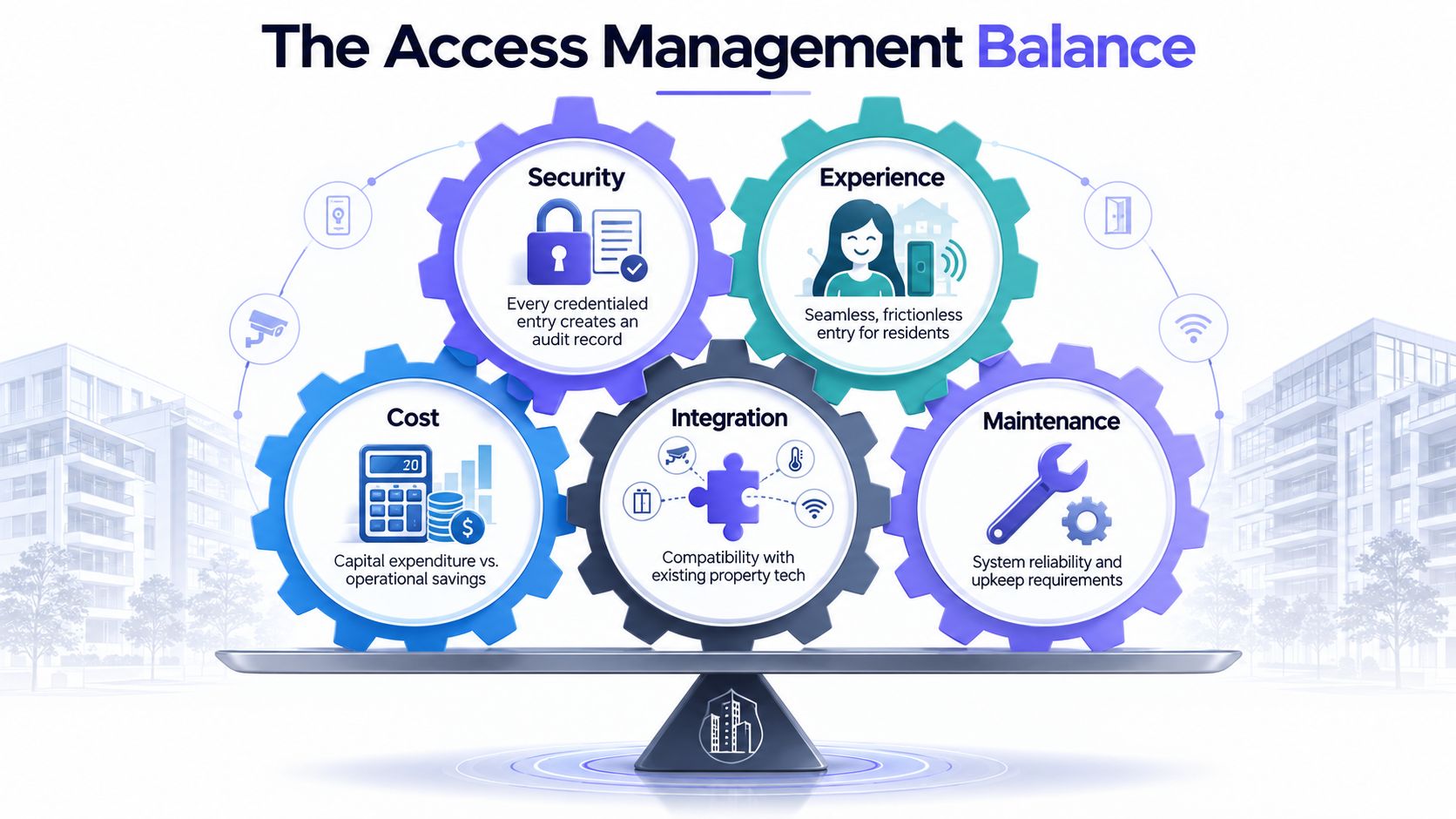
Access decisions become expensive when security, resident experience, cost, integration, and maintenance are evaluated separately. Strong programs improve the five together because each one affects the others.
Security and experience
Every credentialed entry should produce an audit record tied to an individual or defined user identity, not merely a plastic card or shared code. That record helps staff investigate disputes and identify unusual access patterns.
Residents also benefit when the process is simple. Digital credentials can reduce fob replacement requests, remote visitor management can eliminate unnecessary office calls, and move-in access can be prepared before the resident arrives for the walkthrough.
The best security experience doesn't feel punitive. It gives residents convenient control while giving operators clearer boundaries.
Cost and retrofit design
A retrofit can preserve an existing gate operator instead of forcing a full replacement. Cellular connectivity also avoids dependence on Wi-Fi drops at remote entry points and can reduce the need for trenching new network cabling.
The cost model should include hardware, installation, cellular service, software subscriptions, administrative seats, support, training, and future replacement. Subscription pricing can smooth capital spikes, but it creates an ongoing operating obligation. Boards should compare the full lifecycle cost rather than focusing on the installation invoice.
Integration and maintenance
Access systems should publish relevant events to the property management platform and consume data from visitor, package, leasing, and reservation systems. Lease start and end dates should drive credential changes wherever the integration supports it.
Maintenance is the practical test of the architecture. Remote firmware updates, centralized device health, cellular diagnostics, and clear escalation procedures matter more than a long list of unused features. A system that requires a technician to visit every gate for routine updates will create portfolio-wide labor even when the hardware itself is reliable.
Hardware-agnostic retrofit technology can be valuable where properties operate mixed gate operators and door hardware. The buyer should confirm compatibility in writing and test the existing equipment before approving a broad rollout.
Implementation Checklist and Vendor Evaluation Criteria
A controlled rollout beats a portfolio-wide switch. The first property should function as an operational pilot, not a showroom.
Use a phased sequence
- Select a representative pilot: Include the access conditions that create the most support work, not only the easiest gate.
- Complete an access audit: Inventory residents, staff, vendors, entry points, old credentials, emergency overrides, and integrations.
- Migrate amenity access: Test identity rules, schedules, visitor permissions, and staff workflows in a contained environment.
- Deploy vehicle-gate access: Validate cellular signal, gate-controller compatibility, emergency procedures, and resident onboarding.
- Measure milestone completion: Require audit signoff, credential migration, staff training, and support readiness before expanding.
- Retain transition overlap: Keep legacy credentials active until the new workflow proves stable, then disable them through a documented change plan.
Permit requirements and resident communications need early ownership. The manager should set a communication window, explain the credential change, publish support procedures, and identify who handles residents without compatible smartphones or with lost devices.
Test vendors beyond the demonstration
A useful gate access system evaluation criteria framework should force vendors to document the following:
- Cellular coverage: Test the actual gate location, including signal stability and fallback procedures.
- Lockout response: Require a documented service-level agreement with response times under four hours.
- API openness: Request documentation and sample calls, not a promise that integrations are possible.
- Credential interoperability: Confirm Apple Wallet and Google Wallet support where required.
- Firmware ownership: Establish who tests, schedules, and deploys updates.
- Three-year total cost: Include data plans, installation, subscriptions, administrative seats, support, and replacement policy.
- Comparable references: Speak with properties that have a similar size, entry mix, and resident profile.
Score documented performance, not sales claims. The vendor that explains failure recovery clearly is more credible than the vendor that only demonstrates a successful entry.
Questions to Ask Before You Approve Any Access Upgrade
Doing nothing isn't neutral. Lost credentials, package exposure, manual gate calls, and resident frustration continue while a board waits for a perfect replacement project.
Every proposal should answer these questions in writing:
- What happens when cellular signal drops? Does the gate continue operating, and how does the manager receive an alert?
- Who owns the audit trail during a dispute? Can authorized staff export the relevant event history?
- Can residents transfer credentials between communities in the portfolio? If not, what happens when residents move?
- How is lost-phone access revoked in under ten minutes? Is the process available after office hours?
- What is the cost per door after three years? Include hardware, installation, cellular service, software, support, and administrative licensing.
- Which existing gate operators and readers are compatible? Require a site survey rather than a generic compatibility list.
- How are vendors, guests, deliveries, and staff separated from resident permissions?
- What happens during a property-manager transition? Can a new team understand the system without relying on one departing employee?
The right approval decision isn't “Which hardware has the most features?” It is “Which operating model gives the portfolio reliable control, clear accountability, and manageable support work?”
Nimbio provides cellular keyless entry that can retrofit existing electronic gates and building access points, allowing property managers to issue, schedule, revoke, and review smartphone-based credentials without depending on Wi-Fi. Visit Nimbio to evaluate a practical retrofit approach for multifamily property access management and remote visitor control.
Managing access for a gated community or multifamily property?
See how cellular access control works for communities like yours. Explore Multifamily & Gated Communities →


