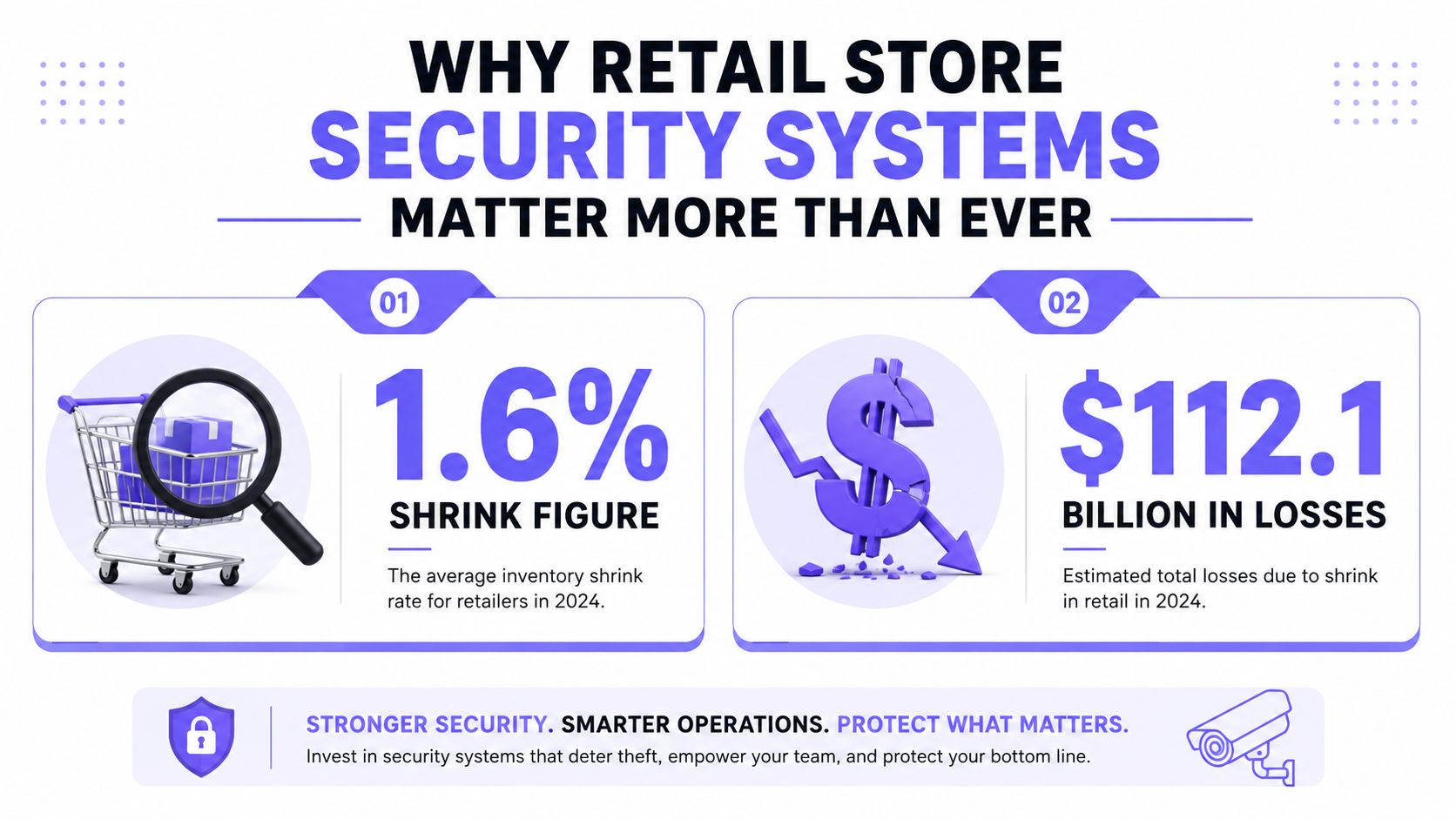
The average U.S. retail shrink rate reached 1.6% of sales in 2022, equal to $112.1 billion in losses, and that's why retail store security systems are no longer a side expense. They're board-level operating infrastructure, just like POS uptime and inventory control.
Retail operators who still think in terms of a camera package and a few alarms are already behind. The right answer is a layered stack, CCTV, EAS, intrusion detection, access control, analytics, and audit trails, all deployed to reduce loss, verify incidents, and make response faster.
Table of Contents
- Why Retail Store Security Systems Matter More Than Ever
- Core Components of a Modern Retail Store Security System
- How to Choose Features and Vendors That Actually Fit
- Integration and Deployment Best Practices
- Cost, ROI, and How to Justify the Budget
- Compliance and Auditability in Modern Retail Security
- Maintenance, Blind Spots, and Incident Response Workflows
Why Retail Store Security Systems Matter More Than Ever
The retail loss problem is already large enough to justify disciplined spending. The NRF's 2023 survey put shrink at 1.6% of sales in 2022, or $112.1 billion in losses, while Pelco's summary notes 52.4% of retail operators planned to increase capital equipment spending for security systems, which shows the budget conversation has moved from “can we afford this?” to “can we afford not to?” Pelco's NRF survey summary
Security budgets aren't growing because operators enjoy buying hardware. They're growing because loss, response, and investigation all now sit inside the same operating model, and the old split between “store ops” and “security” doesn't work anymore. Supporting material from NRF-based guidance also places retail security and loss-prevention budgets at 0.74% of sales in 2018, which gives a useful benchmark for how seriously major retailers treat the problem NRF-based retail security guide
Practical rule: If the system can't help prove what happened, it's not a full security system. It's just hardware on a wall.
The threat mix is broader than shoplifting. Retailers are dealing with external theft, organized retail crime, employee theft, vendor fraud, administrative error, and in-store damage, so a single layer won't cover the whole risk profile. A manager who only buys cameras is buying visibility, not control.
That's why a modern retail stack needs separate functions that work together:
- Video surveillance to see and review incidents.
- Electronic Article Surveillance (EAS) to deter and detect exit theft.
- Intrusion and panic alarms to trigger rapid response.
- Access control to manage staff, stockroom, and back-door entry.
- Analytics and verification to turn noise into actionable incidents.
The wrong mindset is still common, especially in stores that rely on shared PINs, weak door discipline, or one camera facing the front end. That approach creates blind spots, weak accountability, and slow investigations. A stronger system treats security as an integrated operating layer, not an afterthought.
For a useful parallel on how layered controls protect digital assets, the guide to secure online banking shows the same principle in another environment, multiple controls beat one weak gate. Retail security works the same way.
Core Components of a Modern Retail Store Security System
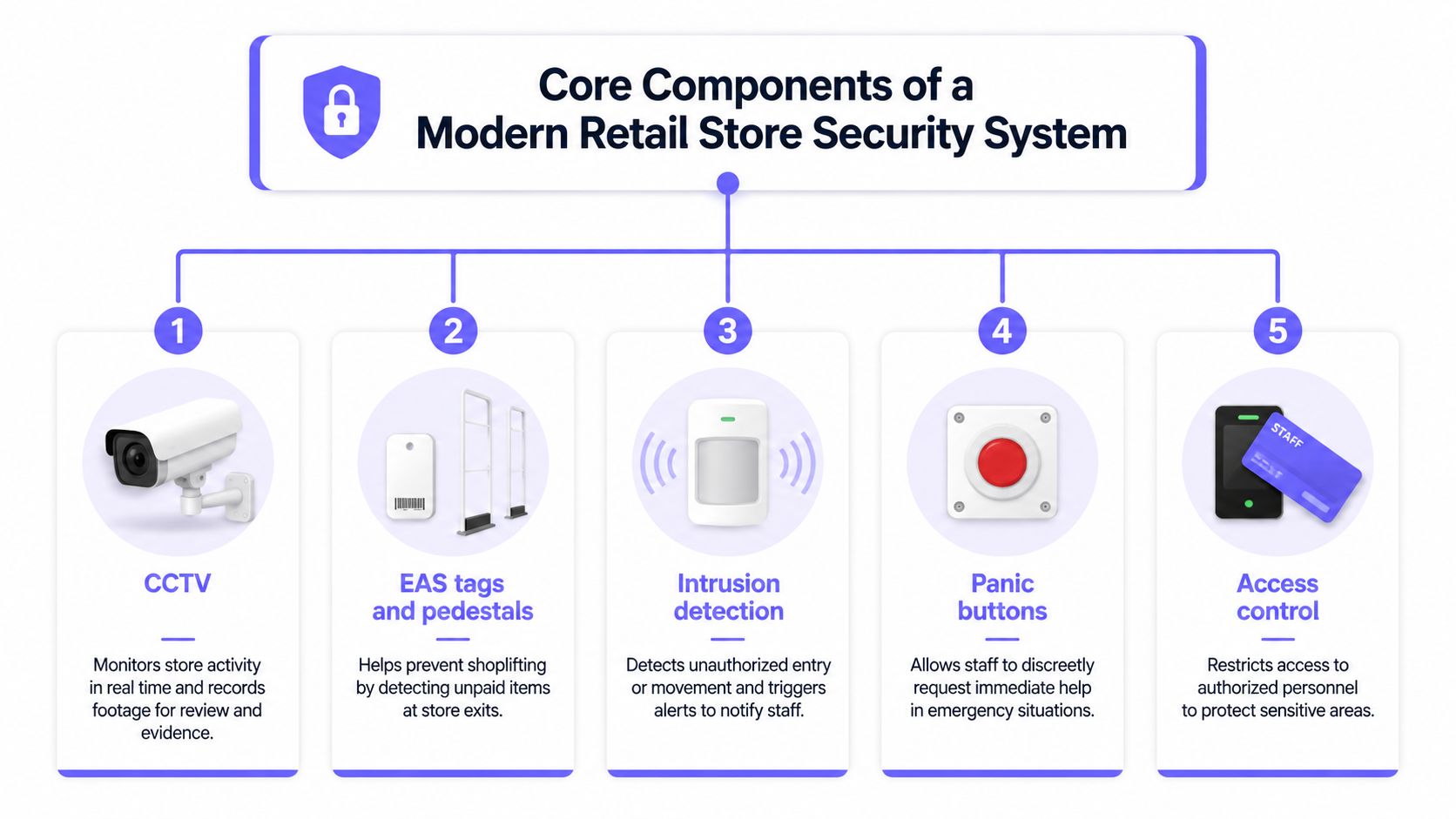
A credible retail system starts with CCTV, but the purchase should be tied to the job each layer has to do. Cameras record, EAS discourages exit theft, alarms trigger response, access control manages who gets in, and analytics decide what deserves attention.
CCTV and video that actually hold up in retail
Retail CCTV should be specified for use, not just bought by brand name. A solid baseline is 2 MP minimum resolution at 25/30 fps, IR-capable cameras with built-in illuminators, IP66 or better weather protection where needed, and ONVIF S/G/T compliance so the system can interoperate across vendors in one VMS or NVR environment technical specification reference
Those details matter for straightforward reasons. Frame rate reduces motion blur at entrances and checkout lanes, IR keeps capture usable after hours, and ONVIF lowers the risk of being trapped inside one vendor's ecosystem. Edge storage, such as a 256 GB Class 10 SD card, adds resilience when the network link goes down or gets segmented on purpose for security. The same technical specification also points to these deployment choices, which is why the camera spec sheet should be treated as an operations document, not marketing copy technical specification reference
EAS, alarms, and access control
EAS is not decorative hardware. In the 8.2 MHz RF class, example detection ranges are 1.6–1.8 m for soft labels and 1.8–2.2 m for hard tags, with performance reaching about 3 m depending on tag size, so pedestal spacing has to match the actual storefront geometry and tag mix. The same system class also uses 24 VDC power, dedicated transmitter and receiver wiring, and visible or audible alarms, which is why it works as an active deterrent rather than a passive log EAS system reference
Hard tags outperform labels, so apparel, cosmetics, and electronics teams should design around the stronger tag, not the weakest one. A bad EAS layout creates false confidence, slows customers at the entrance, or leaves a clean walkout path for grab-and-go theft EAS system reference
Detection range shapes layout. If the pedestals are wrong, the system will either miss lift-through theft or choke customer flow at the entrance.
The remaining layers do different jobs. Intrusion detection covers after-hours entry, panic buttons give staff a direct escalation path, and access control keeps back-of-house traffic from becoming an untracked doorway into the store. That is where smartphone-controlled, cellular retrofit access earns its place, especially for stockroom doors, staff entrances, and contractor management. It gives operators a clean way to issue, revoke, and audit entry without relying on shared PINs or keys that drift out of control, and the Nimbio guide to gate access control shows the same principle in a related access-control setting: Nimbio guide to gate access control
A 2023 retail security survey ranked CCTV, locking cases and cages, exception-based reporting, loss-prevention staffing, and enhanced CCTV among the most successful mitigations for external losses, which is another reminder that the best systems support investigation workflows, not just surveillance 2023 NRF security survey summary
How to Choose Features and Vendors That Actually Fit
Vendor selection gets easier when the scorecard is narrow. The goal is not to buy the longest feature list, it's to buy the system that fits the store's geometry, loss profile, and support model.
Start with interoperability and proof
ONVIF compliance is essential. If cameras, storage, and analytics can't work together later, the store is buying an integration problem instead of a security system. The same logic applies to existing POS and inventory platforms; the vendor should explain how incidents can be traced back into operational data without manual work.
Camera claims should be evaluated against actual store use. Resolution and frame rate matter at entrances, checkouts, and stockroom doors, while analytics like people counting, queue detection, and loitering only help if the system can verify events instead of flooding the team with alerts. If a vendor can't show how false alarms are reduced or how verification happens, the feature set is mostly sales language.
Build the shortlist around total cost of ownership
Total cost of ownership needs to cover more than installation day. A practical buying frame is the full 5 to 7 year horizon, because firmware support, warranty terms, storage expansion, and replacement labor all hit later, not at the purchase order stage.
Use a simple filter:
- Can it integrate with current hardware? If not, the rollout cost climbs fast.
- Can it verify incidents remotely? If not, dispatch efficiency stays weak.
- Can it scale across sites? If not, each store becomes a one-off project.
- Can it support future analytics? If not, the system will age out early.
Bundled national suites are convenient when a retailer wants one throat to choke. Best-of-breed assemblies are stronger when the operator already has a preferred camera or access-control standard and wants to preserve it. The right answer depends on IT maturity, installer quality, and whether the chain values simplicity or flexibility.
One option worth evaluating for back-of-house and staff entry is Nimbio, a cellular-based retrofit access control platform that turns existing electronic gates and doors into smartphone-controlled entry points without replacing the hardware. It fits best where a retailer wants remote visitor management and auditable access without tying the door to local Wi-Fi.
Integration and Deployment Best Practices
Good retail security deployments fail for boring reasons. Cable paths are wrong, cameras are placed for the drawing instead of the aisle, the network team and loss-prevention team never agree on segmentation, and back doors stay on ugly shared codes because nobody owns them.
Get the physical layer right first
Use Cat5e or Cat6 cabling where the system design calls for Ethernet, and size PoE budgets before the install crew starts hanging cameras. If a camera or access device gets underpowered, the failure may look like a bad device when it's really a bad design.
Place cameras to capture decision points, not just open space. Entrances, exits, checkout lanes, stockroom thresholds, and receiving bays are where incidents start and where proof gets created. EAS pedestals need to match the actual entry width, not a best guess, because detection range and traffic flow are tied together.
Separate security from everyday IT traffic
Retail security traffic should be isolated from corporate browsing, email, and guest Wi-Fi. The point isn't paranoia, it's stability and control. A dedicated security VLAN or equivalent segmentation gives loss-prevention teams cleaner uptime and keeps a security event from competing with normal office traffic.
Back-of-house doors need the same discipline. Staff exits, vendor doors, rooftop access, and mechanical rooms often become the weakest entry points because teams treat them as operational conveniences. That's where cellular retrofit access has real value, it lets the operator keep the existing gate operator or lock hardware and add smartphone-based control, instead of ripping out a working system.
Deployment rule: If the receiving bay is easier to enter than the front door, the store has designed the wrong perimeter.
| Layer | Key Deployment Item | Common Failure If Skipped |
|---|---|---|
| CCTV | Camera angle matched to entrance and checkout geometry | Faces the aisle, misses the handoff |
| EAS | Pedestal spacing matched to tag performance | Theft slips through or customer flow bottlenecks |
| Intrusion alarms | Door and motion coverage on after-hours entry points | Rear entry becomes the quiet weak point |
| Access control | Separate credentials for staff, vendors, and contractors | Shared codes destroy accountability |
| Network and storage | Segmented traffic, defined retention, tested failover | Video drops, logs go missing, or systems clash |
Before handover, the installer, IT team, and loss-prevention lead should all sign off on device naming, retention settings, alarm routing, and escalation contacts. For operators who need a deeper framework for access-control planning, the Nimbio guide to gate access control is useful because it shows how a retrofit model fits into a broader entry strategy.
The cleanest deployment is the one that can survive staff turnover. If only one manager knows how the system works, it isn't deployed, it's merely installed.
The Nimbio security integration overview is useful for teams that want to see how access control can sit beside other property systems without forcing a hardware rip-and-replace.
Cost, ROI, and How to Justify the Budget
Finance teams do not buy risk language. They approve spend when you show lower loss, lower response cost, and fewer operational headaches.
Use a budget frame that matches the business
A practical benchmark is the 0.74% of sales retail security and loss-prevention spend figure cited in NRF-based material. That does not mean every chain should spend exactly that amount, but it gives leadership a clear anchor for planning.
The strongest ROI cases usually combine several smaller gains:
- Reduced shrink, especially where EAS and video support faster intervention.
- Lower false dispatch or verification cost, when alarms are video-verified before escalation.
- Less guard dependency, especially at back-of-house doors and contractor access points.
- Cleaner investigations, which saves manager time and improves recovery efforts.
A retail CCTV strategy review reported a company claim that CCTV-related shrink reduction paid for installation within one year, and it also found body-worn camera trials associated with reductions in violent and verbal-abuse incidents ranging from 30% to 80%, with an average reduction of about 45% across the reviewed trials. Those figures are not a promise for every store, but they show the type of measurable outcome finance teams expect to see.
Build the ROI model in plain language
Keep the model simple and defensible:
- Baseline shrink. Use the store's own loss history.
- Target reduction. Apply only a conservative estimate, not wishful thinking.
- Incident-response savings. Include staff time and avoided dispatch waste.
- Access-control savings. Compare hardware-plus-subscription access against guard time where the use case fits.
- Payback period. Show when the system stops being a cost and starts being a control.
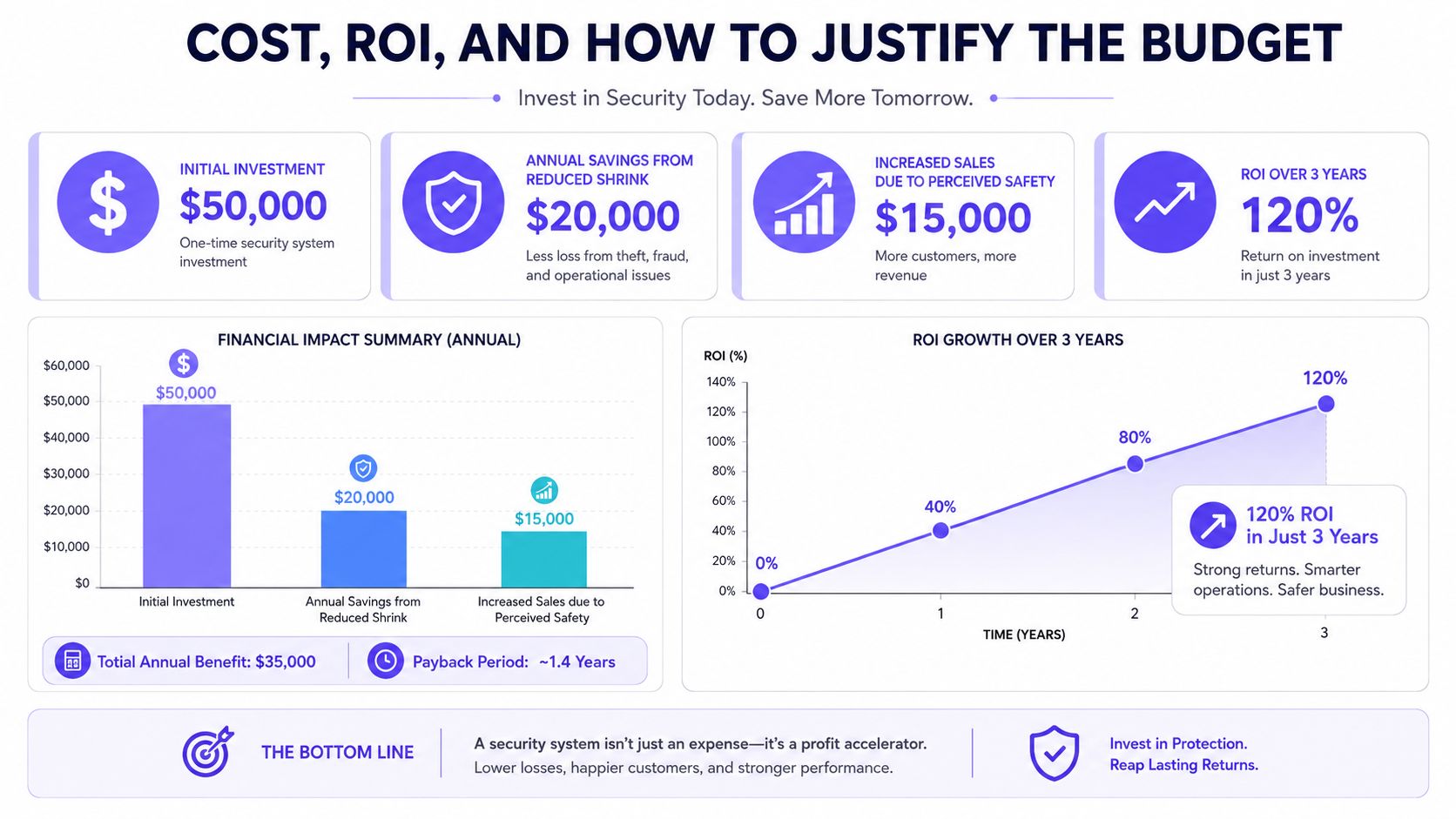
The best budget argument is not a vague claim that security prevents crime. That is true, but it is too broad for a spreadsheet. The stronger case is that a layered system shortens incidents, improves evidence, and reduces the recurring labor that comes from unmanaged doors and unverified alarms.
For back-of-house entry, a cellular retrofit access platform can cost less to operate than assigning a guard or concierge function to a door that only needs controlled, auditable entry windows. That spend is easier to approve because it replaces an ongoing manual task with a fixed system.
Compliance and Auditability in Modern Retail Security
Modern compliance is about evidence, not just equipment labels. Auditors, insurers, and law-enforcement partners want to know who entered, when they entered, what was recorded, and whether the system preserved the trail.
Legacy codes create weak evidence
Shared 4-digit PIN pads are a bad fit for any environment that cares about accountability. They can't reliably show who opened which door, so the entry event becomes anonymous and hard to defend later.
Digital access control is better because it records an identity, a time, and a door event. That gives the operator a defensible log for incidents, scheduled access windows, and revocation after termination. It also makes it possible to separate staff access from contractor access, which is a basic control that too many stores skip.
Make the logs usable, not just available
A retail system should keep time-synced video, role-based access to the VMS, and incident workflows that can be reviewed later. If the logs can't be matched to a real event, they don't help much during an insurance claim or an internal investigation.
Practical controls belong in the policy, not just the software:
- After-hours approval for sensitive entry points.
- Automatic credential revocation when employment ends.
- Scheduled access windows for cleaners, delivery crews, and maintenance vendors.
- Exception reporting for unusual door activity or repeated failed attempts.
For teams thinking about data governance beyond physical security, data destruction best practices for Singapore is a useful reference point because it reflects the same principle, retained records need a clear lifecycle and a clear end point.
Legal exposure stems from unverifiable entry events. A store can't defend what it can't attribute, which is why legacy access methods are fading fast.
Maintenance, Blind Spots, and Incident Response Workflows
Hardware degrades slowly in retail, and that's exactly why teams miss the problem. Coverage drifts when shelves move, signage changes, checkout counters get reset, or seasonal displays block a camera that used to be perfect.
Re-audit coverage before the gaps get expensive
Blind spots usually show up around shelves, corners, stockroom entrances, and counters. Those are the places where camera view gets partially blocked and where staff assume the old layout still works even after the floor plan changed.
A quarterly re-audit is the right rhythm for most stores, and it should be tied to planogram changes and seasonal resets. That doesn't need to be complicated, but it does need to be documented, because a good camera today can become a useless angle next month if merchandising shifts.
Let incident data decide where attention goes
Interface Systems' 2026 Retail Loss Prevention Benchmark Report analyzed 53,369 high-priority security events and found that more than 88% of threats came from just three categories, while incidents peaked between 6-8 PM and Sundays and Mondays accounted for 30% of weekly incident volume Interface Systems benchmark report. That matters because it pushes operators toward targeted staffing, targeted camera placement, and more intelligent remote monitoring instead of blanket coverage everywhere.
The best incident workflow connects three things into one case file:
- Video for visual verification.
- EAS events for exit-related loss.
- Access logs for staff, contractor, and vendor movement.
Operational truth: If the case file lives in three different systems, the investigation takes longer and the result is weaker.
For teams that want a structured response model, Nerds 2 You Edmonton incident response is a useful reference because the same discipline applies whether the event is cyber, physical, or a blend of both.
A continuous monitoring layer also helps when the team can't keep eyes on every door all day. Continuous access control monitoring gives operators another way to think about back-door oversight, especially when staff changes or contractor traffic are frequent.
The point isn't to chase every alert. The point is to make sure the store knows which incidents matter, who responded, and whether the response matched the risk.
Retail operators who want fewer blind spots, better entry control, and cleaner audit trails should start by fixing the stack, not buying more random devices. Nimbio gives property teams a cellular, hardware-agnostic way to turn existing gates and electronic entry points into smartphone-controlled access with remote credentials and entry logs, which fits naturally into back-of-house and contractor management. Visit Nimbio to see how retrofit access control can slot into a retail security program without replacing the hardware that's already in place.