A gate sits half open on a Monday morning, the clicker gets no response, and the first quote mentions torque, duty cycle, and sensors the board has never heard of. That's the moment most buyers discover a slide gate operator isn't picked by brand or motor size alone. It's the motor, drive, and control board that move a sliding gate sideways on command, and it only works well when the gate, safety devices, and power supply fit it.
Table of Contents
- What a Slide Gate Operator Does and Where It Fits
- How to Read Torque, Duty Cycle and IP Ratings
- Entrapment Protection Every Slide Gate Needs
- Checking Compatibility Before a Retrofit
- Installation and Maintenance Overview
- Choosing an Operator for Homes, HOAs and Businesses
- Confirm Your Gate Specs Before You Request Quotes
What a Slide Gate Operator Does and Where It Fits
A slide gate operator is the motor, drive, and control board that move a horizontal sliding gate along its track. It opens and closes the gate on commands from a remote, keypad, call box, or access system. The gate panel itself, its rollers, and its safety sensors are separate parts of the same working system.
Think of the gate as a heavy drawer on runners. The operator is the hand that pushes and pulls the drawer, and the controller decides when the hand moves and how far. If the runners are bent or the drawer is out of square, a stronger hand doesn't fix the problem. It just pushes harder against it.
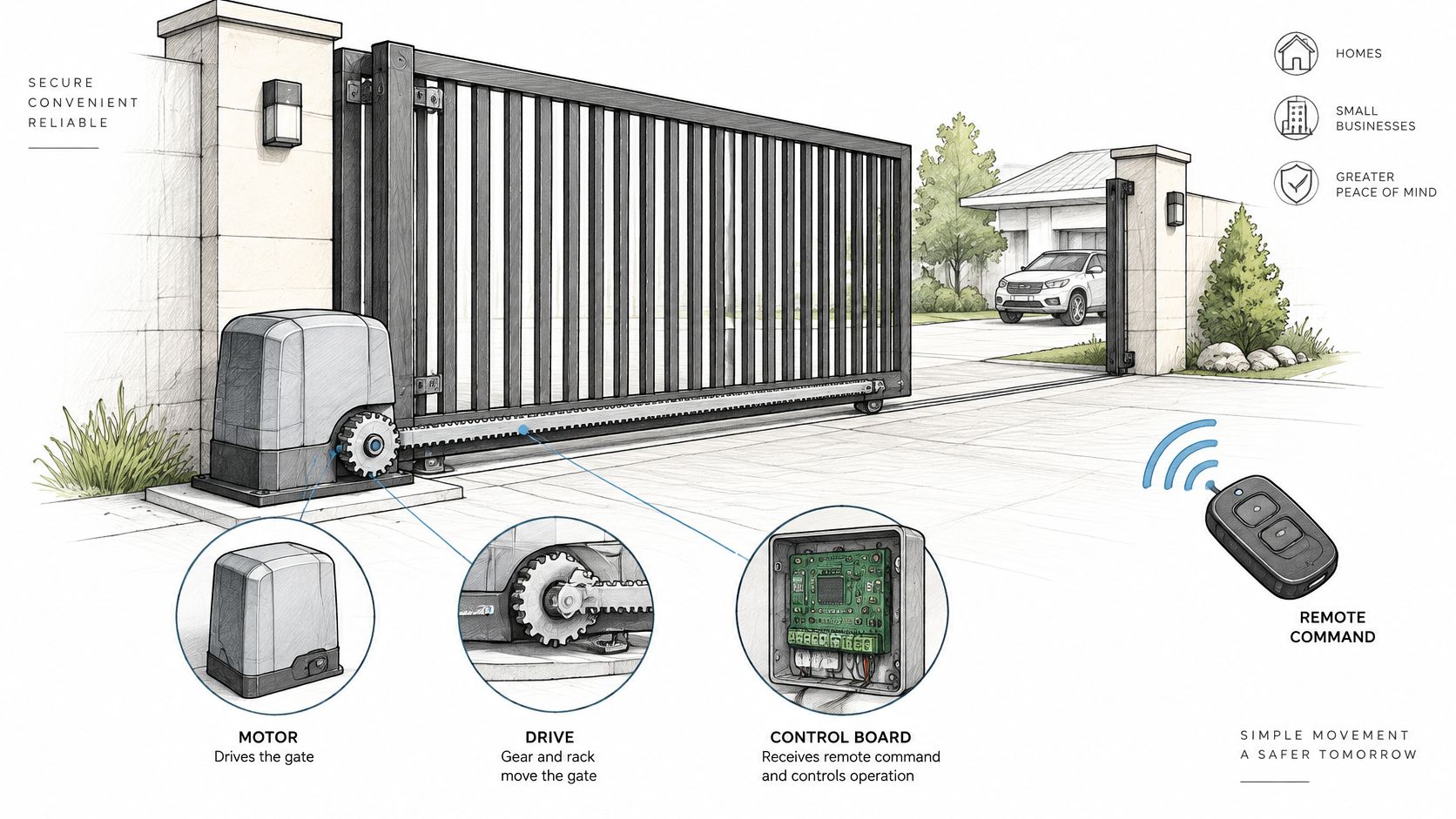
The main parts in order
- Motor: Provides the turning force that drives the gate open and closed.
- Gear drive: Connects the motor to the gate, commonly through a rack and pinion fixed along the gate, or through a chain drive.
- Control board: Holds the limit settings that tell the gate where to stop, plus speed and force settings for each cycle.
- Input terminals: Accept commands from remotes and keypads, and signals from safety sensors.
- Weatherproof housing: Protects the motor and board where the operator sits beside the gate opening.
A swing operator works differently. It pushes a hinged leaf through an arc, so the gate needs clear space to swing into, and that arc crosses driveways and walkways. A sliding gate parks alongside the fence line instead, which suits single-family driveways, HOA entrances, and commercial lots where a gate must not swing into the road or block a path.
An operator does not make a gate safe by itself. Safety devices and gate hardware are separate parts, and each one has to be checked on its own.
That last point shapes everything that follows. Specs decide whether the operator fits the gate, safety rules decide what protection must surround it, and compatibility checks decide whether new controls can work with what's already installed. Choosing well means working through all three before any purchase or retrofit.
How to Read Torque, Duty Cycle and IP Ratings
A spec sheet tells a buyer whether an operator fits one specific gate, so the sheet gets matched to the gate before brands get compared. Reading it in the wrong order causes most mistakes. A large torque number looks reassuring until the gate's weight, the site's traffic, and the weather exposure are checked against it.
| Specification | What It Controls | What to Check |
|---|---|---|
| Torque | Force available to start and move the gate | Gate weight and length against the manufacturer's rated chart |
| Duty cycle | How long the motor can run in a set period before resting | Expected open and close frequency at the site |
| IP rating | Protection of the motor and controls against dust and water | Outdoor, coastal or flood-prone exposure, and the rating in the manual |
| Supply voltage | Power the operator needs to run | Match to the site supply and the controller's input requirements |
| Speed and force limit | Movement speed and pull force under UL 325 for Class I and II | Chain tension, limit settings and gate binding on the track |
| Operator class | Class under UL 325 the operator is rated for | Class named in the manual; if the manual doesn't name one, ask the manufacturer |
Torque, duty cycle, and the IP rating
Torque is the force the operator has available to start the gate moving and keep it moving. Gate weight, gate length, friction in the rollers and track, and any slope decide how much force a site needs. The practical check is the manufacturer's rated gate weight and length chart for that model. Torque numbers shouldn't be compared across brands, because each manufacturer rates its own models its own way, and the chart is the figure written for installers.
Duty cycle describes how long the motor can run within a set period before it must rest. A single household cycling the gate a few times a day puts far less demand on a motor than a busy entrance where vehicles arrive in clusters. Sites with frequent cycles need margin above their expected use, because a motor run past its duty cycle overheats, shuts down, or wears early.
The IP rating is a code for how well the housing keeps out dust and water. It gets matched to the site's exposure, so an operator on a coastal property or in a flood-prone corner needs more protection than one under cover inland. The rating printed in the manual for the exact model is the one that counts, not a rating quoted for a similar unit in the same range.
Speed, force, and operator class
Speed and force are limited together, and that pairing matters. The ASTM overview of gate standards states the UL 325 limit for Class I and Class II horizontal slide-gate operators: the gate must not move faster than 0.3 m/s (1 ft/s) when the operator is exerting a pull force of 333.6 N (75 lbf) at maximum rated supply voltage and frequency. Speed and force together set the impact energy and stopping distance, and the time a sensor or a person has to react.
Practical rule: A gate that binds on its track can push the operator toward that force limit while still appearing to work, so friction and alignment get checked before any setting is raised.
Excess chain tension and poor limit settings can cause the same damage. The operator class named in the manual should also be confirmed against the site's use, since the class describes the setting the operator is rated for. The same ASTM overview notes that ASTM F2200 covers the gate structure itself, including positive stops and protection against a detached gate falling more than 45 degrees from vertical. Specs vary by model and local requirements vary, so the manufacturer's manual stays the final reference for any figure.
Entrapment Protection Every Slide Gate Needs
Many buyers assume one sensor makes a powered gate safe. A photo eye across the driveway feels like protection because it stops the gate for cars. For a horizontal slide gate, that belief falls short, because entrapment protection is a system requirement, not an accessory added when the budget allows.
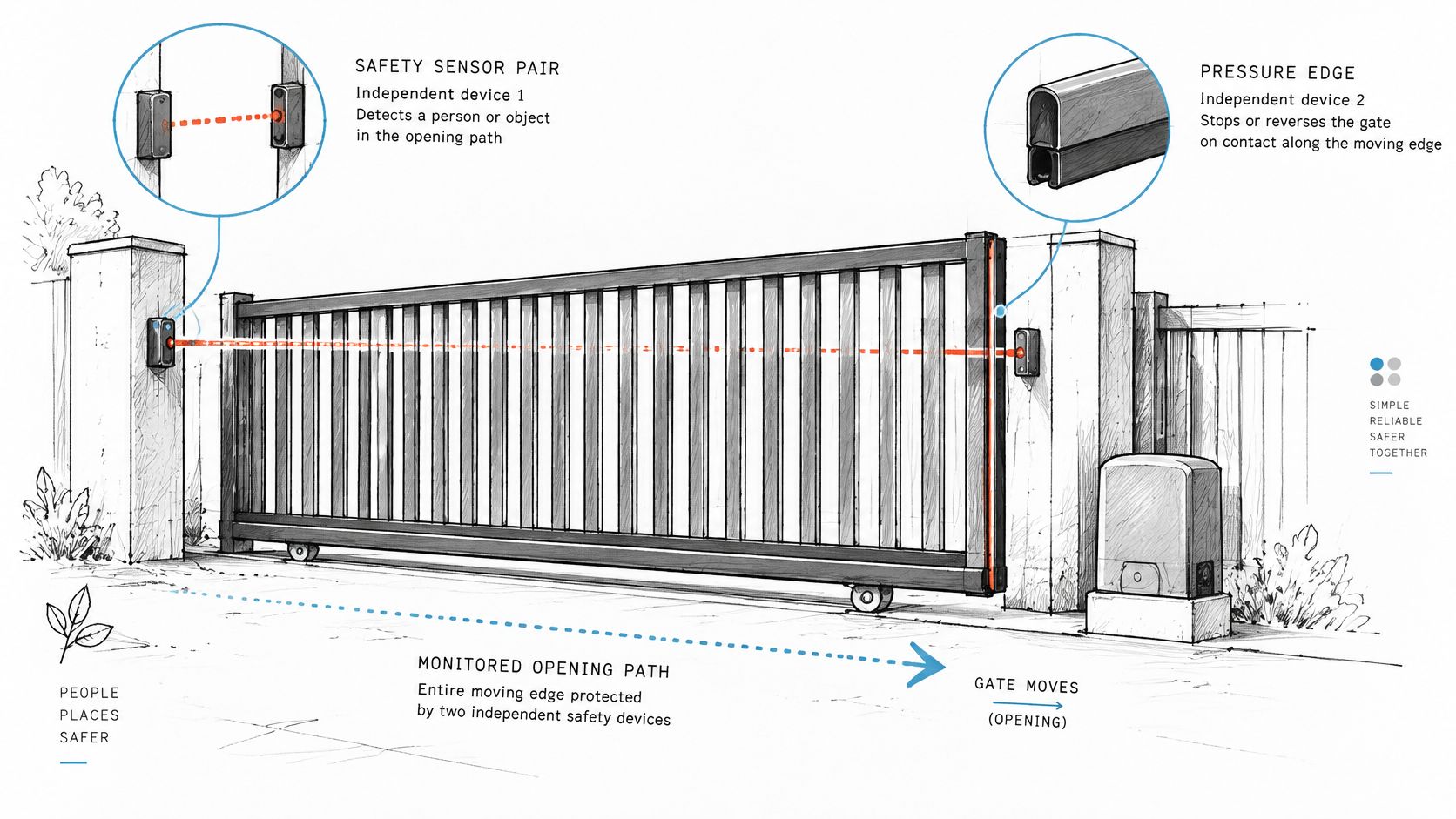
The DASMA technical data sheet on UL 325 states that ANSI/UL 325 requires at least two independent entrapment-protection means in the opening direction and two in the closing direction wherever an entrapment hazard exists. The operator must be designed so it operates only after the required protection devices have been installed and enabled. A gate operator that lacks the required protection should not run at all.
Acceptable means include an inherent force-limiting or reversing system built into the operator, monitored photoelectric sensors, and monitored contact sensors such as sensitive edges. Which combination fits depends on the entrapment zone being protected. The requirement applies separately to each direction of travel because a person can be trapped against different fixed objects while the gate opens than while it closes.
Why independence matters
The two means must be independent, so one failure doesn't remove all protection for the same hazard zone. A home with a smoke alarm in the kitchen and a second detector in the hallway works the same way. If one unit fails, the other still warns the household. On a gate, layered protection guards against crushing, shearing, and drawing-in hazards, where clothing or a limb gets pulled toward a moving part.
Motor current sensing alone doesn't meet that test. It can leave a secondary hazard zone unprotected, because the motor only reacts after the gate has already met resistance at one point. Areas away from that point, such as where the tail of the gate passes a fence post, may have no effective detection. Independent presence or contact sensing covers those zones directly.
DASMA guidance on entrapment zones states that two entrapment-protection means are required for each entrapment zone. That per-zone wording changes how a site gets audited. Each place where a person could be caught gets its own check, rather than the gate receiving one overall pass.
Retrofits and warning signage
Any retrofit controller should work through the operator's command inputs. It must never bypass the operator's safety circuitry, because bypassed monitoring means a failed sensor no longer stops the gate. The access device asks the operator to run, and the operator's own protection decides whether it's safe to move.
Warning signs are part of the same picture, since people near the gate need to know it can move without a driver present. Evright Industrial's safety signage guide is a useful reference for what clear, durable safety signage should communicate at a hazard point. Sign wording and placement should still be confirmed against local rules, because sign requirements differ by jurisdiction.
Start any safety audit at three zones: the leading edge that meets the receiver post, the receiver post itself, and the tail end of the gate's travel.
Local requirements vary, so the setup gets confirmed with the authority having jurisdiction before the gate returns to service. That confirmation belongs in the property's records alongside the test results. A slide gate operator installed without that paperwork leaves the next board or manager guessing what was verified.
Checking Compatibility Before a Retrofit
A controller arrives on site, the technician opens the operator housing, and the terminal layout matches nothing on the diagram that came with it. The parts go back, the gate stays as it was, and the property pays for a second visit. Will this operator or controller work on the existing gate? That question gets answered with a checklist, not a guess from a photograph.
- Operator brand and model: Read the label inside the operator housing and photograph it for the installer.
- Command input type: Confirm the dry-contact terminals that clickers and keypads use to trigger the operator, since a retrofit controller wires in parallel to that same input.
- Supply voltage: Match the power available at the operator to what the new controller accepts. A cellular retrofit unit such as Nimbio works on 6.5V–24V AC/DC switching power, a range most operators supply.
- Existing sensors: Note each photo eye and contact edge, where it sits, and whether it's damaged or misaligned.
- Enclosure location: Check where a controller can mount and whether the space stays dry. Some enclosures mount inside the operator housing itself, with a weatherproof option where they can't.
- Wiring diagram: Keep the manufacturer's diagram for that model with the checklist.
Brand notes and model differences
Common operators include LiftMaster, Linear, Viking, FAAC, Nice, DoorKing, and Mighty Mule. The command terminals, terminal labels, and safety inputs differ by model across all of them, and two operators from the same brand can wire differently. The brand's own diagram and manual for the exact model stay the reference.
Memory from a previous job isn't a safe substitute.
Gate condition needs the same attention as the electronics. The DASMA installer guide to ASTM F2200 states that openings in the gate, and in the adjacent fence line covered by the gate when open, must be guarded or screened so a 2.25-inch sphere cannot pass through openings up to 48 inches above grade, while openings from 48 to 72 inches above grade must prevent passage of a 4-inch sphere. The same guide requires weight-bearing rollers located less than 8 feet above grade to be guarded or covered.
Those measurements exist because a person can reach through a gate or fence into the travel path, or touch an exposed roller while the gate moves. Screening and roller covers are physical safeguards that sit alongside the operator's electronic protection. Local requirements vary, so the installer confirms the current standard adopted at the site.
A new controller cannot fix a gate that's out of square or binding on its track. Mechanical faults get repaired first, or the new controls inherit them.
One retrofit example makes the checklist concrete. A Nimbio controller wires in parallel to the operator a property already has, connecting to the same dry-contact input the clickers and keypads use, so those keep working alongside the app and the gate itself doesn't need replacing. It connects over the cellular network, so it needs no Wi-Fi at the gate. Its overview of retrofitting legacy gate operators explains how that parallel wiring approach fits existing hardware.
Where a model is uncertain or the label is unreadable, a qualified technician confirms compatibility before parts are ordered. For a Nimbio retrofit, dedicated wiring diagrams covering virtually any operator sit in the Help & Support Center, and the support team will confirm wiring for a specific gate model at 1-800-353-3422. That single check costs less than returning equipment and paying for a second site visit.
Installation and Maintenance Overview
Installing a slide gate operator is physical work for a qualified gate or low-voltage technician. Every step follows the manufacturer's manual for the model being installed. Readers without a manual can find theirs on the brand's own site, and the technician should have that document open during the job, because mounting spacing, terminal layouts, and setting procedures differ between models.
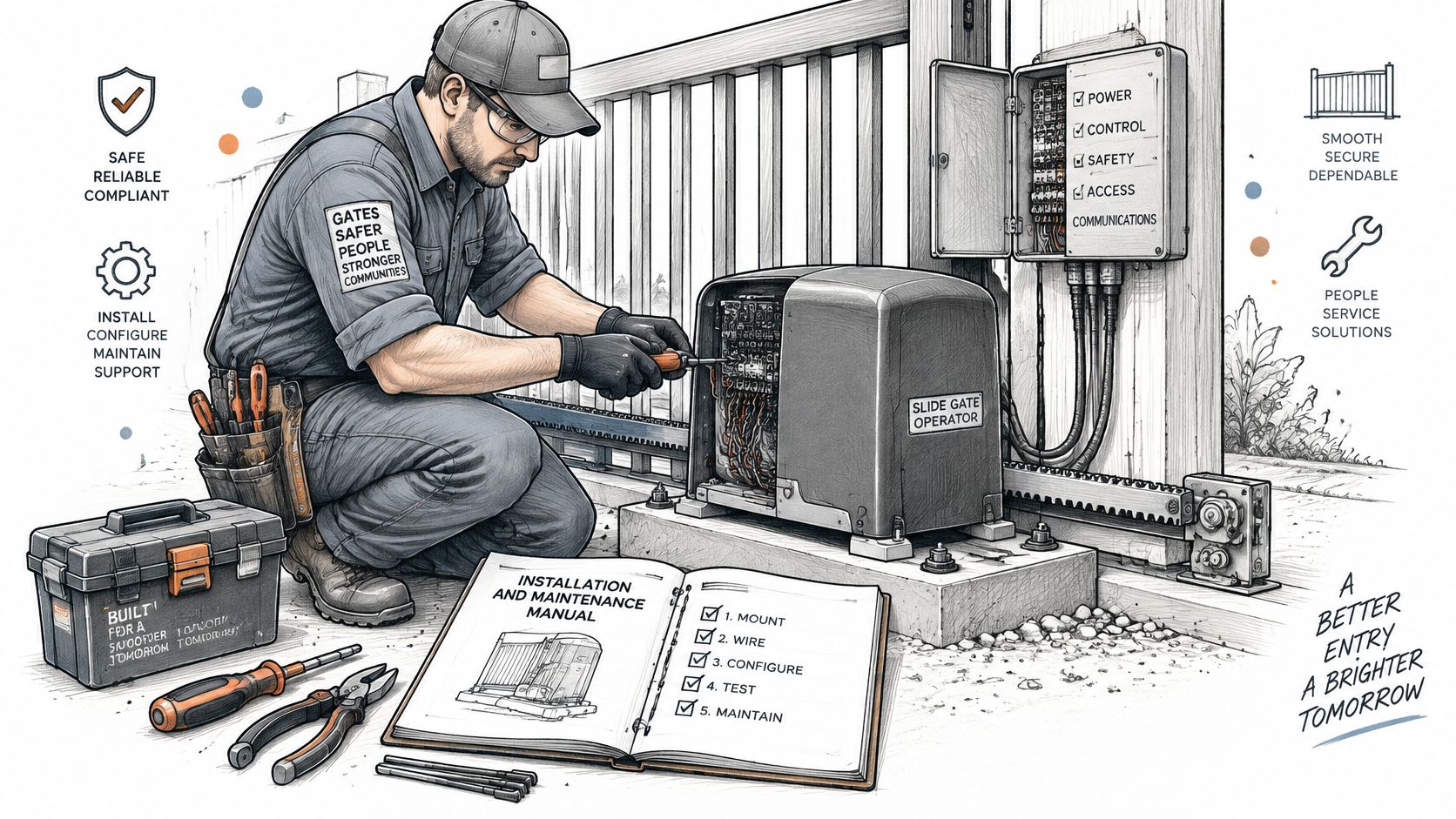
The installation phases
- Assess the gate: The technician checks weight, square, track level, rollers, guide posts, and positive stops before any mounting starts.
- Mount the operator: The unit sits on a level base, spaced from the gate as the manual directs for correct chain or rack alignment.
- Wire the system: Power, command inputs, and safety devices connect using the manual's wiring diagram, terminal by terminal.
- Fit the sensors: Photoelectric sensors and contact edges get positioned and aligned at the zones they protect.
- Set limits and commission: Travel limits and stops are set, then protection is tested separately for opening and closing under realistic load.
- Hand over records: The property receives the settings, wiring diagram, and test results for its files.
Commissioning carries the safety weight of the whole job. The DASMA data sheet on entrapment protection devices describes the acceptance test as verifying protection separately during opening and closing, confirming that obstruction detection reverses or stops movement as specified, and ensuring any reset control sits with a clear line of sight to the gate. External sensors also need correct positioning, wiring, alignment, and monitoring to count as protection. A retrofit access controller interfaces with the operator's command inputs rather than bypassing its safety circuitry, so those monitored circuits stay intact after the upgrade.
Recurring maintenance checks
Routine care keeps the installation honest. Rollers and guides get inspected for wear and wobble, positive stops get confirmed, and sensors get cleaned and realigned so dirt or a knock doesn't blind them. Chain or rack condition gets checked for stretched links and damaged teeth, and enclosure seals get checked so water stays away from the board. For general upkeep habits that apply across automatic gates, Lighthouse Energy Services gate maintenance tips offer a practical starting point for a property's own checklist.
Nobody should guess what an indicator light or error code means. The manual defines it for that model, and a qualified technician handles anything the manual doesn't resolve.
Intervals for these checks vary by model, traffic, and exposure. The manual sets them for the operator installed, and busy sites shorten them. A slide gate operator that's inspected on schedule gives warning before it fails, usually as noise, sluggish travel, or a sensor fault that a technician can correct early.
Choosing an Operator for Homes, HOAs and Businesses
The right choice matches traffic, safety documentation, and the number of gates on the property. Gate width alone doesn't decide it. Two gates of the same size can need very different operators once daily cycles, visitors, and record-keeping enter the picture.
| Site Type | Typical Traffic | Main Priority | Records to Keep |
|---|---|---|---|
| Single-family driveway | One household with occasional cycles | Reliable operation and a suitable IP rating | Operator manual, installer invoice and wiring diagram |
| HOA community entrance | Residents, guests, delivery and service vehicles | Multiple gates, access logs and hold-open schedules | Maintenance contract and inspection dates |
| Commercial, multifamily or logistics site | Frequent cycles from staff and the public | Duty cycle margin, safety testing and auditability | Written inspection and training records |
What each site type needs
A single-family driveway needs reliable operation, an IP rating suited to its exposure, and a simple remote setup the household can manage. Traffic is light and predictable. The main risks are weather getting into the housing and safety devices being skipped because the gate feels like a home appliance. It isn't one, and the protection rules apply the same way.
An HOA entrance serves many users across one or more gates. Access logs show who entered and when, scheduled hold-open times handle school or service windows, and a service contract keeps one technician team familiar with the site. Boards also change over time, so written records matter more than memory. Without inspection dates on file, a new board can't tell whether the gate was tested last year or never.
Commercial, multifamily, and logistics sites see frequent cycles from staff and the public, often with delivery vehicles on tight schedules. Duty cycle margin keeps the operator running through peak periods. Safety testing and written inspection records protect the property when an incident gets reviewed. Managers comparing access options for these sites can review how commercial gate access control is structured for properties with several entry points.
A full safety audit covers the whole gate, whatever the site type. It includes entrapment zones, gate construction, travel limits, guarding, structural stability, and worker training for anyone who operates or resets the gate. Remote opening raises the stakes on that audit, because a person can start the gate moving without standing where they can see it. Verified obstruction sensing and documented inspections carry more weight in that setup, not less.
Hypothetical example: An HOA with one resident gate and one visitor gate might standardize on one operator brand so technicians learn one system and carry one set of parts. That's a planning illustration, not a recommendation for any brand.
The closing rule is plain. If public or commercial vehicles use the gate, the property chooses an operator rated for heavier duty and budgets for regular inspections from the start. Retrofitting that discipline later costs more than building it into the purchase.
Confirm Your Gate Specs Before You Request Quotes
Comparable quotes start with the same information going to every installer. The property gathers the gate's make and model, the operator's manual and wiring diagram, and the gate's weight and length if known. Photos of the operator box and each safety device go in the same packet, along with a list of current entry methods such as remotes, keypads, and call boxes. Reviewing gate access system evaluation criteria helps a manager judge the access side of each bid on the same terms.
Quotes vary with the gate's condition, the operator's model, and the number of entry points, so a complete list makes each bid cover the same work. Physical installation is completed by independent professional gate technicians or local low-voltage installers. Nimbio recommends a licensed professional gate or low-voltage technician for installation and can put customers in touch with an installer who has worked with Nimbio before on request. Its support team will confirm wiring compatibility before installation if a customer is unsure about a specific gate model, and customers can call 1-800-353-3422.
Questions about the controller can go through the Nimbio contact page. For any wiring, safety device, or repair work on a slide gate operator, the manufacturer's manual gets checked first and a qualified technician does the work.
Once the operator, sensors, and gate hardware check out, Nimbio adds smartphone access through a cellular controller that wires into the operator already on site, so existing clickers, fobs, and keypads keep working. Property managers can issue and revoke digital keys remotely, set expiration dates, and let visitors in with video verification. Visit the site to confirm compatibility with the gate model on the property.