Digital leasing is an end-to-end online process that replaces traditional paper-based leasing workflows, allowing renters to find, apply for, and sign a lease for a property entirely from their device. In rental housing, that shift matters because 84% of renters say technology has a moderate to major impact on their rental decisions.
A lot of property managers are still stuck in the middle. Listings may be online, but applications arrive by email. Leases get sent as PDFs, then someone has to chase signatures, collect documents, answer status calls, and coordinate move-in details across four different systems. That isn't digital leasing. That's partial digitization with manual cleanup.
Busy teams usually don't need more software. They need fewer handoffs, cleaner records, and a leasing process that doesn't break every time a prospect applies after hours. Digital leasing works when it connects the full workflow, from first inquiry through signed lease and move-in coordination, into one repeatable system.
Table of Contents
- The End of Paperwork What Is Digital Leasing Anyway
- How Digital Leasing Works The Platform and the Process
- A Side-by-Side Look Traditional vs Digital Leasing
- The Double-Sided Benefits For Managers and Residents
- Beyond Paperwork Connecting Leasing to Property Access
- Your Digital Leasing Implementation Checklist
- Frequently Asked Questions About Digital Leasing
The End of Paperwork What Is Digital Leasing Anyway
Digital leasing means running the leasing workflow online instead of pushing prospects through paper forms, office visits, phone tag, and scattered files. In practice, that usually includes online marketing, virtual tours, applications, screening, e-signatures, rent collection, and tenant communication inside a web-based system, as outlined in this digital leasing overview from Bay Property Management Group.
For property managers, the important distinction is this. What is digital leasing isn't the same as sending a lease for signature through one app while everything else stays manual. It is the shift from isolated digital steps to an integrated workflow that tracks the resident journey from first click to signed documents and onboarding.
That difference changes daily operations. Staff spend less time re-entering information, hunting through inboxes, or checking whether a prospect completed the next step. Managers get a process that is easier to standardize across units and easier to monitor when volume rises.
Practical rule: If the leasing team still has to manually move information between listing tools, application forms, screening vendors, documents, and payment requests, the process isn't fully digital yet.
Tenant demand is a major reason this moved from optional to expected. NMHC research cited by SmartRent shows that 84% of renters say technology has a moderate to major impact on their rental decisions. For a manager, that doesn't just mean adding a nicer website. It means the leasing path itself needs to feel current, responsive, and easy to complete on a phone.
A useful parallel exists in back-office operations. Teams that want fewer dropped steps in leasing often face the same challenge they face in closings and compliance. This guide to transaction management platforms is a helpful reference because it shows why centralized workflows beat document-heavy, handoff-heavy processes in real estate.
How Digital Leasing Works The Platform and the Process
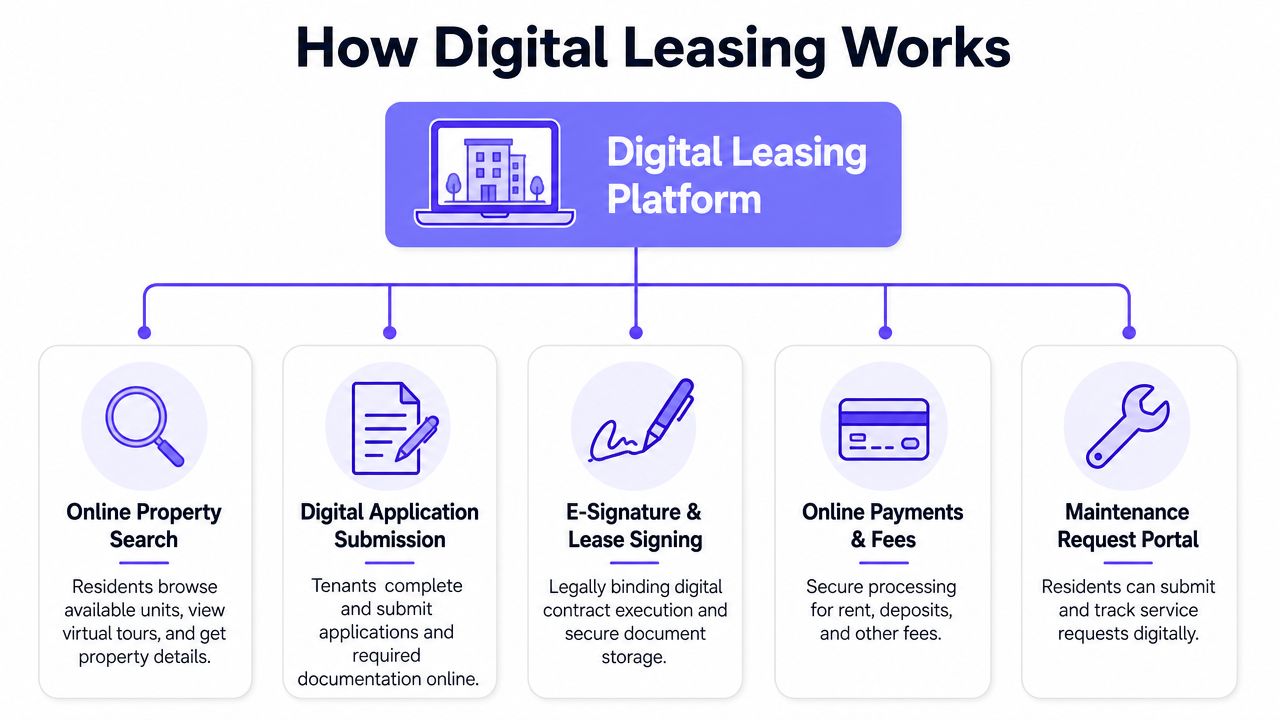
A strong digital leasing setup works like a connected production line. Each stage feeds the next, so the prospect doesn't have to start over and the leasing team doesn't have to rebuild the file at every step.
The core workflow inside the portal
Most platforms follow a similar sequence:
- Listing and discovery: A unit gets published with photos, pricing, policies, and often a virtual tour or self-guided tour option.
- Application intake: The prospect fills out an online form, uploads documents, and submits required information from any device.
- Screening and review: Managers review a complete file in one place instead of piecing together attachments from email threads.
- Lease generation and e-signing: Approved applicants receive documents electronically and sign without visiting the office.
- Payments and onboarding: Deposits, rent setup, and resident communication move into the same system.
The operational gain comes from process compression. HelloData's digital leasing definition explains that digital leasing platforms create efficiency by compressing the entire pre-move-in workflow into a single online portal, which shortens leasing cycle time in competitive rental markets.
That matters more than many teams expect. A prospect who can tour, apply, upload documents, and sign in one continuous flow is less likely to stall between steps than a prospect who has to wait for office hours, print forms, or chase updates.
What makes the process actually efficient
The platform only helps if the handoffs are clean. Three things usually separate systems that work from systems that frustrate staff:
- Status visibility: Staff need to see exactly where each applicant sits without checking multiple inboxes.
- Document continuity: Information entered at the application stage should carry into lease prep and resident onboarding.
- Communication triggers: Applicants should get automatic prompts when something is missing or ready for review.
The best digital leasing workflows don't just store documents. They move the next task forward without someone having to remember it.
That same principle applies before the application starts. Teams trying to reduce slow response times often pair their leasing portal with tools that automate real estate lead engagement, especially when inquiries come in after business hours.
There is also a resident-access angle that managers should think about early. Once a tenant has signed digitally, move-in feels clunky if access is still managed with paper forms, front-desk calls, or physical credentials alone. For gated or controlled-entry properties, Nimbio Guestview capabilities show how visitor and entry workflows can align with a more modern leasing and onboarding process.
A Side-by-Side Look Traditional vs Digital Leasing
Traditional leasing usually fails in the gaps, not in the headline tasks. A team can market a unit well and still lose momentum when applications arrive incomplete, signatures drag out, or documents get trapped in someone's inbox.
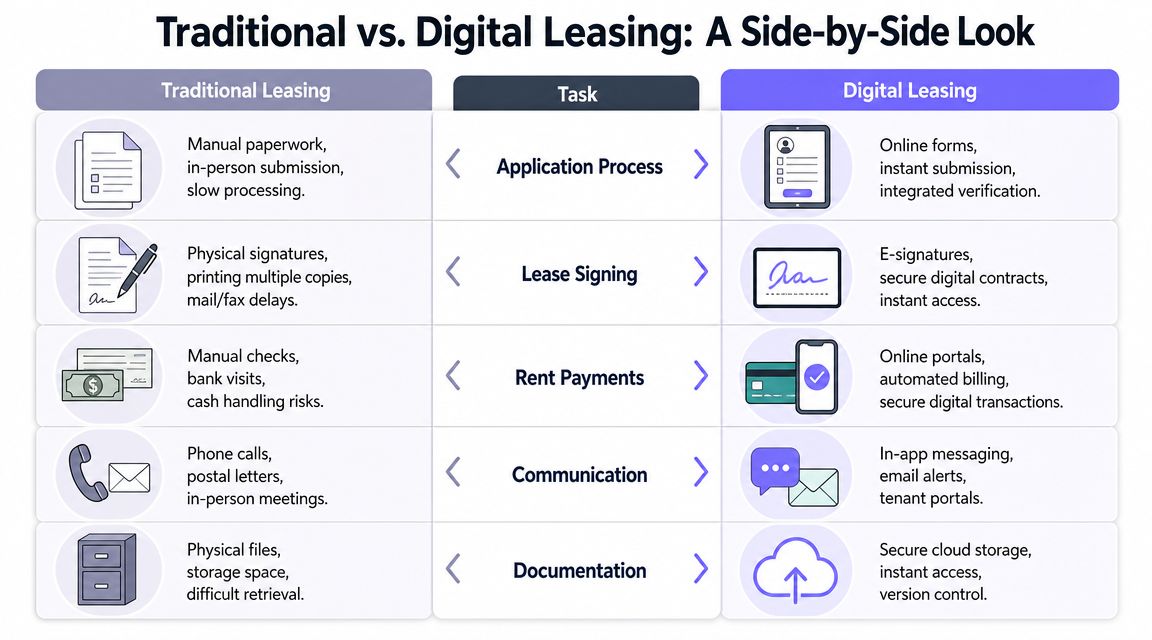
Leasing task comparison
| Leasing Task | Traditional Method (The Old Way) | Digital Leasing Method (The New Way) |
|---|---|---|
| Advertising a vacancy | Staff post listings manually across channels, then update details one by one | Listings are managed in a centralized system with consistent information |
| Property tours | Prospects call, email, and wait for a showing slot | Prospects review online details first, then move into virtual or scheduled tour options |
| Application intake | Paper forms, emailed PDFs, missing attachments, and follow-up calls | Online applications collect required fields and documents in one place |
| Screening review | Staff gather data from separate tools and manually track decisions | Applicant records are reviewed as part of one digital file |
| Lease signing | Printing, scanning, in-person visits, or repeated email reminders | Electronic leases are sent, signed, and stored online |
| Payments | Deposits and fees are collected through checks, cash, or disconnected systems | Online payment requests and confirmations stay tied to the resident record |
| Recordkeeping | Filing cabinets, local folders, and inbox searches | Cloud-based records are easier to retrieve and audit |
| Communication | Phone tag and fragmented email threads | Portal-based updates create a clearer communication history |
Where the old process breaks down
The old model creates friction in predictable places:
- Scheduling dependence: Every step waits on business hours, office staffing, or both.
- Duplicate entry: Staff often retype the same names, addresses, and terms into multiple systems.
- Poor visibility: Managers can't quickly tell whether a delay came from the prospect, the team, or a missing document.
- Document risk: Signed copies, notices, and payment confirmations are harder to trace later.
Digital leasing doesn't remove judgment calls. A manager still needs to review applicants, communicate policies clearly, and verify readiness for move-in. What it does remove is the dead space between those decisions.
A paper-heavy process usually looks manageable at low volume. It becomes fragile as soon as multiple units turn at once.
Another practical difference is consistency. In a traditional workflow, every leasing agent develops workarounds. One person saves files on a desktop folder, another uses email labels, another prints everything. A digital process gives the team one operating method, which is easier to train, easier to audit, and easier to scale.
The Double-Sided Benefits For Managers and Residents
Digital leasing succeeds when it improves operations for the staff and lowers friction for the resident. If it only helps one side, adoption tends to stall.
What property managers gain
For managers and ownership groups, the gains are mostly operational:
- Cleaner workflow control: Teams can track applications, documents, signatures, and payments without bouncing between disconnected tools.
- Less manual admin: Printing, scanning, filing, and re-keying data drop sharply when the process stays inside one portal.
- Better documentation: Centralized records create a clearer audit trail for leases, notices, and communication history.
- Stronger consistency: Every applicant goes through the same steps, which helps reduce avoidable errors and ad hoc exceptions.
- Easier portfolio oversight: Standard processes are simpler to roll out across multiple buildings or communities.
Managers also gain a marketing advantage when speed improves. If a prospect can complete the next step immediately, staff don't have to hope that interest survives a slow follow-up cycle. This AgentPulse's guide for property managers is useful reading because it connects leasing outcomes to practical marketing and response habits.
What residents notice immediately
Residents don't usually describe the value as "workflow efficiency." They experience it as convenience and clarity.
- Fewer office visits: They can review details, apply, and sign without rearranging work or travel.
- More transparency: Status updates and stored documents reduce uncertainty about what happens next.
- Device flexibility: The process works from a phone, tablet, or laptop instead of requiring a printer and scanner.
- Faster completion: They can move from interest to commitment without long pauses between steps.
- More organized communication: Messages, documents, and payment steps live in one resident-facing system.
A lot of managers underestimate this last point. Residents don't just want digital forms. They want a rental experience that feels coherent from application through move-in and daily living. That's why resident-facing tools matter after the lease too. For that part of the journey, teams can Explore Nimbio for residents when evaluating how access, entry, and day-to-day convenience fit into the broader experience.
Residents rarely separate leasing technology from the rest of the property experience. To them, it's one brand interaction.
Beyond Paperwork Connecting Leasing to Property Access
A signed digital lease solves the administrative part of move-in. It doesn't solve the physical reality of getting through the gate, into the building, or managing visitor entry on day one.
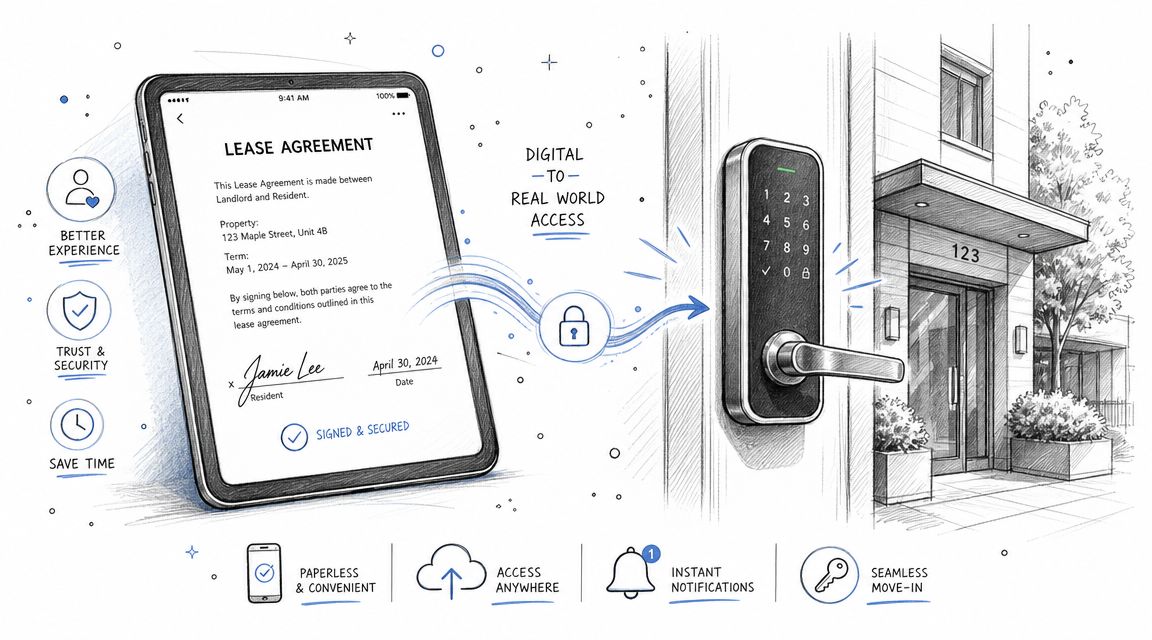
Digital leasing solves one half of the move-in problem
Property managers often modernize the front half of the resident journey first. The listing is online. The application is digital. The lease is signed electronically. Then move-in day arrives, and the team falls back to key handoffs, shared gate codes, paper instructions, or a front office workaround.
That disconnect is where many "digital" experiences still feel old. The resident just completed a remote, device-based transaction, but access to the property still depends on manual coordination.
Why access control belongs in the conversation
The technical overlap is real, not just conceptual. Leni's digital leasing overview notes that the technical foundation for both digital leasing and modern access control is the same: cloud software centralizes control, digitizes artifacts such as leases or keys, and provides an auditable trail. That convergence helps operators manage contracts and physical access with less administrative overhead.
For a property manager, that means digital leasing and modern access control should be planned together when possible. The question isn't only whether a resident can sign online. It's whether the rest of the experience follows the same logic:
- Can access be granted remotely
- Can permissions be changed without collecting physical credentials
- Can the property keep an audit trail of entry events
- Can move-ins and visitor access be managed without sharing untrackable codes
One option in this category is remote access control for buildings, which lets operators manage entry through a smartphone-based system rather than relying only on physical keys, fobs, or static PINs.
The strongest resident experience starts before move-in and continues through the first time the resident opens the gate or front door.
Your Digital Leasing Implementation Checklist
Most leasing rollouts fail for ordinary reasons. The software may be fine, but the team didn't map the process, define ownership, or decide how digital leasing should connect to existing systems.
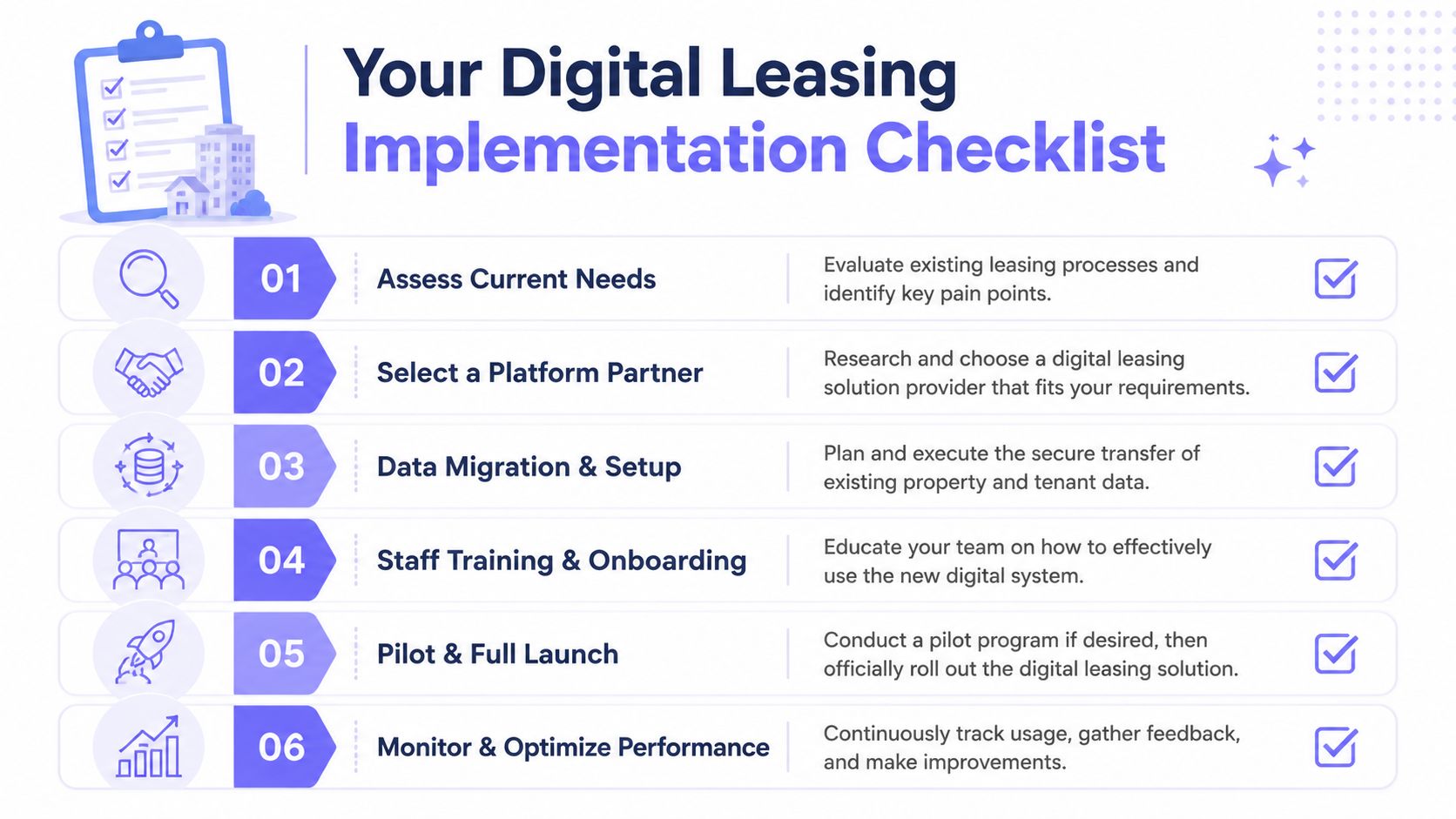
Questions to answer before choosing a platform
Start with operations, not features.
Where does the current process break?
Map the path from inquiry to move-in. Note every delay, duplicate entry point, and step that depends on one staff member remembering to follow up.What must the platform handle end to end?
Some teams only need stronger application and signing workflows. Others need the full chain, including listing distribution, payments, resident messaging, and onboarding.What systems must it connect to?
If accounting, CRM, screening, or access control live elsewhere, define those dependencies before vendor demos start.What does the team need to see at a glance?
Dashboards matter when they answer real management questions, such as which applications are incomplete, which leases are pending signature, and where approvals are stuck.
What rollout teams often miss
The setup work isn't only technical. It is procedural.
- Assign ownership: Someone needs to own templates, permissions, and process rules after launch.
- Standardize documents: Lease packets, addenda, and communication templates should be cleaned up before migration.
- Train around exceptions: Staff usually handle the common path well. Trouble starts with guarantors, missing documents, transfers, and special approvals.
- Plan resident communication: Prospects and incoming residents need clear instructions about what to expect and where to complete each step.
- Review access workflows: If the property has gates, building entry, or visitor controls, move-in permissions should be part of the implementation plan.
A cautious rollout is often better than a dramatic one. Pilot the system on a limited set of units or one property if needed, then tighten the workflow before expanding.
Field note: Teams adopt digital leasing faster when management defines the process first and the software second.
The best checklist question is simple. If a prospect applies tonight, can the system move them forward without creating manual cleanup tomorrow morning?
Frequently Asked Questions About Digital Leasing
Are digital leases and tenant records secure
They can be, if the platform is configured and managed properly. The main advantage of digital systems is centralized control. Documents, signatures, and communication history live in one managed environment instead of being scattered across inboxes, desktops, and paper files.
Managers should still ask practical questions during vendor review:
- How are documents stored
- Who can access lease records
- What audit trail exists for edits, signatures, and uploads
- How are permissions handled for onsite staff and regional managers
Security doesn't come from the word "cloud." It comes from disciplined access control, role-based permissions, and a clear operating process.
What if some residents aren't comfortable with technology
That concern is real, but it usually calls for support, not abandonment of the system. A practical digital leasing process should be simple enough for applicants to complete on a phone and flexible enough for staff to assist when needed.
Good teams handle this with a hybrid service model:
- Offer guidance at key steps: Staff can help applicants complete forms without reverting the whole operation to paper.
- Use plain instructions: Residents need a clear sequence, not a dense email full of attachments.
- Keep fallback procedures ready: There should be a documented path for exceptions, accessibility needs, or unusual applications.
The mistake is building the entire workflow around edge cases. Most applicants want convenience. A smaller group needs extra support.
Can digital leasing work outside multifamily housing
Yes. The workflow adapts well to single-family portfolios, gated communities, commercial spaces, and equipment-leasing contexts because the core mechanics are similar. A party expresses interest, submits information, signs an agreement, pays through a defined process, and needs ongoing account management.
The exact steps differ by asset type, but the underlying value stays the same:
- Centralized records
- Remote transaction completion
- Fewer manual handoffs
- Clearer operational visibility
Properties with controlled entry often get added value because digital access can support tours, move-ins, resident permissions, and visitor management as part of the broader operating model.
Is digital leasing just another word for paperless leasing
No. Paperless leasing usually means replacing printed documents with digital files. Digital leasing is broader. It covers the full workflow, including marketing, applications, screening, signing, payments, and communication.
That distinction matters because a paperless document process can still leave the team doing manual work across disconnected systems. A true digital leasing setup is designed to reduce those breaks in the process.
Digital leasing works best when the resident journey doesn't stop at the signed contract. If the goal is a more complete modern experience, Nimbio can help property teams extend that digital workflow into secure smartphone-based access for gates and building entry.