

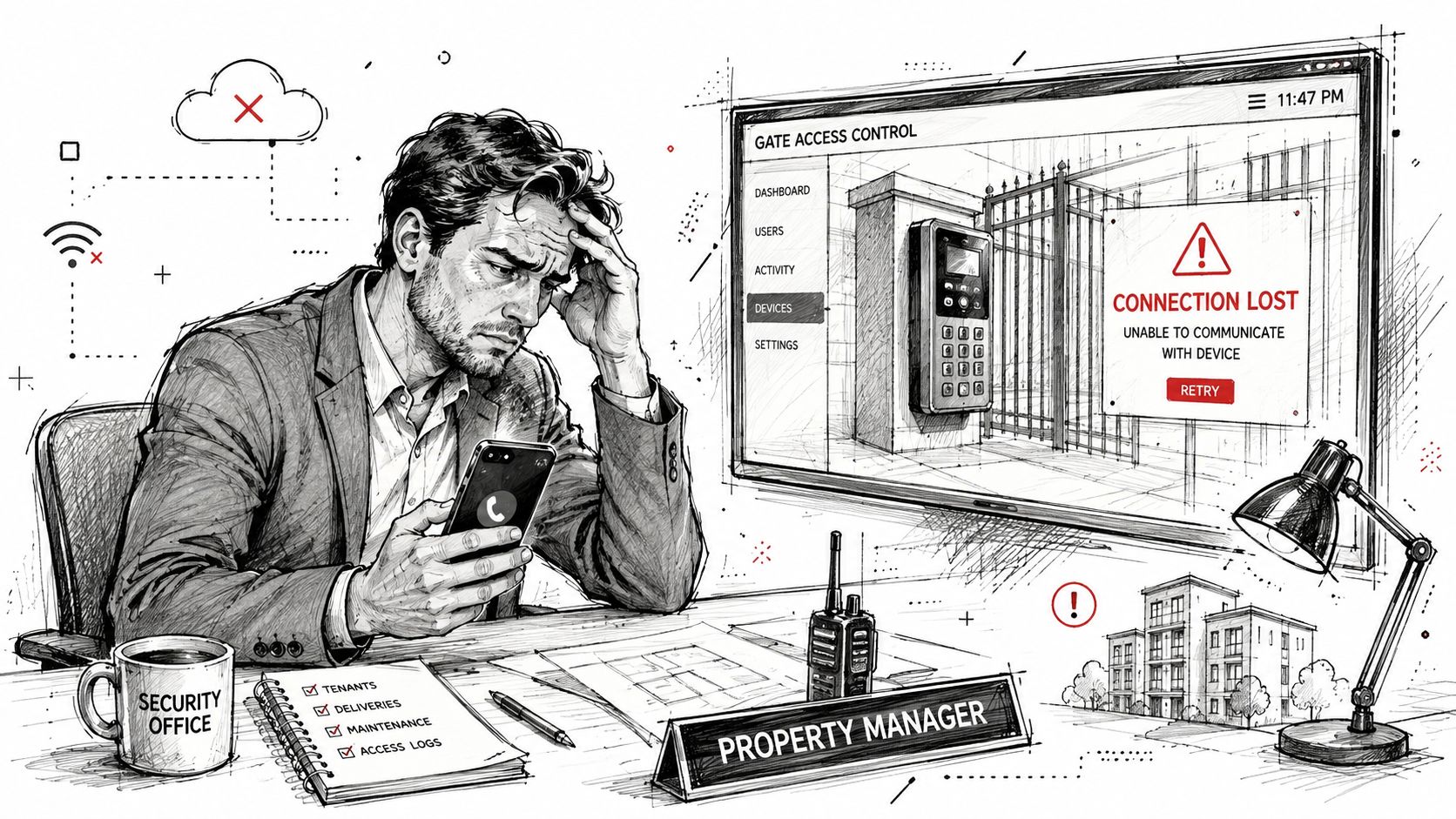
At 10 PM, a property manager gets the call nobody wants: the community gate won't open. Residents are waiting in a line of cars, the gate operator is powered, and the access-control panel looks normal. The problem turns out to be a dropped connection between the gate and the property network.
A WiFi bridge kit can prevent the need to trench cable between a clubhouse, guardhouse, apartment building, and remote gate. It can also introduce a new outdoor failure point that general-purpose Wi-Fi was never designed to handle. For HOA security and property managers, the important question isn't whether a wireless bridge can carry data. It's whether that connection will remain dependable when residents need access, credentials must be revoked, and the network changes.
Table of Contents
- Why Property Managers Are Looking at WiFi Bridge Kits
- How a WiFi Bridge Kit Actually Works
- Real-World Performance Limits You Won't See on the Box
- WiFi Bridge Kits vs Cellular Access Control Systems
- Installation Requirements and Gate Operator Compatibility
- Security and Reliability Risks of Wi-Fi at the Gate
- Choosing the Right Connectivity for Your Property
Why Property Managers Are Looking at WiFi Bridge Kits
A WiFi bridge kit connects a remote wired device to an existing network without requiring a physical Ethernet run between locations. In a gated community, one bridge unit connects to the property network, while the other connects to the gate operator or access-control panel.
That sounds straightforward, and often it is. A preconfigured point-to-point kit can be installed faster than trenching, conduit, and cable across a driveway or landscaped area. For a detached gate, warehouse entrance, or remote parking barrier, the approach can reduce disruption and simplify a retrofit.
Consider a small HOA with a gate operator at the street and the management office several buildings away. The board may prefer a bridge because it avoids excavation, preserves the current gate hardware, and gives an installer a relatively quick deployment path. A homeowner may make the same choice for an electronic driveway gate separated from the house by a long approach.
Property managers also evaluate connectivity alongside broader operations. A platform such as property management software with RealEstateCRM can organize resident and property workflows, but the gate still needs a dependable connection to receive access commands and report activity.
Where the appeal is strongest
A WiFi bridge kit makes practical sense when:
- The route is difficult to trench: Driveways, retaining walls, mature landscaping, and public rights of way can make cabling disruptive.
- The existing network is stable: A strong network at the source location gives the bridge a reliable backhaul to use.
- The gate is not the only control path: Staff may have local controls or another method for entry during an outage.
- The deployment is limited: A single remote point is easier to engineer than a growing network of gates and buildings.
The trade-off is important. A bridge doesn't remove connectivity risk. It moves that risk outdoors, where alignment, interference, weather, power, and physical movement can affect performance. Properties seeking multifamily gate access control should therefore evaluate the bridge as part of the complete access system, not as a simple replacement for cable.
How a WiFi Bridge Kit Actually Works
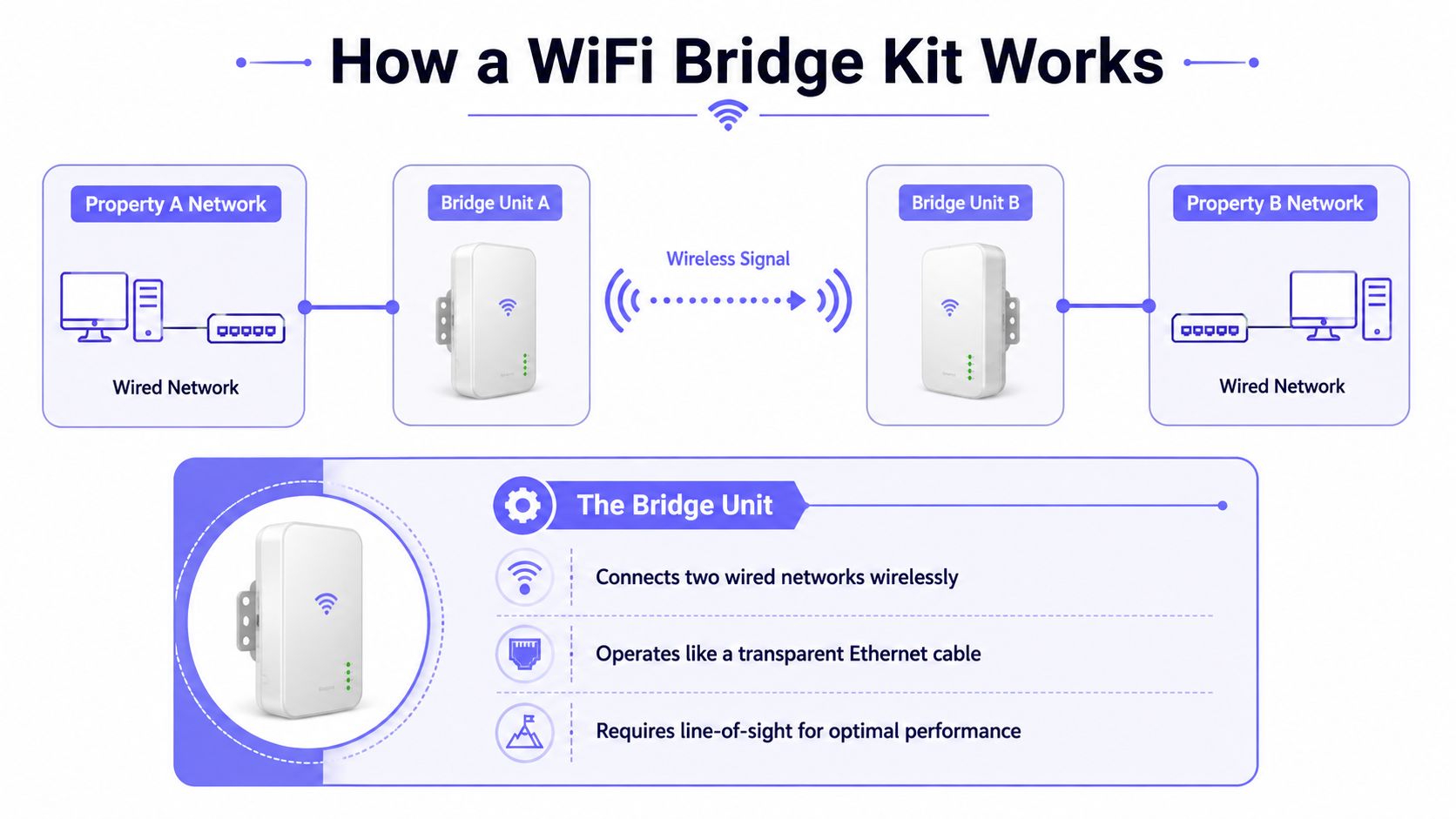
A wireless bridge links two wired network segments over the air. The simplest analogy is an invisible Ethernet cable. One end plugs into the source network, the other end hands off Ethernet to a gate controller, access-control panel, switch, or another network device.
The basic connection path
- Source network: Bridge Unit A connects by Ethernet to the property router or network switch.
- Wireless path: The two radios exchange traffic through a focused wireless link.
- Remote handoff: Bridge Unit B delivers the connection through Ethernet to the gate equipment.
- Device communication: The gate controller communicates with the broader network as though a cable connected the locations.
A point-to-point configuration uses two units and serves one remote endpoint. Point-to-multipoint designs use one central radio with multiple remote units, but each additional endpoint adds planning, capacity, and support considerations.
Outdoor systems commonly use the 5 GHz band with 802.11ac or 802.11ax-class radios. A current product class can advertise distances from about 5 km to 15 km and nominal 5 GHz PHY rates up to 867 Mbps, although those figures describe radio link capacity rather than application payload according to the manufacturer datasheet.
Why the standard matters
The IEEE formed the 802.11 working group in 1990, and the first 802.11 standard arrived in 1997. Amendment 802.11c later addressed bridge operation procedures and was incorporated into IEEE 802.1D in 2001, showing that bridging was formalized early in Wi-Fi's development in this historical overview.
802.11ac supports 20, 40, 80, and optional 160 MHz channels, with up to eight spatial streams. Its theoretical rates can reach 1.3 Gbps for 80 MHz 2×2 MIMO and about 1.73 Gbps for 80 MHz 4×4 MIMO as summarized in this technical paper. Actual gate traffic generally needs far less capacity, but the available margin can matter when video, cameras, management traffic, and access events share the link.
The bridge's advertised rate won't reveal its sustained performance. Channel width, modulation stability, interference, antenna alignment, and clear line-of-sight determine how much usable throughput reaches the gate. Readers comparing bridge options with general guidance on how to boost WiFi signal in rural areas should distinguish broad coverage from a dedicated point-to-point link.
Real-World Performance Limits You Won't See on the Box
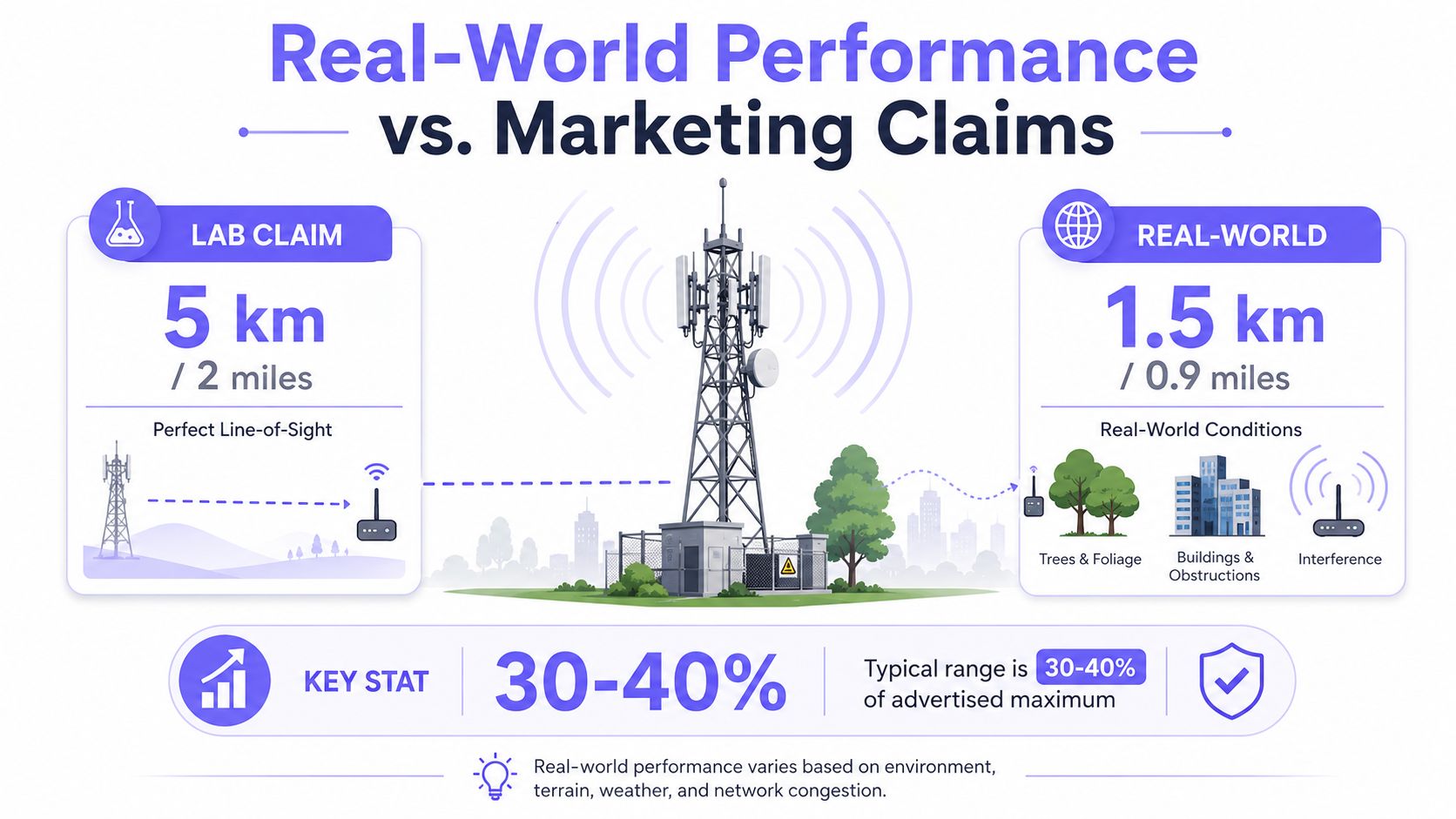
A bridge can meet its advertised range in favorable conditions and still disappoint at a property. Manufacturers and installers often describe maximum distances under controlled assumptions, while a gate installation includes trees, buildings, reflective surfaces, radio congestion, moving equipment, and mounting hardware that shifts in wind.
A product source explicitly notes that advertised 5 km coverage is laboratory-based and that actual results vary with antenna performance, client limitations, and environmental conditions in its product documentation. Another industry source identifies aiming, interference, and distance as factors that can reduce bridge speed in its discussion of wireless bridge performance.
Line-of-sight is a design requirement
A clear path between radios matters because focused outdoor antennas depend on a clean wireless corridor. A building that partially blocks the path, a row of dense trees, or vegetation that grows into the signal zone can reduce stability even when both units remain powered.
Seasonal changes create a maintenance problem. A path that looks clear during installation may become obstructed as branches grow, leaves appear, or construction adds a new structure. Rain and other environmental conditions can also reduce available margin, particularly on longer or already marginal links.
Alignment can decide whether the gate works
Link-budget calculations account for transmit power, antenna gain, cable loss, and free-space path loss. The engineering guide from PingDo warns that a 2-degree tilt on a high-gain dish can cost roughly 6 to 10 dB, which may break a marginal link in its wireless link-budget guidance.
That is why rigid mounting and careful aiming matter more than a headline speed. An installer should verify signal quality after tightening the hardware, not only while holding the unit in its approximate position.
Practical rule: Design for usable margin, not maximum distance. A link that barely works on installation day has little resilience when interference, weather, or vegetation changes.
The market is expanding, but buyer confusion remains. One estimate places the wireless bridge market at USD 1.82 billion in 2025, forecasting USD 3.13 billion by 2030 at an 11.5% CAGR. Another estimate places the category at USD 3.0 billion in 2025 and USD 14.14 billion by 2034 at an 18.8% CAGR, while Wi-Fi bridge segments were estimated to represent 43.0% of the wireless bridge market in 2026 in the cited market report. Growth doesn't eliminate the need for a site survey or a backup access plan.
For ongoing visibility, property teams can pair the installation with network monitoring for SMBs, provided the monitoring system can identify bridge health separately from the gate operator itself.
WiFi Bridge Kits vs Cellular Access Control Systems
A WiFi bridge is a networking component. Cellular access control is a purpose-built connection between the access platform and the gate hardware. Both can send commands, but they place responsibility in different parts of the property infrastructure.
| Criteria | WiFi Bridge Kit | Cellular Access Control |
|---|---|---|
| Connectivity | Depends on the source network, radio path, alignment, power, and local interference | Uses a cellular connection at the controller and doesn't depend on the property's Wi-Fi |
| Installation | Requires two mounted units, clear path planning, PoE, Ethernet runs, and aiming | Typically retrofits existing gate wiring without a wireless bridge between buildings |
| Network exposure | Adds outdoor radio equipment connected to the property network | Separates access traffic from the local Wi-Fi infrastructure |
| Credentials | Often depends on the connected access platform and its account controls | Supports app-based digital credentials that administrators can grant, revoke, and schedule |
| Auditability | Depends on the gate system and network design | Can provide entry records and centralized credential administration |
| Maintenance | Requires attention to firmware, alignment, weatherproofing, and changes around the link | Reduces local network dependencies and can support over-the-air updates |
| Best fit | Remote devices, non-critical networking, and sites with a robust wireless path | Managed gates where reliability, user identity, remote administration, and audit records matter |
A WiFi bridge can be appropriate for a detached building, camera backhaul, or a gate where the access system already has strong local controls. It may also be the only practical option when a property has reliable network infrastructure and the radio path is easy to maintain.
A cellular system removes the gate's dependence on the property's Wi-Fi. Nimbio, for example, uses cellular connectivity and a hardware retrofit to connect electronic gates, call boxes, and building entry systems with smartphone-based access. Administrators can issue or revoke digital keys, manage visitors remotely, and review entry activity without extending the property network to the gate.
The operational distinction
Wi-Fi bridge maintenance belongs partly to the network team and partly to the low-voltage installer. A change to the router, firewall, power supply, or outdoor mounting can affect access.
Cellular access control creates a more self-contained access path. Property managers evaluating Wi-Fi vs LTE gate security comparison should focus on the failure consequences, not just the purchase price. A short outage affecting a workshop is inconvenient. An outage affecting the only resident entrance can become an emergency support issue.
Installation Requirements and Gate Operator Compatibility
A WiFi bridge installation succeeds or fails before the first access credential is tested. The installer must confirm the radio path, mounting surface, power plan, Ethernet handoff, and gate-controller requirements as one system.
A preconfigured point-to-point bridge can connect remote locations wirelessly up to 2 miles, and one example uses a ruggedized IP67 outdoor enclosure with a rainproof rating and an operating range of -40 to 167°F as described in the product documentation. Those specifications describe the hardware's design conditions, not a guarantee that every site will produce a stable access connection.
Field checklist
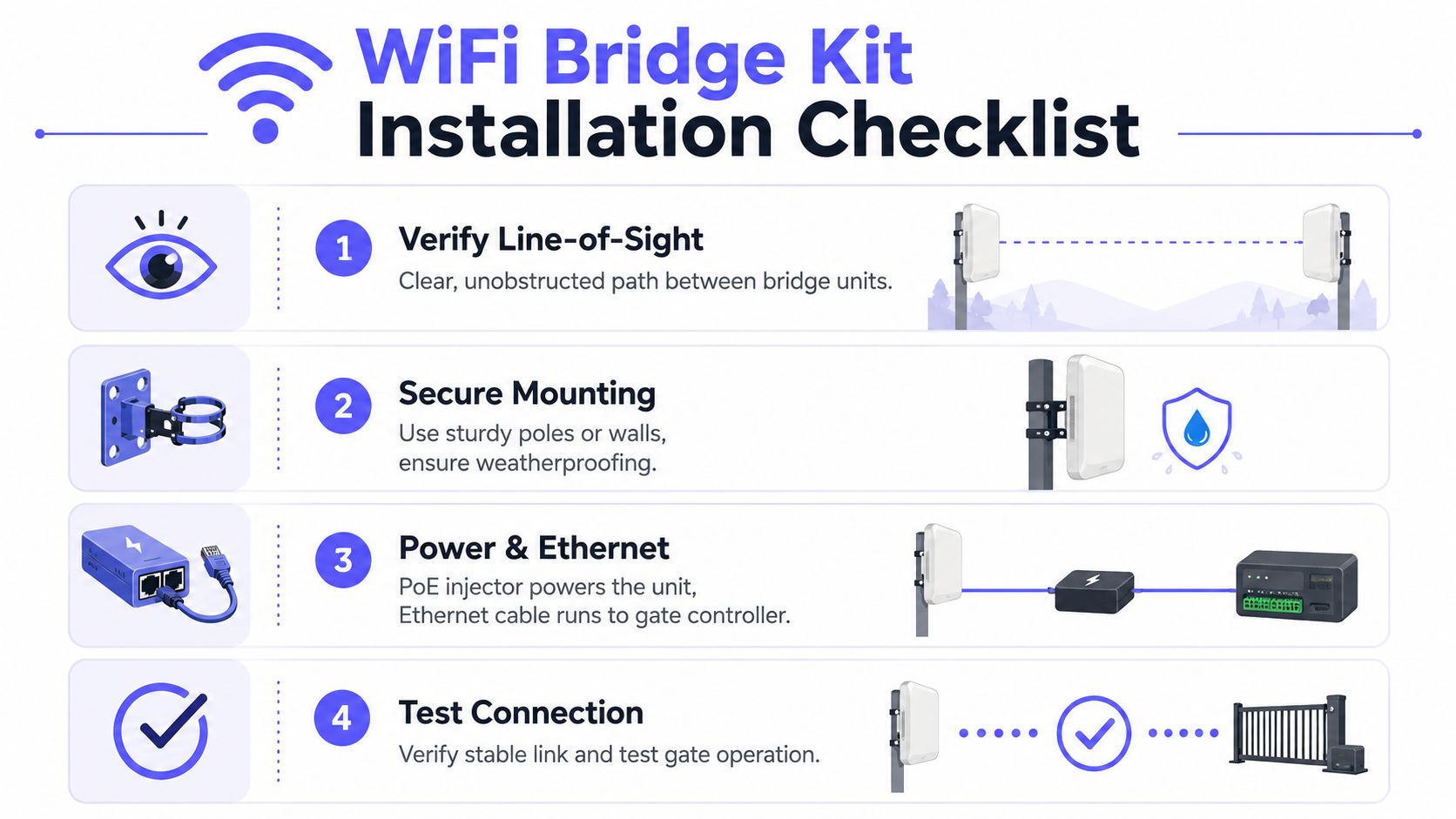
- Verify line-of-sight: Confirm that buildings, trees, signs, and future landscaping won't obstruct the path.
- Secure the mount: Use a rigid pole or wall mount. Prevent wind movement, water entry, and cable strain.
- Plan PoE and Ethernet: Many bridge units use PoE, allowing one cable to carry power and data. Confirm the injector, cable route, grounding, and weather sealing.
- Test the gate under load: Verify the bridge link, command delivery, status reporting, and normal gate operation. Test during the conditions most likely to expose weakness.
The remote unit typically hands off Ethernet to a gate controller or access panel. Compatibility therefore depends less on the bridge brand and more on the gate equipment's network interface, control protocol, power arrangement, and access software.
Common operator brands found in residential, multifamily, and commercial deployments include LiftMaster, Viking, FAAC, Nice, DoorKing, and Mighty Mule. A bridge can provide network connectivity to these systems, but it doesn't automatically provide credential management, visitor workflows, or a complete audit trail.
Common installation mistakes
- Weak fade margin: The link works during commissioning but has no reserve for interference or weather.
- Loose alignment: A pole moves, the antenna shifts, and performance falls without an obvious equipment failure.
- Poor weatherproofing: Water enters cable ends, PoE components, or junction points.
- Unplanned interference: Nearby radios, industrial equipment, or congested channels reduce stability.
- Wrong integration assumption: A network connection is mistaken for full remote access control.
A cellular retrofit may be more appropriate when the property needs managed credentials rather than a basic remote trigger.
Security and Reliability Risks of Wi-Fi at the Gate
A gate is not just another network endpoint. It controls vehicle movement, resident access, deliveries, contractors, and emergency entry. That role raises the required standard for uptime, identity management, and accountability.
A WiFi bridge adds another path into the access environment. The property team must protect the source network, secure the bridge configuration, restrict administrative access, maintain firmware, and account for radio exposure. Interference and signal degradation can also interrupt commands even when the gate operator itself has power.
Traditional remote gate arrangements often rely on shared PINs, clickers, or credentials that staff cannot easily trace to one individual. When a resident moves out or a contractor's work ends, the property may have no reliable way to revoke every shared credential without changing the code for everyone.
What managed cellular access changes
A cellular access-control platform can separate gate connectivity from the community Wi-Fi and support:
- Per-user digital keys: Administrators can issue access to named residents, staff, vendors, or guests.
- Revocation and scheduling: Credentials can be removed or limited by time without distributing a new shared code.
- Entry records: Real-time logs help property managers investigate access events and confirm operational status.
- Remote visitor management: Residents or staff can handle approved visitors without issuing permanent credentials.
- Over-the-air maintenance: The access platform can receive firmware and feature updates without a local bridge reconfiguration.
Access control should be judged by what happens during an outage, a personnel change, or a security investigation, not only by the speed shown during installation.
Cellular isn't immune to every failure. Coverage, carrier service, power, and the controller itself still matter. The advantage is architectural: the gate no longer depends on the property's Wi-Fi signal, router configuration, or outdoor point-to-point alignment.
Choosing the Right Connectivity for Your Property
The right choice starts with the access requirement, not the advertised radio range. A property manager should ask whether the gate needs occasional remote triggering or continuous, accountable access administration for many users.
A WiFi bridge kit may fit a site with a short, unobstructed path, stable source networking, limited user management, and a practical fallback for local operation. It can also suit a non-critical remote device where a temporary outage won't strand residents or prevent emergency access.
Cellular access control is usually the stronger fit when the property needs:
- Independent connectivity: The gate should operate without relying on the community's Wi-Fi infrastructure.
- Credential control: Staff need to grant, revoke, schedule, and audit individual digital keys.
- Remote administration: Managers need to change permissions or respond to visitors away from the property.
- Scalable operations: The platform must support multiple entrances, buildings, user groups, and administrative roles.
- Accountability: Entry logs must help resolve disputes, investigate incidents, and verify access activity.
Compare total ownership, not only installation
A bridge's initial hardware cost is only one part of ownership. The property should also account for site surveys, mounting, PoE equipment, weatherproofing, troubleshooting, firmware work, and future changes to trees, buildings, or the local network.
A cellular platform may use a hardware-plus-subscription model. Nimbio offers that model with fixed monthly rates for residential and multifamily properties, usage-based pricing for commercial sites, and a lifetime hardware warranty for replacement needs. Those terms can make a self-contained cellular retrofit easier for smaller communities to budget, although every property should confirm current pricing and service conditions directly.
For a structured gate access system evaluation criteria, the board or property manager should document:
- Site conditions: Line-of-sight, power, network availability, carrier coverage, and environmental exposure.
- Access policy: Residents, guests, vendors, staff, emergency services, and temporary permissions.
- Failure response: Manual release, local control, support ownership, and communication procedures.
- Lifecycle cost: Hardware, subscriptions, service visits, replacements, and administrative labor.
- Vendor responsibility: Warranty terms, software updates, support hours, and installer assistance.
A WiFi bridge can be a sound networking tool when its limitations match the site. For a gate that residents depend on every day, connectivity should support the access policy, not dictate it.
Nimbio provides cellular, smartphone-controlled access for electronic gates, call boxes, and building entry systems, with remote visitor management and digital credential administration that doesn't depend on a local Wi-Fi bridge. Visit Nimbio to evaluate a retrofit approach for the property's existing gate operator and discuss a more manageable access-control connection.


