

The most popular advice about a wireless access control keypad is also the least complete: install one and the access-control problem is solved. A keypad can eliminate trenching and simplify retrofit work, but it still depends on batteries, radio conditions, code discipline, and a reliable gate operator or lock.
For a property manager, HOA board, installer, or resident, the better question is not whether a keypad is convenient. It's whether PIN-based entry provides enough accountability and control for the property. Wireless keypads remain useful, especially at difficult-to-wire gates, but cellular smartphone credentials are increasingly becoming the longer-term direction for access management.
Wireless access control has moved beyond niche deployment. The 2025 Assa Abloy wireless access report says 42% of end users deploy wireless locks, compared with 39% in 2023, a 3-point increase over two years. The broader access-control market is also substantial, with Fortune Business Insights estimating USD 11.62 billion in 2025 and projecting USD 26.22 billion by 2034, at a projected 9.46% CAGR (market context via the referenced access-control material).
The practical conclusion is straightforward: a keypad can be a strong retrofit layer, but it shouldn't automatically be treated as the final access strategy.
Table of Contents
- What a Wireless Access Control Keypad Actually Is
- How Wireless Keypads Communicate, Authenticate, and Stay Powered
- Wireless vs Wired Keypads: The Retrofit Trade-Offs
- Key Features to Evaluate Before You Buy
- Integrating Keypads With Smartphone Apps and Cloud Controllers
- Installation, Maintenance, and Failure Modes That Matter
- Use Cases for Residential, Multifamily, and Commercial Properties
- Pricing, Compliance, and the Move Beyond Shared PINs
What a Wireless Access Control Keypad Actually Is
A wireless access control keypad is a numeric input panel that sends an open command over radio instead of relying on a physical cable between the keypad and the gate operator or door lock. The device may use battery power, low-voltage power, or a controller-assisted design.
The keypad doesn't open the gate by making the access decision itself. It reads a PIN, checks or forwards that credential, and sends a signal to a paired receiver, relay, or access controller. That downstream equipment then triggers the electronic gate operator, magnetic lock, electric strike, or similar hardware.
Where the keypad fits
The distinction matters because several products look similar from the outside:
- Mechanical keypad: Uses physical buttons and a mechanical locking mechanism. It may work without batteries or radio.
- Wired keypad: Sends signals through a cable to the access-control panel or gate operator.
- Wireless keypad: Transmits the entry signal by radio, often to a receiver near the operator.
- Credentialed access system: Manages individual users, permissions, schedules, revocation, and event history through a controller or software platform.
A keypad is therefore one credential input inside a broader access workflow. It isn't equivalent to cloud-based access control, mobile credentials, or a full audit system.
Practical rule: A keypad answers “was a valid code entered?” A connected access platform can answer “which user entered, when, under what permission, and who can revoke that access now?”
Wireless keypads earn their place during retrofits. They're especially practical where paving, landscaping, concrete, or long distances make new conduit unattractive. The technology can avoid civil work while preserving an existing gate operator, which explains why wireless control technologies continue to expand. Maximize Market Research estimates the wireless access-control market at USD 13.09 billion in 2024 and projects USD 24.59 billion by 2032, with an expected 8.2% CAGR (market figures referenced in the provided access-control material).
The limitation is the credential itself. Shared PINs spread easily among residents, contractors, delivery personnel, and former occupants. A wireless keypad can modernize the physical entry point, but it doesn't automatically create individual accountability.
How Wireless Keypads Communicate, Authenticate, and Stay Powered
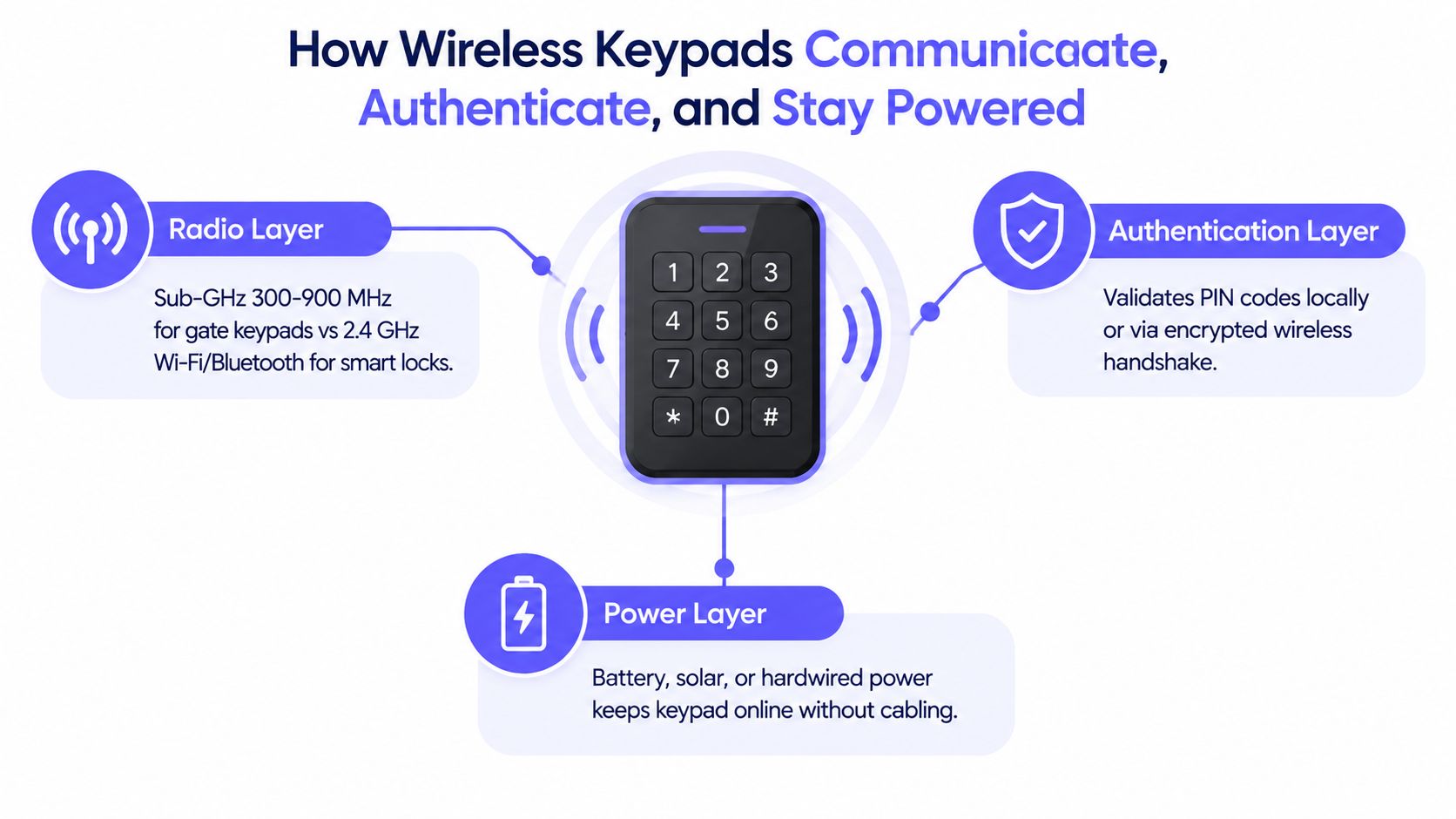
A wireless keypad is not a single technology. It combines a radio path, an authentication method, and a power system. Those layers determine whether a retrofit works reliably, and whether the keypad can remain useful as properties move toward smartphone credentials.
The radio layer
Gate-oriented keypads commonly use sub-GHz frequencies such as 433.92 MHz or 868 MHz. Many smart locks instead use 2.4 GHz Wi-Fi or Bluetooth. Lower-frequency RF generally passes through walls and foliage more effectively than 2.4 GHz, although metal gate operators, concrete, landscaping, and interference can still reduce range. Product details for the Nice Era EDSW describe these frequency and operating characteristics (Nice Era EDSW technical information).
Published products report open-area ranges from about 25 meters indoors to 200 meters or more in line-of-sight conditions. Treat those figures as test conditions, not a property guarantee. A receiver should be tested at the actual gate, with the gate closed and nearby obstructions present.
The receiver validates the radio message before activating the operator. With a protected rolling-code system, a code captured from one opening should not be accepted again as though it were a new request. That protection addresses replayed transmissions, while separate PIN controls address who is allowed to request entry.
The authentication layer
A basic keypad sends a valid PIN to a paired receiver. More advanced products use rolling codes, two-way communication, code hopping, encryption, or frequency hopping. These methods reduce replay risk compared with fixed-code remotes, but they do not make a shared or poorly managed PIN individually accountable. The Centurion SmartGuard specifications illustrate how keypad capacity and code management can vary between products (Centurion SmartGuard keypad specifications).
Some wireless keypads support up to 1,000 unique PIN codes, user-defined code lengths from 1 to 10 digits, and 15 separate radio channels paired with code-hopping receivers.
That makes the keypad a useful retrofit layer, not necessarily the long-term credential. Cellular smartphone access can associate entry with a person, apply permissions remotely, and reduce dependence on shared PINs. See how cellular gate access works when comparing that model with keypad entry.
The power layer
Battery operation avoids trenching power to the keypad. Specifications include standby current below 10 µA, battery life around 24 months, and 3-year life on four AA batteries. Other products claim up to 9,000 openings or roughly one year on AAA batteries, depending on use (SAK7 keypad specifications).
Each transmission, backlight event, and relay action uses energy. High-traffic entrances may suit external power or a controller-assisted design, especially where cold weather can reduce battery performance.
Wireless vs Wired Keypads: The Retrofit Trade-Offs
A wireless keypad is often the better retrofit choice, but it is rarely the final access-control destination. The decision should focus on installation work, reliability, and failure behavior, not on whether one connection type sounds more modern.
A wired keypad creates a physical path to the controller or gate operator. That reduces radio variables and removes a keypad battery, but the route may require trenching, conduit, surface repair, and coordination with landscaping or paving. Retrofit guidance identifies trenching and conduit costs of $500 to $2,000 per gate run, an expense wireless systems can avoid.
Wireless technology moves those responsibilities elsewhere. Installation is usually simpler, yet the property depends on RF conditions, battery servicing, receiver placement, and protocol pairing. Latency may also differ because the wireless system adds an RF transmission step before the controller receives the request.
| Factor | Wired Keypad | Wireless Keypad |
|---|---|---|
| Installation | Requires cable, conduit, and physical routing | Avoids a dedicated cable run to the keypad |
| Retrofit cost | Civil work can make the project expensive | Often reduces trenching and surface restoration |
| Reliability | Less exposed to RF interference | Depends on receiver placement and radio conditions |
| Power | Usually supplied through wiring | Often battery-powered or locally powered |
| Failure mode | Cable damage, power loss, relay failure | Dead battery, RF interference, desynchronization |
| Best fit | High-cycle commercial entries | Difficult-to-wire gates and retrofit doors |
Site rule: Wireless is a practical choice when the entry is more than roughly 50 feet from a powered structure, excavation would disturb pavement or landscaping, or the budget cannot absorb civil work. Wired remains preferable for high-cycle commercial access when uptime and signal security justify the installation effort.
The keypad also deserves a clear role in the access plan. It can bridge an existing gate operator and a property that is not ready for a full credential change. Over time, cellular smartphone credentials can associate entry with a person and allow permissions to be managed remotely, reducing reliance on shared PINs. Property teams can review how a GSM gate opener works when considering remote credentials alongside the existing operator.
Installers should test the actual RF path around metal gate housings and concrete structures. A receiver near the operator may perform differently from one inside a metal enclosure, so testing should happen before final mounting.
Key Features to Evaluate Before You Buy
A wireless keypad can look impressive on a product sheet and still fail at a specific gate. Evaluate each feature as a decision filter tied to the property's security risk, environment, and operating model. The keypad is often a retrofit layer, not the long-term credential system. Choose hardware that can serve the site now without blocking a later move to cellular smartphone access.
Security and authentication
Start with the authentication method. Look for AES-128 or equivalent protection, rolling-code transmission, and replay protection. A rolling code changes the authentication value between sessions, unlike a static signal that can be captured and reused.
The PIN policy matters as much as the encryption. Guidance from FarPointe Data recommends avoiding short, sequential, or patterned codes, assigning unique PINs, changing codes regularly, and positioning the keypad to reduce shoulder-surfing and wear-based disclosure (PIN best-practices guide). Shared codes may be convenient, but they make permission changes and event review harder.
Power and environment
Battery performance should match actual traffic, weather, and service access. Confirm:
- Battery chemistry: Lithium is generally better suited to cold climates than alkaline batteries.
- Service expectation: Check realistic battery life under the expected entry pattern.
- Alerts: Confirm whether low-battery warnings reach a controller or administrator.
- Backup power: Determine whether external power or a wired fallback is available.
- Outdoor protection: Select an ingress rating suited to exposure, with greater protection for exposed gates.
For outdoor installations, examine impact resistance, sunlight readability, button durability, and operating-temperature limits. A keypad that works in a sheltered lobby may be a poor fit for a gate exposed to rain, dust, or direct sun.
Connectivity and compatibility
Wireless describes the connection method, not a single standard. The unit may use Wi-Fi, sub-GHz RF such as 433 MHz or 868 MHz, Bluetooth, or Z-Wave. Metal gates, masonry walls, and nearby electrical equipment can weaken or disrupt the signal, so the protocol must fit the building and gate construction.
Check the electrical and data interface before purchase. The keypad's relay output, voltage, and support for Wiegand or OSDP must match the existing gate operator or door hardware. A secure keypad is still unusable if its output cannot activate the installed controller.
| Feature Category | What to Verify | Minimum Acceptable Threshold |
|---|---|---|
| Encryption | Encryption method, rolling code, replay protection | AES-128 or equivalent documented protection |
| Battery | Chemistry, traffic assumptions, low-battery alert | Documented battery life suited to the design |
| Radio | Frequency, receiver placement, interference tolerance | Suitable protocol for the property's construction |
| Outdoor housing | Ingress and impact resistance | Appropriate IP rating for exposure |
| Integration | Relay voltage, Wiegand, OSDP, operator compatibility | Written integration documentation |
| Administration | User capacity, logs, revocation | Individual codes or connected credential management |
Before selecting hardware, property teams can use these gate access system evaluation criteria to assess the retrofit path, controller requirements, and eventual move beyond shared PINs.
Integrating Keypads With Smartphone Apps and Cloud Controllers
A standalone keypad becomes more useful when a controller gives it administrative context. Without that layer, the keypad may only send a relay trigger. With a connected controller, the system can associate credentials with permissions, schedules, event logs, and revocation rules.
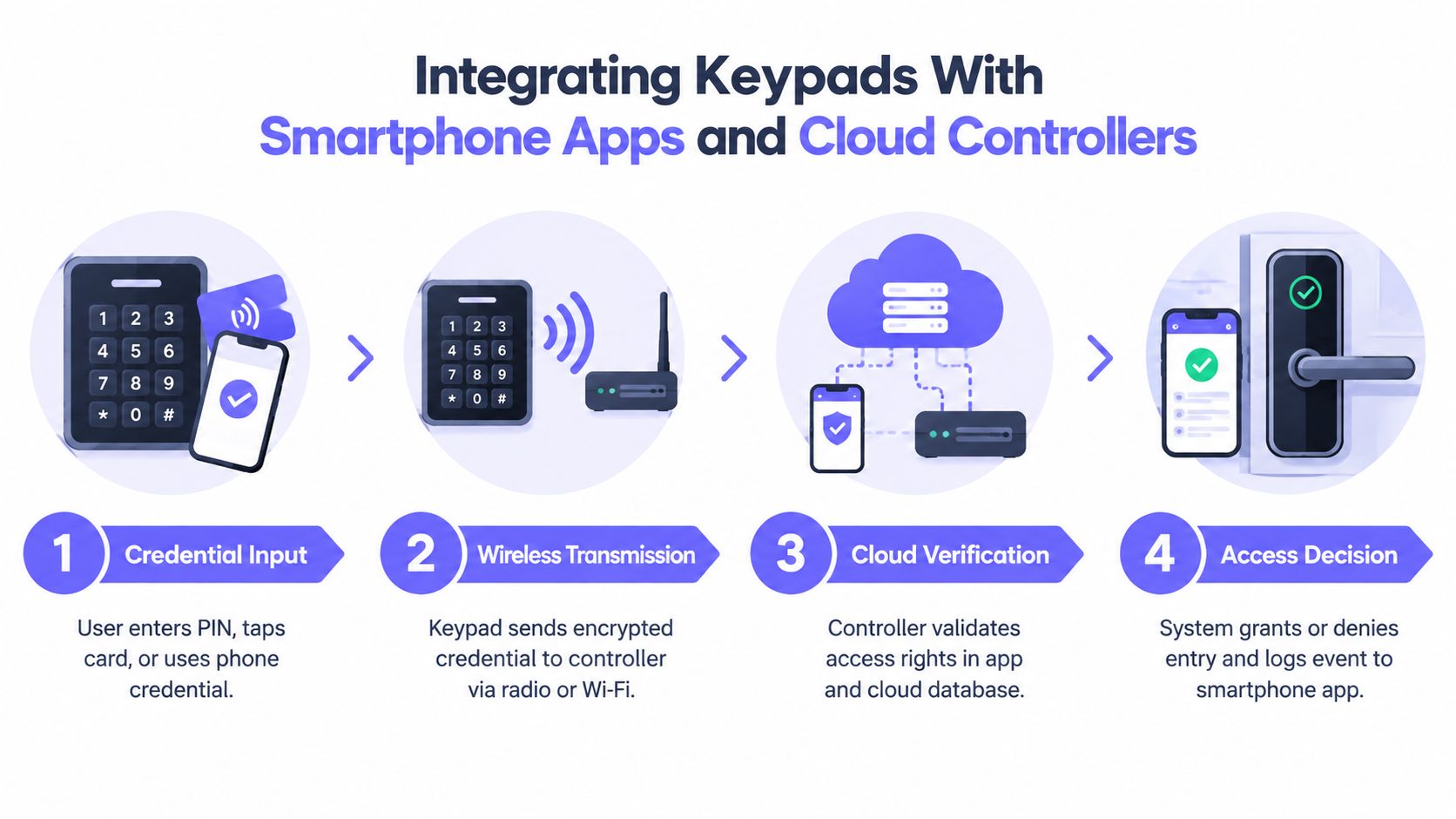
The integration pattern is easier to understand as a sequence:
- Credential input: A user enters a PIN, presents a card, or uses a phone credential.
- Wireless transmission: The keypad or reader sends the credential event to a receiver or controller.
- Access verification: The controller checks whether the user has permission at that entry and time.
- Access decision: The controller activates the relay, denies the request, and records the event when the platform supports logging.
A cellular retrofit controller such as Nimbio can sit between a legacy gate operator and a cloud-managed access system. The existing operator continues to perform the physical opening action, while the controller adds smartphone credentials, remote visitor management, scheduling, and credential administration.
Two integration tiers
Lightweight integration keeps the keypad close to the hardware. The keypad communicates with a receiver or relay, and the relay triggers the lock or gate. This approach is simple, but administration may require local programming and event visibility may be limited.
Networked integration connects the keypad and controller to a dashboard. A property manager can issue a temporary code to a delivery driver, revoke a former resident's access, or review an entry record without traveling to the gate.
The keypad can remain available for residents who don't use smartphones or for temporary visitors. Smartphone credentials can handle residents and staff who need individual identity, scheduled permissions, and remote revocation.
Modern technical specifications may also include dynamic-key encryption and frequency hopping to reduce interference and radio attack exposure (Ajax outdoor keypad technical specifications). Those protections improve the radio layer, but cloud administration is what adds operational visibility.
Installation, Maintenance, and Failure Modes That Matter
A wireless keypad is easier to retrofit than to maintain. Its real cost includes mounting, pairing, battery service, firmware, weather exposure, and a recovery plan when entry fails.
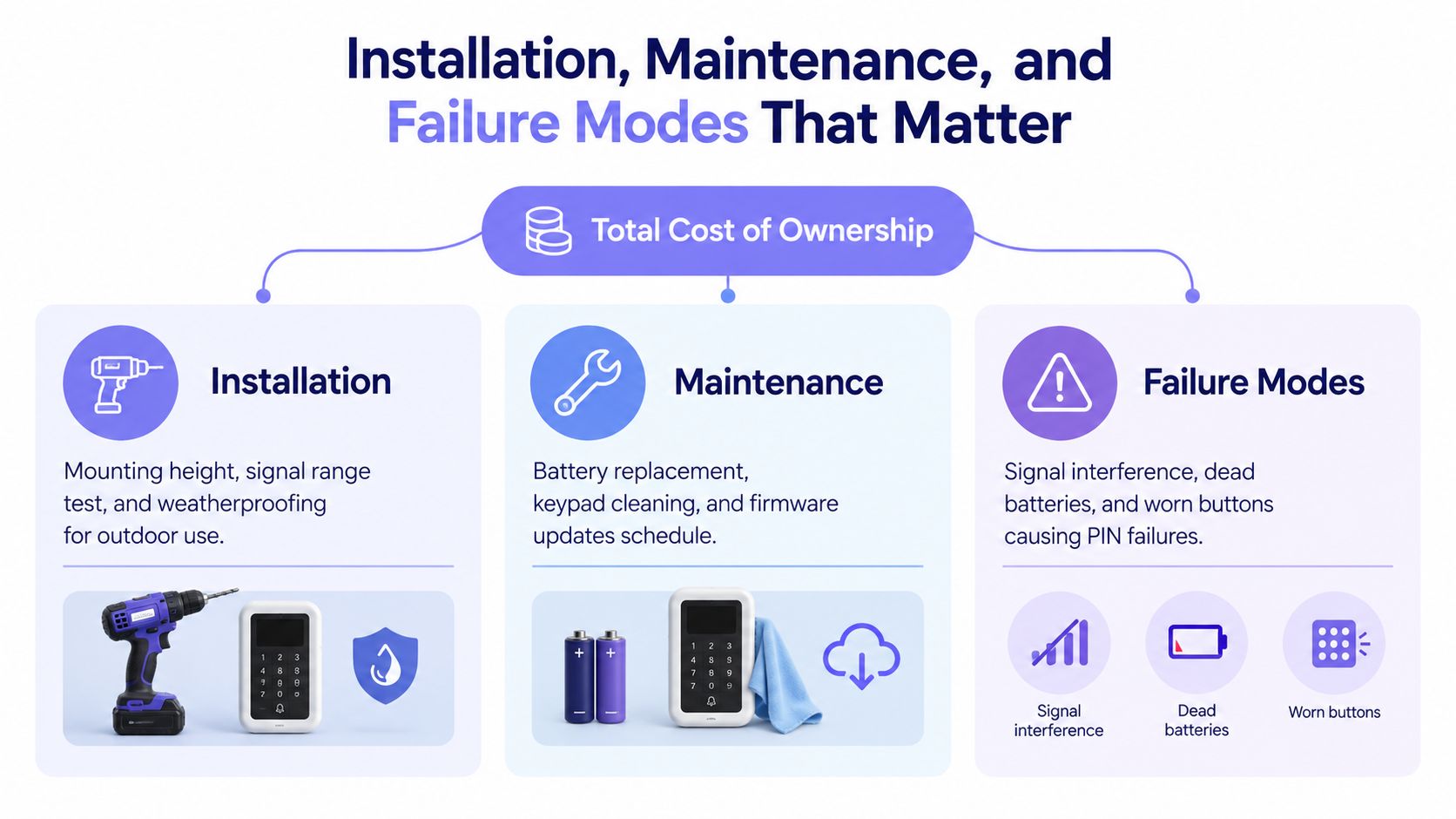
Treat commissioning like testing a small access system, not mounting a box:
- Mounting position: Keep the keypad in the intended radio path and at a practical user height. Metal surfaces can weaken the signal.
- Receiver pairing: Pair it with the receiver or controller before closing the enclosure, then record the pairing procedure for future service.
- Credential setup: Configure the master credential and user PINs with a named owner. Avoid leaving installer credentials active.
- Relay test: Test accepted and rejected credentials, then confirm the relay triggers the lock or gate operator consistently.
- Weather protection: Seal conduit entries, inspect enclosure joints, and check for water paths after heavy exposure.
A successful bench test proves little if the installed gate has metal obstructions, longer radio paths, or changing line of sight. Test the complete route under realistic conditions, including the position where users will enter a PIN.
Maintenance and failure response
Battery service is a scheduled operating task, not an occasional repair. Depending on traffic and device design, replacement may be needed within the interval documented for the equipment. Networked units also need firmware updates, surface cleaning, and confirmation that low-battery alerts reach the responsible manager. The SAK7 keypad specifications describe the type of battery and operating requirements to verify before setting a maintenance schedule (SAK7 keypad specifications).
Common failures have specific remedies:
- Cold-weather battery loss: Alkaline performance can fall sharply in freezing conditions. Use a battery chemistry approved for the device and replace packs before the cold season.
- RF desynchronization: Record receiver pairing steps and repeat them after a receiver or controller replacement.
- Memory loss: Select non-volatile credential storage where available, then verify credentials after power interruption.
- Relay contact problems: Protect relay hardware from moisture and inspect high-cycle installations for sticking or intermittent operation.
- Worn or contaminated buttons: Clean vandal-prone surfaces and test every key, especially digits used in common PINs.
Operational lesson: Wireless hardware reduces cable work during a retrofit, but it shifts cost toward batteries, inspections, and service visits. That makes the keypad a useful transition layer, not necessarily the property's long-term credential system.
Use Cases for Residential, Multifamily, and Commercial Properties
A wireless keypad's suitability changes with traffic, user turnover, and the level of accountability required.
For a single-family home, the device can work well at a side gate, detached garage, or driveway gate where a cable run would disturb finished surfaces. A keypad-only arrangement may be sufficient for a low-traffic property with a small, controlled user group.
For a multifamily property or gated HOA, the central problem is rarely the first installation. It's the ongoing management of residents, vendors, guests, and former occupants. A keypad can provide a familiar fallback, while mobile credentials and temporary visitor access reduce dependence on shared codes.
For a commercial property, the keypad is often more valuable as a secondary credential method than as the only control. Warehouses, yards, loading areas, and employee-only doors benefit from individual user identities, schedules, and audit records.
Commercial systems demonstrate why logging matters. One Schlage commercial platform lists up to 2,000 users and 2,000 audit records, while another keyless platform stores the last 1,000 event logs and supports export for review (Schlage commercial catalogue).
| Property Type | Best Keypad Role | Primary Benefit | Watch Out For |
|---|---|---|---|
| Single-family | Primary entry for a low-traffic gate | Avoids disruptive cable installation | Shared household codes can spread |
| Multifamily or HOA | Backup alongside app credentials | Supports residents, visitors, and service access | Shared PINs weaken accountability |
| Commercial | Secondary factor alongside cards or phones | Adds controlled entry and user-linked records | High traffic increases maintenance demands |
Property owners planning a broader installation can consult this Ottawa gate installation guide for context on gate hardware, access methods, and installation considerations.
The practical fit is clear: keypad-only works best for simpler residential use, keypad-plus-app suits multifamily operations, and keypad-as-secondary-factor fits commercial security programs.
Pricing, Compliance, and the Move Beyond Shared PINs
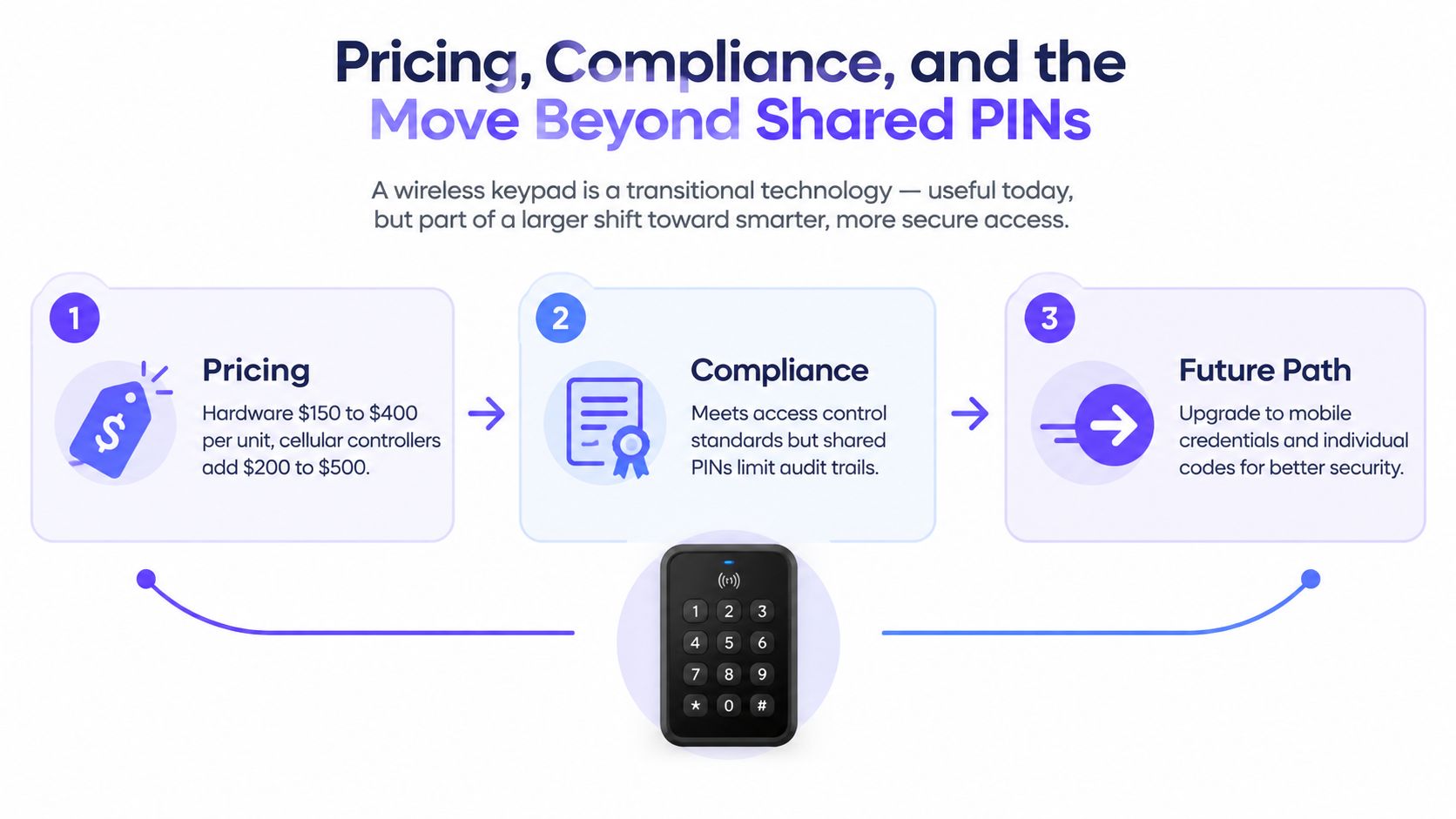
A wireless keypad may reduce retrofit expense by avoiding excavation, conduit, and surface restoration. As illustrative planning ranges, hardware may cost $150 to $400 per unit, while a cellular controller may add $200 to $500 plus a modest monthly data fee.
Those figures do not resolve the larger access-control question. A shared PIN identifies a code, not the person using it. The code may pass from a resident to a contractor and remain active after either party no longer needs entry.
The compliance baseline
Buyers increasingly look for encrypted RF communication, rolling-code protection, and audit logging. These controls reduce replay exposure and support investigations, but they cannot correct weak credential management.
A property manager should ask:
- Can each resident, employee, or vendor receive a unique credential?
- Can access be revoked without a site visit?
- Can temporary permissions expire automatically?
- Can the system show who used the entry point?
- Is there a usable fallback during connectivity or power problems?
Mobile credentials answer these questions more directly than a shared PIN. A smartphone credential can connect access to a user identity, follow a schedule, and be revoked when circumstances change. The keypad remains useful as a retrofit layer or backup path, rather than carrying the whole access program.
A 2025 door access keypad market report from MarketIntelo identifies networked keypads as a fast-growing segment and highlights mobile and touchless access as important trends. It also points to practical concerns around offline behavior, backup entry, and maintenance planning.
A wireless access control keypad is a bridge, not necessarily the destination. It can update a difficult gate quickly, while cellular smartphone credentials provide a stronger long-term foundation for HOA security, multifamily operations, and commercial property management.
Nimbio adds cellular smartphone access, remote visitor management, credential scheduling, and audit visibility to existing electronic gates and locks without relying on Wi-Fi at the gate. Property managers, HOA boards, and installers can visit Nimbio to evaluate a retrofit that keeps existing keypads and gate operators in service while shifting everyday access beyond shared PINs.


