

Most buying advice treats a wireless gate intercom system as an easy installation because it doesn't need a cable back to a building. That advice misses the part that fails in real properties. Wireless describes the connection between the gate station and the resident or property manager, not the power, mounting, relay wiring, or signal conditions at the gate.
A reliable system must answer three engineering questions: How does the gate reach the person approving entry? How does the gate station receive dependable power? How does the system trigger the existing gate operator? Cellular connectivity often beats Wi-Fi for a retrofit because it avoids dependence on local network coverage, but it still requires proper site planning.
The global door intercom market reflects growing demand for connected access control. One estimate values it at roughly USD 2.29 billion in 2024 and projects USD 3.40 billion by 2032, while another places the market at USD 4.09 billion in 2026 and forecasts USD 5.94 billion by 2031. The estimates differ, but both point to an expanding category shaped by security, automation, and remote-entry needs in North America, Europe, and Asia-Pacific (door intercom market analysis).
Table of Contents
- What a Wireless Gate Intercom System Does
- Cellular vs Wi-Fi vs Wired Gate Intercom
- Key Features That Matter in 2026
- Compatibility and Pre-Install Checklist
- How Visitor Access Works Step by Step
- Pros, Cons, and Honest Trade-Offs
- Why Cellular Retrofit Beats Full Replacement
- Choosing the Right System for Your Property
What a Wireless Gate Intercom System Does
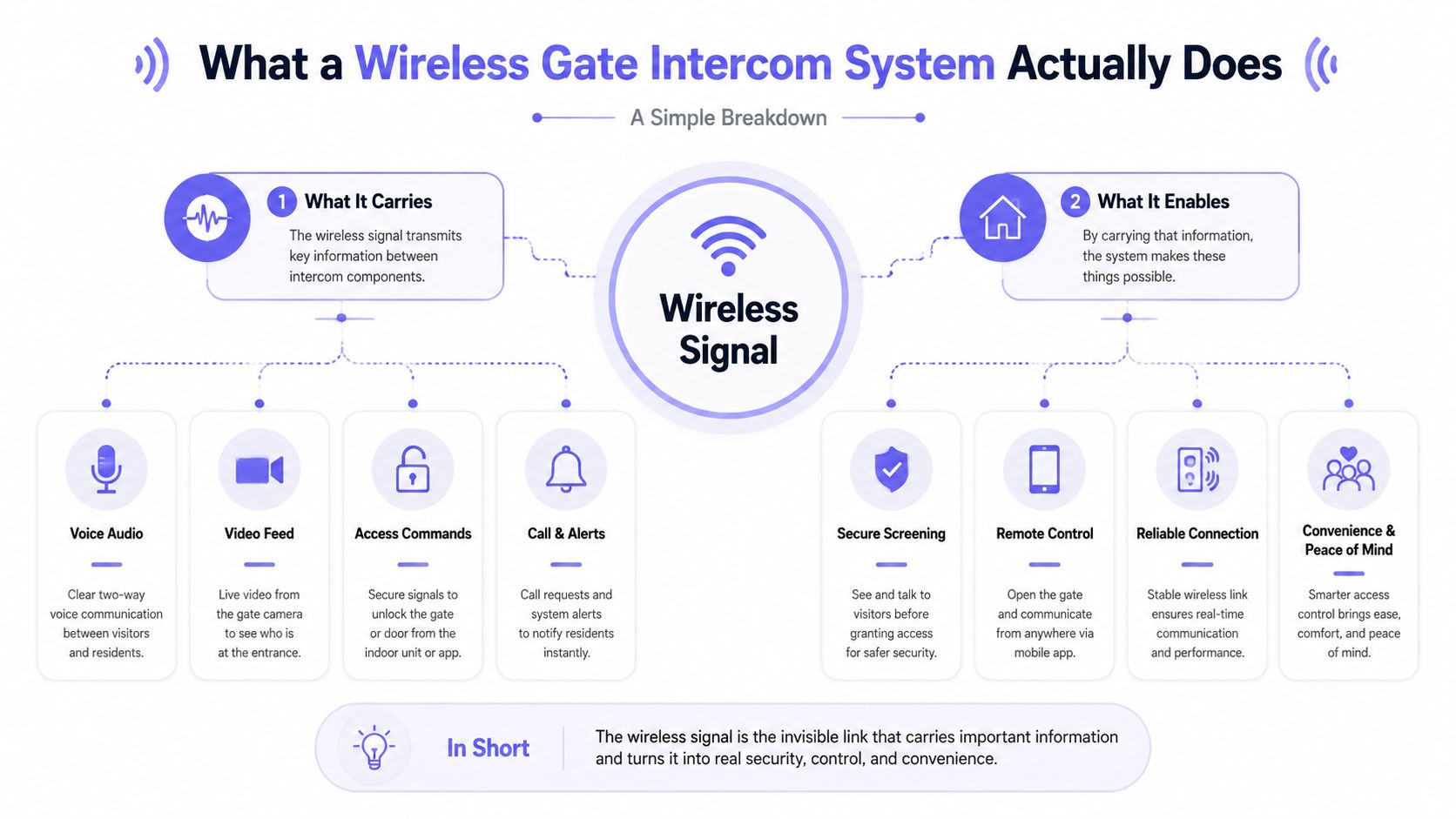
A wireless gate intercom system still depends on hardware at the entrance. Visitors may press a call button, scan a QR code, choose a directory entry, or enter a credential at the gate station. That station needs a weather-resistant mount, a dependable electrical supply, and a compatible connection to the gate operator's control board.
The wireless link carries communication between the gate and the resident or manager. Depending on the system, it handles voice, video, app notifications, access decisions, and event records. Opening the gate still requires a physical relay signal, commonly a momentary dry-contact closure, sent to the operator.
Three decisions that determine reliability
Treat the installation as three connected subsystems:
- Connectivity: Cellular or Wi-Fi carries the call and access command. Cellular operation does not require on-site Ethernet or Wi-Fi, but LTE reception, congestion, terrain, and metal enclosures can affect delivery and command execution (cellular gate intercom deployment guidance).
- Power: The gate station needs stable low-voltage power. A cellular modem, camera, speaker, display, and relay controller cannot perform reliably through an unstable supply.
- Relay integration: The intercom must send the electrical signal the operator accepts. An app can process an access request perfectly while the gate remains closed if the relay input or wiring is incompatible.
The practical failure points are power reliability, relay integration, and signal coverage. Call quality and app design matter, but they do not compensate for a weak supply, poor reception, or a mismatched operator input.
Practical rule: “Wireless” removes a communications cable. It still requires an electrical and mechanical site survey.
For HOAs, multifamily properties, and security installers, verify the gate post, operator cabinet, power source, relay requirements, and coverage before comparing app screens or camera specifications. This planning determines whether the system will open the gate consistently after installation.
Cellular vs Wi-Fi vs Wired Gate Intercom
Before comparing features, define the engineering problem. “Wireless” describes the communication path. Power supply, physical mounting, relay wiring, and signal conditions at the gate still determine whether access works consistently.
Cellular is usually the strongest retrofit option for a remote entrance, a gate that is difficult to trench, or a property outside dependable Wi-Fi coverage. An integrated LTE modem uses the mobile network, so the site needs a SIM, an active data plan, adequate signal, low-voltage DC power, and a relay connection to the gate operator. Metal enclosures and poor antenna placement can weaken reception.
Wi-Fi suits a gate with strong, professionally managed outdoor coverage. The system still needs a network path, such as Ethernet, a wireless bridge, or another engineered extension. That adds network credentials, access-point maintenance, firmware coordination, and exposure to outdoor dead zones. A weak access point can leave the intercom connected at the building while the gate itself loses service.
Wired systems make sense where conduit already exists or where a dedicated long-term connection justifies the installation work. New work may require trenching, conduit, pavement restoration, and cabling to a base station or communications equipment. Every architecture still needs dependable power and a compatible relay trigger.
| Requirement | Cellular | Wi-Fi | Wired |
|---|---|---|---|
| Gate connectivity | Built-in mobile modem and SIM | Existing network or engineered wireless bridge | Dedicated cable to a base station or network |
| Main site demand | Reliable cellular signal | Strong outdoor network coverage | Conduit, trenching, and cable path |
| Recurring expense | Mobile service subscription | Usually no separate cellular plan | Usually lower connectivity expense |
| Typical strength | Remote and hard-to-wire retrofits | Sites with dependable managed Wi-Fi | Stable infrastructure with existing cabling |
| Typical failure mode | Weak signal, congestion, or enclosure interference | Access-point failure, coverage loss, or network changes | Cable damage, power faults, or physical line failure |
The trade-off is direct. Cellular reduces civil work but adds a recurring service fee. Wi-Fi lowers connectivity cost but assigns network responsibility to the property. Wired provides a dedicated physical path but can demand more labor and disruption.
Use this Wi-Fi vs LTE gate security comparison to frame the choice around site conditions, not the word “wireless.” Cellular and LTE systems can remove the need for on-site networking at the gate, which helps when building internet infrastructure does not reach outdoors (4G LTE intercom overview).
Key Features That Matter in 2026
A wireless intercom succeeds through site engineering, not an impressive app demo. Power reliability, relay integration, and signal coverage determine whether access commands work at the gate. A polished interface cannot compensate for an incompatible operator input or incorrect wiring. Judge each feature by whether it reduces uncertainty, administrative work, or unnecessary gate releases.
Start with visitor verification
Video earns its place when it provides usable evidence. Resolution alone says little. Check low-light performance, dynamic range, camera angle, glare control, and whether faces and vehicle areas stay readable after dark.
A practical feature checklist includes:
- Live video calling: Residents can see who is requesting entry before approving access.
- App-based remote gate release: Managers and residents can open the gate while away from the property.
- Two-way audio: Visitors can explain unusual requests, delivery issues, or access problems.
- Photo capture: Each entry attempt can create a visual record for later review.
- Directory controls: Multi-tenant properties can route calls without exposing unnecessary personal details.

Prioritize administrative control
Audit logs help resolve resident disputes, investigate after-hours events, and document access decisions for an HOA board. Records should identify the event, timestamp, user, and any available image or visitor context.
Hold-open scheduling handles delivery periods, vendor visits, trash collection, and planned community events without repeated manual releases. Temporary credentials need firm boundaries too. Contractor codes and visitor passes should expire automatically, while managers must be able to revoke access without retrieving a physical fob.
Cloud-based systems can combine app control, event notifications, caller-ID credentials, scheduled permissions, and remote gate commands (cellular access-control mechanics). Use what to look for in a gate access system to compare platforms, then test each feature against actual traffic, staffing, and outage procedures.
Compatibility and Pre-Install Checklist
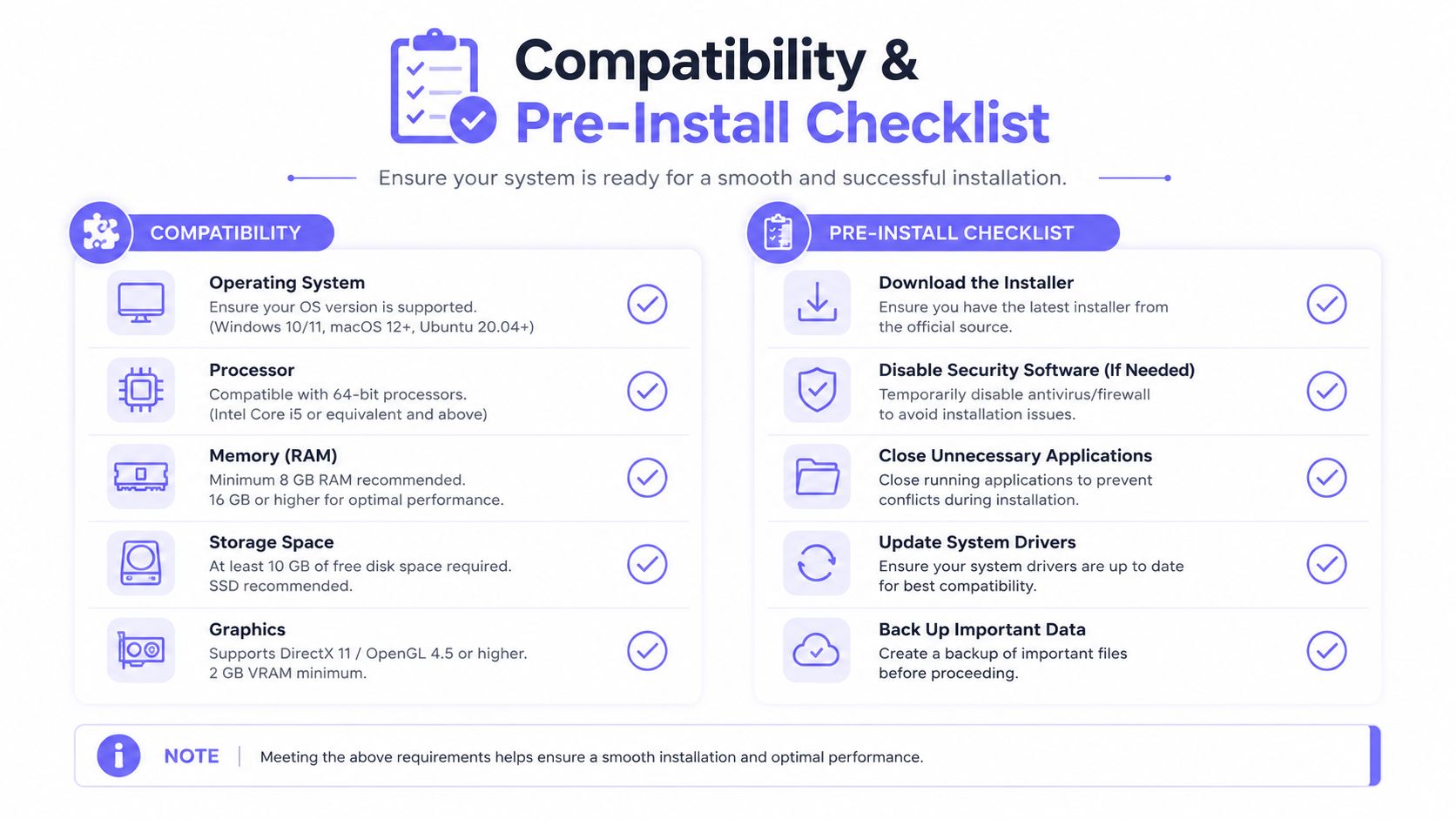
The gate operator cabinet deserves more attention than the product brochure. Before purchasing hardware, the installer should inspect the controller and document how the existing gate opens, what power is available, and what access remains possible during a connectivity outage.
Four checks belong on every survey
- Relay input: Confirm that the operator accepts a dry-contact trigger. If another intercom is already connected, verify whether the new relay can be safely paralleled.
- Operator identity: Record the brand and control-board revision. Doorking, LiftMaster, Viking, FAAC, and Hy-Security equipment can use different terminals, logic, and programming.
- Power at the post: Identify an available low-voltage AC tap, suitable DC supply, or the absence of usable power. A cellular device can't be installed cleanly without an energy plan.
- Outage behavior: Document whether the gate is fail-secure or fail-safe when connectivity or power fails. The emergency procedure must be clear to staff and first responders.
The survey should also cover physical conditions. Check the pedestal cutout, mounting height, weather exposure, sun direction, drainage, vandalism risk, and the visitor's position relative to the camera and microphone.
Signal testing belongs at the gate, not in the leasing office. A marginal cellular signal can cause delayed calls, dropped video, or incomplete commands even when the controller itself is healthy (wireless intercom site-planning guidance).
Require a fallback before approval
Every property needs a documented backup access method:
- Keyed override: Useful for authorized staff and emergency access.
- Secondary keypad or credential reader: Keeps resident entry available if the intercom connection fails.
- Manual release procedure: Gives responders and trained personnel a known path through the entrance.
A short, disciplined site survey can prevent weeks of installer revisions. The most expensive mistake is buying a sleek device that can't power up, fit the pedestal, reach the network, or fire the gate relay.
How Visitor Access Works Step by Step
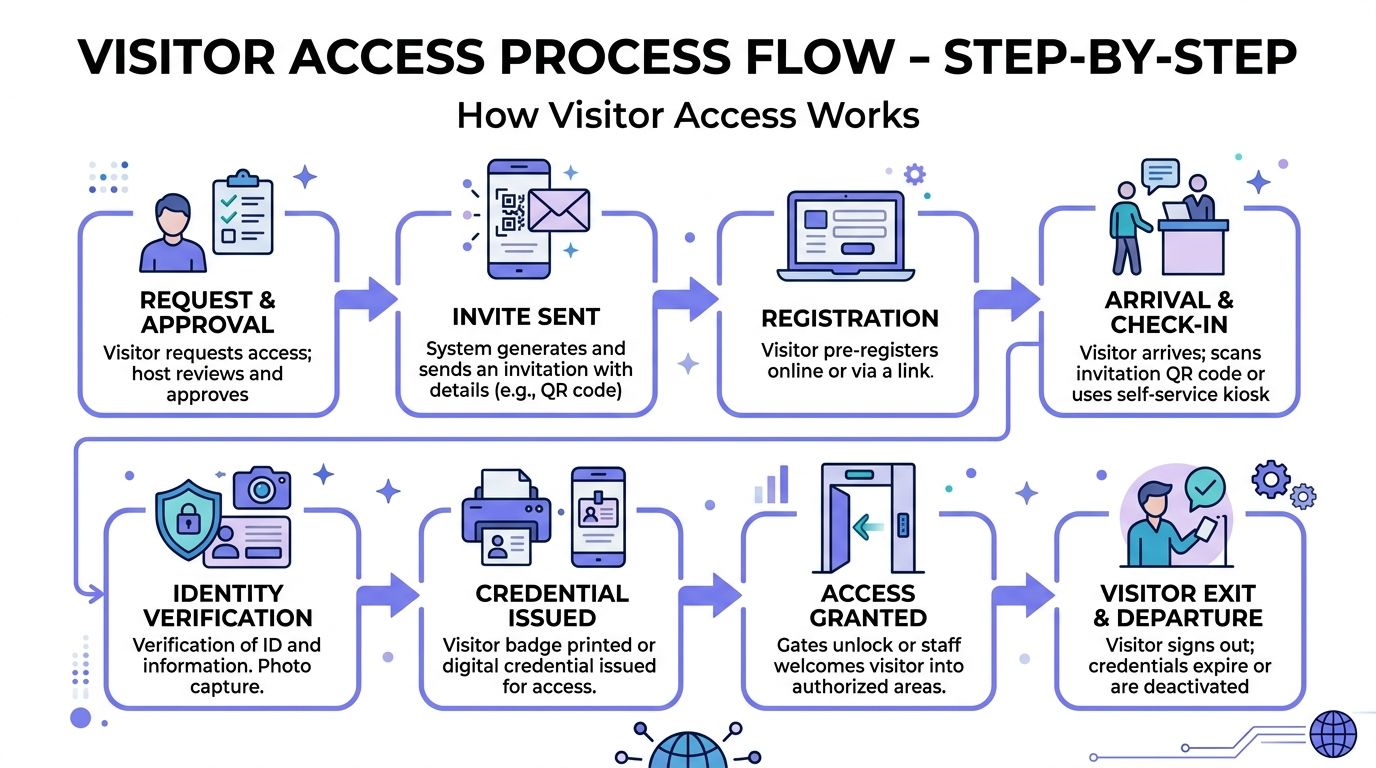
A modern visitor workflow starts before the gate opens. The visitor arrives at the entrance and uses the available method, such as a call button, resident directory, QR code, NFC tag, temporary credential, or approved access code.
The system then identifies the intended recipient. A directory search may route the call to a resident, while a property manager can issue a time-limited credential for a contractor or delivery provider.
The approval path
- Visitor initiation: The visitor presses the call button, scans a QR code, or enters a directory code.
- Call routing: Cellular connectivity sends the request to a resident's phone or manager's device. Wi-Fi and wired systems use their respective local or dedicated paths.
- Verification: The recipient uses video and two-way audio to assess the visitor.
- Gate command: The recipient taps an access control or uses an approved phone command.
- Relay activation: The intercom closes the dry-contact relay momentarily, signaling the operator to begin its opening cycle.
- Event recording: The platform records the access event with a timestamp and, where supported, a camera image.
The workflow can include hold-open schedules for deliveries or waste collection. Managers can also set contractor permissions, create temporary access codes, and handle delivery exceptions without leaving a desk.
Visitor-management platforms increasingly support QR entry, browser-based temporary codes, and mobile intercom calls that reach residents without exposing their names or phone numbers (visitor access workflow examples). That combination gives gated communities a self-service path while preserving privacy and auditability.
Pros, Cons, and Honest Trade-Offs
A wireless gate intercom system removes the need to run a communications cable from the entrance to every residence or interior station. That can make a retrofit less invasive, especially when the existing gate and operator already work.
Residents get a more useful interaction than a legacy audio-only call. They can see the visitor, speak through a smartphone, and grant access remotely instead of relying on a fixed handset or an untracked manual release.
The limitations are just as practical.
- Subscription dependence: Cellular systems require an active carrier or service plan. A recurring fee becomes part of the property's operating budget.
- Signal dependence: A weak LTE signal can delay a call or prevent a command from completing.
- Power maintenance: Remote posts using battery or solar power need inspection, replacement planning, and weather-aware maintenance.
- Network administration: Wi-Fi systems avoid a cellular plan but depend on the property's coverage, credentials, access points, and IT support.
- Human judgment limits: An intercom can show and connect a visitor, but it can't enforce tailgating rules or handle a complicated package handoff like a trained guard.
| Option | Install Effort | Recurring Cost | Remote Access | Failure Mode |
|---|---|---|---|---|
| Cellular intercom | Lower civil work when power and relay access exist | Mobile or software service fee | Strong fit for off-site approval | Carrier coverage, congestion, or power failure |
| Wi-Fi intercom | Moderate network extension and configuration | Network and software support | Available where outdoor Wi-Fi is dependable | Coverage loss, credentials, or ISP outage |
| Wired intercom | Highest when new trenching or conduit is needed | Lower connectivity expense, with maintenance | Depends on system architecture | Cable, conduit, handset, or power fault |
| Guard service | No intercom installation required | Ongoing staffing contract | Human response on site | Staffing availability, judgment inconsistency, or limited hours |
| Virtual attendant | Hardware and service integration required | Ongoing service contract | Remote human assistance | Service availability or escalation delays |
A smart intercom generally wins on availability and predictable access workflows. A guard service wins when the property needs judgment, active perimeter observation, tailgating enforcement, or physical package handling.
The sensible choice for many communities is an intercom with a documented fallback, not the belief that technology removes every operational risk.
Why Cellular Retrofit Beats Full Replacement
Full replacement sounds clean until the project includes new posts, conduit, trenching, electrical work, permits, pavement restoration, resident communication, and gate downtime. Those costs can overshadow the access-control hardware itself.
A cellular retrofit takes a narrower path. It mounts a controller or intercom onto existing infrastructure and uses the gate operator's available relay input. The property keeps the functioning gate mechanism while adding smartphone access, remote credentials, scheduled permissions, and cloud administration.
The retrofit decision rests on three questions
- Is the operator healthy? A gate that opens, closes, and reverses correctly is a strong retrofit candidate.
- How much civil work would replacement require? Remote entrances, paved drives, and communities with extensive grounds make new cable routes disruptive.
- Does the service model fit the budget? Retrofit shifts more of the investment toward predictable ongoing service instead of a large construction project.
Retrofit isn't always appropriate. Full replacement can make sense when the operator has failed, the controller has no usable trigger input, the gate structure needs reconstruction, or the property wants a coordinated pedestrian intercom and vehicle-entry redesign.
The practical advantage is reduced disruption. Existing credentials and keypads may remain in service while smartphone-based access is added, depending on the controller and installation design.
Nimbio is one cellular retrofit option. Its controller can connect to compatible electronic gates and building access points, while its app supports digital keys, remote opening, scheduled hold-open periods, and activity logs. That hardware-agnostic approach is useful when a community wants to modernize access without replacing a working gate operator.
The right question isn't whether replacement looks newer. It's whether the existing operator can safely support the required relay command and whether replacement adds enough value to justify the civil work and downtime.
Choosing the Right System for Your Property
Property type matters, but site constraints matter more. A single-family driveway with dependable Wi-Fi and light visitor traffic has different needs from an HOA entrance serving multiple buildings, while a commercial facility may need cellular service plus a credential reader.
| Property Type | Recommended System | Signal Requirement | Best For |
|---|---|---|---|
| Single-family home | Wi-Fi or cellular retrofit | Strong local Wi-Fi or cellular coverage at the driveway | Remote family and service access |
| Small multifamily property | Cellular retrofit | Reliable cellular signal at the gate | Smartphone visitor calling and manager control |
| HOA or gated community | Cellular retrofit or hybrid system | Cellular coverage, with a fallback credential path | Resident access, visitor management, and audit trails |
| Large community | Hybrid cellular and keypad or RFID setup | Reliable primary signal plus independent fallback | High traffic and continuity planning |
| Commercial or gated amenity site | Hybrid or wired architecture | Engineered connectivity at each entry | Staff workflows, credentials, and operational resilience |
Two questions can disqualify a system before feature comparisons begin:
- Is cellular service reliable at the gate?
- Does the existing operator have a usable trigger input?
If the answer to either question is no, the property needs a different infrastructure plan. A wireless label won't solve a missing power supply, a damaged operator board, or a dead coverage zone.
For broader access-control context, property teams evaluating UK keyless entry systems can compare how smartphone credentials, electronic locks, and traditional fallback methods fit different building types. The principles are consistent: validate the hardware, define the failure response, and make credential administration auditable.
HOAs and multifamily operators should request a site survey before selecting a residential gate access control system. The survey should confirm power, relay compatibility, enclosure placement, cellular signal, outage behavior, and the backup access method.
The strongest rollout plan starts with one gate. The property manager can test visitor calls, relay operation, app permissions, logs, and emergency procedures before extending the system across the community.
Nimbio provides cellular keyless entry systems that retrofit compatible electronic gates and building access points, giving residents and property managers smartphone control without relying on Wi-Fi. Visit Nimbio to review the retrofit approach, request a site survey, and evaluate a one-gate pilot before committing to a wider deployment.
Managing access for a gated community or multifamily property?
See how cellular access control works for communities like yours. Explore Multifamily & Gated Communities →


