

A lot of properties are in the same bind right now. Residents still have old remotes in glove boxes, vendors know the gate PIN, the keypad code has been shared too many times, and the manager gets the after-hours call when someone can't get in.
That's why door access control system installation isn't just a lock job anymore. For HOAs, multifamily sites, and commercial properties, it's an operations project that touches the gate operator, low-voltage wiring, life safety, admin workflow, and the way access gets granted and revoked every day.
The market reflects that shift. One major estimate places the global access control market at USD 10.76 billion in 2024, USD 11.56 billion in 2025, and projects USD 17.30 billion by 2030 at an 8.4% CAGR from 2025 to 2030, while hardware accounted for 61.45% of revenue in 2025 and hosted access-control-as-a-service models captured 51.60% share that same year, according to Grand View Research's access control market analysis. That matters on the ground because installs now have to work as both physical hardware and managed digital infrastructure.
Table of Contents
- Why Modern Door Access Control System Installation Matters Now
- Planning Your Site Survey and Retrofit Strategy
- Wiring Mounting and Cellular Controller Setup
- Provisioning Users Mobile Credentials and Visitor Access
- Testing Commissioning and Security Compliance Checks
- Troubleshooting Maintenance and Long Term Performance Tips
Why Modern Door Access Control System Installation Matters Now
A familiar property story goes like this. The gate still opens, but nobody really controls access.
The community has remotes that were never collected, a keypad code that's been passed from resident to resident, and a call box that works only when the network behaves. The system technically functions, but it doesn't give the manager clean control, reliable auditability, or a simple way to handle visitors.
The job changed from hardware swap to infrastructure work
Modern access control evolved over a long stretch from mechanical entry and basic credential systems into a connected stack of controllers, software, electronic locks, and service models. Current industry estimates describe that installed base at significant scale, including a projection of USD 4.09 billion in 2026 after a USD 3.80 billion base in 2025 globally in one forecast, while another estimate places the U.S. market at USD 3.79 billion in 2025, according to Mordor Intelligence's access control market coverage.
For installers and property teams, that changes the conversation. The question isn't just which reader or keypad to mount. The question is how the site will handle credentials, remote administration, audit logs, visitor entry, and service after turnover.
Practical rule: If a property still depends on shared fobs, shared clickers, or a shared 4-digit PIN, the weak point usually isn't the gate. It's credential control.
Why retrofit-first wins on occupied properties
Full rip-and-replace sounds clean on paper. On a live property, it often creates more disruption than the site needs.
A retrofit-first approach usually works better when the operator is still healthy and problem is outdated access management. That's especially true for HOA security, multifamily entries, and mixed estates where different gates and doors were installed at different times.
A modern retrofit should aim to preserve what still works:
- Existing gate operator: Keep the LiftMaster, DoorKing, FAAC, Viking, Nice, or other operator in place if its core function is sound.
- Existing remotes where needed: During transition, sites often need old credentials to stay active temporarily.
- Existing entry habits: Residents and staff adopt mobile access faster when the physical gate behavior stays familiar.
Why cellular matters more than most buyers think
Many access failures blamed on “the app” are really network problems. Wi-Fi at gates is often the weak link because the gate sits at the edge of the property, signal quality changes, and consumer-grade networking doesn't belong inside a critical entry workflow.
That's why cellular connectivity has become so useful for cloud-based access control. It avoids dependence on local Wi-Fi, reduces coordination with resident internet setups, and gives property managers a cleaner path to remote credential management and visitor access.
One practical option in that category is Nimbio, which retrofits existing electronic gates and building entry points with a cellular controller so residents and managers can manage access by smartphone while preserving compatible existing hardware.
Success on a clean install looks simple from the outside. The gate opens when it should, closes when it should, visitors are handled remotely, access can be revoked immediately, and the manager isn't chasing down fobs and old keypad codes anymore.
Planning Your Site Survey and Retrofit Strategy
Most bad installs are already bad before the first hole gets drilled. The mistake happens during the survey, when somebody assumes the gate is “standard,” the power is “probably fine,” and the old wiring can “likely be reused.”
The field doesn't reward guesses. It punishes them later.
What to inspect before ordering anything
The door or gate is usually the hardest part, not the software. Trade coverage aimed at installers notes that the toughest part of many projects is the physical locking mechanism and the specific door makeup, with IT coordination also creating real implementation friction, according to this installer-focused report from Security Electronics & Networks.
Start the survey with the opening itself:
- Operator condition: Check the gate operator model, age, board condition, relays, dry-contact inputs, and enclosure space.
- Door or gate mechanics: Confirm the leaf, hinge, closer, strike, maglock, latch, and alignment all work before adding electronics.
- Power availability: Verify dedicated low-voltage power strategy, battery space, and safe routing.
- Cable path: Look for conduit, sleeve access, pull-string availability, weather exposure, and burial challenges.
- Signal environment: Test whether a cellular controller can live where the hardware needs to be mounted.
- Admin workflow: Ask who grants access, who removes it, and how visitors are handled now.
Use the survey to document brand names and board terminals. A hardware-agnostic retrofit depends on accurate notes about what's already there, especially with operators like LiftMaster, DoorKing, FAAC, Nice, Viking, and Mighty Mule.
A quick visual reference helps crews stay disciplined during planning:
A practical retrofit or replacement test
Not every opening deserves a retrofit. Some need a rebuild.
Choose retrofit when:
- The operator or electrified hardware is mechanically sound.
- The board still accepts clean control input.
- The enclosure can support protected mounting and wiring.
- The site mainly needs better credentials, remote management, and cleaner auditability.
Choose replacement when:
- The gate operator is unreliable even without access hardware.
- The door doesn't latch consistently.
- Existing hardware is unsafe, corroded, or incompatible with code-compliant egress.
- The wiring path is so compromised that new infrastructure is the only honest option.
A reader won't fix a sagging gate, a bad closer, or a strike that never aligned correctly.
Site-survey checklist by property type
Single-family and small HOA gates
- Resident access pattern: Usually simple, but guest access is often messy.
- Controller location: Often tight. Check for weather and heat inside the operator housing.
- Credential transition: Keep remotes active short term if the community needs a phased cutover.
Multifamily properties
- Entry mix: Vehicle gate, pedestrian gate, lobby, amenity doors, and service access all behave differently.
- Move-ins and turnovers: Plan for fast adds and revokes.
- Vendor access: Define delivery, maintenance, and recurring contractor rules before go-live.
For teams dealing with broader property changes at the same time, the Reworx Recycling relocation guide is useful because moves and site reconfigurations often expose hidden access-control dependencies that get missed in early planning.
Commercial and mixed-use sites
- IT coordination: Get network and facilities involved early even when the controller is cellular.
- Traffic windows: Map deliveries, employee shifts, and after-hours access.
- Compliance sensitivity: Ask up front whether the opening ties into fire, egress, or restricted areas.
When owners are weighing platforms before the survey turns into a parts order, this guide on comparing cellular gate access systems is a useful starting point.
Wiring Mounting and Cellular Controller Setup
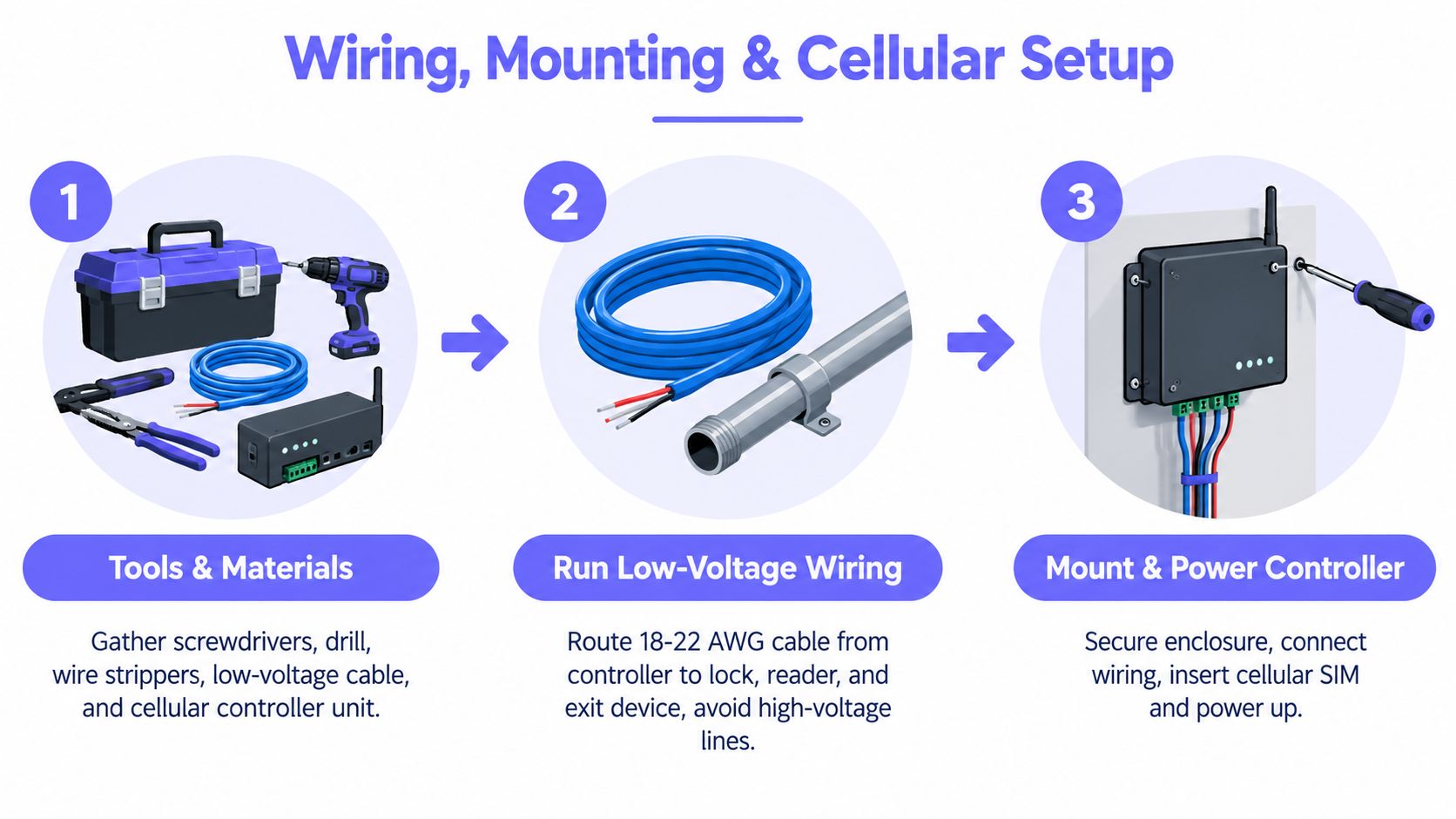
The cleanest installs are boring. Good wire path, solid labels, protected mounting, clean terminations, and no mystery conductors stuffed into an operator can.
Most callback work comes from the opposite. Sloppy routing, unlabeled cable, shared pathways with high voltage, weak strain relief, and controller placement that looked convenient on install day but becomes a service headache later.
Wiring rules that save hours later
Neutral installer guidance recommends a phased workflow that includes site planning, procurement, project management, testing and maintenance, and end-user training. The same guidance recommends running low-voltage wiring separately from high-voltage lines, using manufacturer-specified shielded multi-conductor cable, labeling both ends of every conductor, and verifying each credential path during commissioning, according to this access control installation planning document.
That guidance holds up in the field because it prevents three common failures:
- Electrical interference: Low-voltage control wiring routed with high-voltage lines creates noisy behavior and inconsistent inputs.
- Slow troubleshooting: Unlabeled conductors turn every future service call into a tracing exercise.
- Partial functionality: A relay may fire while the request-to-exit path or door position path was never validated.
Mounting standards that affect real installs
Some installation requirements are not optional preferences. They change where and how crews mount gear.
A university specification requires monitored doors to also have mechanical panic hardware so the door can still be manually locked if the access control system fails, requires 10 feet of extra access-control cable at the panel, and says mounting must follow NEC requirements, according to this Division 28 specification.
A separate public-sector design guideline requires:
- Door controllers on the same floor as the door they control
- A card reader, request-to-exit device, and door position switch at all doors
- Control wiring in conduit until above ceiling level
- Emergency power for panels and power supplies
- Backup battery with at least 30 minutes of runtime
- Fail-secure behavior for all doors
Those requirements come from the University of Missouri System access control design guidelines.
Those are public-sector standards, but the logic travels well even in private work. Protected wire path, local serviceability, emergency power, and defined behavior during power loss prevent ugly surprises.
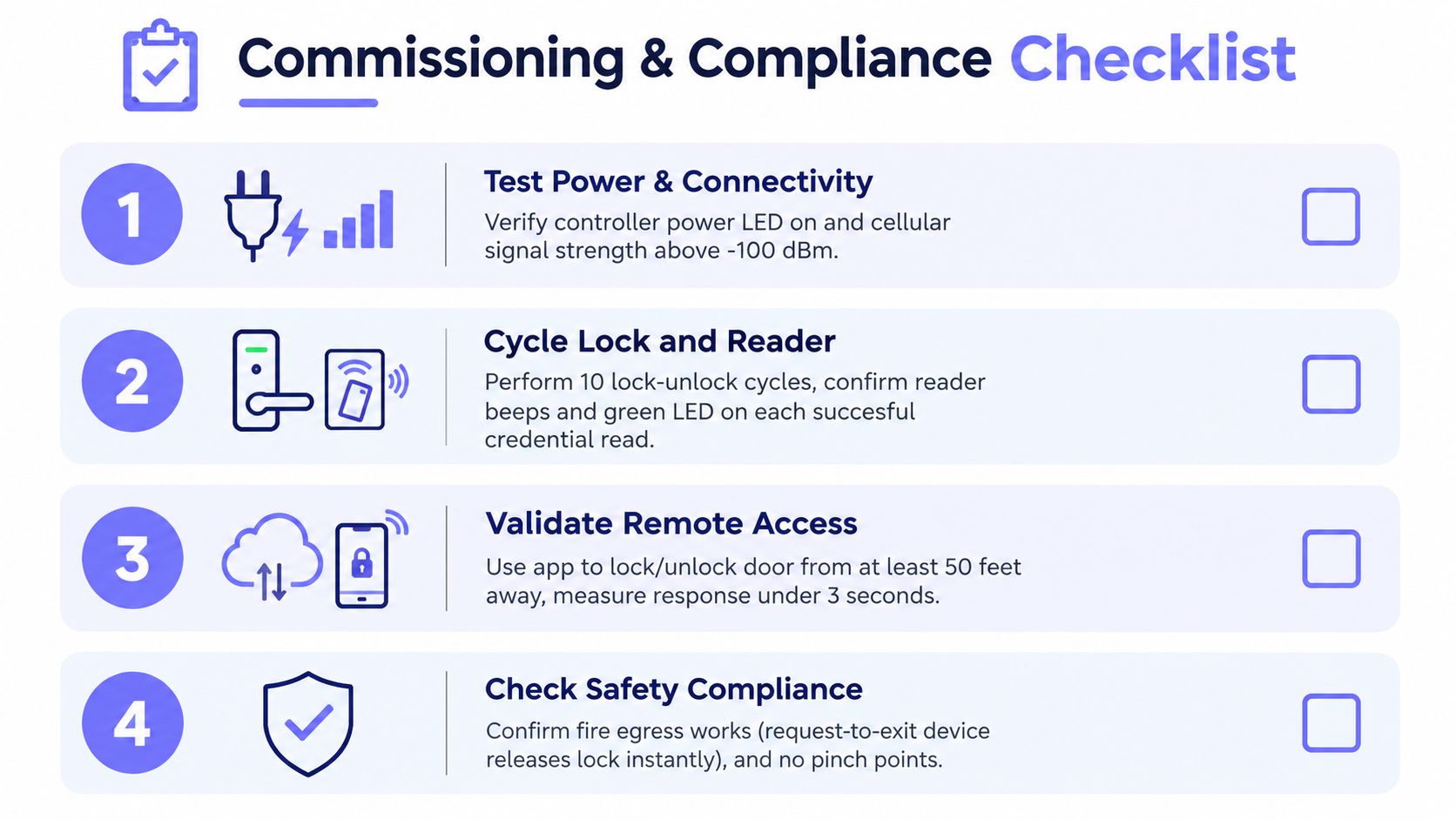
A disciplined crew should commission against a written checklist, not memory:
Cellular controller retrofit sequence
On retrofit gate work, the smartest path is usually additive. Leave the operator's core function alone and add controlled access through the proper relay input.
A typical cellular-based sequence looks like this:
Kill power safely and verify the enclosure
Confirm where the controller can mount without interfering with service access, moving parts, heat sinks, or rain exposure.Identify the control input
Find the operator's dry-contact trigger points and verify them against the board labeling and documentation on site.Run and protect the low-voltage path
Use shielded multi-conductor cable where specified, secure the route, and keep it away from high-voltage lines.Terminate with labels that make sense later
Label every conductor at both ends. Use names a future technician will understand in bad weather with a flashlight.Power the controller and provision it
Cellular systems reduce dependence on local Wi-Fi, which is a major advantage at perimeter gates and detached entries.Test coexistence with existing hardware
If the site is transitioning gradually, verify that legacy remotes, keypads, or call boxes still behave as intended.
For teams evaluating this architecture, it helps to understand how cellular gate openers work before choosing the mounting and provisioning approach.
Field note: The neatest enclosure wins. If the can is crowded, unlabeled, or heat-soaked, service quality drops fast six months later.
What usually goes wrong during install day
One installer guide reports that poor implementation causes 34% of access-control failures, more than 90% of organizations experience failures within six months of installation, and poor technician expertise accounts for roughly one-third of system failures, according to this summary of common access control installation mistakes.
That lines up with what crews see every week. Failures usually come from poor system design, wrong equipment selection, or weak integration discipline, not from the concept of mobile or cloud access itself.
Provisioning Users Mobile Credentials and Visitor Access
Once the controller is live, the project moves from wiring discipline to administration discipline. Good installs either become easy to run or turn into another burden for the office.
Mobile credentials work best when the property structure is clean from day one. That means buildings, gates, doors, resident groups, staff roles, vendor roles, and schedules all need to be named in a way that someone else can understand later.
Build the property in roles, not individual exceptions
A common mistake is granting access person by person with custom rules for everybody. That works for a week and becomes chaos after turnover.
Use role-based provisioning instead:
- HOA managers: Need admin-level control for resident adds, revokes, visitor oversight, and schedule changes.
- Residents: Need simple smartphone access for the entries relevant to their unit or lot.
- Maintenance vendors: Need limited access windows and clean revocation after the job ends.
- Commercial admins: Need location-based groups, after-hours restrictions, and event visibility.
That structure matters because mobile access is growing, but properties still need a practical upgrade path. Recent industry coverage says smart lock adoption in multifamily more than doubled from 7% in 2022 to 16% in 2024, while 29% of organizations already use smartphone-based access and 27% plan to adopt it within 12 to 18 months, as noted in Gatewise's access control trends overview.
What to configure right away
After the hardware goes live, provision these items first:
- Digital keys: Grant and revoke by person, role, or unit.
- Schedules: Set recurring access times for staff, vendors, and amenity windows.
- Hold-open rules: Useful for office hours, move-in windows, or staffed delivery periods.
- Visitor workflows: Replace shared PIN habits with named, trackable entry permissions.
- Entry logs: Confirm the manager can review who opened what and when.
Remote visitor management starts paying off. Instead of a gate code living forever in a text thread, the property can control visitor access from a dashboard and mobile app with an audit trail behind it.
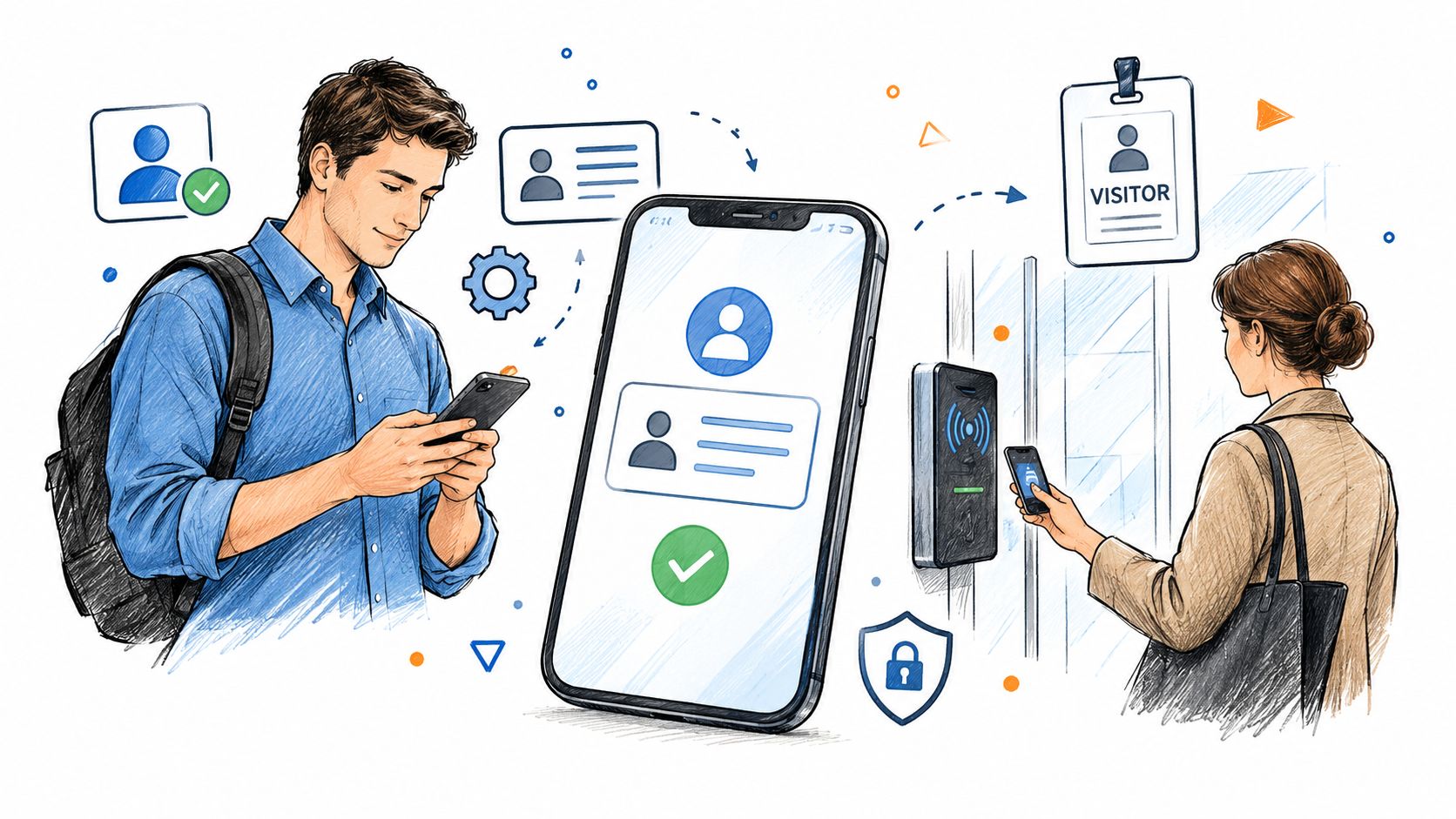
This kind of mobile workflow is what residents now expect:
Visitor access without shared codes
For gated communities and multifamily properties, visitor management usually causes more trouble than resident entry. Shared keypad codes are easy, but they're not traceable and they're hard to control once they spread.
A better setup includes:
- Resident-approved guest access
- Time-bound delivery or vendor permissions
- Remote verification for unknown visitors
- Real-time logs for management review
Properties that are still comparing keypad-style workflows can use this practical primer on keyless entry for your garage as a reference point, especially when deciding whether to keep a keypad in the mix during transition.
Shared PINs feel convenient until someone needs to know who actually opened the gate.
For larger multifamily portfolios, bulk onboarding matters just as much as the app itself. Import units, assign resident groups in batches, and decide in advance who owns offboarding when people move out. For commercial sites, keep the logic lean and tie access to work function, shift, and zone instead of handing out broad all-hours permissions.
Testing Commissioning and Security Compliance Checks
Commissioning is where crews find out whether the system was installed or merely mounted. Plenty of systems power up. Fewer are tested in a way that survives inspection, turnover, and the first service call.
The gap shows up fast on occupied properties. A credential works at one entry but not another. The request-to-exit device releases late. The door contact reports backwards. The gate opens from the app but doesn't log correctly.
What a proper commissioning sequence looks like
Every credential path needs a real-world test. Not just a dashboard check.
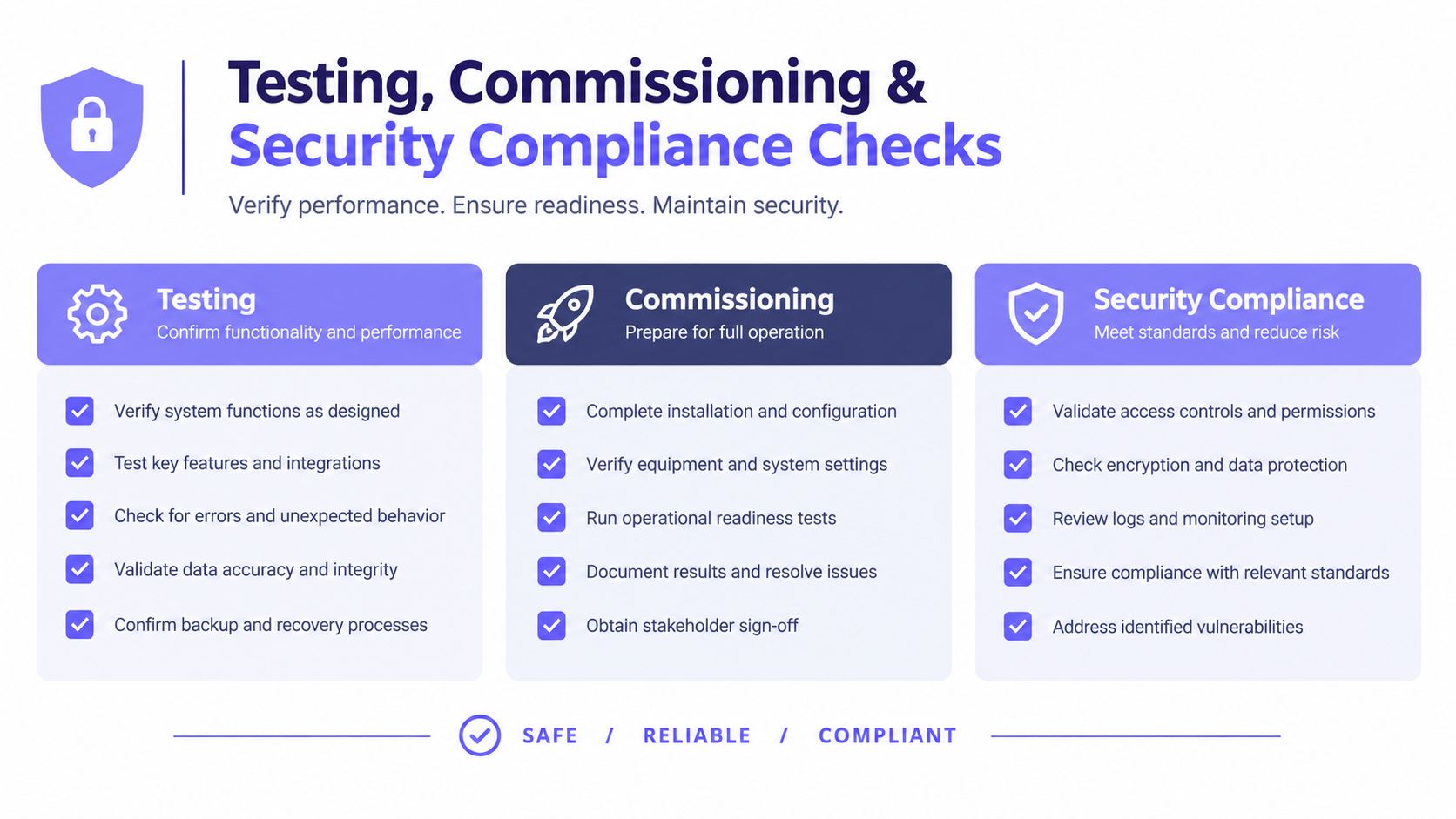
Run the opening through a repeatable sequence:
- Present a valid credential and confirm expected release or trigger behavior.
- Present an invalid or revoked credential and confirm denial plus event logging.
- Test request-to-exit behavior from the secure side.
- Verify door position switch reporting as open, closed, forced, and held-open conditions allow.
- Confirm backup power behavior and restore sequence.
- Review event logs for readable naming and accurate time stamps.
A broader property security setup often includes cameras, and DigiDevice's home security guide is a practical reference for aligning camera views with access events so incident review is useful.
A commissioning team should also use a clear visual process for signoff:
Code and permit checks that get missed
Access control work often gets treated casually because it's low voltage. That's a mistake.
Several building standards require access control installations to comply with UL 294, NFPA 70, NFPA 101, the National Electrical Code, and applicable local or state building codes, according to the Whole Building Design Guide specification reference. In practice, that means the install has to satisfy recognized safety and electrical rules, not just vendor instructions.
Permitting can also trigger earlier than some owners expect. The Dallas Fire Code section on electronic access control systems says construction permits are required for installation or modification, and a separate permit is required if the fire alarm system is connected to the access control system, according to this electronic access control permitting reference.
Access Control Commissioning Compliance Checklist
| Checkpoint | Requirement | Why It Matters |
|---|---|---|
| Controller location | Place controllers on the same floor as the door they control where that guideline applies | Shorter, cleaner service path and simpler maintenance |
| Reader and egress devices | Confirm each controlled door has the required reader, request-to-exit device, and door position switch where specified | Prevents incomplete door functionality |
| Wiring protection | Keep control wiring in conduit until above ceiling level where required | Reduces physical damage and inspection issues |
| Backup power | Verify emergency power for panels and power supplies, plus at least 30 minutes of battery runtime where required | Keeps entry control working through short outages |
| Lock behavior | Confirm fail-secure operation where the specification requires it | Maintains exterior security during power loss while preserving egress as required |
| Panic hardware | Verify mechanical panic hardware at monitored doors when required by the spec | Preserves manual operation if the electronic system fails |
| Cable slack | Leave the specified extra cable at the panel where required | Makes service and replacement work far easier |
| Permit review | Confirm whether access work, fire alarm interconnect, or both need permits | Avoids red-tag delays and expensive rework |
For closing documentation and handoff, crews should complete a final walkthrough for gate control so the owner knows exactly how the site behaves in normal use, emergency conditions, and admin turnover.
Commissioning isn't paperwork. It's the last chance to catch the mistake when the tools are still on site.
Troubleshooting Maintenance and Long Term Performance Tips
A system that works on day one can still fail early if nobody owns maintenance. The usual problems aren't mysterious. They come from loose terminations, dirty documentation, weak battery follow-up, and credential sprawl after move-ins, turnover, and contractor churn.
Long-term stability starts with a short maintenance rhythm:
- Monthly visual check: Look for moisture, insects, corrosion, loose glands, and enclosure heat stress.
- Credential review: Remove stale users, old vendors, and temporary access that never got revoked.
- Event-log spot check: Make sure the property team still understands what the logs are showing.
- Power and battery inspection: Replace weak backup components before the outage exposes them.
- Firmware discipline: Use over-the-air updates carefully and document when they were applied.
When problems do show up, isolate them by layer. If the gate doesn't trigger, verify relay behavior and operator input first. If users report random failures, check wiring separation, conductor labeling, and signal environment before blaming the app. If only certain people fail, inspect permissions, schedules, and whether old credentials were left active in parallel.
The hardest issues are usually mixed-system issues. The controller may be fine, but the gate operator board may have intermittent input response. The mobile credential may be fine, but the admin assigned the wrong schedule. The request-to-exit device may be wired, but it may not be reporting or releasing correctly because commissioning skipped a path.
That's why disciplined upkeep beats heroic troubleshooting. Clean labels, accurate as-builts, controlled admin rights, and periodic credential housekeeping keep door access control system installation from turning into another recurring property headache.
For installers and managers, the long-term goal is simple. Keep the hardware stable, keep access auditable, and keep remote management reliable across residential, multifamily, and commercial properties.
Nimbio offers a cellular-based retrofit that turns compatible electronic gates and entry systems into smartphone-controlled access points without depending on local Wi-Fi or forcing a full gate replacement. For properties that want cleaner credential control, remote visitor management, and hardware-preserving upgrades, visit Nimbio.


