

A gate fails at the worst possible moment. A vendor is waiting outside, a resident is calling about a missing fob, and the property manager is trying to remember which shared PIN still works. Meanwhile, the access system offers no reliable answer about who entered, when they entered, or whether a former employee still has permission.
That's why a keyless entry system for business should be evaluated as more than a new reader, keypad, or app. It's an operational, cybersecurity, and return-on-investment decision. For HOAs, multifamily properties, warehouses, and small commercial buildings, the right architecture can reduce credential risk while preserving existing gates and doors.
Table of Contents
- Why Business Keyless Entry Is a Strategic Decision in 2026
- The Main Types of Business Keyless Entry Systems
- Benefits That Matter to Commercial and Multifamily Buyers
- Cellular Retrofit Versus Wi-Fi and Hardwired Systems
- Procurement Criteria and Deployment Workflow
- Cost Structure and ROI for Business Access Control
- Real-World Use Cases Across Property Types
Why Business Keyless Entry Is a Strategic Decision in 2026
A property manager handling physical keys, shared codes, and remote entry requests is also running an informal identity system. Every fob, clicker, PIN, and approval represents a permission that can be copied, shared, misplaced, or left active after a resident, employee, or vendor departs.
Distributed properties expose the weakness quickly. A board member may approve a contractor remotely, a service provider may need access after office hours, and a former resident may leave without returning a credential. Cloud management makes each decision explicit, assigns permissions to identifiable users, and gives administrators a practical way to revoke access without chasing physical devices.
The market reflects this shift. The global access control market is estimated at USD 4.09 billion in 2026 and projected to reach USD 5.94 billion by 2031, representing a 7.72% CAGR, according to Mordor Intelligence's global access control market analysis. The demand is tied to centralized administration, audit trails, mobile credentials, and remote management, not replacement locks.
The U.S. market is estimated at USD 3.94 billion in 2026 and projected to reach USD 4.81 billion by 2031, with a 4.05% CAGR, according to Mordor Intelligence's U.S. access control market analysis.
The board-level question
A commercial access system belongs in cybersecurity and capital planning discussions, not only facilities budgets.
- Cybersecurity: Credentials and administrator accounts require secure provisioning, lifecycle controls, and prompt revocation.
- Insurance posture: Structured records can help demonstrate who received access and how permissions were managed.
- Operations: Vendor entry, after-hours access, and move-out revocation need repeatable workflows.
- Property value: Remotely managed building and gate infrastructure can support buyer expectations.
Cellular retrofit systems deserve particular attention when Wi-Fi is unreliable or trenching is expensive. They can connect existing gates and doors without forcing a full hardware replacement, while preserving a path to centralized management. That reduces installation disruption and limits the lifecycle cost of rebuilding access infrastructure at every site.
Auditability determines whether the system can support a serious review. A useful log records the timestamp, reader or door ID, credential or user ID, event type, and decision reason. Essentry's access-control documentation guidance notes that logs are commonly retained for 1–3 years in general business settings and 5–7 years in regulated financial environments.
Practical rule: If the system cannot show who was authorized, what happened, and when access was denied, it is not a complete business access-control system.
The Main Types of Business Keyless Entry Systems
Buyers usually encounter five categories. They overlap in some products, but each solves a different problem.
Keypad access
A keypad is the digital version of a deadbolt. Users enter a PIN, making it simple for gates, service doors, and low-complexity commercial spaces.
The weakness is governance. Shared codes are difficult to attribute and impossible to selectively revoke when everyone uses the same combination. Individual codes improve accountability, but administrators still need to manage code distribution and prevent sharing.
Card and fob access
RFID cards and fobs work well for employees who enter through controlled doors every day. The credential is familiar, fast, and easy to use without a phone.
The operational cost appears during turnover. Lost cards, unreturned fobs, and former employees can create a steady replacement and deactivation workload. Perimeter gates also create friction when residents or contractors need credentials outside normal office hours.
Mobile credentials
A mobile credential turns the smartphone into a digital wallet. Bluetooth or NFC lets an authorized user present the phone to a compatible reader or use an app-based command.
The security model can be stronger than a shared PIN or static card when the credential is stored in a phone's Secure Enclave or Trusted Execution Environment. Those environments isolate and encrypt the credential, making it harder to copy, export, photograph, or clone. Cloud-based revocation can occur in under 30 seconds, according to ASDV Consultant's explanation of mobile credentials.
Biometric access
Biometrics use a fingerprint, face, or palm as the credential. This can suit controlled interior areas where identity assurance matters more than throughput.
Biometric readers are less practical at exposed perimeter gates because weather, lighting, gloves, privacy concerns, and vehicle flow complicate deployment. They're a specialized choice, not the default answer for most commercial gates.
Cellular retrofit access
A cellular retrofit adds a cloud-managed controller to existing gate or door hardware. It's the right category for owners who want mobile administration without replacing a working gate motor, telephone entry system, or electric lock.
For rental and multifamily properties, buyers comparing smartphone access options can also review this guide to the best keyless entry for rental properties, especially when temporary permissions and remote administration matter.
| System Type | Credential | Best Fit For | Admin Complexity |
|---|---|---|---|
| Keypad | PIN | Service doors, simple gates, smaller teams | Low to medium |
| Card or fob | RFID credential | Employee entrances and controlled buildings | Medium |
| Mobile credentials | Smartphone via Bluetooth or NFC | Residents, employees, vendors, distributed sites | Medium |
| Biometric | Fingerprint, facial, or palm pattern | Restricted interior areas | Medium to high |
| Cellular retrofit | App and cloud-managed digital credential | Existing gates, call boxes, and remote properties | Low to medium |
Benefits That Matter to Commercial and Multifamily Buyers
A contractor needs access for one afternoon. A resident moves out after business hours. A gate dispute requires a reliable record. In each case, the value of keyless entry comes from managing identity, permissions, and evidence as one operating process.
A property manager can issue a credential to a contractor, limit it to an approved schedule, and revoke it when the work ends. A board can review access activity without waiting for a technician to download the controller. Facilities staff can administer multiple locations from one console instead of maintaining separate spreadsheets.
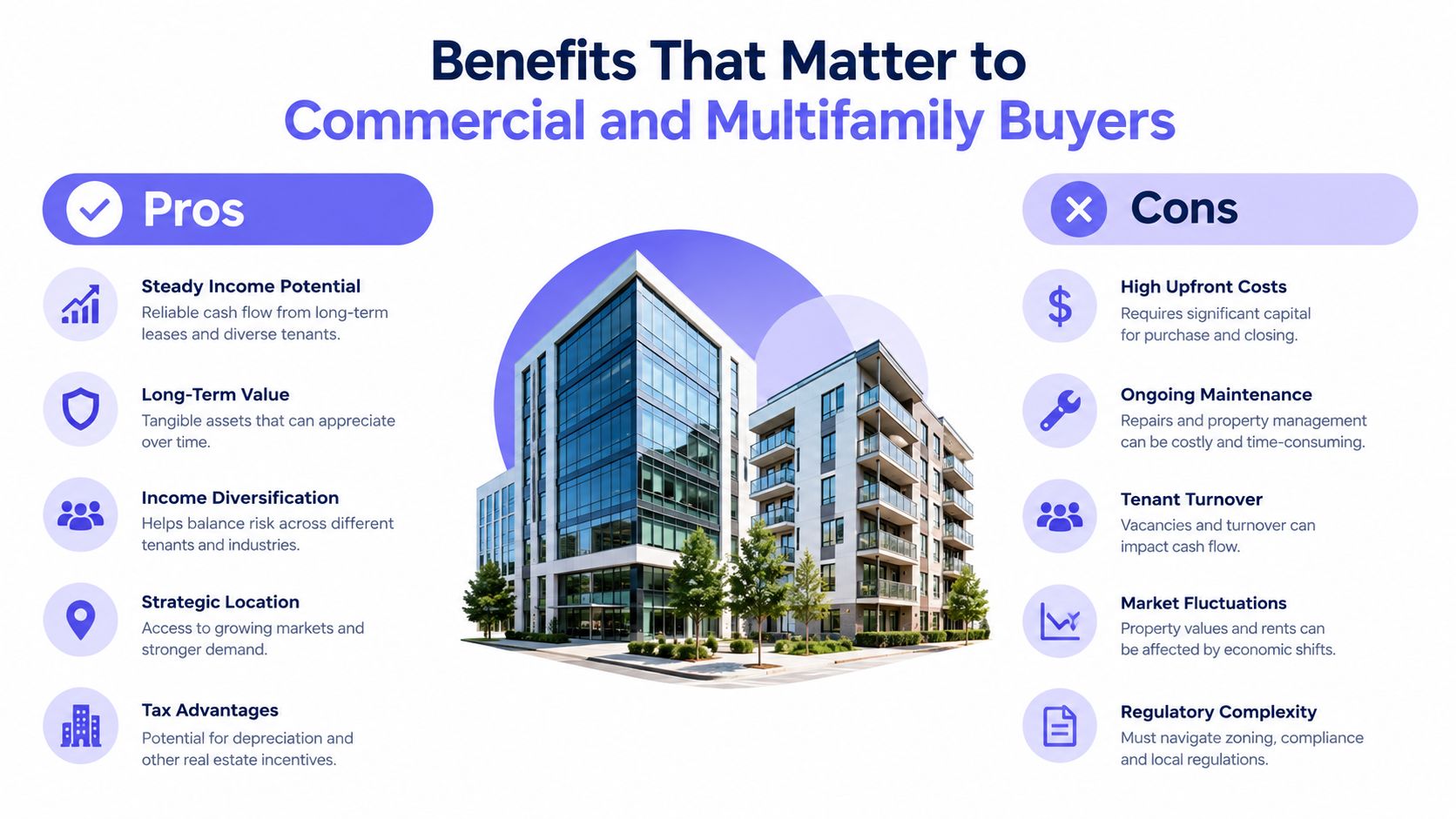
These workflows also support cyber resilience. Central administration, audit trails, and remote credential changes reduce dependence on shared codes, scattered records, and local-only access decisions. Buyers should judge the system by how well it controls permissions and preserves evidence, not by the appearance of its mobile app.
Security benefits beyond convenience
Mobile credentials change the threat model. A shared PIN can be photographed or passed to another person. A static card can be copied or remain active after a user leaves. A credential protected within a hardware-isolated mobile environment is harder to extract, while remote revocation shortens the gap between a policy change and enforcement.
Mobile access still requires disciplined administration. Protect administrator accounts, control enrollment, define device lifecycle procedures, and document what staff must do when a phone is lost or a user departs.
Audit records provide another operational advantage. Each approved or denied event should identify the user or credential, entry point, time, event type, and decision reason. Managers can then investigate forced-entry attempts, schedule violations, and disputes using records rather than recollection.
Operational outcomes buyers can actually manage
Commercial and multifamily teams typically gain value through:
- Faster vendor onboarding: Issue temporary access remotely instead of waiting for a physical fob.
- Lower lockout workload: Let residents and employees use managed phone credentials rather than calling staff for replacement devices.
- Less rekeying: Revoking a digital credential does not require changing gate or door hardware.
- Fewer site visits: Administrators can make many permission changes without dispatching an installer.
- Clearer accountability: Individual credentials replace untrackable shared access codes.
For a property evaluating a dedicated business gate access system, require integration with existing security and IT policies. Administrators should be able to export records, separate roles, and document revocation. Those controls determine whether the system improves daily operations and supports a defensible response when access is misused.
Cellular Retrofit Versus Wi-Fi and Hardwired Systems
The connection architecture determines whether a system remains useful when the surrounding property network fails. Feature comparisons often miss that point.
Wi-Fi works well for indoor doors with reliable coverage and nearby power. At a vehicle gate, the signal may weaken around concrete, metal cabinets, landscaping, or long driveways. The controller also becomes dependent on the property's network rules, password changes, access points, and internet service.
Hardwired systems offer a stable connection when designed correctly, but retrofits can become construction projects. Trenching, conduit, traffic disruption, and coordination with existing utilities can turn a simple access upgrade into a costly installation with avoidable downtime.
A cellular controller communicates through the carrier network and can connect to existing gate equipment. Cellular-first access is particularly useful for communities that don't want to depend on Wi-Fi drops or maintain VPN tunnels and local network rules, as described in Nimbio's mobile access documentation.
Where each architecture fits
- Cellular retrofit: Best for existing gates, remote sites, multifamily communities, and properties where trenching is undesirable.
- Wi-Fi dependent: Best for indoor doors with dependable coverage and an established network team.
- Hardwired: Best for new construction or major renovations where conduit and network infrastructure are already planned.
Cellular connectivity also supports remote visitor management. A manager can approve a vendor without being onsite, while a resident or tenant can use a smartphone rather than a shared keypad code.
The key caveat is resilience planning. Buyers should ask what happens during carrier interruptions, power loss, internet outages, and cloud dashboard unavailability. The system should define local fallback behavior, credential caching, cellular redundancy where appropriate, and how access logs remain consistent during a connectivity gap.
| Criterion | Cellular Retrofit | Wi-Fi Dependent | Hardwired |
|---|---|---|---|
| Retrofit disruption | Usually limited | Limited if coverage exists | Often higher |
| Perimeter coverage | Independent of property Wi-Fi | Can be inconsistent | Stable when installed correctly |
| Network administration | Carrier-managed connection | Property IT-managed | Requires network and cabling planning |
| Existing gate compatibility | Designed to attach to current hardware | Depends on controller and network | Often requires new wiring |
| Best deployment context | Remote and existing sites | Indoor doors | New construction or major renovation |
| Main risk | Carrier or power interruption | Wi-Fi or ISP failure | Installation cost and disruption |
Property managers evaluating the technical model can review how cellular gate openers work before requesting proposals.
Procurement Criteria and Deployment Workflow
A reliable purchase starts with the site, not the product catalog. The controller must match the location, gate operator, electrical setup, administrative process, and continuity requirements.
1. Verify coverage at the actual entry point
Check LTE-M or NB-IoT coverage where the controller will be installed. The test should include the gate, equipment cabinet, and areas affected by concrete, metal, or landscaping. Nimbio's remote access guidance specifically recommends verifying cellular coverage at each planned entry point.
A vendor that skips this step is asking the property to accept an avoidable uptime risk.
2. Audit the existing hardware
Record the gate operator, motor voltage, relay behavior, call box, electric lock, wiring, and device serial numbers. A retrofit controller needs electrical and relay compatibility, not merely a compatible brand name.
The audit should also document the gate's safety devices and operating logic. Access control must not interfere with vehicle detection, emergency release, or safe closing behavior.
3. Design the administration model
Define who can grant access, who can revoke it, and who can review logs. Use role-based permissions rather than a single administrator account.
Build workflows around actual events:
- Vendor entry: Issue time-bound credentials tied to a work order.
- After-hours access: Set schedules instead of relying on permanent permissions.
- Visitor approval: Give residents or tenants a clear approval path.
- Move-out revocation: Remove access as part of the lease or membership closeout.
- Incident review: Preserve event records and document operator actions.
Technical auditability should be part of the specification. Structured logs with timestamps, reader IDs, user IDs, event types, and decision reasons make security reviews evidence-based, while append-only or checksummed storage can reduce tampering risk.
4. Pilot one entry point
Run a pilot on one gate or door before approving a full rollout. Test resident entry, vendor turnover, after-hours access, denied credentials, power interruptions, and cellular recovery.
The pilot should expose administrative friction early. If staff can't revoke a credential quickly or retrieve a useful event record, a larger deployment will multiply the problem.
5. Roll out in phases
Train property staff, publish user instructions, record the chain of custody for credentials, and maintain an inventory of installed devices. Keep a documented fallback plan for outages and emergencies.
Red flags include vendors who refuse a coverage check, lock credentials into an opaque administrative process, or cannot provide SOC 2 or equivalent security documentation where the buyer requires it. Property managers can use Nimbio's gate access buyer's guide as a procurement reference, then validate every recommendation against the site's own requirements.
Cost Structure and ROI for Business Access Control
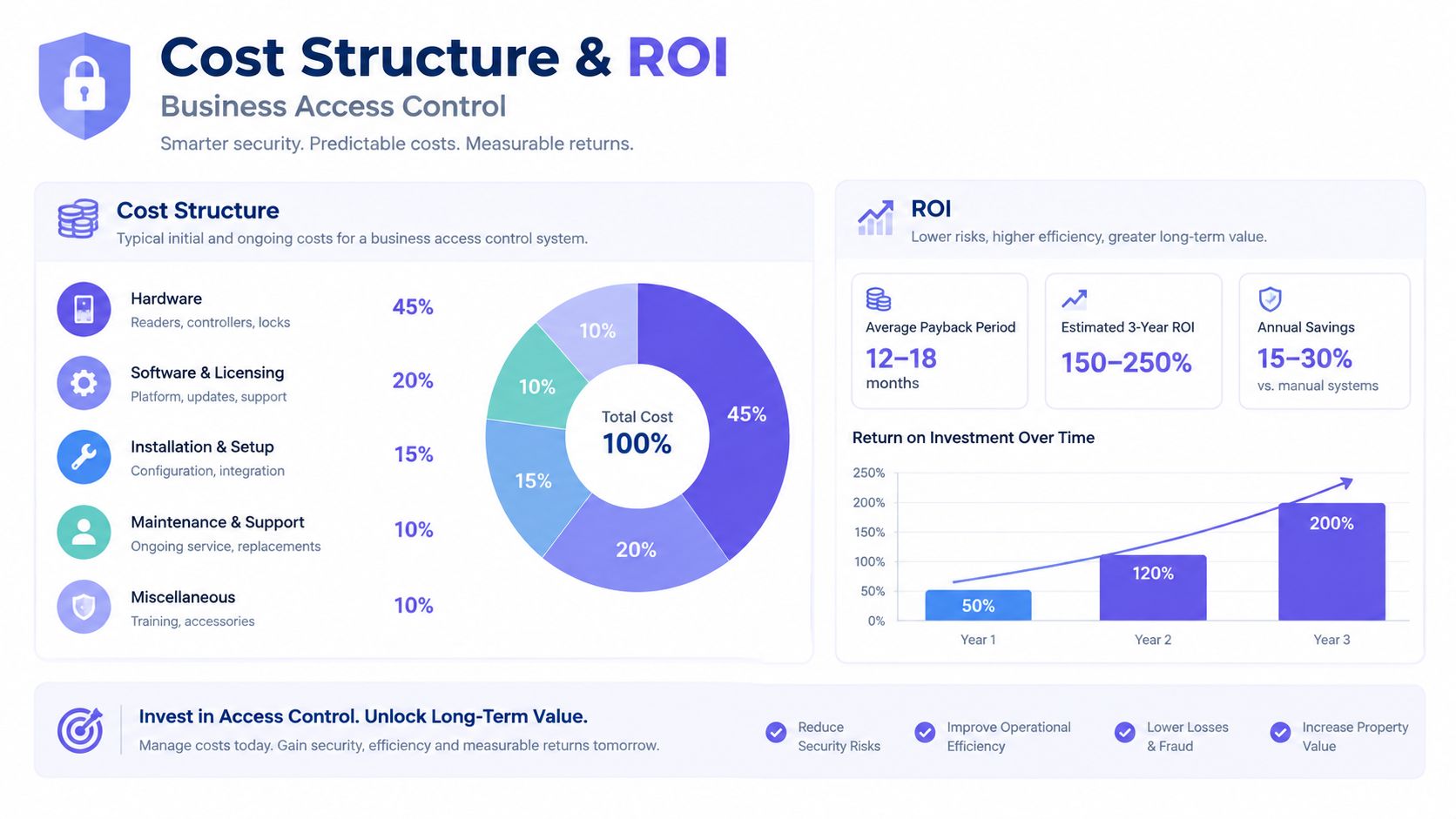
A business access-control budget has more layers than the controller price. Hardware, connectivity, software, credential administration, installation, maintenance, and disruption all belong in the model.
The cost structure should separate recurring expenses from project costs:
- Hardware: Controllers, readers, power components, and related equipment.
- Connectivity: Cellular service or property network dependency.
- Software: Administrative dashboards, credential tools, reporting, and integrations.
- Labor: Enrollment, revocation, support calls, troubleshooting, and staff training.
- Installation: Wiring, conduit, trenching, mounting, testing, and traffic control.
- Replacement costs: Lost fobs, rekeying, failed devices, and emergency service visits.
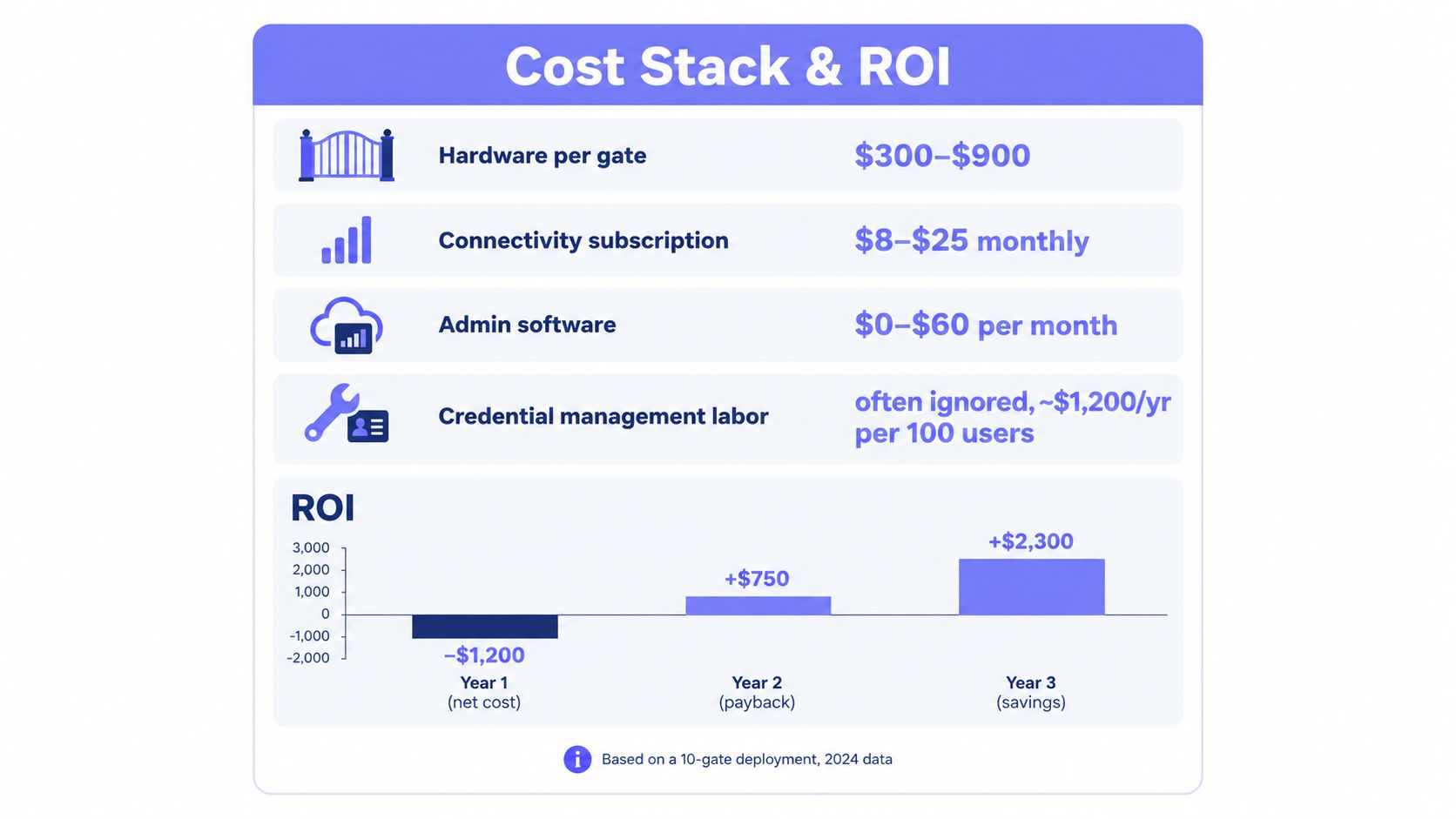
The required cost-stack visual includes the provided estimates for hardware, subscriptions, software, labor, and projected ROI. Those figures should be treated as the infographic's stated scenario, not as a universal quote for every property.
A practical ROI model
A useful formula is:
ROI = monthly guard or rekeying cost plus labor saved, minus hardware amortization and subscription cost
That formula needs site-specific inputs. A property should compare the access system with the actual cost of guard coverage, repeated fob replacement, staff time, lockout handling, and service calls. It shouldn't assume that every avoided task becomes a direct cash saving.
Installation architecture can change the result substantially. A cellular retrofit can compress the payback period when it reuses existing gate hardware and avoids extensive trenching. A hardwired replacement may be justified for new construction, but it can be difficult to defend when a functioning gate operator only needs remote administration.
Hidden costs that distort comparisons
Buyers often undercount:
- Credential turnover: Staff, tenants, vendors, and residents require continual permission updates.
- Physical inventory: Fobs and clickers must be ordered, stored, issued, recovered, and replaced.
- Network maintenance: Wi-Fi systems may require access-point changes, VPN rules, or IT support.
- Construction disruption: Conduit and trenching can affect drive lanes, landscaping, and tenant operations.
- Dispute handling: Without an audit trail, managers spend more time reconstructing events.
Audit-ready records also reduce uncertainty during tenant disputes and incident reviews. They don't eliminate liability, but they give managers a defensible record of authorization and system activity.
Real-World Use Cases Across Property Types
A gated HOA, logistics yard, and mixed-use building may use the same cellular retrofit architecture for completely different reasons.
A gated HOA with aging entry equipment
A 120-unit gated HOA has a 25-year-old telephone-entry intercom that fails monthly. The board faces a $40,000 hardwired replacement, while residents continue calling management about unreliable entry.
A retrofit controller can reuse the existing gate hardware and wiring used for power, then add smartphone credentials for residents. Property staff can issue vendor permissions with time windows without waiting for a construction season, and the board can review entry activity through a cloud portal.
The important outcome isn't just app access. It's the removal of shared, hard-to-revoke credentials from a system that already has a functioning gate operator.
A regional warehouse logistics yard
A warehouse needs to coordinate access for 40 carriers per shift without issuing physical fobs. Dispatch and security staff need to know which carrier received permission, when the permission applied, and whether the gate opened.
A cloud dashboard can issue time-limited digital access, including QR-based workflows where supported. Entrance photos and event records can help connect gate activity with dispatch records, while cellular connectivity avoids dependence on a warehouse Wi-Fi network extending to the perimeter.
The administrator's priority is throughput with accountability. Temporary credentials should expire automatically, and denied entries should remain visible for follow-up.
A small mixed-use commercial building
A building houses two restaurants, a clinic, and four offices that share one entrance. Each tenant needs different schedules, and lease expirations must remove access without affecting the other occupants.
Group-based permissions solve that administrative problem. The manager can assign schedules by tenant, revoke a departing business's credentials, and retain event records for insurer or incident review.
Across all three properties, the operational gains come from the same design choices:
- Fewer truck rolls: Staff can handle routine permission changes remotely.
- Faster onboarding: Vendors and occupants receive digital access without physical credential inventory.
- Provable records: Logs show authorization decisions and entry events.
- Better retrofit economics: Existing gates and locks remain in service where compatible.
- More resilient perimeter access: Cellular connectivity reduces dependence on property Wi-Fi.
A cellular keyless entry system for business makes the most sense when the property needs modern administration but doesn't need, or can't justify, a full hardware replacement.
Nimbio provides cellular controllers that retrofit compatible electronic gates, call boxes, doors, and locks for smartphone-based access without relying on property Wi-Fi. Property managers and business owners can visit Nimbio to review retrofit options and ask whether their gates and doors are compatible.
Securing gates or doors at a commercial property?
See how cellular access control works for commercial sites. Explore Commercial Gate & Door Access Control →


