Most popular advice treats LiftMaster battery back up as if a number on a spec sheet guarantees entry during an outage. It doesn't. A battery-backed operator can keep moving while the keypad, call box, or controller that tells it to open sits dark, and a rated cycle count means little if the gate binds, the battery is old, or nobody has tested it under load.
That's the gap property managers, HOA board members, and installers have to close. The useful question isn't whether a LiftMaster operator lists battery backup. It's which operator is installed, which battery pack is inside it, how many complete cycles it still delivers, and what else in the access chain needs power.
Table of Contents
- What LiftMaster Battery Back Up Keeps Running
- How Long a LiftMaster Battery Keeps the Gate Moving
- Matching a Battery Kit and Gate Size to Your Operator
- How to Install or Replace a Backup Battery Safely
- What Battery Backup Leaves Out of Your Access System
- Testing, Maintenance and Fixing a Weak Backup Battery
What LiftMaster Battery Back Up Keeps Running
LiftMaster battery back up keeps the gate operator running when utility power fails, so the gate can still open and close on stored energy. It doesn't power the whole property. Say power drops at a gated entrance on a Friday evening. The operator's motor and control board draw from the battery pack inside or connected to the operator. If that pack is charged and healthy, the gate cycles. If it isn't, the gate stops, regardless of what the product page promised when the battery was new.
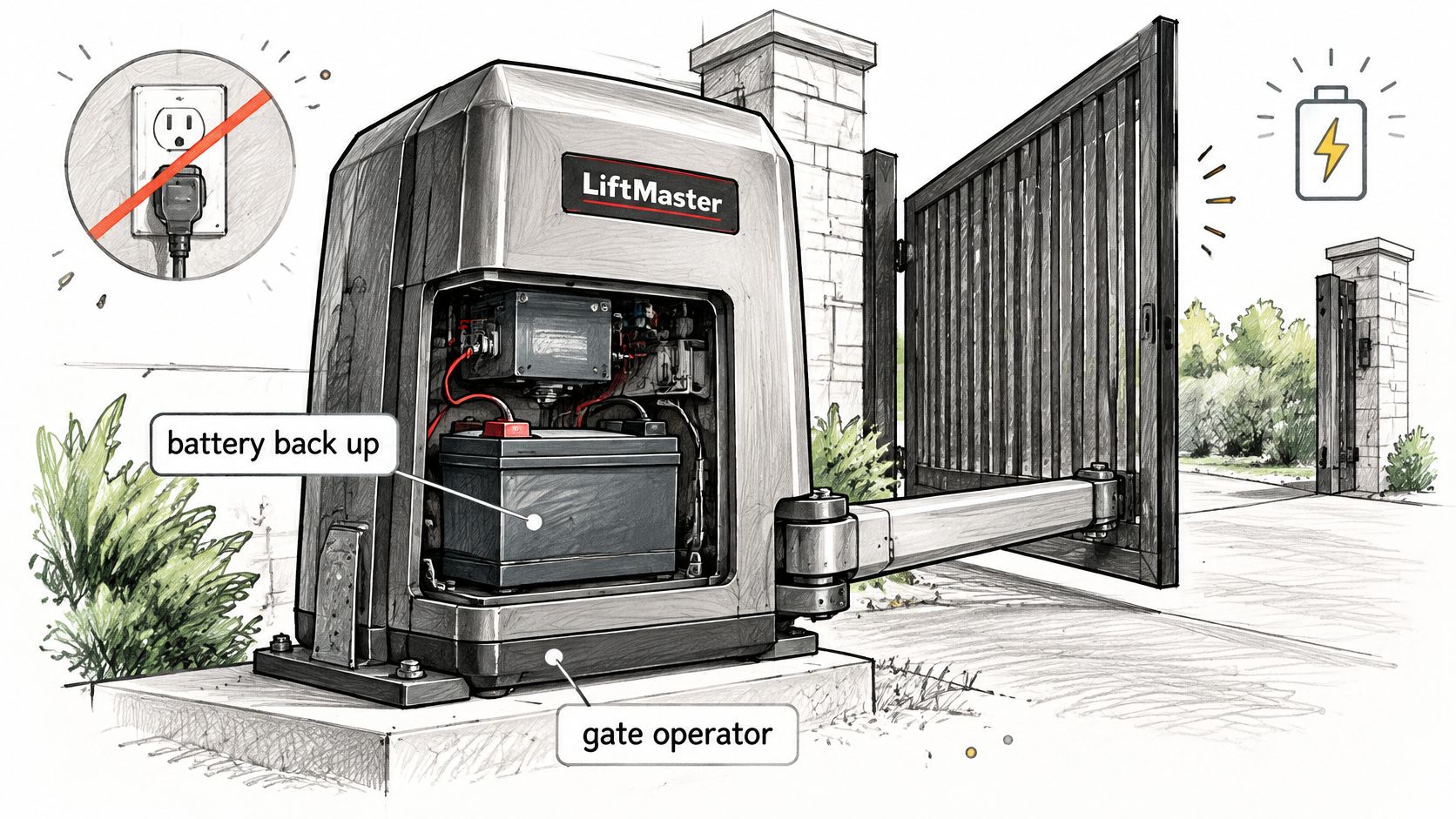
Three terms cover most of what readers will see in a manual:
- Operator: The motor, drive, and control board that move the gate and manage safety inputs.
- Battery pack: The stored energy source, commonly 12V 7Ah batteries with 33Ah options on several models.
- Standby: How long the system can wait on battery power with no openings before the pack runs down.
LiftMaster lists battery backup on product pages for the RSL12UL residential and light-commercial slide operator, the CSW24UL commercial swing operator, the INSL24UL industrial slide operator, and the MA barrier operators, and LiftMaster's INSL24UL product page doesn't present one universal runtime for all models. That's deliberate. The feature means continued access capability during an outage, not unlimited power, and not indefinite running without utility power.
A battery rating belongs to a specific operator and pack, not to the LiftMaster name in general.
Start at the unit label. Write down the exact model before looking at any runtime table, ordering any battery, or setting expectations for residents. Every useful number that follows depends on that model, and guessing from a similar operator leads to the wrong pack, the wrong cycle estimate, or both.
How Long a LiftMaster Battery Keeps the Gate Moving
Use this table as a lookup, not a promise. The LA400UL product guide lists up to 400 cycles or 97 days of standby with two 7Ah batteries, and up to 3,622 cycles or 180 days with two 33Ah batteries. The LiftMaster UL 325 listed gate operators guide lists the RSL12UL at 114 cycles or 63 days with one 7Ah battery, 281 cycles or 126 days with two 7Ah batteries, and 710 cycles or 180 days with one 33Ah battery.
Rated cycles and standby time by LiftMaster operator and battery setup
| Operator | Battery setup | Cycles | Standby time |
|---|---|---|---|
| LA400UL swing-gate operator | 2 x 7Ah | up to 400 | up to 97 days |
| LA400UL swing-gate operator | 2 x 33Ah | up to 3,622 | up to 180 days |
| RSL12UL slide-gate operator | 1 x 7Ah | 114 | 63 days |
| RSL12UL slide-gate operator | 2 x 7Ah | 281 | 126 days |
| RSL12UL slide-gate operator | 1 x 33Ah | 710 | 180 days |
Reading the LA400UL rows
The two LA400UL rows show why battery capacity matters, and why it doesn't scale evenly. Two 7Ah batteries total 14Ah, while two 33Ah batteries total 66Ah. On that operator, the stated cycle figure rises by more than nine times, from 400 to 3,622, while standby rises from 97 days to 180 days in the same guide linked above. Cycles reward extra capacity more directly because each opening draws a defined burst of energy. Standby still has to feed the control board and connected accessories day after day, so doubling waiting time takes far more stored energy than a simple ratio suggests.
Don't transfer that math to another operator. A different motor, a slide gate instead of a swing gate, or a different standby draw changes both figures. Compare battery rows only within the same operator, then treat the row as a ceiling.
Reading the RSL12UL rows
The RSL12UL makes the same point at a smaller scale. Moving from one 7Ah battery to two raises the listing from 114 cycles or 63 days to 281 cycles or 126 days, and the single 33Ah listing reaches 710 cycles or 180 days in the guide linked above. A quiet single-family driveway and a busy community entrance can share the same operator and exhaust the same pack at very different speeds. Standby days assume the gate mostly waits. Cycles assume it works. A real outage mixes both, so a property won't get the full cycle count and the full standby period from the same charge.
There's also a paperwork conflict readers need to catch before buying. The performance listing shows a single 33Ah setup for the RSL12UL, while the operator manual describes a 33Ah upgrade for solar or extended backup as requiring two batteries. Those can't both be used as an ordering instruction without checking. Confirm the exact kit, harness, and battery count in the manual for the installed unit before spending money.
Why field results fall short
Published figures are manufacturer test or design values. They aren't a guarantee for every property. Runtime falls with gate weight, friction, temperature, battery age, charging conditions, accessory load, and how often the gate opens. The LA400UL guide linked above also gives an operating temperature range of approximately -4°F to 140°F (-20°C to 60°C), which matters at properties with hard winters or hot, closed operator enclosures in summer.
Field rule: Use the table row to choose a pack size, then use a controlled outage test to learn what the installed gate actually delivers.
Accessories deserve a hard look here. Loops, safety devices, receivers, and add-on controllers that draw from the operator supply reduce what's left for the motor. A clean test on a light, well-balanced gate in mild weather will beat a heavy gate with worn rollers in extreme cold every time. That difference isn't a defective battery. It's physics, and it's why a test count recorded at the property beats a headline number in a brochure.
Matching a Battery Kit and Gate Size to Your Operator
Choose a battery configuration for the specific operator and gate, not by enclosure space alone. The operator's gate limit and its approved battery arrangement are separate checks: a pack cannot compensate for a gate that exceeds the model's rated size or weight.
Battery kits and gate size limits by LiftMaster operator
| Operator | Battery kit or configuration | Gate size limit |
|---|---|---|
| RSL12UL slide-gate operator | Standard 12 VDC 7Ah; 33Ah upgrade for solar or extended backup needs two batteries | Up to 25 ft and 800 lb |
| CSW24UL commercial swing operator | Standard 7Ah 12V arrangement; two 33Ah batteries available | Up to 18 ft or 1,600 lb |
| SL1000ULC slide-gate operator | Optional 490EVUL kit, two 12V 2.2Ah lead batteries | Up to 1,000 lb |
| TECHNA IBG24DC industrial barrier operator | Two standard 12V 7Ah batteries; optional two 12V 33Ah | Barrier arm up to 24 ft |
| CSL24UL commercial operator | 24 VDC transformer operation; standard 7Ah 12V arrangement; two 33Ah optional | Up to 50 ft and 1,500 lb |
The LiftMaster RSL12UL product page lists a gate limit of 25 feet and 800 pounds. The CSW24UL limit is 18 feet or 1,600 pounds. For the SL1000ULC, LiftMaster's SL1000ULC product page specifies a maximum gate weight of 1,000 pounds. The TECHNA IBG24DC is for barrier arms up to 24 feet, according to LiftMaster's TECHNA IBG24DC product page. The CSL24UL is rated for gates up to 50 feet and 1,500 pounds. Confirm that the installed gate falls within its model's limits before choosing a battery pack.
Battery arrangements also vary. LiftMaster lists the SL1000ULC's optional 490EVUL kit as two 12V 2.2Ah lead batteries. The TECHNA IBG24DC uses two standard 12V 7Ah batteries, with two 12V 33Ah batteries available as an option. A configuration listed for a barrier operator is not automatically suitable for a slide or swing operator.
Why bigger is not automatically better
A larger battery is only suitable if the operator's charger, enclosure, harness, and controller support it. Amp-hour capacity alone does not determine runtime or compatibility. Check the manual for the exact model and installed configuration, including the battery count. The RSL12UL's 33Ah configuration, for example, calls for two batteries for solar or extended backup.
On CSL24UL sites, follow the LiftMaster CSL24UL wiring instructions when adding cellular access, and confirm the add-on's power source before sizing backup. Record the setup so later testing has a clear baseline:
- Record the basics: Operator model, battery part number, voltage, Ah rating, install date, and measured charging voltage.
- Inspect the connections: Check that terminals are clean, tight, and free of corrosion.
- Simulate an outage: Run the gate with its normal load and accessories, then log the result.
How to Install or Replace a Backup Battery Safely
A battery swap is only safe when the operator is isolated, the replacement matches the installed model, and the gate is tested under load. Use the model-specific manual as the final authority. The LiftMaster operator manual provided here is for the CSL24UL, not the RSL12UL, so it should not be used to confirm RSL12UL battery specifications. Check the RSL12UL manual for its battery configuration and replacement procedure.
Power isolation and replacement steps
- Switch off AC power. Isolate the operator before reaching inside its enclosure.
- Disconnect the battery connector from the control board. The battery can still energize the system after AC power is off.
- Check that the gate is within the model's size and weight limits. An overloaded gate can make a later cycle test misleading.
- Inspect polarity and the harness. Before installing the replacement, check for reversed leads, damaged insulation, corrosion, or loose terminals.
- Reconnect the battery, then restore AC power. This allows the integrated charger to operate.
- Set the backdrive. “MANUAL” permits movement after AC and battery power are lost. “SECURE” makes the gate difficult to move.
- After charging, test the gate during a controlled outage. Count complete open-close cycles and record the result.
A status indicator can show that a battery is present, but it cannot confirm how long the gate will operate. A counted test checks actual performance with the gate's normal travel and accessories connected. For an LA400 add-on controller, follow the LiftMaster LA400 wiring instructions so the accessory setup during testing reflects normal service.
Backdrive is a policy decision
Choose the backdrive setting based on the property's security and emergency-access needs. MANUAL allows residents or responders to move a gate after power is lost. SECURE resists manual movement. Record the chosen setting and make sure staff know how the gate behaves when both power sources are unavailable. An undocumented change can cause confusion during an outage.
Disconnect AC and battery power before any service work, and keep gate service with trained gate-system personnel.
Battery backup does not replace entrapment protection
Backup power and entrapment protection address different risks. LiftMaster's UL 325 safety guidance states that, beginning August 1, 2018, a slide-gate operator needs at least two independent means of entrapment-zone protection in both directions. The inherent reversing system counts as one means, and installations generally still require two monitored external safety devices. Photoelectric sensors or monitored edges help protect people and objects from entrapment. The battery only keeps the operator powered. Requirements vary by location, so confirm applicable codes and standards with the authority having jurisdiction.
If the installed model's manual shows a different connector, battery count, or indicator meaning, follow that manual or contact a qualified technician. Do not guess what an indicator means.
What Battery Backup Leaves Out of Your Access System
A common assumption fails here. LiftMaster battery back up powers the supported operator. It doesn't guarantee that cellular gateways, keypads, intercoms, card readers, CCTV, or access-control networking stay available.
Opener manuals make the boundary clear. The LiftMaster Model 8550W manual describes backup behavior for that opener itself, noting the door runs more slowly, the light may not operate, audible alerts sound, and an automatic lock can remain disabled until utility power returns. That's useful evidence about limits, but it's an opener manual. A gate operator's own manual can differ, so check the model on the gate before applying any of those behaviors to a driveway or community entrance.
A hypothetical that shows the gap
Consider a hypothetical multi-tenant property during a utility failure. Residents assume a phone app will open the gate because the operator has a battery. The operator still has stored energy, but a call box on its own supply is dark, so a visitor can't request entry. Physical opening capability survives. Normal access policy doesn't. Staff then improvise with propped gates or shared codes, which creates a security problem the battery was never meant to solve.
Map every device before an outage
A short outage map prevents that scramble:
- List each device: Operator, receiver, keypad, intercom, card reader, loops, safety devices, locks, cameras, and network gear.
- Name its power source: Operator battery, separate power supply, or utility power only.
- Write the fallback: What residents, visitors, and emergency services can still do if that device is dark.
- Post the procedure: Manual egress and emergency-entry steps where staff can find them without opening the operator.
Where a cellular add-on is part of the chain, put it on the same map. Nimbio wires into the gate operator a property already has, connects over cellular LTE with no Wi-Fi at the gate, and draws power directly from the gate operator's supply, so its availability during an outage depends on that supply staying up. Readers can review how that cellular connection works before deciding where the controller belongs in the outage plan. Existing clickers, fobs, and keypads keep working alongside the app, but each still needs a powered receiver or controller to be heard.
A gate that can move is not the same as an entrance that still controls who gets in.
Testing, Maintenance and Fixing a Weak Backup Battery
A battery that still pushes the gate can fail the access test the same afternoon. Count complete cycles under a controlled outage, then write the result down. Replacement follows that trend, not a guess about age.
Backup battery symptoms, likely causes and what to do
| Symptom | Likely cause | What to do |
|---|---|---|
| Gate completes fewer cycles than the rated row | Battery age, low charge, temperature, accessory load, or a heavier or binding gate | Charge fully, count cycles, check binding and balance, replace per the manual |
| Gate moves slowly or stalls on battery | Binding or imbalance can drain backup energy | Free the binding, check balance, test safety reversal |
| Status indicator flashing or abnormal | Can signal low capacity; exact meaning is model-specific | Read that model's manual, then test and replace only if it says to |
| Battery no longer holds a charge | Aged or repeatedly discharged pack, or poor charging connection | Inspect terminals for corrosion or looseness and replace per the manual |
| Gate does not move on battery during a test | Discharged or failed pack, disconnected harness, or operator fault | Stop and call a qualified technician |
Each operator publishes its own cycle and standby expectations. An LA400UL and an RSL12UL do not share one backup figure, and a status light only means what that model's manual defines. Read the indicator section for the operator in front of you, run the count, and replace the pack only when the manual says the result calls for it. The manufacturer's manual remains the final word on test method and on what a light means.
Mechanical drag can look like a weak battery
A struggling gate consumes stored energy faster and may not finish a safe cycle. Check binding and balance, then test safety reversal, before condemning a pack. Worn rollers, a rack out of alignment, a sagging hinge, or debris in a slide track all raise current draw. A new battery on a dragging gate buys a short improvement and the same stall later. Correcting the mechanics often recovers more cycles than fitting a larger pack.
The outage test that gives staff a number
- Charge fully: Leave AC power on until the charger has brought the pack to full charge under the manual's guidance.
- Simulate an outage: Remove AC power in a controlled way, with the gate area clear and safety devices active.
- Count complete cycles: Count full open-close cycles only. Part travel is not a successful entry.
- Compare with the rated row: Use the row for that exact operator and battery setup as the ceiling, then judge the gap.
- Record accessory behavior: Note whether receivers, keypads, intercoms, and controllers stayed available.
- Repeat on schedule: Test before storm season, after any battery replacement, and during preventive maintenance.
The rated row is a ceiling for that chassis and battery, not a promise that keypads or controllers stayed alive for the same count. Installers checking an add-on on a different LiftMaster chassis should use Nimbio's LiftMaster SL585UL installation guide for that model's wiring rather than copying connections from a smaller operator. Power draw and terminal layout change with the chassis. The counting method does not.
Keep a property log, not a reminder to buy batteries
A useful log fits on one page per gate:
- Battery identity: Part number, voltage, Ah rating, and install date.
- Measured result: Date of test, complete cycles counted, and charging voltage if the manual calls for measuring it.
- Indicator behavior: Exactly what the status light did, recorded without interpreting codes the manual does not define.
- Accessory result: Which entry devices still worked during the simulated outage.
- Mechanical notes: Binding, balance, and safety reversal results.
Trends in that log justify replacement. A steady drop in counted cycles points to an aging pack or rising drag. A sudden drop points to a connection, charger, or mechanical change. Waiting for beeping or a fault light turns maintenance into an outage report.
If the gate does not move on battery during a test, stop. Restore safe conditions per the manual and call a qualified technician. Repeated attempts can drain a weak pack, stress the operator, and leave the property with neither powered nor planned manual access.
If the operator's LiftMaster battery back up passes a counted outage test, that stored energy is a measured number staff can plan around. Nimbio wires in parallel to the operator already on the gate, so app access during an outage depends on the supply that test just checked. Property managers can issue or revoke digital keys from the app. See Nimbio to judge whether that retrofit matches the operator and the outage log already on the property.