

A portfolio manager starts Monday with three unrelated access problems. One gated community has a failed entry gate, another has a vendor credential that expired overnight, and an HOA president at a third property wants last week's entry logs before the board meeting. Every site is technically managed, but the portfolio isn't being managed from one place.
That gap is what multi site management addresses. For property managers, HOA boards, security installers, and residents, it means coordinating gates, building doors, amenities, visitor access, credentials, and audit records across multiple properties without forcing every location to operate as an island. The practical objective is straightforward: centralize oversight while preserving reliable local operation.
Table of Contents
- Why Property Managers Are Rethinking Multi Site Management
- What Multi Site Management Actually Means
- Key Challenges and Risks at the Portfolio Level
- Core Features Every Multi Site Access System Needs
- Deployment Process and Rollout Checklist
- Metrics That Prove Your Multi Site Strategy Is Working
- Choosing the Right Vendor or Integration Partner
- Bringing It All Together Across Your Properties
Why Property Managers Are Rethinking Multi Site Management
A property manager overseeing several gated communities can spend much of the day switching between vendor portals, resident directories, spreadsheets, gate operator interfaces, and conversations with local technicians. A resident's access issue may involve one system, while a visitor request depends on another. The manager has responsibility for the outcome, but not always a single source of truth.
That operating model creates avoidable friction. A credential may remain active after a resident moves, a contractor may receive broader access than the HOA intended, or an incident review may require collecting records from separate sites. The problem isn't just inconvenience. It's the lack of consistent policy, visibility, and accountability across the portfolio.
Industry reporting describes the scale behind this shift. An industry summary on multi-site management cites Acquia as saying large enterprises manage an average of 268 customer-facing websites, while the share of large organizations adopting multi-site strategies is projected to rise from 76% to 85% during 2024. The same summary reports that 47% of companies work with multiple content management systems and 91% want to use more headless CMS the following year.
Property operations have a parallel challenge, even though the systems are different. Each community may have its own gate operator, intercom, access reader, amenity schedule, and local habits. Multi site management creates the portfolio layer that standardizes what should be standardized while leaving site-specific rules intact.
The operating pressure behind centralization
Several forces are pushing HOAs and property managers toward centralized access control:
- Resident expectations: Residents increasingly expect smartphone access, remote entry, and convenient digital visitor credentials.
- After-hours coverage: Managers need to diagnose access problems remotely instead of waiting for a technician or guard to reach the property.
- Audit requirements: Boards want entry logs, credential histories, and override records that can be reviewed without relying on one employee's memory.
- Security consistency: Vendor, resident, and visitor policies should remain controlled even when communities have different operating hours.
A practical portfolio strategy begins with streamlining gate access operations, then extends the same discipline to building entrances, clubhouses, package rooms, and other shared facilities.
What Multi Site Management Actually Means
Multi site management is a centralized operating layer for multiple physical locations owned, managed, or governed by the same organization. In a property setting, that layer may connect access control, gate operators, intercoms, video systems, resident directories, visitor workflows, and reporting through one administrative environment.
The central dashboard should provide more than a list of properties. It should show which locations are online, which credentials are active, which incidents need attention, and which policies apply across the portfolio. Local staff still handle on-site responsibilities, but managers can set permissions and review activity without signing into a separate system for every community.
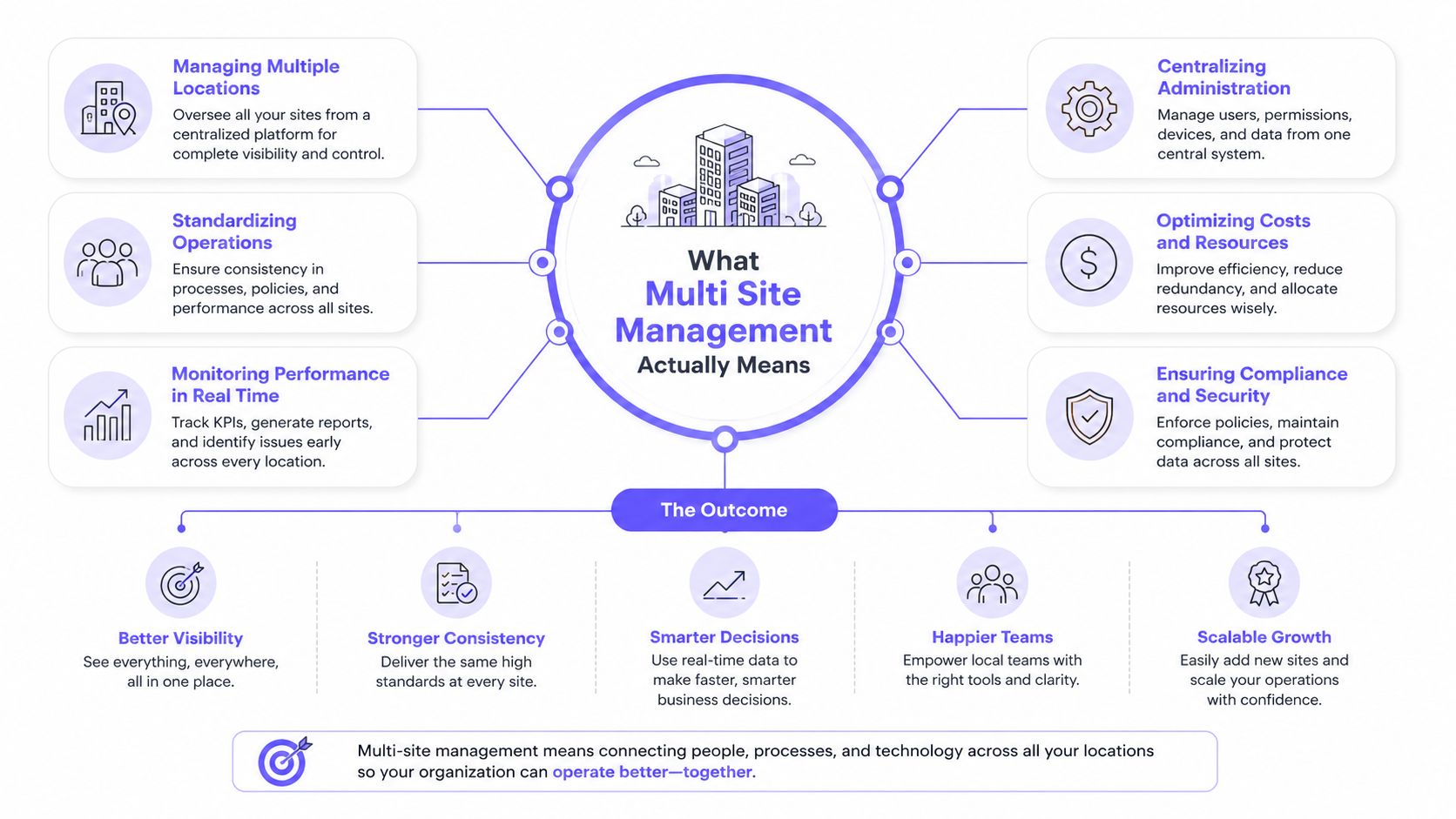
A useful comparison is property accounting software. Each community still has its own ledger and transactions, but reporting, permissions, and oversight roll up to the portfolio level. Access management should work similarly. A manager can apply a shared policy to several communities, then adjust a local rule where the property's governing documents require it.
Multi site versus multi tenant
The terms sound similar but describe different operating models:
- Multi site: One operator manages multiple locations using shared workflows, permissions, and reporting.
- Multi tenant: Multiple independent customers share an underlying platform or infrastructure, with each customer's data and administration separated.
HOA and property-management portfolios generally need a multi-site architecture. The relevant locations may include:
- Entry and exit gates
- Pedestrian doors
- Clubhouses and fitness centers
- Pool areas
- Package rooms
- Leasing offices
- Maintenance and vendor-only areas
The platform should preserve local context while giving the central team a unified view. A board member might receive reporting access for one community, while a regional manager oversees several properties and a security installer receives limited device permissions.
Centralization also shouldn't mean central failure. Best-practice access architectures keep door decisions and event capture operating at the site level during a WAN or cloud interruption, then synchronize records when connectivity returns. Enterprise access-control guidance on multi-facility dashboards identifies this local-continuity model as important for availability and timestamped reporting.
Key Challenges and Risks at the Portfolio Level
Several gated communities can turn small local problems into portfolio-wide exposure. An outdated controller at one property is a maintenance task. Without a shared view, the same weakness may remain unnoticed elsewhere, while staff continue managing separate portals, spreadsheets, and technician notes.
Hardware fragmentation is usually the first obstacle. One HOA may use a LiftMaster operator, another a DoorKing panel, and a third an older intercom or card reader. Mixed brands can still support a coordinated rollout, but each site requires compatibility checks, device testing, and a clear plan for credential administration. Replacing every controller at once may simplify support, yet it can also create a large capital expense and disrupt residents.
Policy drift creates a separate risk. One board may allow vendors during extended hours, while another limits contractor access to defined business windows. If those rules exist only in local files or staff memory, a manager can apply the wrong permission at the wrong gate. Standard templates help, but legitimate community differences still need documented exceptions.
Remote visitor workflows add pressure. A resident may request access for a delivery or contractor while the onsite team is unavailable. If the gate, intercom, and visitor record use disconnected systems, staff may approve access without a reliable way to confirm when it started, where it applied, or whether it was revoked.
Operational reporting becomes harder as locations multiply. An independent facility-management source reports that 68% of multi-site FM directors lose more than 6 hours per week manually consolidating site reports. The same source reports that 40% of multi-site operations leaders lack consistent visibility into preventive-maintenance compliance across all locations. The facility-management reporting shows why access events and maintenance records need a shared operating view.
Portfolio-Level Risks When Centralization Is Missing
| Risk Category | Typical Symptom | Portfolio Impact |
|---|---|---|
| Hardware fragmentation | Different operators and readers require separate tools | Slower troubleshooting and uneven upgrade decisions |
| Policy inconsistency | Visitor and vendor rules vary without documented exceptions | Greater chance of excessive or unauthorized access |
| Credential sprawl | Residents and vendors use separate apps, cards, or shared codes | Revocation is slow and difficult to verify |
| Reporting gaps | Records remain in multiple portals or local devices | Incident reviews take longer and lack context |
| Legacy security exposure | Older controllers retain weak credentials or undocumented settings | One neglected site can become a portfolio liability |
| Staffing dependency | One technician knows a particular legacy system | Absence or turnover delays repairs |
| Licensing creep | Each property carries separate subscriptions | Growth raises overhead without improving control |
Centralization reduces these risks only when governance supports it. The portfolio still needs defined roles, approved access policies, credential lifecycle rules, exception handling, and a documented response when connectivity or equipment fails.
Practical rule: Use the centralized dashboard as the system of record for access decisions and incident review, not as another screen that mirrors disconnected site tools.
Core Features Every Multi Site Access System Needs
A board meeting starts with a resident locked out, a vendor waiting at the wrong gate, and a manager switching between portals to find the cause. A workable platform should answer three questions quickly: What is happening now, who can access each location, and what happened during an incident? The following features support those decisions across legacy gates, mixed hardware, and remote visitor workflows.
Start with one operational view
A unified dashboard should show live gate status, open incidents, device health, and relevant resident or credential information across the portfolio. Authorized staff should be able to open a specific property from that view without another login or losing the broader context. An admin dashboard for access control should present those controls clearly enough for property staff and board members, not only security engineers.
Permissions must match responsibility. A board member may need reports but no gate controls. A security officer may handle visitor requests, while an integrator receives limited device permissions for diagnostics and maintenance. Keep those boundaries explicit, especially when remote access replaces an on-site guard or technician.
Make every action reviewable
Tamper-evident audit logs should capture credential issuance, revocation, overrides, door cycles, and administrator activity with timestamps. Exportable records help HOA boards and property managers review incidents, answer resident questions, and document whether staff followed the approved policy.
Bulk administration saves time across a portfolio. Managers should be able to apply access hours, holiday rules, amenity schedules, and credential changes to selected properties instead of repeating each task manually. The system should also support OTA firmware updates where the hardware allows them, with a safe recovery process if an update fails. APIs and webhooks can pass access events to property-management software, resident directories, and other operational tools.
Design for transition, not a perfect replacement
Residents and vendors may need mobile credentials alongside older RFID cards during a phased changeover. A hardware-agnostic platform is useful when communities use different gate operators, readers, and electronic locks. Retrofitting compatible equipment avoids forcing every property into the same replacement schedule, though older controllers may still require separate testing and maintenance.
For the physical work, Lotus Locksmith Service installation offers context on coordinating smart-lock selection with on-site implementation. The software plan should account for that installation work, credential migration, resident communication, and fallback access procedures.
| Feature | What It Solves |
|---|---|
| Unified dashboard | Reduces repeated logins and disconnected site views |
| Role-based permissions | Matches actions to board, staff, vendor, or installer responsibilities |
| Audit logs | Creates a reviewable record of access and administrative actions |
| Bulk policies | Reduces repetitive scheduling and configuration work |
| OTA updates | Supports remote firmware maintenance where compatible |
| APIs and webhooks | Connects access events with other property systems |
| Mobile and legacy credential support | Enables phased adoption without immediate disruption |
Deployment Process and Rollout Checklist
A gate rollout usually goes wrong before installation. A property may have an older controller, a different reader brand, weak cellular coverage, or a visitor workflow that staff handle manually. Start with a site inventory, not a software demo.
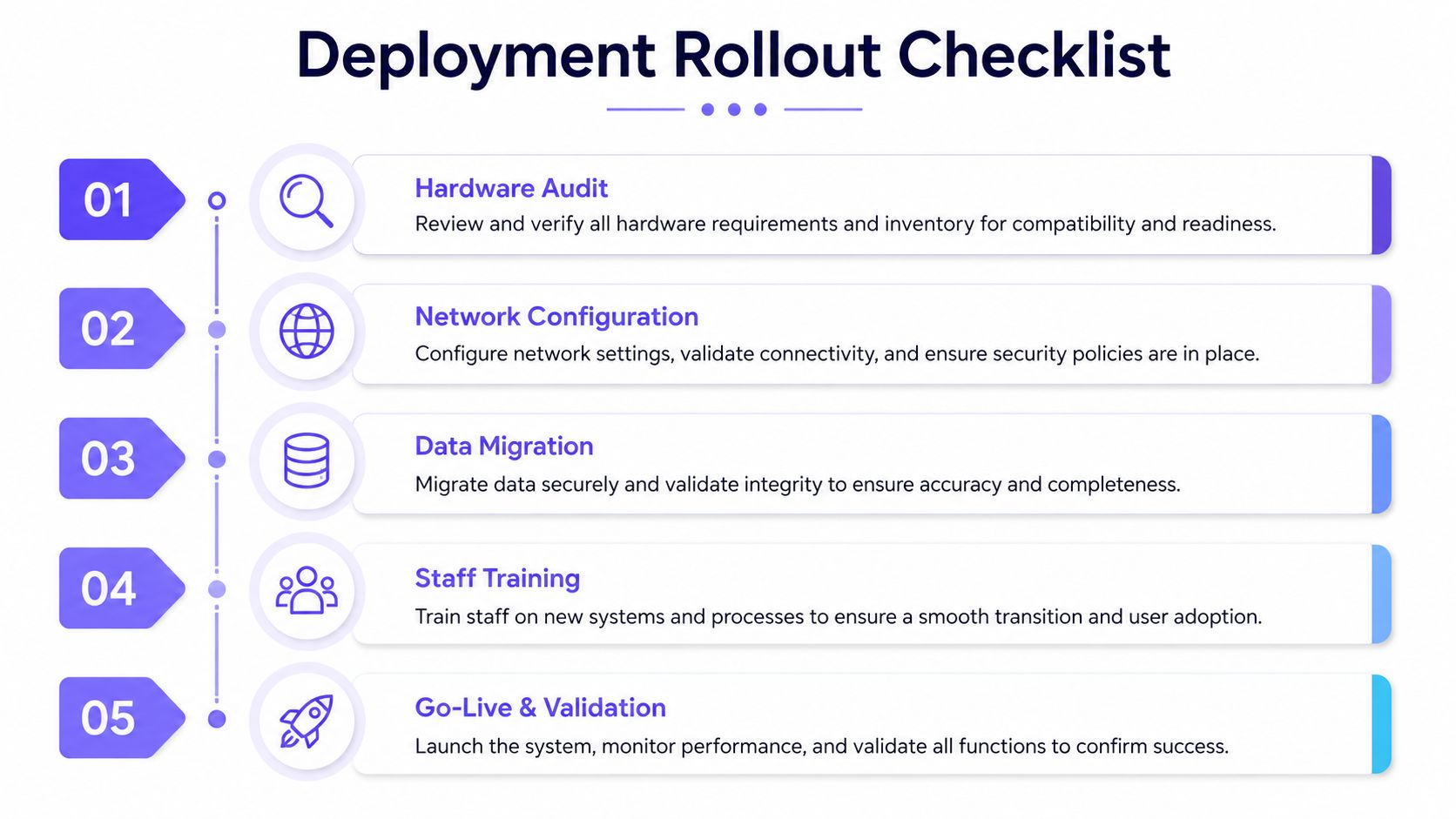
Build the inventory before setting a date
Record these details for every community:
- Gate operator and controller models
- Reader, intercom, and keypad types
- Firmware and configuration details
- Resident, vendor, and staff credentials
- Cellular, wired, or wireless connectivity
- Emergency release and manual override procedures
- Local contacts, guards, technicians, and escalation paths
This audit reveals compatibility gaps before residents rely on the new workflow. It also separates properties ready for a retrofit from sites that need controller replacement, extra testing, or a longer transition.
Configure the operating model
Set up the cloud tenant, property hierarchy, user roles, shared rules, and site-specific exceptions before importing the full resident directory. Batch imports make validation easier and limit the impact of incorrect mappings. Test remote visitor access with the people who use it, including residents, vendors, guards, board users, and after-hours managers.
Run the pilot at one community for two to four weeks, as specified in the rollout plan. Check remote gate operation, audit-log completeness, credential revocation, app adoption, and emergency access. Include older RFID cards or other legacy credentials if they will remain active during the changeover.
Scale in controlled waves
After the pilot, move properties in waves of three to five sites so support requests stay manageable. Before each cutover, verify cellular failover, confirm local manual operation, train on-call guards, test visitor workflows, and document the legacy override process.
The overlooked deployment task is teaching the person who has to open the gate at night when the normal workflow fails.
Use a cutover checklist:
- Confirm connectivity and local operation.
- Validate resident and vendor assignments.
- Test revocation and expiration.
- Review event timestamps and exports.
- Confirm escalation contacts.
- Send resident instructions.
- Keep the previous process available during transition.
This approach slows the rollout at first, but it gives property managers a controlled fallback while mixed hardware and remote workflows are still being proven.
Metrics That Prove Your Multi Site Strategy Is Working
A portfolio dashboard should produce a monthly operating scoreboard, not a wall of status colors. HOA boards and property managers need measures that connect gate performance with response quality, resident experience, and governance across communities with mixed hardware.
Track response and reliability
Measure mean time to resolve access incidents by site and incident type. Remote diagnostics should reduce avoidable site visits, but comparisons only work when every team uses the same start and end points.
Credential issuance cycle time covers the period from resident onboarding to usable access at each permitted gate or amenity. Delays usually expose directory-sync errors, approval bottlenecks, or unclear handoffs between the manager and installer.
Other useful operational measures include:
- After-hours exceptions: Separate genuine late activity from access rules that failed to propagate.
- Active resident usage: Check whether residents use mobile credentials after onboarding, rather than relying on enrollment numbers alone.
- Audit-log completeness: Find overrides and local actions that bypass the central platform.
- Planned versus actual downtime: Show whether outages follow maintenance plans or indicate recurring failures.
- OTA update success: Confirm that compatible devices receive updates and that failed updates receive follow-up.
Use the scoreboard to compare communities, not to punish a property for hardware it cannot replace immediately. A legacy gate with unreliable connectivity may need a repair plan, while a newer site may need policy changes or better resident instructions. The useful question is whether each metric has an owner, a threshold, and a documented response.
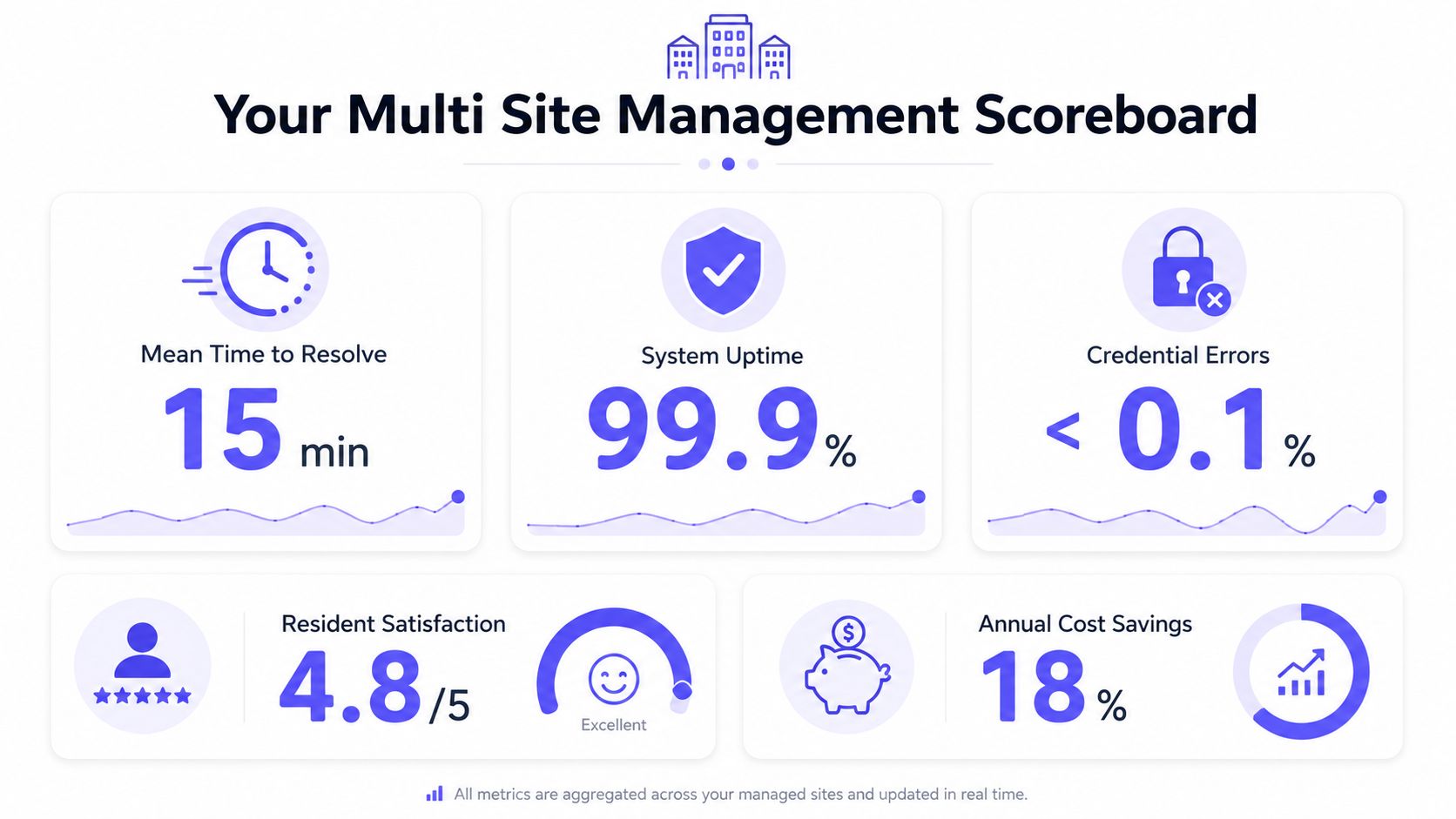
A practical cadence keeps review work manageable:
- Daily: Review outages, alarms, and unresolved access incidents.
- Monthly: Compare sites, credential activity, exceptions, and audit completeness.
- Quarterly: Review hardware health, policy changes, vendor performance, and capital needs.
The scorecard should lead to action, such as assigning an integration fix, retraining guards, or budgeting for a gate retrofit.
Choosing the Right Vendor or Integration Partner
A community with an older gate, mixed reader brands, and a small on-site team needs a different partner from a newly built development with standardized hardware. Start by mapping what the portfolio already has, then match the vendor's capabilities to staffing, governance, and the rollout plan.
A dedicated access-control platform may offer stronger credential and door administration. A property-management suite may connect resident records and billing more directly. A local integration partner may be better equipped for cabling, gate retrofits, commissioning, and on-site training. These roles serve different needs. The software vendor owns the platform and product roadmap, while the integrator handles controller configuration, wiring, gate-operator compatibility, and field support. A portfolio often needs both.
Questions worth asking during evaluation
Require a demonstration using one actual community and a real visitor or resident workflow. Ask the team to show:
- Which existing controllers, readers, intercoms, and gate operators are supported?
- Can staff view every property from one dashboard?
- Which issuance, revocation, override, and access events appear in the audit log?
- How are firmware updates delivered, confirmed, and handled when they fail?
- Can permissions differ for board members, managers, guards, residents, vendors, and installers?
- How are data retention, exports, and integrations managed?
- Does each property continue local operation if the central connection fails?
- Does pricing depend on sites, credentials, devices, usage, or a combination?
| Evaluation Area | What to Ask | Red Flag | Green Flag |
|---|---|---|---|
| Hardware compatibility | Which existing controllers and gate operators can be retrofitted? | Requires proprietary replacement hardware | Supports a documented range of existing equipment |
| Portfolio dashboard | Can staff manage multiple locations from one login? | Separate accounts presented as multi-site | Hierarchical portfolio, region, and property views |
| Audit records | Are issuance, revocation, overrides, and events captured? | Limited or non-exportable history | Timestamped, searchable, exportable records |
| Permissions | Can roles be restricted by property and action? | One broad administrator role | Granular, property-specific permissions |
| Integrations | Are APIs or webhooks available? | Closed system with no documented integration path | Clear integration support and documentation |
| Commercial model | How does cost change as the portfolio grows? | Per-credential pricing that penalizes adoption | Predictable scaling model |
Test failure handling before signing. Disconnect the central connection, issue a visitor credential, revoke a resident's access, and confirm what guards can still do locally. A platform that looks strong in a demo may leave staff without a workable fallback at a legacy gate.
A vendor that will not expose APIs can complicate future property-management connections. Proprietary hardware can also turn a new community into a replacement project. Review the Nimbio guide for property managers with the hardware inventory and pilot findings. Keep the shortlist to two or three platforms tested against one real community, rather than chosen from feature sheets alone.
Bringing It All Together Across Your Properties
A board may approve centralized access, but rollout work starts with the gates residents use every day. A practical 90-day multi site management rollout begins with inventory and risk discovery. Record every gate, reader, controller, intercom, credential type, connectivity path, and override procedure in one working file. Include the hardware brand, current failure points, and who can authorize emergency entry.
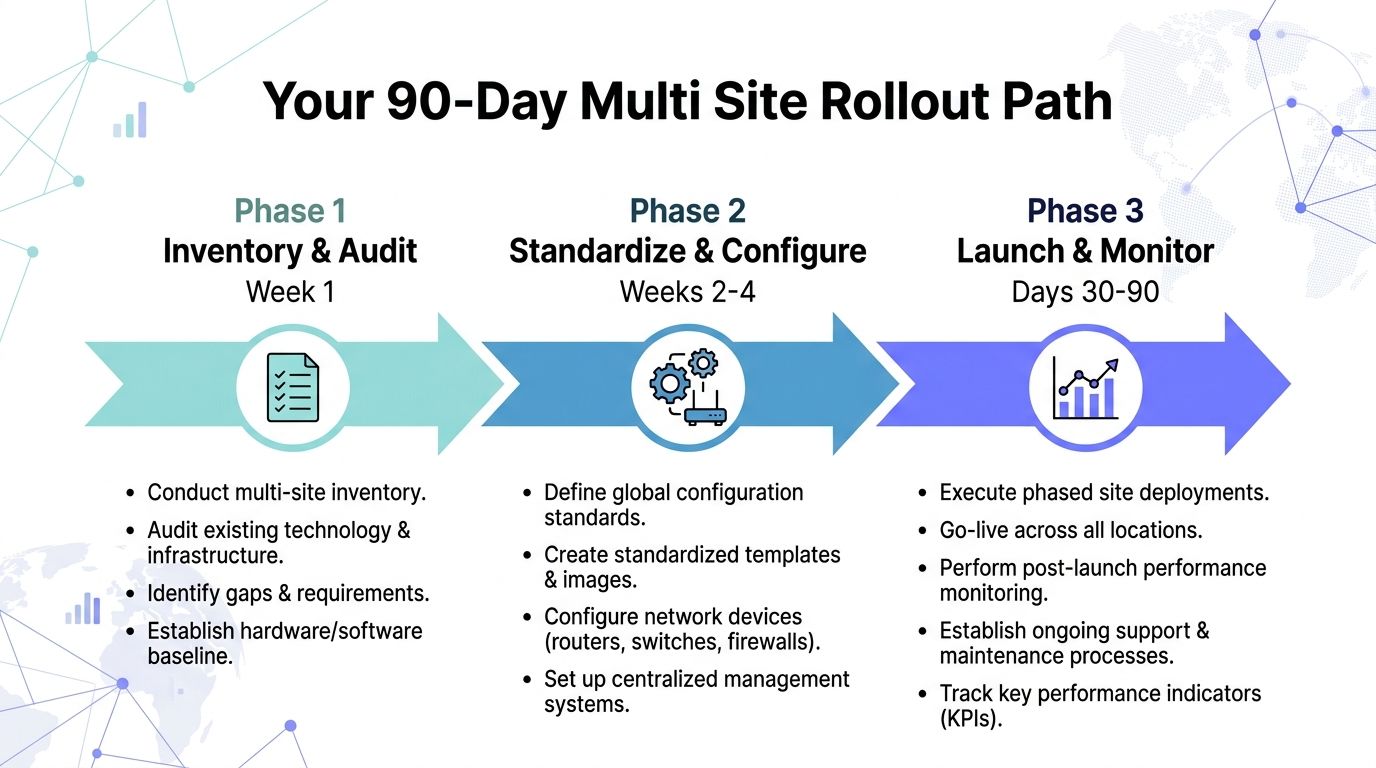
During weeks two through four, standardize resident records, credential names, roles, visitor categories, and approval rules. Separate portfolio-wide controls from local HOA decisions. The shared baseline can set vendor identity checks and credential expiration, while each community keeps authority over approved access hours and board-specific exceptions.
During weeks five through eight, configure the central dashboard and pilot it at one community. Track remote incident handling, credential turnaround, after-hours exceptions, audit completeness, and resident adoption. Test the awkward cases directly: a guard using the fallback process, a visitor arriving while the manager is unavailable, and a legacy gate responding to a connectivity interruption. Those tests show whether the workflow works outside a polished demonstration.
From weeks nine through twelve, expand in controlled waves, adjust permissions for board members and staff, and set the reporting cadence. The central team should review exceptions and recurring failures, while local managers retain decisions tied to their property. That division limits policy drift without forcing every gate into the same operating pattern.
Where the model still has limits
Central administration does not remove legacy hardware constraints. Mixed systems may require phased controller replacement, and smaller HOAs may need a lighter setup than a full portfolio architecture. Cellular connectivity can reduce dependence on local Wi-Fi, but installations still require reliable power, compatible gate interfaces, and a documented emergency process.
Start with a measurable pilot. Select one community, establish a baseline for response times and after-hours access incidents, then run a 30-day comparison after centralized workflows begin. Give the board unresolved exceptions, implementation costs, resident feedback, and the specific work required at the next property.
Nimbio provides cellular keyless entry for electronic gates and building access, including smartphone credentials, remote visitor management, centralized administration, and operation without property Wi-Fi. Visit Nimbio to assess a retrofit at one community and use the pilot findings to plan a broader rollout.


