The most common advice about multicode gate openers is to add more PINs or replace an old keypad. That misses the main issue. A property needs to decide who holds each credential, how access is removed, and whether the gate itself is safe to operate. Updating access credentials and bringing a gate system up to current safety expectations are separate jobs.
Table of Contents
- What a Multicode Gate Opener Actually Does
- How Multi-Code Remotes and Keypads Work Under the Hood
- The Real Weakness of Shared Gate Codes
- Where Multicode Sits Next to Other Entry Methods
- Layering Cellular Control Onto an Existing Operator
- What a Cellular Controller Does Not Fix
- A Practical Migration Plan for Property Managers
What a Multicode Gate Opener Actually Does
A multicode gate opener is a receiver, keypad, or controller that recognizes more than one credential. Depending on the setup, those credentials might be remote transmitters, PINs, or a combination of clickers, fobs, cards, and smartphone inputs that can trigger the same gate operator.
“Multicode” describes a capability, not one specific brand or product type. A receiver may store several remotes, while a keypad may accept multiple PINs. A controller that accepts more than one kind of input can bring different access methods together, but the gate still responds through its operator.
More credentials do not guarantee better control
Most gated properties already use some form of multicode access. Residents may have separate clickers, while visitors use a shared keypad code or call box. The system can accept many credentials and still provide little accountability if people share a PIN or nobody removes old credentials.
A useful way to understand the setup is to separate its parts: the credential identifies or authorizes someone, the receiver or controller checks the input, and the operator moves the gate. Adding another input changes how someone requests entry. It doesn't, by itself, improve the gate's physical safety or determine who should still have access.
For a practical example of how an electronic access gate fits into a property's security setup, see Admiral's Yard Self Storage's account of a secure gate for Admiral's Yard Leeds.
What the term doesn't tell a property manager
“Multicode” alone doesn't tell a manager how many credentials a device can handle, whether credentials are individually assigned, or whether the system records who opened the gate. Those details depend on the equipment and its configuration. The useful question isn't how many codes it supports. It's whether the property can manage each credential through its full lifecycle.
How Multi-Code Remotes and Keypads Work Under the Hood
A gate usually receives an input through a radio receiver, keypad, or access controller. The input is checked against what the equipment accepts. If authorized, a relay sends a request to the operator, which controls the gate. Different entry methods can therefore lead to the same operator action, even when they use different signals or credentials.
Think of the receiver as a bouncer with a list of approved faces, and the keypad as a bouncer with a list of approved phrases. The analogy has limits: electronic systems check signals or entered digits, not a person's identity unless another system connects that credential to a named user.
Remotes send signals, keypads check entries
A remote transmitter sends a radio signal that a compatible receiver is designed to recognize. Fixed-code systems send the same code each time. Rolling-code systems change the transmitted code, so a captured transmission isn't intended to work repeatedly. Which method a gate uses depends on its equipment, and the operator or receiver manual is the place to confirm compatibility and programming details.
A keypad works differently. Someone enters a PIN, and the keypad or connected controller checks it against accepted codes. If the PIN is accepted, the device sends an opening request to the operator. A shared PIN can be easy to distribute, but the equipment can't distinguish one person from another when they all use the same entry.
The relay is the common handoff
Whether the signal comes from a remote, keypad, or another controller, the gate operator receives a command through its control circuit. That shared handoff explains why several entry methods can coexist. It also explains why a new input doesn't necessarily require replacing a working keypad or remote receiver.
The mechanisms may be familiar, but the relevant management question is still current: who is authorized, and how can that access be removed? A long list of accepted signals or PINs isn't the same as a list of individually accountable users. Properties get better control by managing credentials well, not by focusing only on how many slots the receiver offers.
The Real Weakness of Shared Gate Codes
A shared PIN is one credential known by many people. If a resident moves out, a contractor's job ends, or the code is passed beyond the intended group, the property can't revoke access for that person alone. Changing the PIN may cut off everyone who still needs it, so managers often leave the code in place longer than they should.
NIST's digital-identity guidance treats authentication as proof that a person controls an authenticator and recommends managing credentials through their lifecycle, including removal when they're no longer needed or are compromised (NIST digital-identity guidance). Applied to gate access, the principle is straightforward: give each authorized person a separately managed credential where the system allows it.
A code list is not an access policy
A multicode keypad can store multiple PINs. That doesn't mean each PIN belongs to a named person, expires when needed, or leaves an event record. A property needs to define who issues credentials, who can remove them, and what happens when a phone or credential is lost.
Event records are useful when they associate an opening with a credential, a time, a gate, and an authorization decision. They can help a manager review a disputed entry or check whether a contractor used access outside the agreed window. A shared PIN, by contrast, generally tells the manager only that someone entered the right digits.
Practical rule: If a property can't identify who owns a credential, it can't reliably manage that credential.
When to move beyond the shared PIN
Keep a keypad when it serves a real need, such as providing a familiar entry method or a fallback for people who can't use a phone. But don't treat a communal PIN as good enough for every resident, employee, or contractor. Individually assigned credentials make it possible to remove one person's access without changing everyone else's.
Properties weighing digital credentials should also review cellular access security explained and set a clear process for issuing, expiring, and revoking access. The key distinction is between many accepted credentials and many individually managed identities.
Where Multicode Sits Next to Other Entry Methods
Different entry methods solve different problems. A keypad gives people a code to enter. A remote lets an authorized holder operate the gate from nearby. An intercom or call box supports a visitor request, while a cellular add-on can provide remote control through a mobile connection. None is automatically right for every property, and many sites use more than one.
| Entry method | Best fit | Main caveat |
|---|---|---|
| Multicode keypad | Shared or visitor entry where users can enter a PIN | A shared PIN doesn't identify which person used it |
| Fixed-code remote | A simple setup where convenience matters more than stronger signal protections | The same code is transmitted each time |
| Rolling-code remote | Remote access where the compatible receiver changes the accepted signal | Compatibility and programming depend on the specific equipment |
| Intercom or call box | Visitors who need to contact someone before entry | Someone must respond and decide whether to open |
| Cellular add-on controller | Remote entry and separately assigned digital credentials without replacing the existing operator | Remote commands depend on cellular connectivity and need an offline fallback |
Choose based on the access problem
For a single-family homeowner whose main need is letting household members use the gate, compatible remotes may be enough. An HOA balancing resident entry and visitor access may keep its keypad while adding individually managed credentials for people who need their own access. A logistics yard with rotating contractors benefits from credentials that can be removed when work ends, while a commercial site that needs to review gate events should choose an approach that provides suitable records.
An add-on controller doesn't have to replace a keypad or operator. It can add a different way to authorize entry alongside existing equipment. For a separate overview of entry technology in a rental setting, Global's smart lock picks offer context on a related, but distinct, access-control problem.
Keep the method that serves a clear purpose
A property should be able to explain why each method remains in use. Keypads can be useful for people who need a code-based option; remotes can suit regular users who enter from a vehicle; and visitor systems can support entry requests. Digital credentials may help managers assign and remove individual access without changing a shared PIN.
The decision isn't “old hardware or new technology.” It's whether the current mix gives the property a workable way to admit authorized users, handle visitors, remove expired access, and preserve a fallback when one method is unavailable.
Layering Cellular Control Onto an Existing Operator
A cellular controller can add another access path to an existing gate operator. The operator, keypad, and remotes remain in place if they're compatible and functioning. The exact connection depends on the operator, so installation should follow the manufacturer's documentation and be handled by a qualified technician.
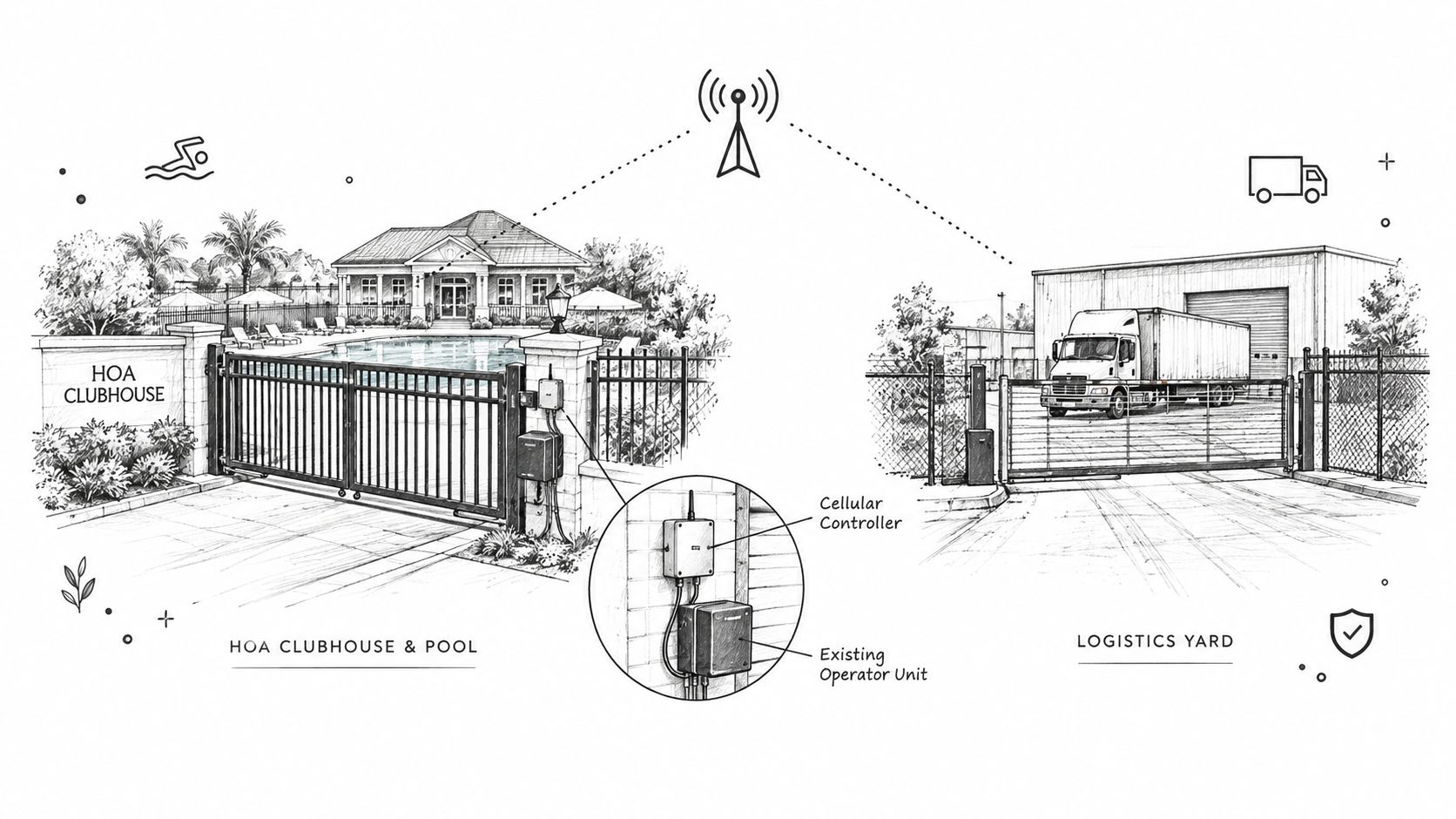
Consider a hypothetical HOA with a clubhouse gate, an existing keypad, and resident clickers. The board could keep the familiar entry methods while using individually assigned digital keys for residents who need them. If someone's access should end, the manager can revoke that person's key rather than changing a PIN used by the entire community.
Add an input without discarding working equipment
In a hypothetical logistics yard, a small team may use remotes while contractors come and go. A cellular controller could add a way for the manager to issue time-limited digital access, while the existing keypad and remotes remain available. That arrangement doesn't make the original entry methods disappear; it gives the manager another way to grant and remove access.
The installer must confirm how the controller connects to the operator and whether the operator supports the intended input. Managers shouldn't assume every gate terminal behaves the same way or try wiring changes based on generic advice. The equipment manual and installer's assessment should settle those details.
What a digital layer can provide
Nimbio is one example of this approach. Its cellular add-on controller connects over LTE, so it doesn't need Wi-Fi at the gate. Property managers can issue and revoke digital keys remotely and set an expiration date, while existing clickers, fobs, and keypads keep working alongside the app. Visitors can also be let in remotely, including through video verification at the gate.
That kind of setup is an addition to the existing operator, not a reason to assume the gate itself has been upgraded for safety. Properties considering retrofitting legacy gate operators should have the equipment and its connection assessed before installation.
What a Cellular Controller Does Not Fix
A cellular connection doesn't guarantee that a remote command will reach the gate. The FCC documented a nationwide AT&T wireless outage on February 22, 2024, that lasted at least 12 hours and affected more than 125 million registered devices; voice and 5G data services were unavailable during the incident (FCC outage report). A gate controller that depends on a network needs a fallback plan for a carrier outage, power loss, or local coverage problem.
Keep existing remotes and keypads working where practical, and preserve mechanical egress and emergency-release procedures. For a critical site, have the installer check cellular coverage at the actual gate, not just at the property office, and document what users should do when remote service is unavailable. Follow the operator's manual for any testing or service procedure.

Credential modernization is not safety compliance
A new keypad or cellular controller doesn't make an unsafe gate safe. In the United States, UL 325 addresses gate operators and entrapment protection, while ASTM F2200 covers the physical construction of automated vehicular gates. Local requirements vary, and the property should have a qualified installer assess the gate against applicable requirements rather than treating an access-control change as a compliance check. The safety framework and its development are summarized in an access-control research report from ASIS International.
The gate itself needs attention to hazards such as entrapment zones, moving parts, pedestrian access, and the condition of the structure. An older gate may need work beyond adding a receiver or controller. The operator manual and local code determine what applies at the property.
Check the reset and access-control locations
UL 325 specifies that a stop or reset control used after two sequential activations of entrapment-protection devices must be within the line of sight of the gate (DASMA technical data sheet). That local reset function is separate from ordinary access authorization. An app or keypad can request operation, but it can't replace a safety reset that must be visible from the gate.
An installer should verify the operator's safety devices, reset behavior, control location, and the way any added access module connects to the system. Don't guess at terminals, indicator lights, or error codes. Equipment varies, so the manufacturer's manual and a qualified technician should guide troubleshooting and repair.
A Practical Migration Plan for Property Managers
A careful migration starts with the equipment already on site. The manager should inventory remotes, fobs, PINs, keypads, call boxes, and any other active entry methods, then decide what to keep, retire, or treat as a fallback. This is also the time to flag credentials with no clear owner.
Property managers often coordinate access as part of wider rental operations. For context on those responsibilities, see Royal LePage Brookside Realty's guide to rental management tasks explained.
Move in phases
- Record the current setup. List each entry method, who uses it, and who can manage it. Identify shared PINs and credentials that should no longer be active.
- Add individual access where it helps. Introduce separately assigned digital keys while retaining working keypads and remotes when they serve users or provide a fallback. Set expiration dates for temporary access, such as a contractor's work period.
- Test loss of service. With a qualified installer, confirm the property's procedures for cellular loss and power loss. Check that the intended fallback methods still work and that service returns as expected after an interruption. Follow the operator manual for test procedures.
- Write the access policy. Name who issues and revokes credentials, how quickly revocation should take effect, and what users should do after a phone is lost or an account is compromised.
Let the site determine the final decision
The manager shouldn't decide on a new access method in isolation from the operator and gate. Ask a qualified technician to assess compatibility and safety, and use the manufacturer's manual for model-specific operation and troubleshooting. Local requirements vary, so the final compliance decision belongs with the relevant local authority and qualified professionals, not a generic programming guide.
Properties comparing options can consult this cellular gate access system buyer's guide. The goal is to keep the entry methods that meet real needs, make individual credentials manageable, and maintain a safe fallback when a digital method isn't available.
Nimbio offers a cellular add-on controller and smartphone app for electric gates, with remotely managed digital keys and visitor video verification, while existing keypads and remotes keep working. To see whether that layered approach fits an existing property, visit Nimbio.