

A delivery driver is waiting at the community entrance, a resident is searching for a phone, and the property manager is wondering whether the gate's Wi-Fi connection has dropped again. The system may be described as offering “remote access,” but that phrase can hide an important distinction: remote access vs remote control determines who can enter, what they can do, and how clearly the property can reconstruct the event later.
For an HOA board or property manager, the difference isn't academic. A resident should receive permission to open a gate, not unrestricted control over the gate operator. A contractor may need a time-limited credential, while an administrator may need to review logs or schedule a hold-open period. The right cloud-based access control design separates those responsibilities.
| Capability | Remote access | Remote control |
|---|---|---|
| Primary purpose | Establishes a secure pathway to a network, system, or resource | Actively operates a remote device |
| Physical-property example | An authenticated resident app reaches an access service | A technician manipulates the gate operator or connected interface |
| Typical permission | Specific entry action or resource | Broader device-level interaction |
| Main governance need | Identity, authorization, encryption, and logs | Strong authentication, narrow scope, supervision, and detailed session records |
| Best fit for daily gate use | Resident entry, visitor credentials, scheduled access | Approved maintenance or troubleshooting |
Table of Contents
- Defining Remote Access and Remote Control
- Technical Differences and Network Requirements
- Security Privacy and Auditability
- Real-World Use Cases for Gates and Entry Systems
- Admin Controls and Visitor Management
- Implementation and Hardware Integration
- Decision Checklist for Property Managers
Defining Remote Access and Remote Control
Remote access means reaching a resource from outside its protected network or location. CISA describes it as the ability to reach non-public computing resources, data, and systems inside a physically or logically protected network from an external location, a definition that translates well to a property's gate controller or building-entry platform (CISA's remote-access guidance).
Remote control goes further. Fortinet distinguishes remote access from remote control by describing remote control as full operation of the remote device, including mouse and keyboard input (Fortinet's remote-access glossary). In physical access, that difference becomes the boundary between sending an authorized “open” command and taking over the underlying gate operator.
A delivery driver waiting at the entrance illustrates the distinction. The driver needs a credential or resident-approved invitation that triggers entry. The driver doesn't need access to motor settings, schedules, diagnostic screens, or any other function that could affect the gate's operation.
The operational boundary
A modern property-access system should expose the smallest useful action to each person.
- Residents receive digital credentials that permit authorized entry.
- Visitors request access and wait for confirmation.
- Property managers grant, revoke, and schedule permissions.
- Installers or technicians receive supervised access for maintenance when the work requires it.
Microsoft's documented reporting workflows show why these categories have different monitoring needs. Remote-access reporting tracks network connections, historical usage, and server load, while remote-control reporting emphasizes individual sessions, including start and end times and duration (Microsoft's historical remote-client reporting documentation).
That separation is valuable for HOA security. A gate platform should record who was authorized to enter and when, without giving every user a broad control session. Access gets people through the perimeter. Control changes the device. Treating those functions as interchangeable creates unnecessary exposure and weakens accountability.
Technical Differences and Network Requirements
Physical gates expose network weaknesses quickly. A controller may sit at the edge of a property, inside a metal enclosure, or beyond the dependable reach of a building's wireless network. A Wi-Fi signal that works in an office can become inconsistent at a driveway entrance, where distance, construction materials, interference, and power conditions affect reliability.
The technical requirements also depend on what the operator is doing. Huawei's smart-port whitepaper lists remote signaling control at under 30 milliseconds of latency with only 50 to 100 Kbps of bandwidth. Video-based remote control requires 30 to 200 Mbps while still targeting latency below 30 milliseconds (Huawei's 5G smart-port whitepaper).
That gap matters at a residential gate. A simple command, such as a verified request to open, needs very little data. Adding live video, two-way audio, or a continuously viewed control interface creates a much heavier network requirement.
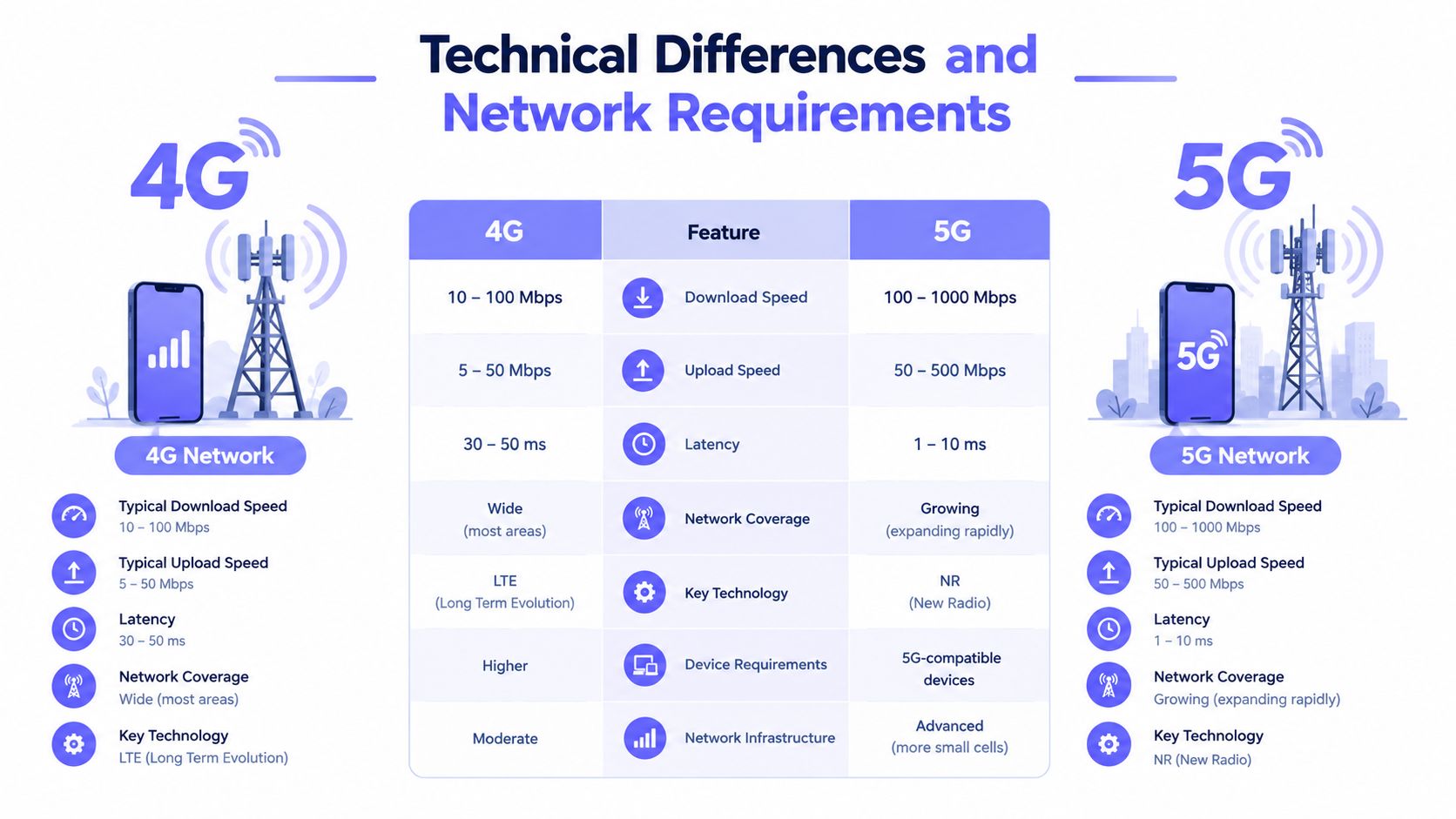
Latency changes the user experience
Independent remote-desktop guidance reports that responsiveness degrades above roughly 60 to 70 milliseconds, with noticeable lag around 100 milliseconds. It also describes bandwidth needs ranging from about 100 to 300 Kbps for basic office work to 2 to 5 or more Mbps for heavy multimedia and large file transfers (remote-desktop latency and bandwidth guidance).
A gate command isn't the same as a full remote desktop, but the lesson is practical. Residents expect an action to occur promptly, while a property manager needs confirmation that the command reached the gate. A delayed or ambiguous response can lead to repeated taps, tailgating, or a resident believing the gate is open when it isn't.
For that reason, an access installer should evaluate:
- Signal path: The controller needs a dependable connection at the gate, not merely strong service inside the management office.
- Command size: Entry triggers can operate with modest bandwidth when the system doesn't depend on live video.
- Verification: The app should confirm status through the service and controller rather than leaving the user to guess.
- Video profile: A visual visitor workflow needs more capacity than a simple gate command.
Cellular connectivity provides a direct alternative to extending a property's LAN or Wi-Fi to the perimeter. Nimbio's explanation of how cellular gate openers work shows the basic model: a cellular controller communicates with the access service and triggers compatible electronic hardware without requiring a local Wi-Fi connection.
The practical position is straightforward. Use cellular connectivity for the access path when Wi-Fi reliability at the gate is uncertain. Reserve broader remote-control workflows for approved technical use, where the network, permissions, and supervision match the risk.
Security Privacy and Auditability
A login alone doesn't make remote operation safe. Security depends on the identity behind the login, the permission granted, the duration of that permission, and the record created when someone uses it.
A resident opening a gate through an approved app and a technician entering a gate-management interface aren't equivalent events. The first should be a narrowly defined access action. The second may expose settings that can affect schedules, safety behavior, or the gate's operating state.
Control should be an exception workflow
Security guidance for telework environments recommends treating remote-control tools as supervised exceptions. Approved maintenance cases should connect to a request or ticket, use named technicians, and preserve attribution rather than relying on an open-ended shared login (guidance on remote-control tools in telework environments).
CISA also warns that threat actors co-opt legitimate remote-access tools to reach victims. That makes unrestricted device takeover a poor default for daily property entry, even when the underlying software uses encryption.
Practical rule: Residents and visitors should receive an entry permission, not the keys to the gate operator's administrative interface.
A secure property workflow should include:
- Identity checks: Each resident, manager, vendor, or technician should have an attributable identity.
- Least privilege: The credential should permit only the required entry action or administrative task.
- Time limits: Temporary visitors and contractors shouldn't retain access after the approved purpose ends.
- Encryption: The connection should protect commands and account information in transit.
- Policy enforcement: Administrators need a way to approve, revoke, and constrain access.
- Audit records: The platform should preserve the relevant user, event, time, and access-point details.
Cloud Controls Matrix LOG-12 maps these principles to physical facilities. It calls for verifying individuals entering secure areas, maintaining physical access logs, escorting visitors, and reviewing access-control logs regularly (Cloud Controls Matrix LOG-12).
Privacy depends on context
A gate log can contain sensitive information about residents, visitors, vendors, and daily routines. Property managers should define who can view logs, how long records are retained, and which events require escalation. A visitor-verification feature should also make clear whether video is one-way, who can see it, and what information the system stores.
The result is more than a security record. A well-designed audit trail helps a board investigate disputes, confirm contractor activity, and identify unusual access without granting every administrator unrestricted control. Managers can use a guide to audit entry system history when establishing a consistent review process.
Real-World Use Cases for Gates and Entry Systems
The difference between access and control appears throughout a normal day at a smart community.
A resident approaches the entrance and uses a smartphone app. The system authenticates the resident and sends an approved gate-opening command. The resident doesn't see the gate operator's configuration, and the property manager doesn't need to issue a shared clicker or keypad code.
A visitor creates a different workflow. The visitor requests entry through the property's designated process, and the resident verifies the request before approving it. Nimbio's GuestView capability, for example, supports a one-way video call through a web directory and the visitor's phone camera, allowing the resident to visually check who is at the gate before granting access.
Where broad control creates trouble
Consider the difference between these two permissions:
- Open the vehicle gate once. This is a narrow, auditable access event.
- Control the gate interface. This may allow changes to schedules, operating modes, or other settings.
The first fits a resident or approved visitor. The second belongs with a trained administrator or technician, and only when the task requires it. Granting the broader permission to solve a simple entry problem is an avoidable design error.
Property managers also handle recurring operational events:
- Move-in and move-out periods: Temporary credentials can support approved access without distributing permanent codes.
- Landscaping and maintenance: Contractors can receive access tied to a defined schedule and revoked when the work ends.
- Emergency response: Authorized personnel can receive controlled entry while managers retain the event record.
- Deliveries: Residents can approve entry without publishing a community-wide PIN.
- Amenity or building entry: Credentials can be limited to the doors or areas relevant to the resident.
A property technology review should examine the whole operating environment, not only the gate. Teams comparing access workflows with broader property utilities can also browse submetering success stories from Axis Meter Solutions for examples of how operational records support property management decisions.
The strongest systems keep the resident experience simple while preserving administrative separation. Residents get a clear action, managers get governance tools, and technicians get controlled maintenance access rather than permanent takeover rights.
Admin Controls and Visitor Management
A property manager shouldn't have to choose between convenience and accountability. The administrative layer should make the safe action easier than sharing a permanent code.
A practical credential workflow
A reliable process can follow this sequence:
- Create a named identity. Add the resident, visitor, delivery provider, or contractor as an identifiable user rather than assigning a shared credential.
- Choose the smallest permission. Grant access to the specific gate, door, or building area needed for the task.
- Set the schedule. Use a defined window for contractors, deliveries, move-ins, or other temporary needs.
- Confirm the event. Review whether the credential was used and whether the gate reported the expected status.
- Revoke or let it expire. Remove access when the relationship or work order ends.
This approach avoids the familiar failure of a shared four-digit PIN. A shared code doesn't identify the person using it, and changing it after one contractor leaves creates friction for everyone else. Dynamic digital credentials create a clearer connection between a person, a permission, and an event.
Separate management from entry
A property manager may need more authority than a resident, but that doesn't mean every manager needs direct control of the gate operator. A cloud dashboard can centralize credential administration, event review, user removal, and scheduled hold-open periods while keeping the end-user experience limited to approved entry actions.
Hold-open scheduling deserves careful handling. A moving truck may need the gate open during a planned window, while emergency access may require a different approval path. The schedule should be visible, attributable, and easy to cancel when conditions change.
Visitor management should also answer practical questions:
- Who requested access?
- Who approved it?
- Which entrance received the request?
- Was the credential temporary?
- Did the gate respond?
- Can the manager revoke the permission immediately?
The answer should come from the access platform's records, not from a resident's memory or a paper sign-in sheet. For HOA boards, that visibility supports consistent enforcement and reduces disputes over who was authorized to enter.
A cellular keyless-entry platform such as Nimbio can connect smartphones with compatible electronic gates, call boxes, doors, and locks while allowing administrators to grant, revoke, and schedule digital keys. Its hardware-agnostic retrofit approach is designed to preserve existing gate equipment, remotes, and keypads while adding a managed smartphone access layer.
Implementation and Hardware Integration
Access modernization often fails before software enters the conversation. The front gate may be far from the management office, the operator may be from a different manufacturer, and the property may not have an easy route for new cabling.
Legacy approaches can involve extending phone lines, building a wireless bridge, or replacing an otherwise functional gate operator. Each option introduces installation dependencies. Trenching changes the project scope, while a Wi-Fi bridge inherits the reliability of the network and the physical path connecting it to the gate.
Retrofit versus replacement
A hardware-agnostic controller changes the decision. Instead of removing the existing operator, an installer can evaluate the operator's control inputs, power, enclosure, safety devices, and available communications path. A compatible cellular add-on can then modernize the access layer while preserving equipment that still performs its core mechanical function.
The comparison is practical:
| Retrofit approach | Full replacement approach |
|---|---|
| Preserves a functioning gate operator | Replaces the operator and access components |
| Limits construction around the entrance | May require broader electrical and installation work |
| Adds cellular connectivity to the access layer | May introduce a new network and hardware ecosystem |
| Can preserve existing remotes and keypads | May require new credentials and user training |
| Depends on compatibility review | Depends on complete system commissioning |
The installer still needs to verify the gate operator, safety loop, fire-access requirements, exit devices, power availability, and local code obligations. Cellular connectivity doesn't remove the need for correct wiring or safe mechanical operation.
What the site survey should establish
Before approving equipment, the property team should document:
- Operator compatibility: Confirm how the controller will trigger the existing gate and whether the installation preserves required safety circuits.
- Cellular service: Test the intended controller location rather than assuming office coverage represents entrance coverage.
- Access hierarchy: Define resident, visitor, manager, installer, emergency, and service permissions.
- Failure behavior: Establish what happens during a power interruption, cellular outage, or controller fault.
- Maintenance ownership: Assign responsibility for account administration, log review, credential removal, and hardware service.
A good retrofit doesn't merely add an app. It creates a dependable connection between an authenticated user and a physical action, without forcing the property to rebuild a working gate system.
Decision Checklist for Property Managers
An HOA board can make the remote access vs remote control decision by asking whether the proposed platform gives people precise access or exposes a device for remote takeover.
Use this checklist during vendor demonstrations and installer reviews:
- Cellular reliability: Can the controller operate without depending on a gatehouse Wi-Fi connection?
- Credential ownership: Does every resident, visitor, contractor, and technician have an attributable identity?
- Permission scope: Can the system issue an entry action without exposing the gate operator's full controls?
- Expiration: Can managers create temporary credentials that end automatically?
- Visitor verification: Can residents confirm a visitor before approving entry?
- Auditability: Does the dashboard show relevant user activity and entry events?
- Hardware compatibility: Can the solution retrofit the existing gate, call box, or electronic lock?
- Operational resilience: Does the design define behavior during connectivity or power failures?
- Administrative separation: Can managers control credentials without giving residents administrative access?
- Lifecycle support: Can the system receive updates and remain maintainable as property needs change?
The right evaluation focuses on the physical outcome. Residents need reliable entry, managers need controlled credentials and records, and technicians need a supervised path for maintenance. A solution that meets those needs through cellular connectivity, hardware-agnostic integration, and visitor management is generally more appropriate than a Wi-Fi-dependent design that grants broad device control.
For a structured review of vendors, integrations, permissions, and operating requirements, property teams can use these gate access system evaluation criteria. The strongest choice is the one that improves day-to-day entry without making the gate operator itself broadly reachable.
Nimbio provides cellular smartphone access for compatible gates, call boxes, doors, and electronic locks, with digital credentials, visitor management, and administrative event visibility. Visit Nimbio to evaluate a hardware-agnostic retrofit that adds reliable cellular connectivity without requiring Wi-Fi at the gate.


