

A resident arrives at a gated community after work, discovers a dead clicker battery, and finds that the shared PIN has been changed without notice. The property manager is away from the office, the visitor intercom is unreliable, and a line of vehicles is forming behind the gate. For HOA boards and property managers, this is more than an inconvenience. It exposes how difficult it can be to manage physical credentials across residents, guests, contractors, and former occupants.
A remote control gate lock adds a connected access controller to the gate's existing electronic equipment. Instead of relying only on a fob, clicker, or shared keypad code, authorized users can trigger entry through a remote, mobile application, cellular connection, or another approved credential.
The technology has developed through several stages. Access control progressed from callboxes installed in Berlin in 1881 to PIN-based keypads in the 1960s, touchscreen kiosks in the 2000s, and cloud-based smartphone systems in the modern era, a development span of more than 140 years (historical access-control timeline). That history matters because modern gate access usually works as an upgrade to existing infrastructure, not as a demand to remove every operator, keypad, and lock already installed.
The market reflects that broader modernization. One industry report estimates the global automatic gate operator market at about USD 2.5 billion in 2023, with projected growth to USD 4.3 billion by 2032 at a 6.5% compound annual growth rate (automatic gate operator market report). Remote control is now part of a wider shift toward connected HOA security, cloud-based access control, and smart-community administration.
Table of Contents
- Introduction to Remote Control Gate Locks for Modern Properties
- How a Remote Control Gate Lock Actually Works
- Comparing Control Methods From RF Remotes to Smartphone Apps
- Security Risks and How Rolling Codes Protect Your Gate
- Compatibility Installation and Maintenance Without Replacing Your Gate
- Admin Controls Digital Keys Logs and Visitor Management in Action
- How to Choose and Deploy the Right Remote Control Gate Lock Solution
Introduction to Remote Control Gate Locks for Modern Properties
A remote control gate lock doesn't replace a metal key with a phone. It connects the gate operator or electronic lock to an access controller that can receive and evaluate an authorized signal.
That signal might come from:
- An RF clicker, which sends a radio transmission to a receiver near the gate.
- A keypad, which accepts a code entered at the property.
- A smartphone application, which sends an instruction through an internet-connected controller.
- A cellular access platform, which communicates over a mobile network without depending on the property's Wi-Fi.
The distinction is important for communities with multiple buildings, aging gate equipment, or weak internet coverage at the entrance. A new access layer can preserve the mechanical gate while improving credential administration, remote visitor entry, and auditability.
The retrofit question comes first
Many buyers begin by asking which smart lock to purchase. Boards and managers should begin with a different question: Can the chosen controller work with the existing gate operator, electronic lock, callbox, remotes, and keypad?
That question protects the property from unnecessary replacement costs and operational disruption. It also supports a gradual transition, where existing residents can keep familiar entry methods while administrators introduce digital credentials for new users, vendors, and guests.
For a property manager, the decision includes more than opening distance. It includes:
- Whether the connection depends on Wi-Fi.
- Whether administrators can revoke access immediately.
- Whether the system records access activity.
- Whether temporary visitor credentials can be issued.
- Whether the controller supports the existing gate hardware.
- Whether future software or firmware updates can extend the system's useful life.
Nimbio's cellular approach fits this retrofit model. Its documentation states that a cellular gate entry app can manage electronic gates, doors, and locks through cellular LTE without Wi-Fi, a telephone landline, or short-range NFC or Bluetooth, while its hardware wires in parallel with existing equipment (Nimbio cellular access technology).
This guide is most useful for HOA boards, property managers, installers, and residents deciding whether to modernize an existing entry system. The key decisions involve how the gate receives commands, how the system protects credentials, how installation affects current hardware, and how administrators manage people after deployment.
How a Remote Control Gate Lock Actually Works
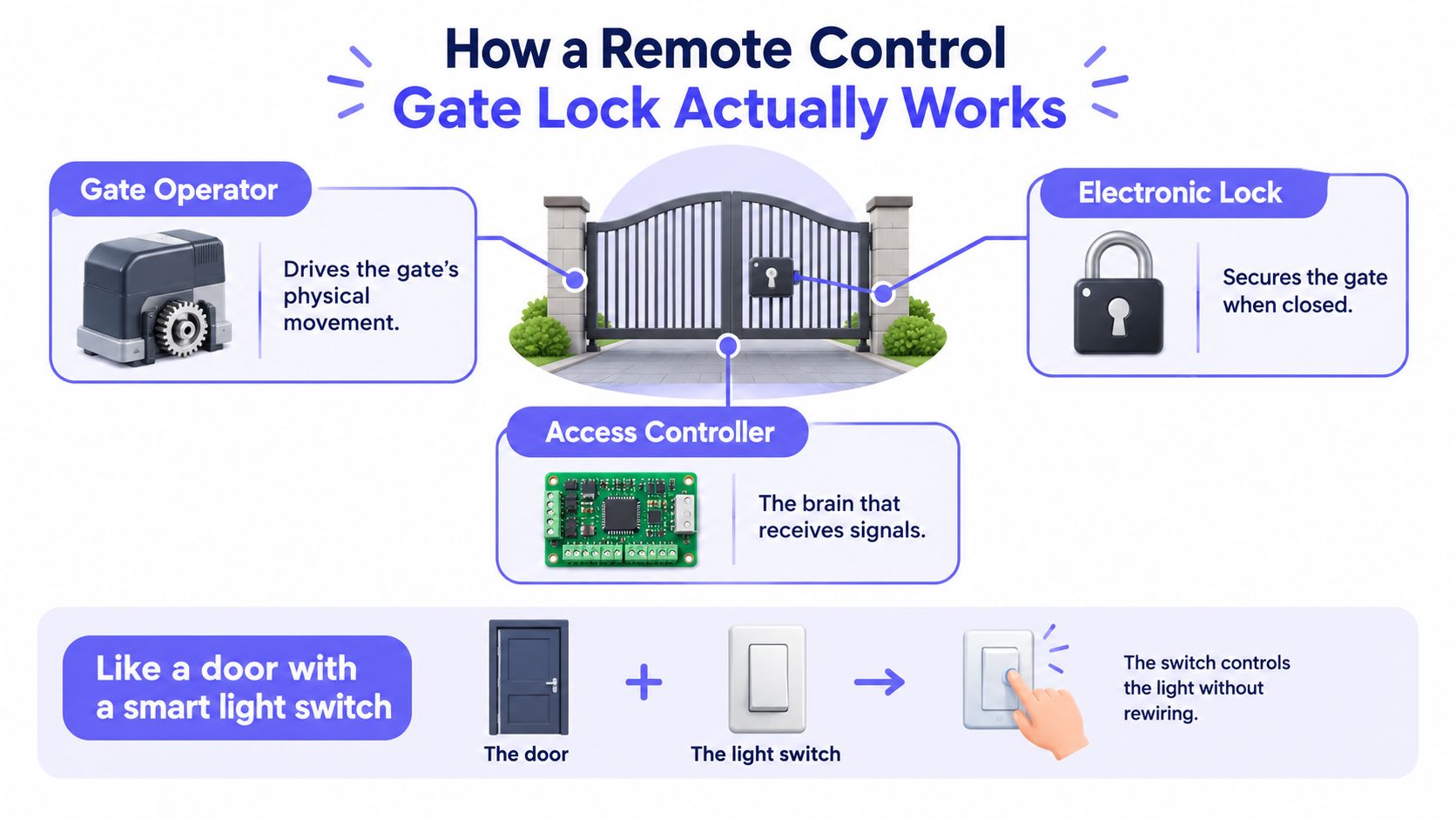
A gate entry system has three practical layers. The gate operator supplies the mechanical force, the electronic lock secures the opening when applicable, and the access controller receives an authorized instruction and passes it to the equipment.
The three core components
Gate operator: The operator contains the motor, drive mechanism, and control board that move a sliding or swinging gate. It may also manage safety inputs and the open or close cycle.
Electronic lock: Some gates rely on the operator's internal locking mechanism. Others use a magnetic lock, electric strike, or separate electronic latch to hold the gate closed.
Access controller: The controller is the decision point. It receives a signal from a clicker, keypad, app, intercom, or other credential source and activates the appropriate relay when access is approved.
A useful analogy is a door with a smart light switch. The switch controls the light without requiring the house owner to rewire the light fixture. In the same way, a retrofit controller can activate an existing gate input without replacing the motor or rebuilding the gate.
Why dry-contact wiring matters
Many automatic gate operators include a dry-contact input. This input behaves like a push-button instruction. When the controller closes the circuit briefly, the gate operator interprets that action as a request to open, close, or begin its programmed cycle.
The controller is commonly wired in parallel with existing clickers and keypads. That means the new access method joins the current control path rather than removing every previous device. Residents may continue using approved remotes while administrators add app-based entry or visitor management.
A property manager should still have a qualified installer confirm the operator model, wiring diagram, safety circuits, power source, and local requirements. A controller can send the correct command, but it can't compensate for a worn gate, misaligned safety sensor, damaged track, or failing motor.
For a clearer visual explanation of how cellular gate openers work, the system can be understood as an added command layer. The app or credential doesn't physically move the gate. It authorizes the controller, and the existing operator performs the movement.
Comparing Control Methods From RF Remotes to Smartphone Apps
Different access methods solve different operational problems. A clicker may be convenient for a household, while a property manager needs credential revocation, visitor scheduling, and a record of entry activity.
Four common control methods
RF remotes send a radio signal to a receiver. They work well for approved vehicles within the receiver's operating area, but administrators must distribute, collect, replace, and deactivate physical devices. Security depends heavily on the remote's coding method and the receiver's implementation.
PIN keypads offer simple shared or individual code entry. They can help contractors and guests enter without a physical transmitter, but shared codes are difficult to attribute and often remain active after a user should lose access.
Bluetooth or Wi-Fi apps can provide smartphone control at local range or through a property's internet connection. Bluetooth generally depends on proximity, while Wi-Fi-based operation depends on the controller's network and the reliability of that network at the gate.
Cellular retrofit controllers communicate over an LTE connection. They're useful where wired internet is limited or unavailable, and modern cellular platforms can support remote credential administration, monitoring, and visitor credentials such as temporary PINs or one-time mobile passes (cellular access-control guidance).
Control method comparison for remote gate locks
| Control Method | Range and Reliability | Credential Management | Best Fit |
|---|---|---|---|
| RF remote | Local radio range, dependent on receiver and transmitter condition | Physical distribution and collection | Single-family homes and small resident groups |
| PIN keypad | Available at the gate, no phone or transmitter required | Shared or individual codes, with limited attribution depending on system | Contractors, service access, and simple residential entry |
| Bluetooth app | Short-range operation near the gate | Digital access can be easier to change than physical remotes | Local smartphone entry |
| Wi-Fi app | Remote operation where the property network remains available | Digital credentials and app administration | Sites with dependable internet at the entrance |
| Cellular retrofit controller | Remote LTE operation without property Wi-Fi | Digital keys, scheduling, visitor access, and administrative controls | HOAs, multifamily properties, commercial sites, and distributed gates |
The most important comparison isn't “old” versus “new.” It's physical credential management versus centrally administered access.
A board that only wants residents to open a driveway gate may accept RF remotes. A multifamily property with frequent move-outs, deliveries, and contractors needs a method that lets staff change access without physically recovering every device.
Practical rule: Choose the control method according to who must be managed, not just how a resident prefers to open the gate.
Cellular control also deserves a separate reliability review. A property can have excellent internet in the leasing office and poor coverage at the entrance. The controller's actual installation location, carrier coverage, power continuity, and fallback procedures should be tested before approval.
Security Risks and How Rolling Codes Protect Your Gate
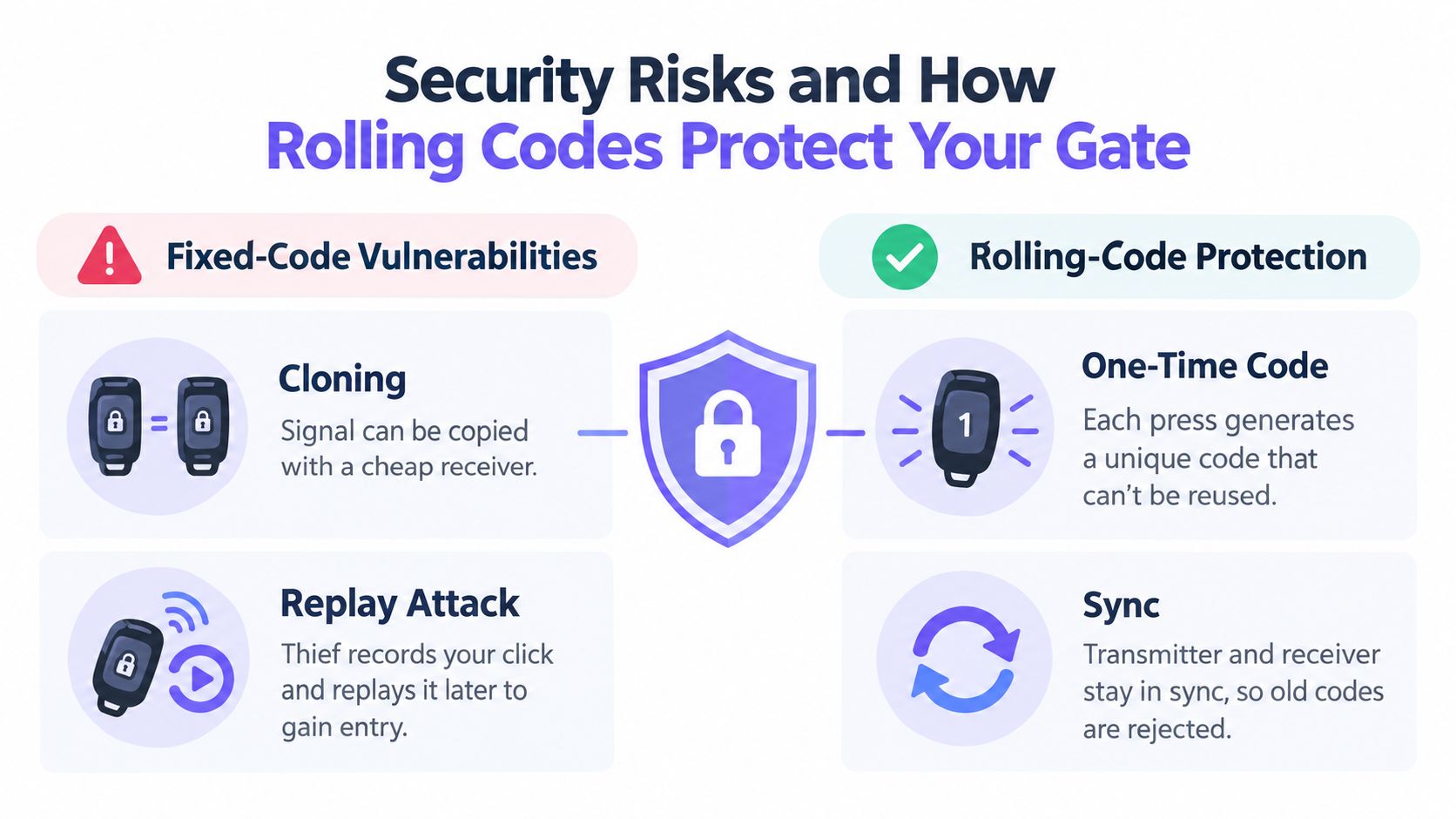
A fixed-code remote transmits the same signal every time. If an attacker captures that transmission, the signal may be recorded and replayed later, which creates a direct path to unauthorized entry.
Independent security research on rolling-code keyless entry identified vulnerabilities in two systems that allowed an attacker to open a door after capturing one legitimate open or close transmission (rolling-code security research). The finding demonstrates why the label “rolling code” isn't enough by itself. The implementation must also resist desynchronization, reuse, and replay attacks.
Fixed codes and replay attacks
A shared keypad PIN creates a different problem. The code may not be intercepted in the same way as a radio transmission, but residents, vendors, former occupants, and visitors may all know it. If the code is changed rarely, the property loses confidence about who can still enter.
RF remotes create another administrative challenge. A lost clicker can remain active unless the receiver supports individual remote deletion or an administrator removes it from the system. A remote control gate lock should therefore be evaluated on both signal security and identity management.
Rolling-code systems improve the radio side of the problem. Each button press generates a new one-time code shared between transmitter and receiver. Technical guidance describes a synchronized counter and cryptographic algorithm that cause intercepted signals to expire after use, making simple capture-and-replay attacks impractical in normal deployments (rolling-code remote guidance).
Security checklist for buyers
A board or installer should ask:
- Does the system reject reused signals? Fixed-code remotes should not be treated as sufficient protection for sensitive access points.
- Can individual credentials be revoked? Removing one resident or contractor shouldn't require changing access for everyone.
- Are entry events logged? Logs support investigation and help administrators identify unusual activity.
- Can guest access expire? Temporary credentials should have a defined end point.
- What happens after synchronization is lost? The system should document recovery without creating a permanent security weakness.
- How are software and firmware updates handled? Connected controllers need a clear update and support process.
For broader principles on protecting connected access hardware, property teams can review Blowfish Technology IoT security. The useful lesson is simple: a secure gate needs more than an encrypted signal. It needs controlled identities, revocation, update support, and records that help people understand what happened.
Compatibility Installation and Maintenance Without Replacing Your Gate
A retrofit succeeds when the installer treats the existing gate as a system rather than as a single device. The operator, lock, keypad, remotes, safety sensors, power supply, and control board all need to work together after the new controller is added.
Start with the operator and input
The first inspection should identify the gate operator brand and model, the available control terminals, the lock type, and the power source. A hardware-agnostic controller should connect to the same input used by existing clickers or keypads, usually through a relay or dry-contact connection.
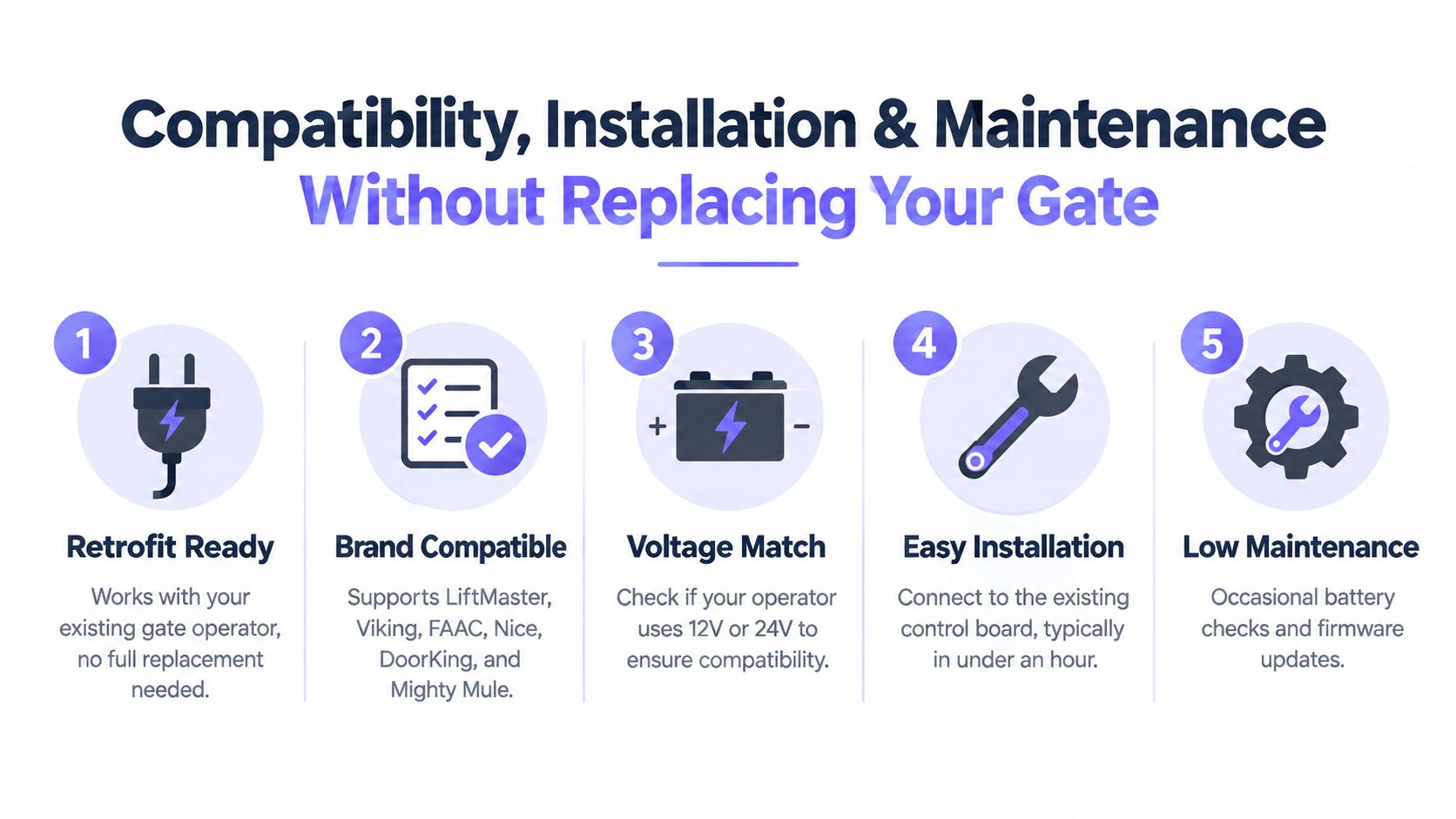
Nimbio's FAQ describes a gate-agnostic retrofit that wires into the existing dry-contact input and supports powered gate operators or electric locks operating from 6.5V to 24V AC or DC (retrofit compatibility details). In those cases, the operator doesn't need to be replaced.
Compatibility should be confirmed for the actual installation, not assumed from a brand list. Common operator families found in the field include LiftMaster, Viking, FAAC, Nice, DoorKing, and Mighty Mule, but the installer still needs to verify the specific control board and wiring configuration.
Preserve current access while adding new control
Parallel wiring allows an app-based controller to coexist with current remotes and keypads. That approach reduces resident disruption and gives the property time to migrate users gradually.
A practical installation review includes:
- Documenting the current setup: Photograph the control board, label wires, and record existing access methods before changes are made.
- Matching power requirements: Confirm voltage, polarity where relevant, enclosure conditions, and available capacity.
- Testing the relay action: Verify that the controller triggers the intended gate cycle without bypassing safety inputs.
- Checking cellular coverage: Test the controller at the gate, not only from an office or maintenance room.
- Testing failure conditions: Confirm what happens during power loss, network unavailability, gate obstruction, and manual release.
Cellular connectivity is especially relevant at detached entrances, parking areas, and industrial sites where Wi-Fi may be weak or unavailable. It removes dependence on the property's local wireless network, but it doesn't eliminate the need to verify mobile coverage and maintain the gate's physical equipment.
Keep the mechanical system healthy
Connected access can't fix a gate that drags, reverses unexpectedly, or fails to close. Maintenance teams should inspect moving hardware, safety devices, hinges or tracks, operator behavior, and backup power according to the equipment manufacturer's requirements.
A practical reference for gate maintenance for property managers can help teams build a recurring inspection routine. Administrators should also track controller firmware updates, enclosure condition, battery status where applicable, and changes to the property's access policy.
Admin Controls Digital Keys Logs and Visitor Management in Action
The operational value of a remote control gate lock appears after installation, when people change. Residents move out, contractors change schedules, guests arrive unexpectedly, and property staff need to answer questions about access.
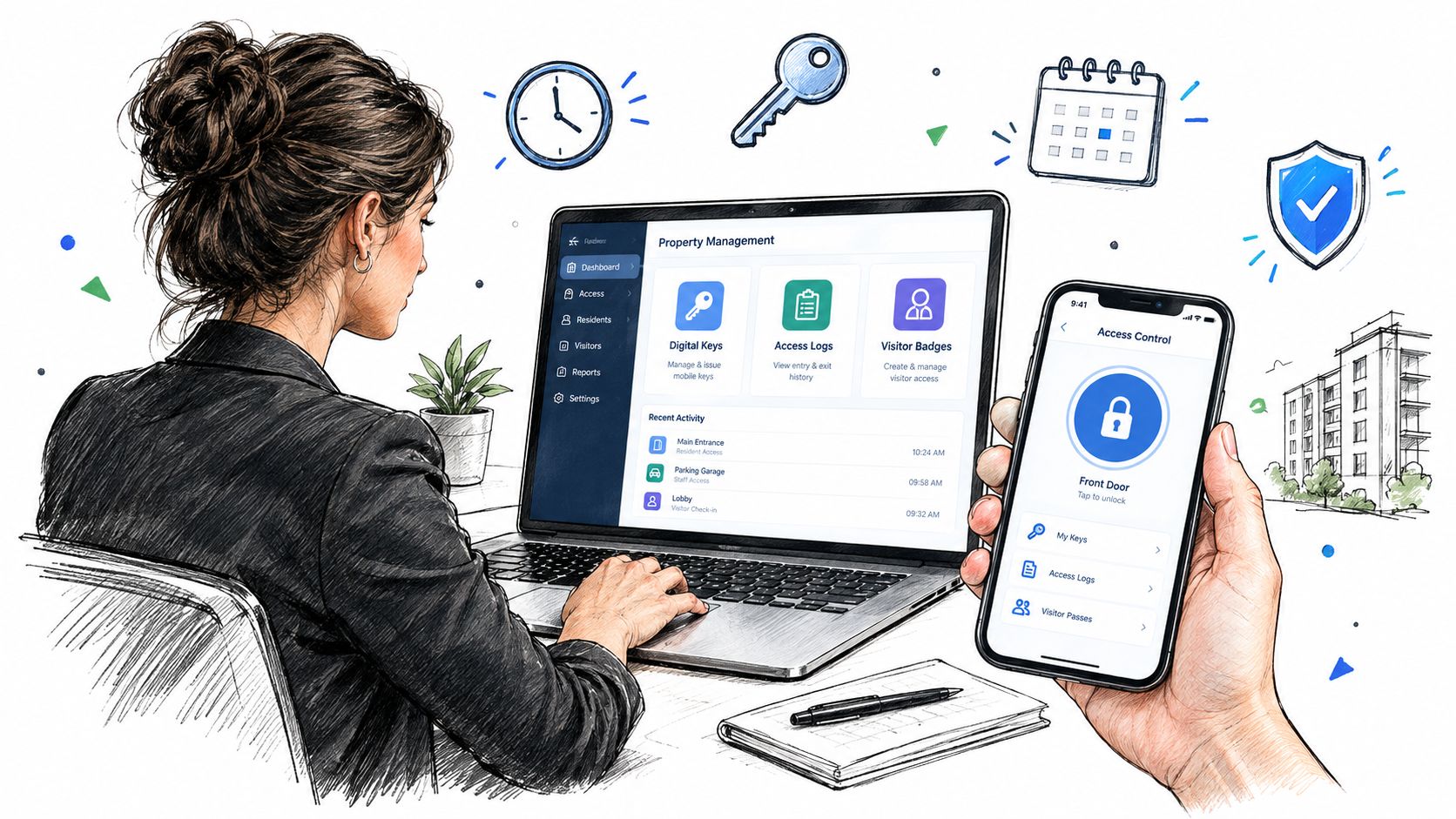
A cloud-based access platform gives an HOA manager a central place to issue, schedule, and revoke digital keys. A new resident can receive access without waiting for a physical clicker, while a departing resident's credential can be disabled without changing the credentials of every other household.
A manager's daily workflow
A manager receives a request from a landscaping contractor who needs entry during a defined service window. Instead of sharing the community's general PIN, the manager creates a limited credential, assigns the appropriate time conditions, and revokes it when the work ends.
Later, a resident reports that a delivery driver couldn't enter. The manager checks the access record, confirms whether the gate received a request, and separates a credential issue from a mechanical or connectivity issue. That distinction speeds troubleshooting because the team isn't guessing from incomplete information.
The same workflow can support:
- Digital key administration, including granting and revoking resident access.
- Scheduled access, useful for vendors, staff, deliveries, and recurring services.
- Entry logs, which provide time and date records for administrative review.
- Real-time status, where the platform supports visibility into the gate's current condition.
- Visitor credentials, such as temporary PINs, one-time mobile passes, or intercom-based guest calling.
A video intercom system can add another layer by logging an access attempt with a time, date stamp, and photo while allowing residents to see and speak with visitors before granting entry (video intercom access details). That model replaces blind remote opening with a deliberate verification step.
Resident experience and administrative control
For residents, the benefit is straightforward. A smartphone can become an access credential, and a guest can request entry without receiving a permanent community-wide code.
For managers, the larger benefit is auditability. The property can move away from access methods that depend on shared secrets and toward credentials tied to people, roles, and time windows. An HOA gate access system should be evaluated on that administrative workflow, not merely on whether an app can open the gate.
How to Choose and Deploy the Right Remote Control Gate Lock Solution
A sound purchase decision starts with the property's operating model. A single-family driveway, an HOA entrance, a multifamily parking gate, and a logistics facility may all need remote entry, but they don't have the same credential volume, traffic pattern, visitor needs, or administrative burden.
Use a retrofit-first evaluation
The first filter is compatibility. Confirm that the controller can connect to the existing operator or electronic lock, preserve necessary remotes and keypads, and support the property's voltage and control inputs.
The second filter is connectivity. Wi-Fi may be suitable where the gate has dependable internet and a stable network path. Cellular control is more appropriate when the entrance is separated from the main building, local Wi-Fi drops are common, or the property wants access control independent of its resident or office network.
The third filter is administration:
- Can staff grant and revoke individual digital keys?
- Can credentials be scheduled?
- Can visitors receive temporary access?
- Are access events recorded?
- Can the system distinguish a credential failure from a gate hardware failure?
- Are updates delivered without replacing the controller?
Interoperability deserves particular attention. A security-industry survey reported that 76% of security professionals considered interoperability important because their organizations use many devices and systems, while 86% said backward and forward compatibility matters for future infrastructure plans (open-architecture and compatibility guidance). For an HOA board, that translates into a practical requirement: the access layer should remain useful when the gate operator, resident app, security platform, or compliance expectations change.
Compare the full ownership model
Review hardware, installation, cellular service, support, warranty, firmware updates, and any usage-based charges. A lower purchase price can become less attractive if every resident change requires a service call or if the system forces a full operator replacement.
Nimbio provides one example of the cellular retrofit model. Its controller connects to existing electronic gates, doors, and locks, while its app supports remote access and administrative credential management. Buyers should compare that approach with other systems using the same criteria, including comparing cellular gate access systems.
The best deployment plan begins with a site survey, a small group of test users, documented fallback procedures, and a resident communication plan. Once the controller, credentials, logs, visitor process, and maintenance responsibilities are clear, the property can modernize access without treating the gate itself as disposable.
Nimbio turns existing electronic gates, callboxes, and building locks into smartphone-controlled access points through a cellular hardware retrofit, without relying on property Wi-Fi. Property managers and HOA boards can use digital keys, visitor access, and entry records to replace shared-code uncertainty with accountable access control. Visit Nimbio to evaluate a retrofit approach for the property's current gate system.


