

A WiFi bridge is a Layer 2 device that transparently links two wired network segments over a wireless link, behaving like an invisible Ethernet cable between two locations. In a 2026 market projection, WiFi bridges are expected to represent 43.0% of the global wireless bridge market (IEEE market reference).
Why does a gatehouse sometimes need a dedicated wireless link instead of “better WiFi”? A property manager may have a router in the clubhouse, an intercom at the vehicle entrance, and no practical way to trench cable across the parking area. A WiFi bridge can connect those locations, but it isn't the same thing as a repeater, mesh node, or cellular gate controller.
The right choice depends on the job. A bridge can extend an existing network to a detached building, while mesh and access points are designed to serve people with WiFi. For a gate operator that only needs a reliable connection to an access-control platform, cellular can remove the wireless path altogether.
Table of Contents
- The Plain-English Answer to What a WiFi Bridge Is
- How a WiFi Bridge Works on Your Network
- WiFi Bridge vs Repeater, Extender, Mesh, and Access Point
- Real-World Gate and Access Control Use Cases for a WiFi Bridge
- When a Cellular Solution Beats a WiFi Bridge for Gate Access
- Security and Installation Considerations Before You Deploy
- Choosing the Right Path for Your Property
- Frequently Asked Questions About WiFi Bridges
The Plain-English Answer to What a WiFi Bridge Is
A property manager with a remote gatehouse usually has a simple problem: the main building has network service, but the gatehouse needs to reach the same network for an intercom, camera, controller, or computer.
A WiFi bridge connects two network segments through a dedicated wireless link. It works at Layer 2, forwarding Ethernet frames between locations based on MAC addresses rather than interpreting the applications using the connection (PCMag's Wi-Fi bridge definition).
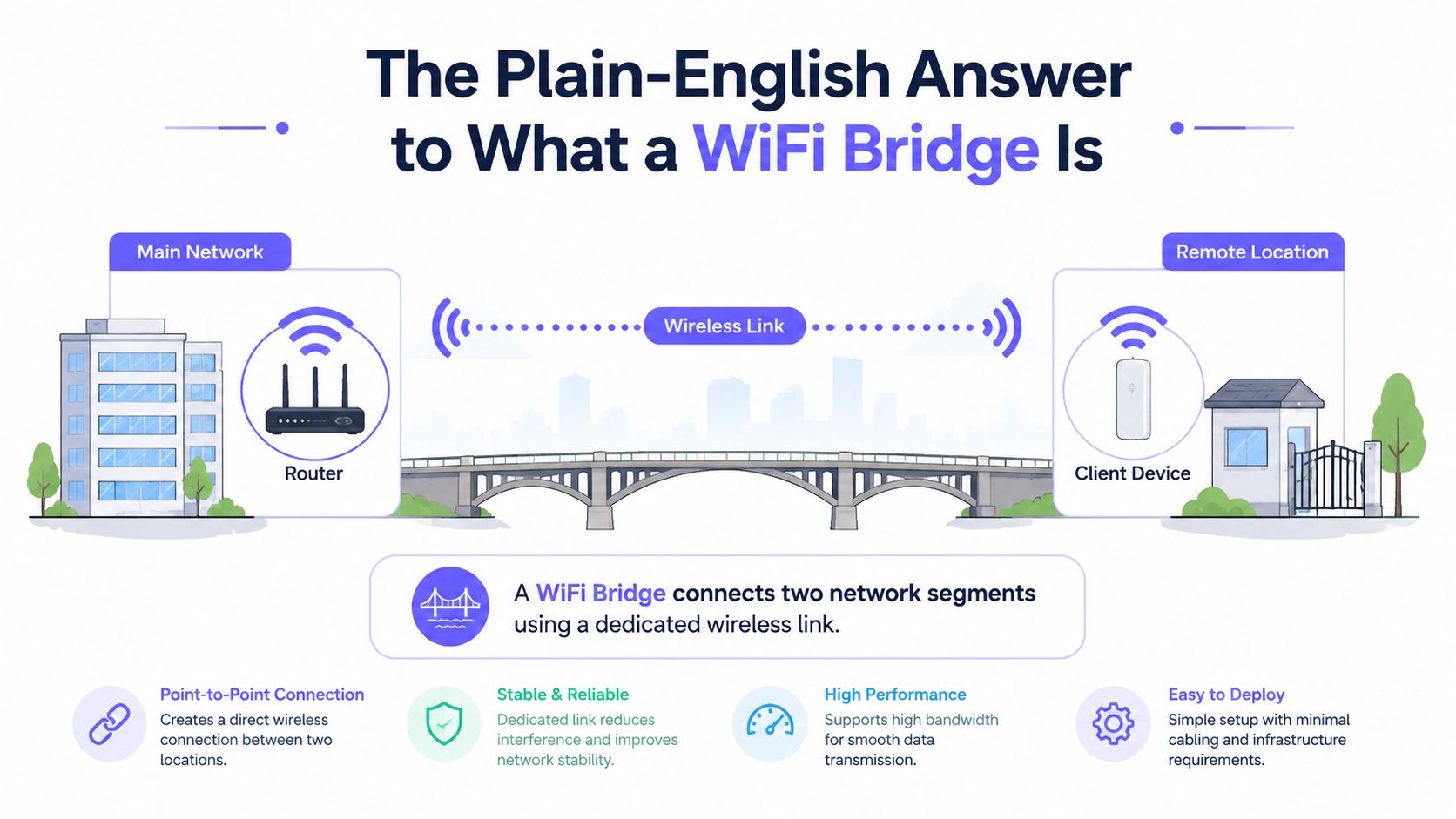
The useful analogy is an invisible Ethernet cable. One bridge unit connects to the main network, another connects to the remote building, and the two exchange traffic over radio. The device at the far end can then connect to a gate controller, network switch, camera, or local access point.
That makes a bridge a strong fit when:
- The destination is fixed, such as a gatehouse or detached office.
- The remote equipment uses Ethernet, rather than needing a broad resident WiFi zone.
- A cable route is impractical, expensive, or disruptive.
- Both locations can support a carefully aligned wireless path.
The most important distinction is purpose. A bridge extends a wired network between fixed points. A repeater or mesh system extends wireless coverage for client devices. Cellular access control takes a different path, connecting the gate controller to the cloud through the carrier network instead of extending the property's LAN.
How a WiFi Bridge Works on Your Network
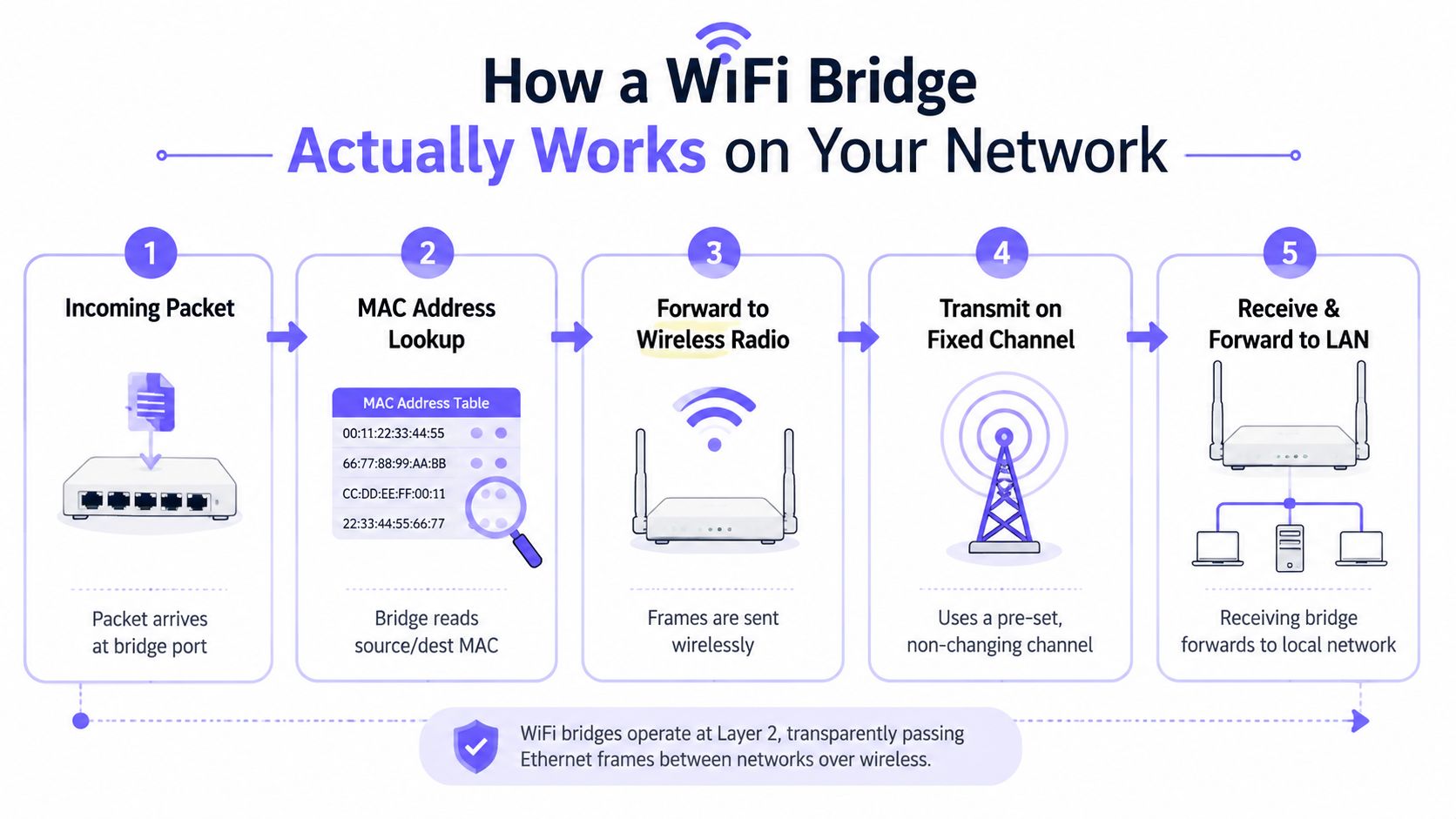
How does a gate controller communicate with a network in another building? A WiFi bridge receives an Ethernet frame at one location, reads its source and destination MAC addresses, then sends it toward the correct network segment. The controller or camera usually does not need to understand the wireless path between the buildings because the bridge handles that connection below the application layer.
In many installations, both locations remain within the same broadcast domain. The link can therefore feel like an invisible cable between the main building and a gatehouse, detached entry system, or remote camera. VLAN settings or filtering can separate traffic when the property's network design requires it, as explained in Industrial Monitor Direct's wireless Ethernet bridge explanation.
The radio settings matter
The two bridge units must be configured as a matched wireless path. They are not ordinary client devices that connect wherever a nearby WiFi signal is available. Both ends need the same frequency band, such as 2.4 GHz to 2.4 GHz or 5 GHz to 5 GHz. A fixed channel is also preferred over automatic selection, which can change the link unexpectedly, according to WiFiSpeed's WDS guidance.
The connection depends on:
- MAC forwarding, which moves frames between each Ethernet port and its radio.
- Band matching, so both ends use compatible wireless settings.
- Channel planning, which limits unexpected channel changes.
- Network design, including VLANs, filtering, and the equipment at each end.
- Bridge hardware, because a laptop or phone is not designed to provide a transparent infrastructure bridge.
IEEE 802.11c, ratified in October 1998, incorporated bridging into wireless bridges and access points before later being folded into IEEE 802.1D-2004 (IEEE 802.11c history). Ordinary 802.11 stations are not designed to act as transparent bridges at the same time, so installers use dedicated equipment or a purpose-built bridge mode.
Installer takeaway: A WiFi bridge carries Ethernet between fixed locations. It isn't a WiFi setting enabled on a regular client device.
WiFi Bridge vs Repeater, Extender, Mesh, and Access Point
Product names create much of the confusion. Some vendors use “WiFi bridge” for a fixed point-to-point system, while others apply the term to equipment that also repeats or broadcasts wireless service (Digital Air Wireless comparison).
| Device | Serves client WiFi? | Extends wired network? | Best fit for gate access |
|---|---|---|---|
| Bridge | Usually no | Yes | A fixed gatehouse, controller, camera, or detached building |
| Repeater | Yes | Usually no | Expanding an existing wireless signal for nearby users |
| Extender | Yes | Usually no | General coverage improvement, depending on the model |
| Mesh | Yes | Sometimes, through nodes | Resident WiFi across a community or building |
| Access point | Yes | Receives a wired uplink | Creating a local WiFi zone at a clubhouse or gatehouse |
A bridge creates a focused connection between locations. It doesn't normally create a new client-facing SSID, so residents' smartphones won't connect directly to it. A repeater or extender listens to an existing WiFi signal and rebroadcasts coverage, while mesh nodes coordinate wireless service across a broader area.
An access point has another role. It takes a wired network connection and creates WiFi for phones, laptops, smart locks, or other client devices. A bridge can deliver the wired connection to a remote location, where an access point can then provide local wireless service.
For a gatehouse with one wired intercom and one controller, a bridge may fit. For community-wide resident WiFi around a pool, clubhouse, or courtyard, mesh or outdoor access points are more appropriate.
Rule of thumb: Use a bridge to connect places, mesh or an access point to serve people, and a repeater only when extending an existing wireless signal is genuinely suitable.
Real-World Gate and Access Control Use Cases for a WiFi Bridge
Consider a gated community with a clubhouse across a parking lot from the main office. The clubhouse needs network access for an intercom, an IP camera, and a gate controller, but a buried Ethernet route would disturb paving and landscaping.
An installer could mount one bridge unit near the main network and another on the clubhouse. The survey would check whether the buildings have a clear line of sight, whether trees or structures intrude into the Fresnel zone, and whether the mounting points allow accurate antenna alignment.
A directional 5 GHz link might be selected when the site supports it and the radio environment is suitable. Both ends would need compatible band settings and a fixed channel, with the antennas aimed directly at each other. The exact design still depends on distance, obstructions, equipment capability, and local interference.
The quiet failure that affects the gate
Wireless conditions can change after installation. A tree may grow back into the path, a new metal roof may reflect or block radio energy, or a delivery truck may temporarily obstruct the link. Cisco community guidance specifically highlights buildings, trees, Fresnel-zone blockage, nearby WiFi equipment, machinery, and wireless cameras as possible sources of disruption (Cisco wireless bridge guidance).
Field-testing examples illustrate why bridge mode matters. Some dedicated bridge modes can sustain around 200 Mbps, while pseudobridge or WDS-slave modes may reduce usable throughput to roughly 100 Mbps (WLAN-Shop24 point-to-point bridge testing).
For access-control planning, the wider discipline matters too. A guide to Securitec Security's access control can help boards and installers separate the physical gate operator, credential system, intercom, and network dependencies.
A working bridge is invisible to residents. A failing bridge can take the gate controller, intercom, and camera offline together. Installers evaluating equipment for properties that can't tolerate that dependency should review options designed to prevent gate network drops.
When a Cellular Solution Beats a WiFi Bridge for Gate Access
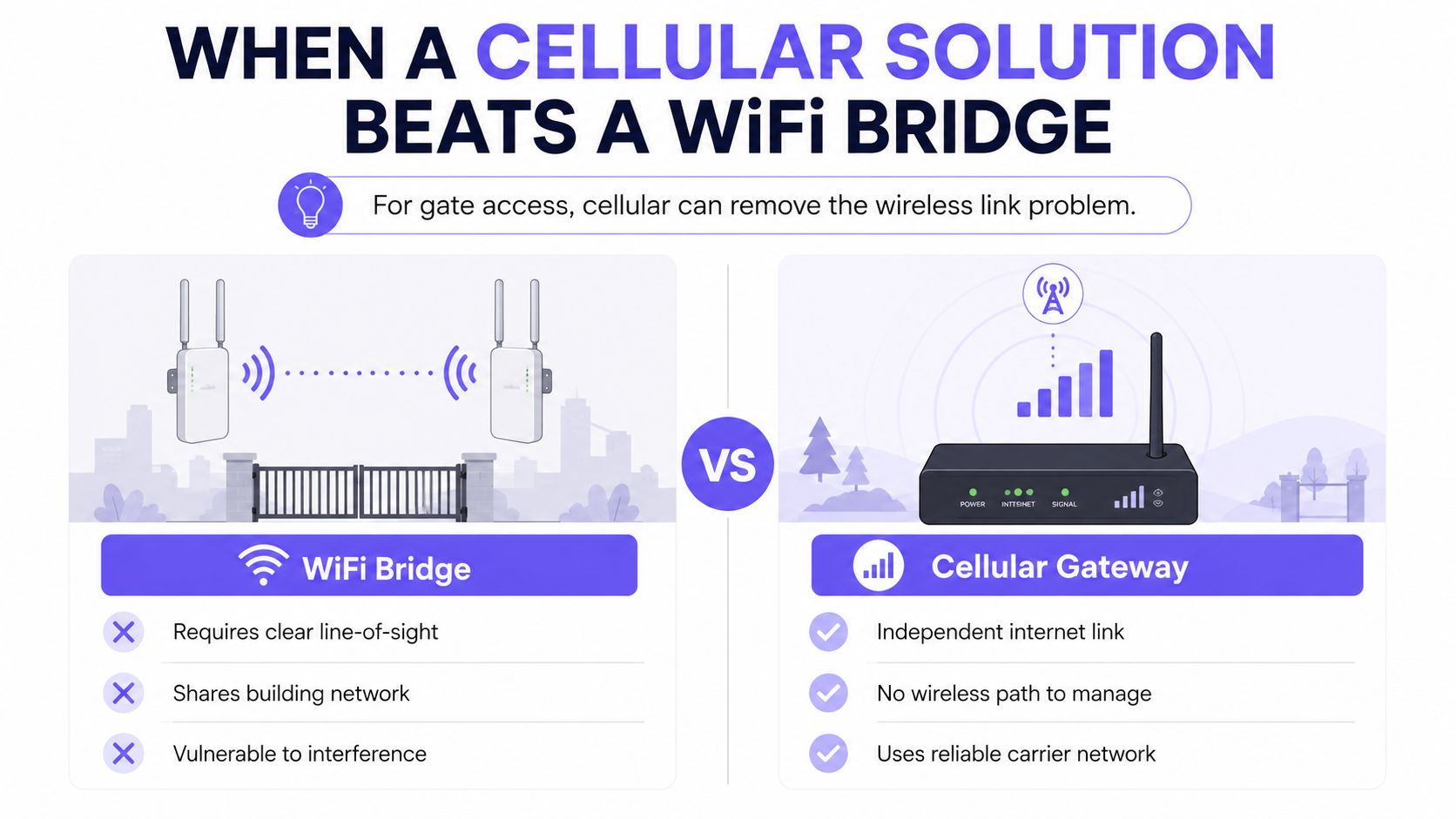
A WiFi bridge isn't automatically the lowest-risk choice just because it avoids trenching. If the only purpose of the connection is to bring a gate controller online, the bridge may add a complete radio path that the access-control system doesn't need.
A cellular controller takes a different approach. The gate operator communicates with a cloud-based access-control service over LTE, so the property doesn't need to extend the office LAN to the entrance. This removes the point-to-point radio alignment, Fresnel-zone clearance, and local WiFi interference concerns associated with the bridge path.
The trade-off for property managers
A cellular retrofit can be a better fit when:
- The gate already works electrically, but its controller lacks modern remote access.
- The entry point is isolated, exposed, or difficult to connect to the property network.
- The community needs remote visitor management, scheduled credentials, and revocation.
- The HOA wants fewer shared PIN codes, unmanaged remotes, or local network dependencies.
- The installer needs to preserve the existing gate operator, rather than replace functioning hardware.
Nimbio provides a cellular-based retrofit that connects to existing electronic gates, call boxes, or building entry systems and triggers them through a relay. Its hardware-agnostic approach is designed to preserve compatible gate operators while providing smartphone-based credentials and remote visitor management through LTE.
For an intercom-heavy entrance, installers can also consult expert tips for intercom setup while deciding which equipment should remain local and which service should operate through the cloud.
The decision isn't “wireless is bad, cellular is good.” Bridges remain useful for connecting cameras, computers, switches, and multiple wired systems in a detached building. Cellular is more direct when the requirement is specifically secure gate access without WiFi drops, local network extension, or bridge maintenance.
Property managers comparing both paths can use this Wi-Fi vs LTE gate security comparison to evaluate the network dependency alongside credential and visitor-management requirements.
Security and Installation Considerations Before You Deploy
A bridge becomes part of the access-control environment as soon as it carries traffic for a gate controller, intercom, or camera. The installation should therefore be reviewed as both a radio project and a security project.
Commissioning checklist
- Pair the same band: Configure both ends for a compatible band. A 2.4 GHz unit and a 5 GHz unit won't form a bridge because both use WiFi.
- Fix the channel: Use a planned, stable channel rather than relying on automatic selection.
- Enable strong encryption: Use the strongest compatible security mode supported by the equipment, and protect administrative credentials.
- Limit permitted equipment: A MAC address allowlist can reduce accidental or unauthorized associations, though it shouldn't replace encryption and network controls.
- Protect the hardware: Lock outdoor units and place indoor power and networking equipment where unauthorized people can't access them.
- Separate critical traffic: Use network segmentation where appropriate so a gate controller doesn't share unrestricted access with resident or guest devices.
The physical path needs the same attention. Trees, buildings, metal structures, machinery, cameras, and nearby access points can interfere with the link, while a partially blocked Fresnel zone can cause retransmissions and unstable throughput. A site survey should examine the path at installation and account for seasonal landscaping changes.
Outdoor cabling also deserves protection. Installers should use suitable weatherproofing, grounding, and surge protection practices for the equipment and local conditions, especially where cables leave a building or equipment sits on an exposed structure.
A bridge that fails quietly can become an access-control outage. Link-health logs and uptime monitoring give the installer a chance to address a deteriorating connection before the gate depends on it during an incident.
Finally, the bridge itself needs a maintenance owner. The HOA, property manager, or security integrator should know who receives alerts, who can access the equipment, and how the gate can be operated safely if the network path fails.
Choosing the Right Path for Your Property
The decision becomes clearer when the property team starts with the equipment requirement rather than the product label.
Keep wired Ethernet where it is practical. A cable remains the most straightforward connection between nearby networked devices when construction, distance, and site conditions allow it. It avoids radio alignment and spectrum competition.
Choose a WiFi bridge for a detached network location. A gatehouse, clubhouse, workshop, or remote office may need several wired devices to reach the main network. In that situation, the bridge can act as the wireless segment between buildings, with a switch or access point added at the remote end when needed.
Choose cellular when the only requirement is gate or entry control. A cellular retrofit avoids extending the property LAN to the entrance. It can also support remote visitor management, digital credentials, scheduled access, and revocation without depending on a local WiFi path.
That distinction matters for HOA security. A bridge may connect a gate controller, but the property team still needs to manage credentials, audit entries, handle visitors, and plan for network failures. Cellular cloud-based access control addresses those operational tasks directly while preserving compatible gate hardware.
Property teams can use a best cellular gate opener guide to compare controller compatibility, entry workflows, and cellular requirements.
Next steps can stay practical:
- Property managers: Map every remote device and identify which ones need the main LAN.
- HOA boards: Compare bridge maintenance against a cellular access-control subscription.
- Installers: Survey the wireless path, inspect the existing operator, and document failover procedures.
- Residents: Ask whether the proposed system supports individual credentials and visitor access instead of shared codes.
Frequently Asked Questions About WiFi Bridges
Can a regular home router act as a WiFi bridge?
A regular router can support bridge mode only if its firmware and hardware explicitly provide that function. The standard client behavior of a router, laptop, or phone shouldn't be assumed to provide transparent Layer 2 bridging.
Can a WiFi bridge serve resident smartphones?
A bridge normally doesn't serve client smartphones directly. It delivers a network connection to the remote location, where an access point or mesh node can provide WiFi for residents and staff.
How far can a point-to-point WiFi bridge reach?
There isn't one reliable distance for every installation. Range depends on line of sight, antenna design, Fresnel-zone clearance, radio interference, mounting, weather exposure, and the equipment's operating limits, so a site survey is more useful than a generic distance promise.
Does cellular remove the need for every bridge on a gated property?
Cellular can remove the bridge requirement for a gate controller when the controller can connect to its cloud service over LTE. A bridge may still be appropriate for cameras, intercom networks, computers, or other equipment that needs access to the property's wired LAN.
Nimbio offers a cellular retrofit for compatible electronic gates, call boxes, and building entry systems, with smartphone credentials and remote visitor management that don't depend on local WiFi. Property managers and security installers can visit Nimbio to evaluate a gate access path that avoids wireless bridge drops while preserving existing hardware.


