

A resident calls the manager after a visitor waits at the gate, a vendor uses an old code after business hours, and nobody can explain who approved either entry. The gate operator works, but the community's hoa access management process doesn't. The board is left sorting through complaints, damage claims, insurance questions, and a call history stored on one manager's personal phone.
That situation is common because many communities treat access control as a hardware purchase. The gate, keypad, call box, fob, or app only delivers permission. The system is the policy that decides who gets access, when it expires, how it's revoked, and what evidence remains afterward.
In the United States, homeowners' associations manage about 355,000 communities, with roughly 40 million housing units inside HOA communities. About 53% of homeowners live in HOA communities, and around 8,000 new HOA communities form each year, according to HOA Facts. Access governance is therefore a mainstream housing operations function, not a niche concern for luxury gated developments.
Table of Contents
- Why HOA Access Management Is an Operations Problem First
- Segment Access by User Type and Lifecycle
- Designing the Digital Key Lifecycle
- Guest and Vendor Workflows That Actually Work
- Audit Logs and KPIs Boards Should Track
- Comparing PINs, Guards, and Cellular Entry
- Migration Plan and 90-Day Success Metrics
Why HOA Access Management Is an Operations Problem First
Boards usually inherit a pile of access decisions without an owner. Nobody knows who created the shared PIN, which vendor still has standing permission, whether a former resident's credential was revoked, or what the access trail will show after a break-in.
The hardware may be functioning perfectly. The operation is still failing.
Three problems create most of the avoidable friction:
- Shared credentials circulate: A static PIN gets passed from a resident to a guest, contractor, delivery driver, or former tenant. Once it spreads, the board can't reliably connect an entry to a person.
- Vendor activity goes undocumented: Landscapers, cleaners, pool contractors, and repair crews may enter during unapproved hours without a clear record of who authorized the visit.
- Managers become the emergency system: After-hours requests arrive on a personal cell phone, creating inconsistent approvals and a private record that may not be available for board review.
Those gaps quickly become governance problems. A resident may dispute responsibility for damage, an insurer may ask who had access, or a board may need to demonstrate that its rules were applied consistently. Without clean records, every answer becomes an anecdote.
The credential is the operating unit
A gate is only a delivery mechanism. So are a mobile app, keypad, clicker, call box, license-plate reader, or guardhouse clipboard. The operational product is the credential lifecycle and its audit trail.
A practical program for operational efficiency starts by assigning ownership for access decisions. The manager, board, security installer, and residents should each have defined responsibilities for issuance, approval, escalation, and revocation.
Practical rule: If a credential can't be tied to a person, a purpose, and an expiration condition, it isn't controlled access.
The same principle applies to vendor selection. Boards evaluating expert operational efficiency insights should focus first on workflow ownership, exception handling, and evidence. Hardware matters, but it can't compensate for a policy that treats every user as permanent and every exception as informal.
Segment Access by User Type and Lifecycle
A community's traffic isn't one population. Residents, long-term tenants, recurring vendors, one-time guests, and emergency responders arrive under different conditions, so they need different permissions.
A single shared code or universal app role collapses those lifecycles into one bucket. That's why gates become chaotic as the community grows.
Five populations need five policies
Residents need persistent credentials linked to the ownership or occupancy record. A move-out, sale, or lease change should trigger revocation without waiting for a former resident to return a fob or notify management.
Long-term tenants may require similar daily access, but their permission should follow the lease record rather than ownership. The manager needs a clear start date, end date, unit, and responsible account holder.
Recurring vendors need access tied to a service contract and a defined schedule. A yard care provider might need recurring weekday windows, while a cleaner may require access only during an approved appointment period. The credential should expire when the contract closes or the schedule changes.
One-time guests need short-lived access with host accountability. The resident should approve the visitor, identify the valid time window, and receive a record of the outcome.
Emergency and municipal responders need a defined override path. Their access may bypass routine approval, but the system should still record the event, location, time, and authority used.
The Florida Security Concepts HOA access guidance recommends separating residents, vendors, guests, and emergency responders because each group requires distinct policies and a clean audit trail. It also warns against shared static PINs and undefined revocation procedures.
Lifecycle matters more than the device
The device at the gate doesn't determine whether access remains controlled. The lifecycle does.
A fob can work well if the system links it to a resident record and revokes it promptly. A smartphone app can fail if administrators grant broad access without expiration. A call box can support accountable entry when the resident approval and event record are clear.
The right design answers four questions for every user:
- Who is this person?
- Why should this person enter?
- When should access work?
- What event ends the permission?
That structure prevents a common failure: choosing a device first and trying to force every population into its limitations. Credential lifecycle design should come before hardware selection.
Designing the Digital Key Lifecycle
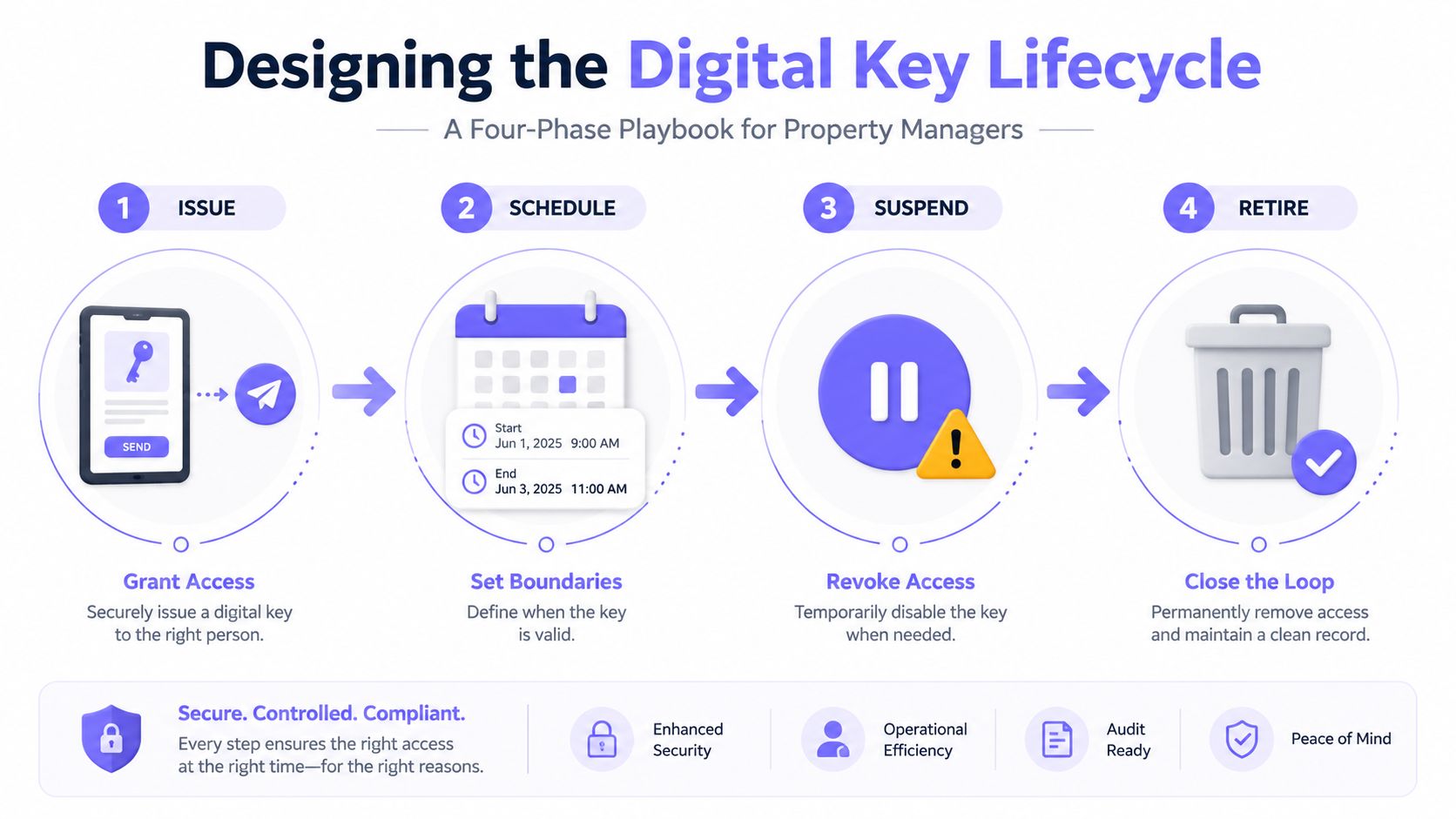
A property manager should be able to manage a digital key without calling a technician for ordinary changes. The platform needs clear states, required fields, automated triggers, and a timestamped event every time the key changes.
Issue with identity and purpose
Issuance starts with identity verification. The manager checks the ownership or occupancy ledger, confirms the unit, and records the credential holder's name and user class.
The access record should capture:
- Unit or property identifier
- Credential holder
- User class
- Credential type
- Issuing administrator
- Start date
- Expiration date
- Approved gates or doors
- Related lease, vendor contract, or guest invitation
The platform shouldn't issue a resident credential based only on an email request. It should use a controlled roster, or at least require an administrator to confirm the person against the HOA's records.
Schedule around the reason for entry
Scheduling should reflect the activity, not the convenience of a universal permission.
- Landscapers: recurring service windows tied to the active contract.
- Move-ins: a temporary window covering the approved move date and access points.
- Guests: a short hold valid only for the invitation period.
- Repair crews: a named vendor, assigned unit, work order, and defined arrival window.
The system should support date-based expiration, recurring schedules, roster synchronization, and immediate suspension. A manager also needs a reason field for exceptions, because undocumented overrides become difficult to defend later.
Hold open without hiding activity
Hold-open scheduling has legitimate uses, such as a planned weekday rush period, move-in activity, or a community event. It shouldn't disable the event stream.
The manager should record:
- Gate or door affected
- Start and end time
- Approving authority
- Operational reason
- Whether entry and exit events remain visible
- Staff member responsible for closing the exception
A hold-open period that appears in the log is an operational decision. A gate propped open with no record is a policy failure. One gated-community rules document specifically states that gates shouldn't be propped open for safety reasons, illustrating why communities need written procedures rather than informal habits. The document also describes a call-box workflow in which a resident answers the gate call and presses 9 to open it, with residents instructed to save the gate number under a named contact. See the gated-community rules document for that concrete example.
Retire on a defined trigger
Revocation should be automatic wherever possible. Triggers include lease end, ownership transfer, vendor contract closure, a reported lost phone, or an administrator's manual suspension after a security incident.
Every state change should create a timestamped event that the board can review. That includes issuance, schedule edits, suspension, emergency override, and retirement.
Guest and Vendor Workflows That Actually Work
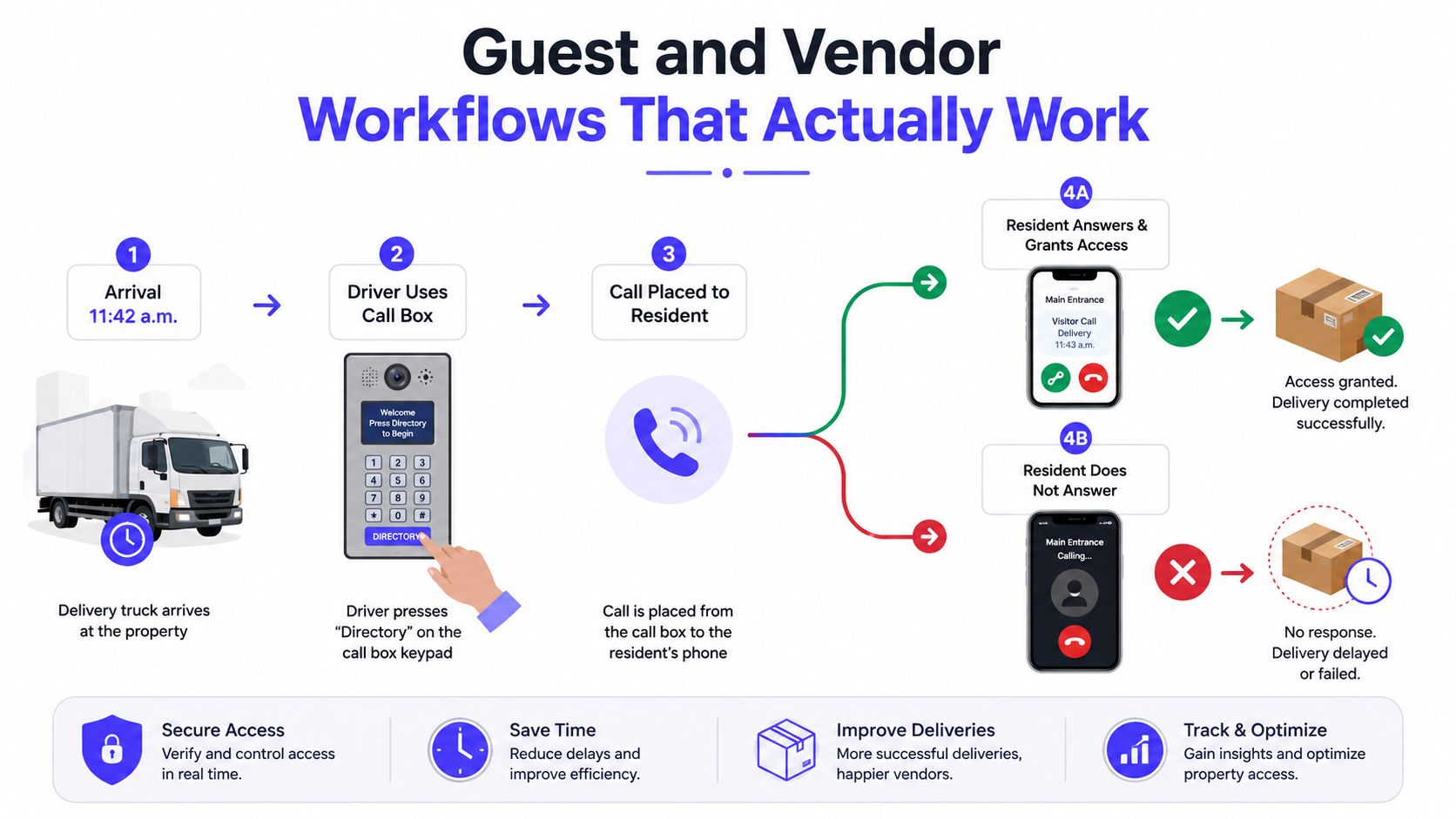
At a 180-unit community, a delivery driver arrives at 11:42 a.m., presses Directory on the call box, and reaches a resident who doesn't answer. If the system has no next step, the driver waits, calls the guardhouse, or leaves. The resident later asks why the package wasn't delivered.
The failure isn't necessarily the call box. It's the missing decision tree.
Four decisions remove ambiguity
Pre-registration versus on-demand access: Residents should be able to pre-register expected visitors with a name, phone number, vehicle information when relevant, and a valid window. On-demand requests should use a resident approval prompt rather than a reusable code.
One-time versus time-bound credentials: A dinner guest may need a single entry. A dog walker may need recurring access during approved windows. A repair contractor should receive a temporary permission tied to the work order.
Resident approval versus vendor auto-approval: Recurring vendors can use scheduled access when management has approved the contract and service window. Unscheduled entry should create an exception requiring resident or manager review.
No-answer behavior: The call box should tell the visitor what to do next. It might offer a retry, a directory search, or a guardhouse fallback. It shouldn't leave the driver guessing.
The resident and guard workflows
The call box should display a concise directory prompt and identify the selected resident. The resident app should show the visitor name, location, request time, and an approve or deny action. A visual verification option can help residents distinguish a genuine visitor from an unknown caller.
For a failed call, the guardhouse, if present, should log the fallback instead of relying on memory. The record should show whether the driver was redirected, delayed, denied, or admitted after manual verification.
Recurring users require their own rules:
- Cleaners and dog walkers: Scheduled recurring windows, named employer, approved gates, and automatic expiry when the arrangement ends.
- Package carriers: Route-specific or delivery-specific handling, with exceptions logged when a delivery falls outside the expected window.
- Repair vendors: Resident or manager approval connected to a work order, not an open-ended credential.
A useful Nimbio guide for property managers can help managers think through vendor permissions as a workflow rather than a keypad setting.
Keep the audit event complete
Each event should record:
- Timestamp and timezone
- Visitor, resident, vendor, or staff identity
- Credential or invitation ID
- Gate or door
- Entry method
- Approval source
- Result, including granted, denied, expired, or overridden
- Guard or manager action when a fallback occurs
That schema keeps the resident experience short while preserving enough detail for a later review.
Audit Logs and KPIs Boards Should Track
A gate that doesn't produce reliable evidence isn't being managed. It's just a door with a log file nobody reads.
Modern gate logs should record entries, exits, denied attempts, overrides, user identity, timestamps, gate location, and access method. The HOA gate access log guidance from GoAccess recommends secure storage, authorized administrator access, regular review, and defined retention policies.
Define the minimum event schema
Every event should carry the same core fields:
- Timestamp with timezone
- Credential ID
- User class
- Gate ID
- Direction
- Granting authority
- Result
- Exception reason, when applicable
The manager should be able to search by unit, credential, vendor, gate, date range, and outcome. A dashboard that only shows successful openings won't explain why residents are calling the office or why guards keep overriding policy.
Turn events into board-level measures
A board doesn't need a raw event dump. It needs a consistent package that answers whether the process is controlled and usable.
| KPI | What It Measures | Source Report | Healthy Target |
|---|---|---|---|
| Unauthorized entry incidents per quarter | Attempts that bypass or violate policy | Security incident and denied-entry report | Establish a baseline, then reduce recurring causes |
| Mean time to revoke after move-out | Speed of removing former resident access | Move-out roster and credential report | Under five minutes is a useful internal operating target, not a universal standard, as noted in multifamily access-management guidance |
| Gate call volume | Pressure placed on residents, staff, or guards | Call-box and phone activity report | Track trend and investigate after-hours spikes |
| Exception volume | Manual overrides, failed credentials, and emergency requests | Weekly exception report | Reduce repeat exceptions through policy or configuration |
| Audit completeness | Events tied to named credentials and authority | Credential and event reconciliation | Set a board-approved baseline and improve coverage |
The same property-management guidance recommends measuring unauthorized entry incidents, revocation time, gate call volume, and exception volume. It also describes a double-digit reduction in after-hours gate calls within six months as an internal operating target, not a universal standard.
Make review automatic
Each week, the manager should receive reports for:
- Expired credentials still attempting access
- Repeated denied attempts
- Vendor entries outside approved windows
- Manual gate overrides
- Emergency or master-code use
- Missing identity or authority fields
- Credentials not used for a defined period
The monthly board packet should include trends, notable incidents, corrective actions, and decisions needed. Data should drive the next budget conversation, not merely document the last complaint.
Comparing PINs, Guards, and Cellular Entry
Shared PINs are cheap to distribute and expensive to govern. Guardhouses provide a human checkpoint but depend on consistent staffing, training, and recordkeeping. Cellular app-based entry adds stronger credential lifecycle control, but boards must plan for residents without smartphones and for power or cellular outages.
| Dimension | Shared PIN | Guard Service | Cellular App Entry |
|---|---|---|---|
| Credential control | Weak. Codes spread and are difficult to revoke for one person | Depends on staff verification and current rosters | Stronger individual permissions with scheduled expiry and revocation |
| Audit quality | Often limited to keypad activity, without reliable identity | Can be detailed, but clipboard records vary by shift | Produces searchable user, time, location, and outcome records when configured correctly |
| Resident experience | Familiar, but residents share a secret | Personal interaction, with possible queues | Remote entry and visitor approval through a phone |
| Vendor handling | Broad access unless staff manually intervene | Staff can verify vendors, but policies may vary | Time-bound and recurring credentials can match contracts |
| Recurring cost per unit | Lower visible cost, with hidden reset and incident work | Ongoing labor expense | Subscription and connectivity costs require budget review |
| Typical failure mode | Former tenants retain codes, and nobody can prove who entered | Inconsistent decisions, labor gaps, and incomplete logs | Smartphone exclusion, connectivity issues, or inadequate fallback planning |
Shared PINs fail most clearly at revocation. A manager can change the code, but that change affects every resident, vendor, and guest who uses it. The result is repeated resets, resident frustration, and weak attribution.
Guard services solve some verification problems, but they don't automatically create consistent governance. A guard may recognize a recurring vendor, yet the board still needs a written rule, a log, and a way to audit exceptions across shifts.
Cellular entry is the strongest fit when a community needs individual credentials and remote management without relying on Wi-Fi at the gate. A system such as Nimbio uses cellular connectivity, can retrofit existing electronic gates, and lets administrators issue, schedule, and revoke smartphone credentials while retaining existing remotes and keypads. It still needs a non-smartphone accommodation, an outage procedure, and a clear emergency override policy.
Before signing, the board should ask:
- Can administrators revoke one credential without disrupting everyone else?
- Does the system work with the existing gate operator?
- What happens during power or cellular service interruption?
- Can residents without smartphones use an accountable alternative?
- Are visitor, vendor, emergency, and override events searchable?
- Who owns configuration, support, and policy updates?
- What reports can the manager bring to a board meeting?
Boards comparing vendors should use a practical cellular gate opener buying guide and score each option against the community's actual workflow, not a feature list.
Migration Plan and 90-Day Success Metrics
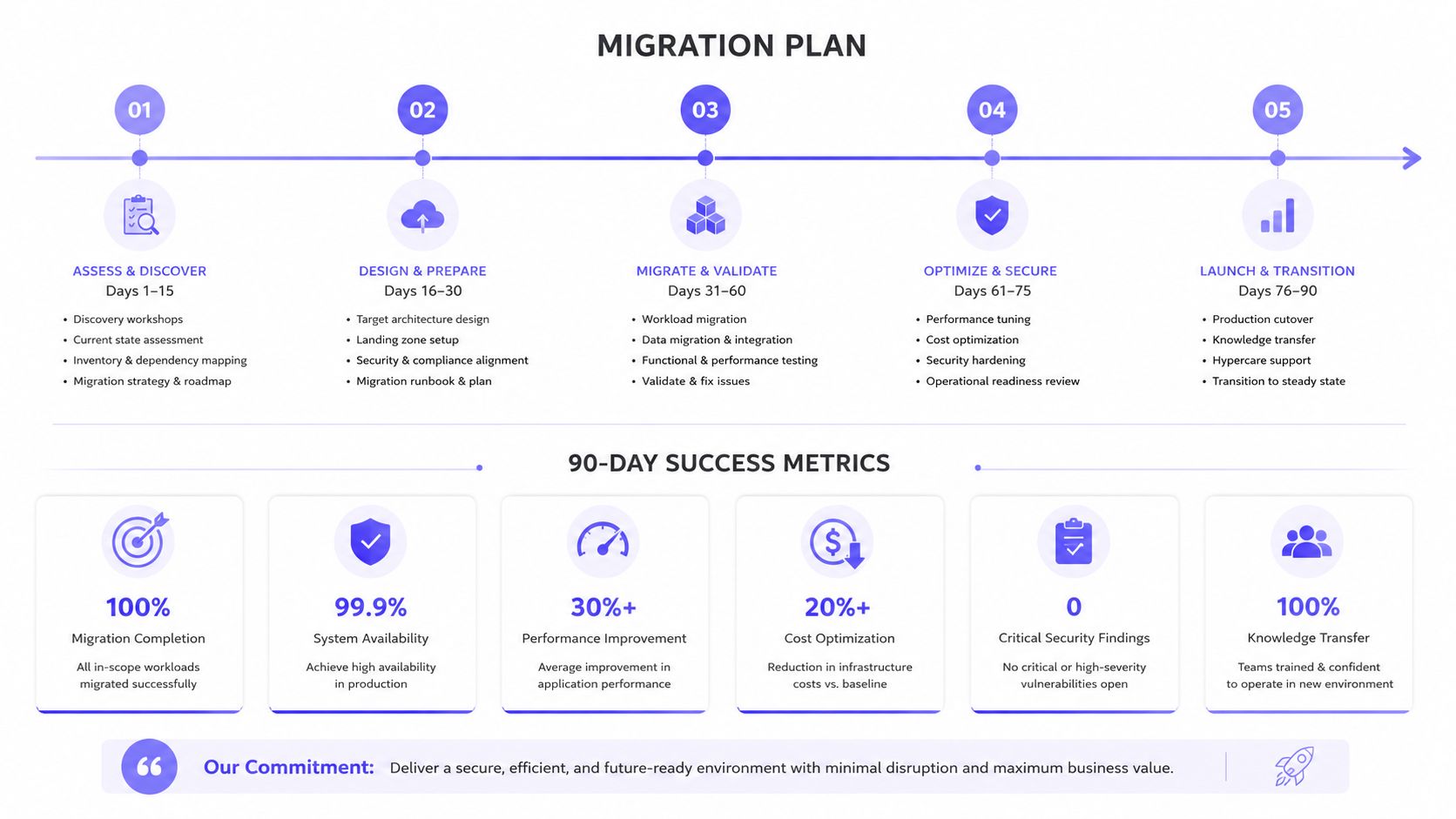
A modernization project should start with policy and records, not installation. The community needs to know what exists before it can decide what to replace, retain, or retire.
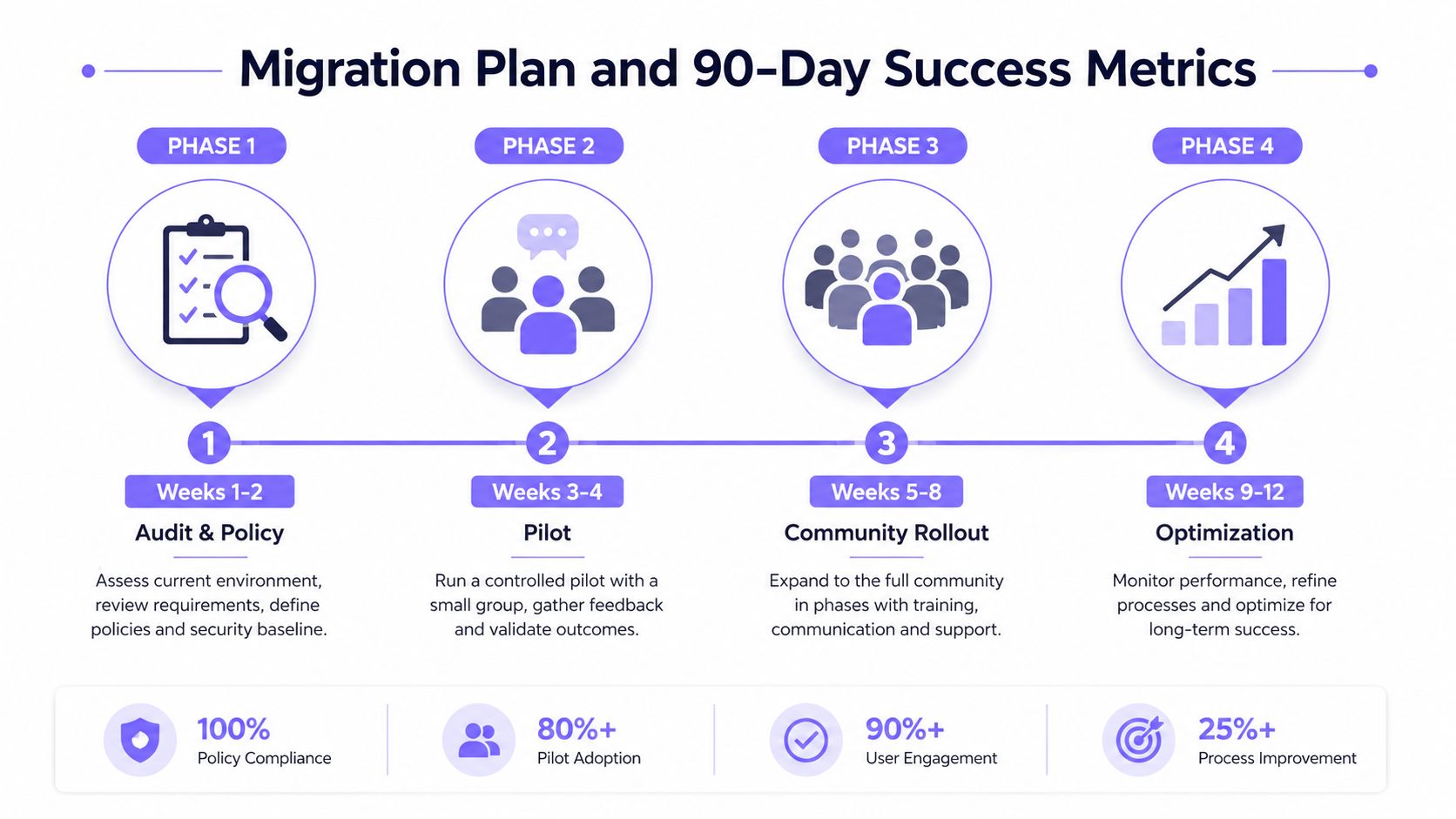
Phase one covers audit and policy
During Weeks 1-2, management should pull the current access roster from the call box, keypad system, property database, or guard log. The audit should identify every resident credential, shared PIN, master code, vendor permission, emergency override, and unknown account.
The board should rewrite the policy around ownership:
- Who may issue credentials
- Who may approve guest and vendor access
- Who may schedule recurring permissions
- Who may revoke access
- How emergency overrides work
- How long records are retained
- How residents without smartphones receive access
The output should be a clean roster and a policy that names responsible roles.
Phase two uses a controlled pilot
During Weeks 3-6, management should install cellular readers at one or two entrances and migrate roughly 10% of households, along with recurring vendors. The pilot should include different user types, not only technology-comfortable residents.
Every exception needs documentation. Managers should record failed credentials, missed visitor calls, manual overrides, resident questions, and vendor scheduling problems. A pilot that hides exceptions produces a polished report and an unprepared rollout.
Phase three expands community-wide
During Weeks 7-10, the community should expand the system to all entrances, publish the new app-based workflow, and decommission shared PINs in writing. Guard or patrol staff should receive training on the audit dashboard, fallback process, and emergency procedure.
Residents need specific instructions, not a generic announcement. The notice should explain how to open the gate, invite a guest, report a lost phone, request an accommodation, and get help during an outage.
Phase four tunes operations
During Weeks 11-13, management should adjust hold-open windows, remove stale credentials, review vendor schedules, and deliver the first 90-day KPI package to the board.
The board should publish:
- Percentage of entries logged with a named credential
- Median guest wait time
- Vendor on-time arrival rate
- After-hours unauthorized entry attempts blocked
- Reduction in PIN resets per quarter
Each measure should lead to a decision. Low named-credential coverage may require roster cleanup. Long guest waits may require better resident prompts. Vendor delays may require schedule changes. Frequent PIN resets may confirm that shared credentials should remain retired.
The board shouldn't approve a system because the gate opens faster in a demonstration. It should approve a system that assigns access by lifecycle, records exceptions, supports the existing gate hardware, and gives managers evidence they can act on.
Nimbio provides cellular, smartphone-controlled access for electronic gates and building entries, with remote visitor management, scheduled credentials, revocation controls, and searchable access logs. Boards and property managers evaluating modern hoa access management can visit Nimbio to assess a retrofit approach that avoids Wi-Fi dependence while preserving compatible existing gate equipment.
Managing access for a gated community or multifamily property?
See how cellular access control works for communities like yours. Explore Multifamily & Gated Communities →


